Introduction
The GOYOJO Thermal Imaging Monocular is designed for clear outdoor observation, offering advanced thermal imaging capabilities for various applications such as hunting, security, and general night vision. It features a 384x288 sensor, 17µm detector, and a 50Hz refresh rate, ensuring sharp and fluid thermal imagery.

Image: The GOYOJO Thermal Imaging Monocular, a compact and ergonomic device for enhanced night vision.
What's in the Box
- Thermal Imaging Monocular Unit
- User Manual
- Handbag
- Storage Box
- Charging Cable (USB-C)

Image: The thermal monocular, its carrying case, and accessories including the charging cable.
Setup
Battery Installation and Charging
The monocular uses a Lithium Polymer 18650 battery (included). To install or replace the battery, unscrew the cap at the rear of the device. Insert the battery with the positive (+) terminal facing inwards, then securely re-attach the cap.
To charge the device, connect the provided USB-C charging cable to the monocular's USB port and plug the other end into a compatible USB power source. The device can also be charged externally using a dedicated 18650 battery charger.

Image: Close-up of the monocular showing the USB-C charging port.
Powering On/Off
Press and hold the power button (usually marked with a power symbol) located on the top panel of the monocular until the display illuminates. To power off, press and hold the same button until the display shuts down.
Operating the Monocular
Basic Controls
The monocular features an intuitive button layout on its top surface for easy operation:
- Power Button: Turns the device on/off.
- Mode Button: Cycles through different color palettes (White Hot, Black Hot, Red Hot, Rainbow, Iron Red, Low-Light).
- Zoom Button: Adjusts the digital zoom level (up to 8x).
- Capture Button: Takes still images or records video.

Image: Detailed view of the monocular's top panel showing the control buttons.
Custom Color Palettes
The monocular offers six distinct color palettes to optimize thermal imaging for various conditions and preferences:
- White Hot: Hot objects appear white.
- Black Hot: Hot objects appear black.
- Red Hot: Highlights hottest areas in red.
- Rainbow: Uses a spectrum of colors to represent temperature differences.
- Iron Red: Provides a distinct color gradient for heat signatures.
- Low-Light: Optimized for low ambient light conditions.
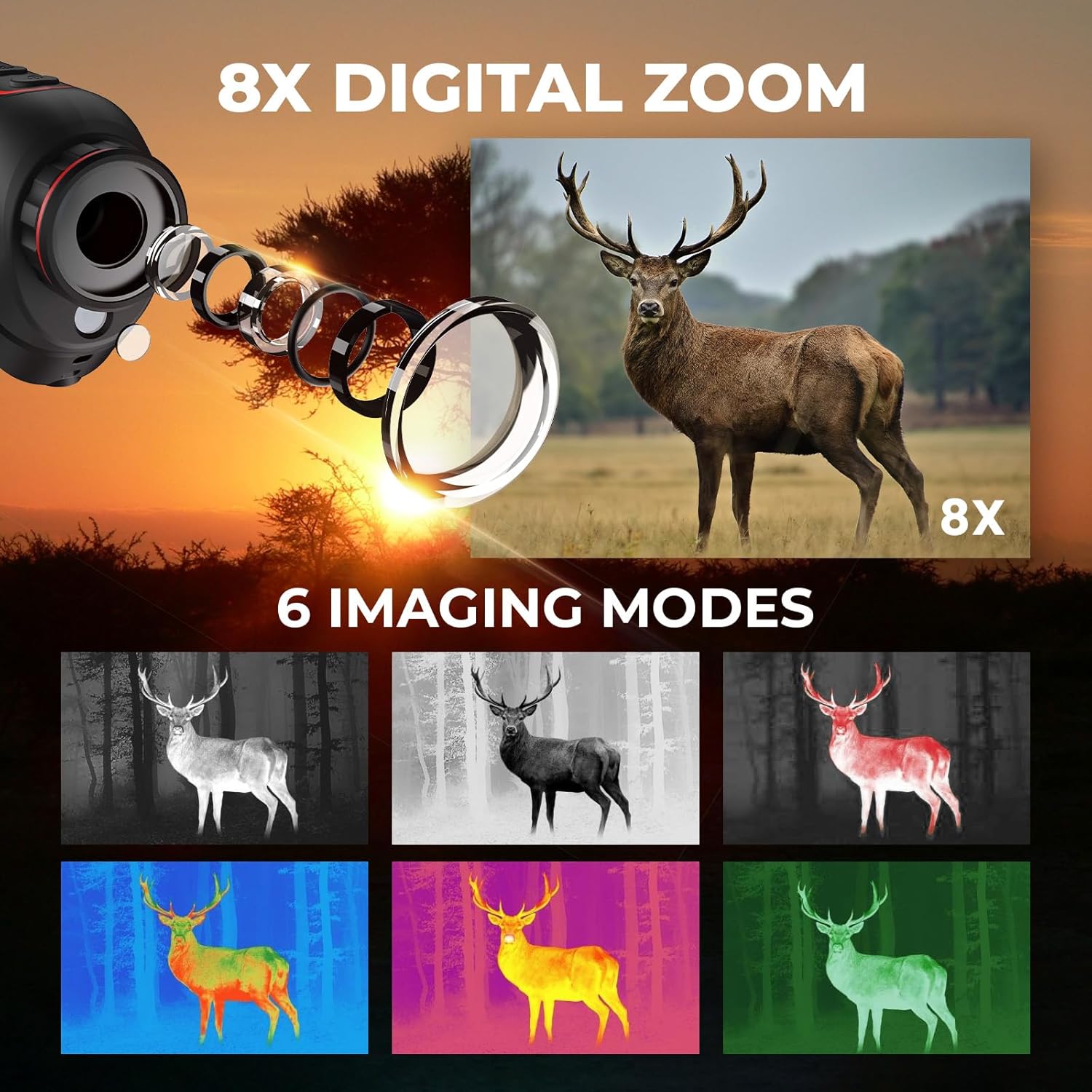
Image: Visual representation of the six different thermal imaging modes.
Quick Zoom & Focus
The monocular features up to 8x digital zoom, allowing for closer inspection of distant targets. Use the zoom button to cycle through magnification levels. The 15mm focal lens provides clear thermal optic images, and manual focus adjustment ensures crisp visuals for various distances.

Image: A visual comparison showing the effect of 8x digital zoom on a distant subject.
Real-Time Sharing (App Connection)
Connect the monocular to your smartphone or computer via Wi-Fi to enable real-time sharing of thermal images and videos. This feature allows for instant documentation, collaborative viewing, and live updates, enhancing situational awareness and decision-making.
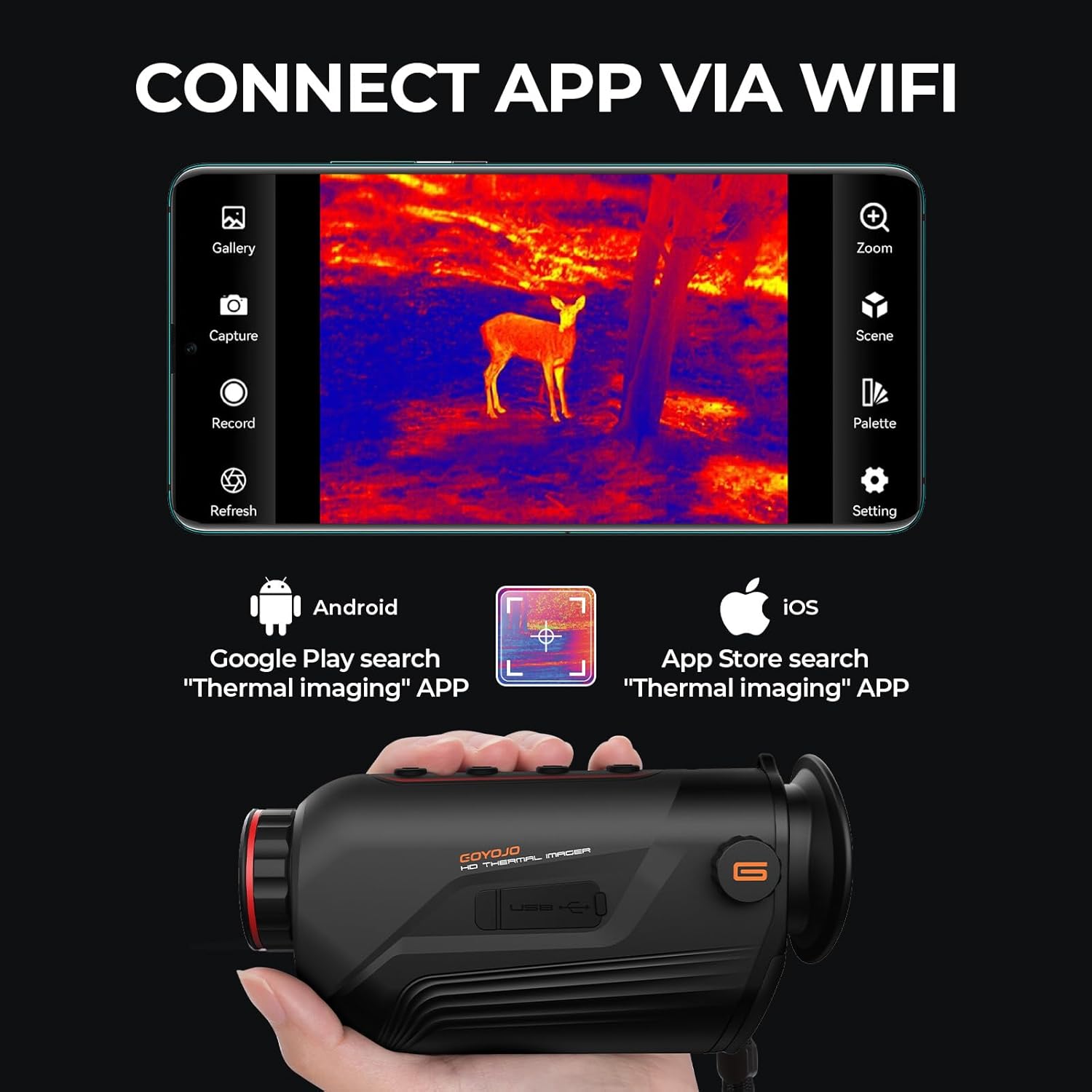
Image: The monocular connected wirelessly to a mobile device displaying thermal imagery.
Maintenance
To ensure the longevity and optimal performance of your GOYOJO Thermal Imaging Monocular, follow these maintenance guidelines:
- Cleaning: Use a soft, lint-free cloth to clean the lens and body of the monocular. For stubborn smudges on the lens, use a specialized lens cleaning solution. Avoid abrasive materials or harsh chemicals.
- Storage: Store the monocular in its provided handbag or storage box when not in use. Keep it in a cool, dry place away from direct sunlight, extreme temperatures, and high humidity.
- Battery Care: If storing for extended periods, remove the battery. Recharge the battery periodically to maintain its health, even if not in use.
- Protection: The device features splash-proof excellence, but avoid submerging it in water. Protect it from drops and impacts.
Troubleshooting
| Problem | Possible Cause | Solution |
|---|---|---|
| Device does not power on | Low or depleted battery | Charge the battery fully. Ensure battery is correctly inserted. |
| Image is blurry or out of focus | Incorrect focus adjustment | Adjust the manual focus ring until the image is clear. |
| Cannot connect to smartphone app | Wi-Fi hotspot not activated or app issue | Ensure Wi-Fi hotspot is enabled on the monocular. Restart the app and device. Check app permissions on your phone. |
| Poor thermal image quality | Lens obstruction or environmental factors | Clean the lens. Ensure no obstructions. Image quality can be affected by fog, heavy rain, or extreme temperatures. |
Specifications
| Feature | Detail |
|---|---|
| Product Dimensions | 9.65 x 5.83 x 4.49 inches |
| Item Weight | 13.4 ounces (380 Grams) |
| Model Number | G315 |
| Batteries | 1 Lithium Polymer battery required (included) |
| Manufacturer | GOYOJO |
| Optical Tube Length | 15 Millimeters |
| Objective Lens Diameter | 15 Millimeters |
| Focus Type | Manual Focus |
| Power Source | Battery Powered |
Warranty and Support
For information regarding product warranty, returns, or technical support, please refer to the official GOYOJO website or contact their customer service directly. Extended protection plans may also be available for purchase.


