
1. Introduction
Welcome to the user manual for your new HiFuture AX100 Smart Watch. This guide provides essential information to help you set up, operate, maintain, and troubleshoot your device. Please read this manual thoroughly to ensure optimal performance and longevity of your smart watch.
The HiFuture AX100 is designed to enhance your daily life with its 1.83" IPS HD display, Bluetooth calling, comprehensive health monitoring, and a wide array of sports modes. Its IP68 waterproof rating and 7-day battery life make it a reliable companion for various activities.
2. Package Contents
Please check the box for the following items:
- HiFuture AX100 Smart Watch (Blue)
- Charging Cable
- User Manual (this document)
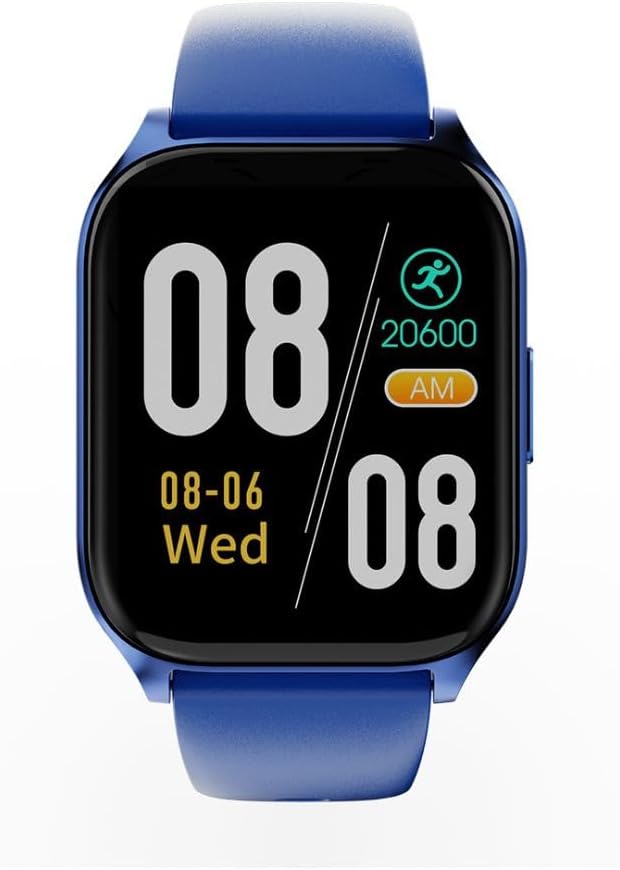
Image: Front view of the HiFuture AX100 Smart Watch, displaying time, date, and step count. The watch features a blue strap and a square black display.
3. Setup
3.1. Charging the Device
Before first use, fully charge your HiFuture AX100 Smart Watch. Connect the provided charging cable to the charging contacts on the back of the watch and to a standard USB power adapter (not included).
- Ensure the charging pins are clean and properly aligned with the watch's charging ports.
- A full charge typically takes approximately 2 hours.
- The watch features a 7-day battery life under typical usage conditions.

Image: Back view of the HiFuture AX100 Smart Watch, highlighting the optical sensors for health monitoring and the two metallic charging contacts.
3.2. Powering On/Off
- Power On: Press and hold the side button until the HiFuture logo appears on the screen.
- Power Off: Navigate to the 'Settings' menu on the watch, then select 'Power Off' and confirm. Alternatively, press and hold the side button for several seconds until the power off option appears.
3.3. Pairing with Smartphone
To unlock the full potential of your smart watch, pair it with your smartphone via Bluetooth and the dedicated companion app.
- Download and install the official HiFuture companion app from your smartphone's app store (e.g., Google Play Store or Apple App Store).
- Ensure Bluetooth is enabled on your smartphone.
- Open the HiFuture app and follow the on-screen instructions to create an account or log in.
- In the app, select 'Add Device' or 'Pair New Device' and choose 'AX100' from the list of available devices.
- Confirm the pairing request on both your smartphone and the smart watch.
3.4. Initial Configuration
After successful pairing, the app will guide you through initial settings such as:
- Time and Date: Automatically synchronized with your phone.
- Personal Information: Enter your height, weight, age, and gender for accurate health tracking.
- Notification Permissions: Grant necessary permissions for call, message, and app alerts.
4. Operating the Smart Watch
4.1. Display and Navigation
The AX100 features a responsive touchscreen display for interaction.
- Swipe Up/Down: Scroll through menus and notifications.
- Swipe Left/Right: Access quick panels or different widgets (e.g., heart rate, weather).
- Tap: Select an item or open an application.
- Side Button: Press to return to the home screen or wake the display.
4.2. Basic Functions
- Watch Faces: Customize your watch face through the companion app or directly on the watch.
- Bluetooth Calling: Once paired, you can make and receive calls directly from your wrist. Access the dialer or call history from the watch menu.
- Smart Notifications: Receive alerts for incoming calls, text messages, and notifications from various apps configured in the companion app.
4.3. Health Monitoring
The AX100 provides comprehensive health tracking features:
- Heart Rate Monitoring: The watch continuously monitors your heart rate 24/7. View real-time data on the watch or detailed trends in the app.
- SpO₂ Monitoring: Measure your blood oxygen saturation levels. Access this feature from the health menu on the watch.
- Sleep Tracking: The watch automatically tracks your sleep patterns, including deep sleep, light sleep, and wake times. Review your sleep data in the companion app.
4.4. Sports Modes
The watch supports over 100 sports modes to track your physical activities. To start a workout:
- Navigate to the 'Workout' or 'Sports' menu on your watch.
- Select your desired activity (e.g., running, cycling, swimming).
- Tap 'Start' to begin tracking. The watch will record duration, calories burned, heart rate, and other relevant metrics.
- Tap 'Pause' or 'End' to stop the workout.
4.5. GPS Functionality
The AX100 utilizes your smartphone's GPS for location tracking during outdoor activities. Ensure your phone is connected via Bluetooth and has GPS enabled for accurate route mapping.
4.6. Water Resistance (IP68)
The watch has an IP68 waterproof rating, meaning it is resistant to dust and can withstand immersion in water up to 1.5 meters for 30 minutes. It is suitable for daily wear, hand washing, and light rain. However, it is not recommended for hot showers, saunas, or diving, as steam and high water pressure may compromise the seal.

Image: Angled view of the HiFuture AX100 Smart Watch, showcasing its blue strap and the sleek design of the watch face.
5. Maintenance
- Cleaning: Regularly clean your watch and strap with a soft, dry cloth. If necessary, use a slightly damp cloth and mild soap, then dry thoroughly. Avoid harsh chemicals or abrasive materials.
- Charging Contacts: Keep the charging contacts on the back of the watch clean and free of dust or debris to ensure proper charging.
- Water Exposure: After exposure to water, especially saltwater, rinse the watch with fresh water and dry it completely before charging or prolonged use.
- Battery Care: To prolong battery life, avoid fully discharging the watch frequently. Charge it when the battery level is low.
6. Troubleshooting
If you encounter issues with your HiFuture AX100 Smart Watch, refer to the following common problems and solutions:
| Problem | Possible Solution |
|---|---|
| Watch does not power on. | Ensure the watch is fully charged. Connect it to the charging cable for at least 30 minutes. |
| Watch does not charge. | Check if the charging cable is securely connected to both the watch and the power source. Clean the charging contacts on the watch. Try a different USB power adapter. |
| Cannot pair with smartphone. | Ensure Bluetooth is enabled on your phone and the watch. Restart both devices. Make sure the watch is within range of your phone. Check the companion app for pairing instructions. |
| Notifications are not received. | Verify that notification permissions are granted to the HiFuture app on your smartphone. Ensure the watch is connected via Bluetooth. Check the app's settings for specific notification preferences. |
| Inaccurate health data. | Ensure the watch is worn snugly on your wrist, about one finger's width above the wrist bone. Keep the sensor area clean. Update your personal information (height, weight) in the app. |
7. Specifications
| Feature | Detail |
|---|---|
| Model Number | HF.HSSW4.BL |
| Display | 1.83" IPS HD Touchscreen (240 x 240 resolution) |
| Operating System | Smartwatch OS |
| Connectivity | Bluetooth |
| GPS | Via Smartphone |
| Health Monitoring | 24/7 Heart Rate, SpO₂ (Blood Oxygen), Sleep Tracking |
| Sports Modes | 100+ modes |
| Water Resistance | IP68 |
| Battery Type | Lithium Polymer |
| Battery Life | Up to 7 days (typical usage) |
| Color | Blue |
| Item Weight | 250 g |
| Package Dimensions | 10.6 x 10.6 x 6.6 cm |
8. Warranty and Support
Your HiFuture AX100 Smart Watch is covered by a manufacturer's warranty. Please refer to the warranty card included in your package or visit the official HiFuture website for detailed warranty terms and conditions.
For technical support, product inquiries, or warranty claims, please contact HiFuture customer service through their official website or the contact information provided in your product documentation. When contacting support, please have your model number (AX100 / HF.HSSW4.BL) and proof of purchase ready.


