
1. Introduction
This manual provides essential instructions for the safe assembly, operation, and maintenance of your ARBELI 12V 7AH Ride-on Tractor with Tiltable Trailer. Please read this manual thoroughly before use and retain it for future reference. Proper use and care will ensure the longevity and safe operation of the product.
2. Important Safety Information
WARNING: CHOKING HAZARD - Small parts. Not for children under 3 years unless supervised.
- Adult supervision is required at all times. Never leave a child unattended while operating the tractor.
- Recommended age range: 2-5 years.
- Maximum weight capacity: 66 lbs. Do not exceed this limit.
- Always ensure the child wears a seat belt and the protective armrests are properly engaged.
- Operate the tractor only on flat, level surfaces. Avoid slopes, uneven terrain, public roads, or near swimming pools and other bodies of water.
- Ensure the child's hands and feet are kept clear of moving parts.
- Do not modify the electrical system or any components of the tractor.
- Keep packaging materials away from children to prevent suffocation.
3. Package Contents
Please verify that all components are present before beginning assembly:
- 1x ARBELI Ride-on Tractor (Main Unit)
- 1x Tiltable Trailer
- 1x 2.4G Remote Control
- 1x 12V 7AH Rechargeable Battery (pre-installed or separate)
- 1x Charger
- Assembly Hardware (screws, washers, etc.)
- Instruction Manual
4. Assembly Instructions
Follow these general steps for assembly. Refer to the included diagrams for detailed visual guidance. Assembly typically requires a screwdriver and wrench (not included).
- Unpack Components: Carefully remove all parts from the packaging and lay them out.
- Install Wheels: Attach the wheels to the tractor chassis as per the diagrams, ensuring all fasteners are secure.
- Connect Battery: If the battery is not pre-installed, connect the battery terminals according to the polarity markings. Ensure a secure connection.
- Attach Steering Wheel: Secure the steering wheel to the steering column. Ensure it clicks into place or is firmly fastened.
- Assemble Seat: Mount the seat onto the tractor body and secure it with the provided screws.
- Attach Trailer: Connect the tiltable trailer to the rear hitch of the tractor. Ensure the connection is secure and allows for proper tilting function.
- Final Checks: Before first use, inspect all connections and fasteners to ensure they are tight and secure.
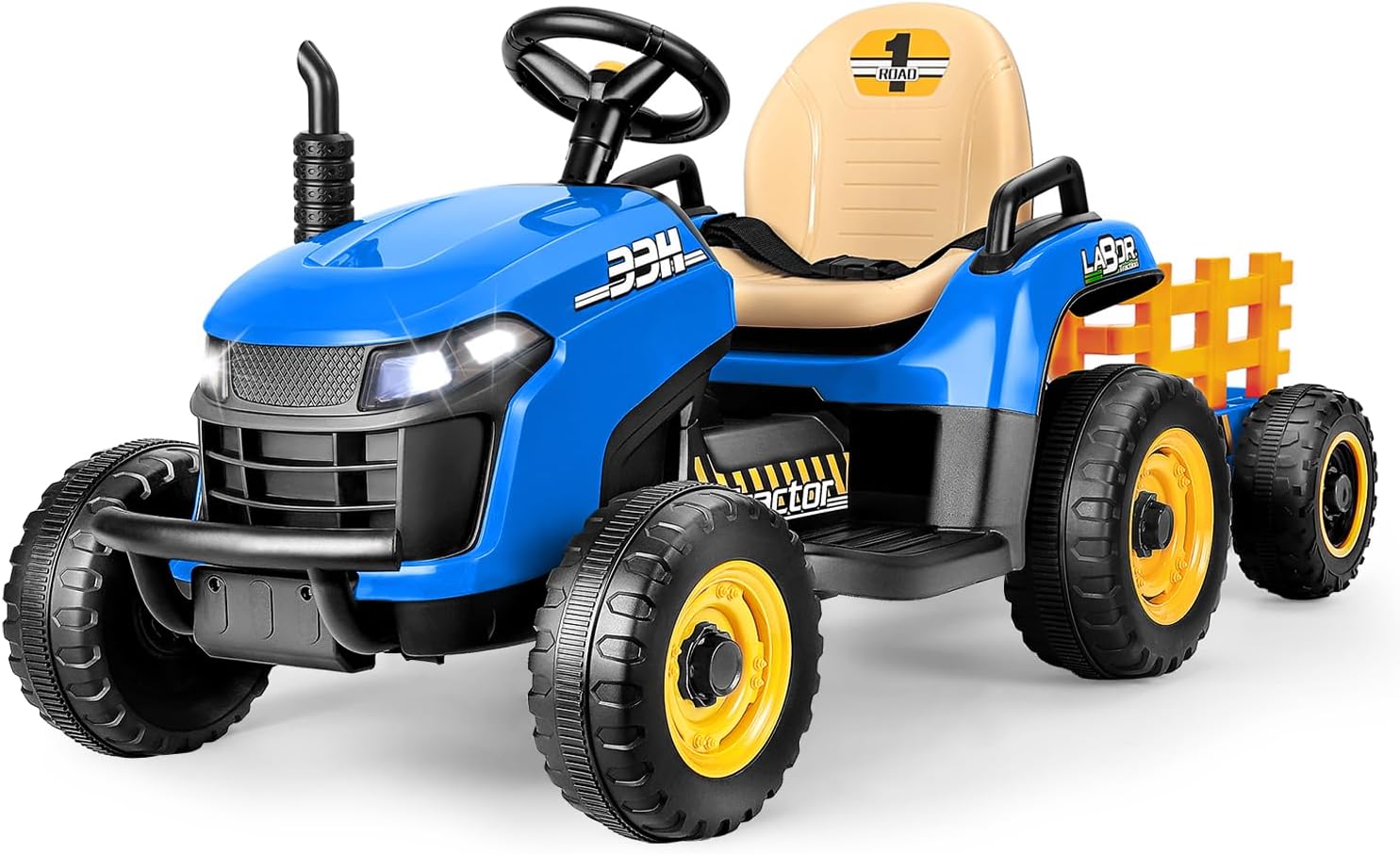
Image: The ARBELI 12V 7AH Ride-on Tractor in blue, featuring the main tractor unit and its detachable tiltable trailer.

Image: A child operating the ARBELI tractor with its tiltable trailer, while an adult rakes leaves into the trailer, demonstrating its utility.
5. Charging the Battery
The tractor is powered by a 12V 7AH rechargeable battery. Proper charging is crucial for battery life and performance.
- First Use: Charge the battery for a minimum of 8-12 hours before the first use, but no longer than 18 hours.
- Regular Charging: After each use, recharge the battery for 8-12 hours. Do not overcharge.
- Charging Port: The charging port is typically located on the rear of the tractor for easy access.
- Charger: Use only the charger provided with the product. Using an unauthorized charger may damage the battery and void the warranty.
- Battery Indicator: The control panel includes a battery indicator to show the remaining charge level.
6. Operating the Tractor
The ARBELI tractor offers both manual operation by the child and remote control operation by an adult.
6.1. Manual Mode (Child Operation)
- Power Button: Press the power button to turn the tractor on.
- Foot Pedal: Press the foot pedal to accelerate. Release to brake.
- Steering Wheel: Turn the steering wheel to control direction.
- Gear Shifter: Use the shifter to select forward (D), reverse (R), or park (P).
- Speed Settings: The manual mode offers 2 speed options. Select the appropriate speed for the child's skill level and environment.
6.2. Parent Remote Control Mode
The 2.4G remote control allows parents to guide younger drivers or intervene for safety.
- Pairing: Follow the instructions in the remote control manual to pair it with the tractor.
- Speed Settings: The remote control offers 3 adjustable speed settings.
- Direction Control: Use the joystick or directional buttons to steer the tractor.
- Emergency Brake: The remote control includes an emergency brake function to stop the tractor immediately.

Image: A child driving the ARBELI tractor, with an adult's hands holding the 2.4GHz remote control in the foreground, illustrating parental control.
6.3. Tiltable Trailer Operation
The unique tiltable trailer enhances play value and functionality.
- Tilting: To unload items, locate the release mechanism (e.g., a lever or switch) on the trailer connection point. Activate it to tilt the trailer bed.
- Auto-Reset: After unloading, gently push the trailer back into its original position. It will automatically reset and lock into place.
- Detachment: The trailer can be detached for use as a compact 4-wheeler. This also aids in storage. Refer to assembly instructions for detachment.

Image: A close-up view comparing the ARBELI tractor's tiltable and auto-reset trailer mechanism with a reinforced support rod, against a standard, non-tilting trailer.
6.4. Multimedia Features
The tractor includes various entertainment options:
- Built-in Music: The control panel features pre-loaded music tracks.
- Bluetooth Connectivity: Connect your mobile phone via Bluetooth to play custom music or stories through the tractor's speakers.
- Volume Adjustment: Use the retro volume button on the control panel to adjust the sound level.
- Realistic Sounds: The tractor features realistic engine start-up and operational sounds.
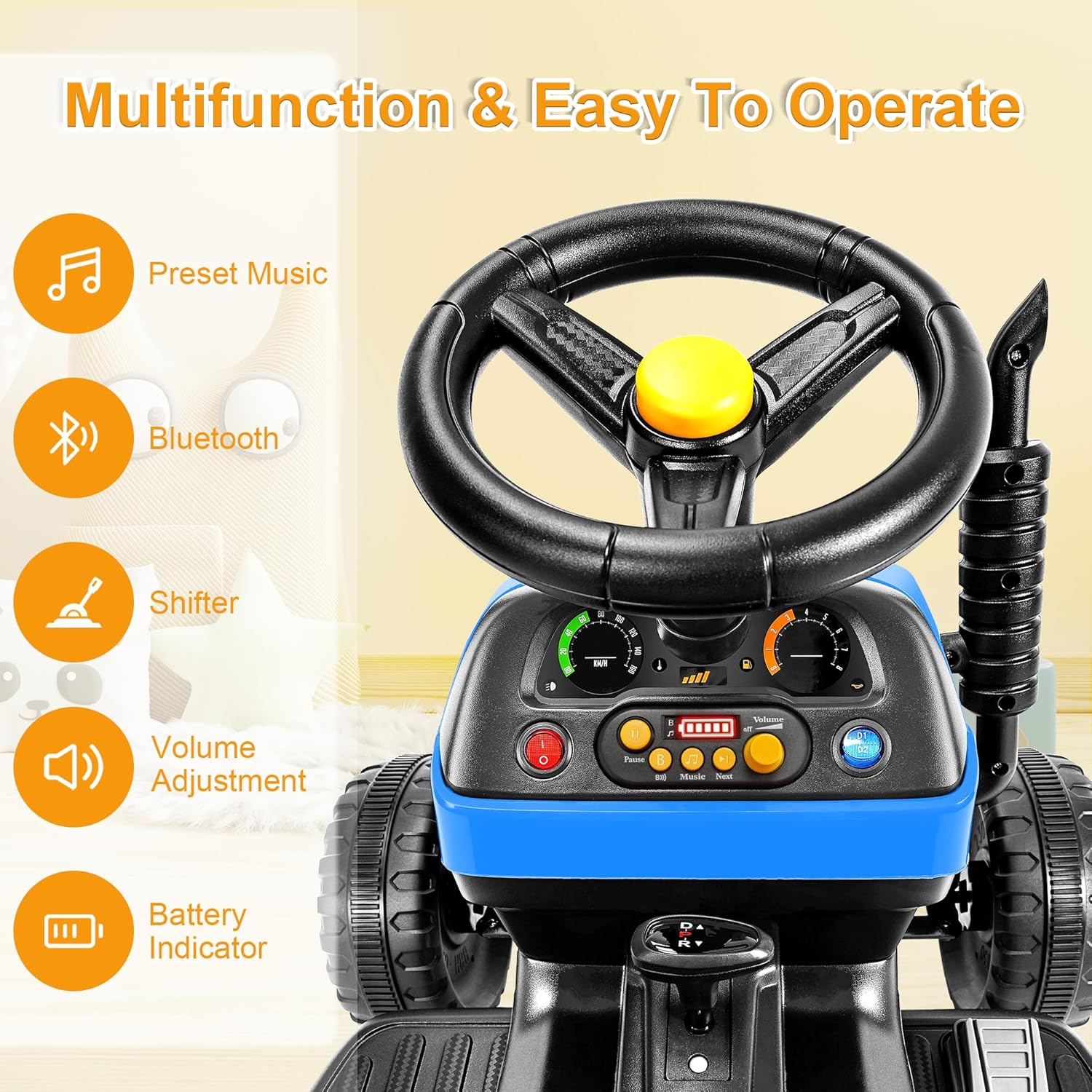
Image: A detailed view of the ARBELI tractor's dashboard, highlighting controls for preset music, Bluetooth, gear shifter, volume adjustment, and battery indicator.
7. Maintenance and Care
Regular maintenance ensures the tractor remains in good working condition.
- Cleaning: Wipe the tractor with a soft, damp cloth. Do not use abrasive cleaners or solvents. Avoid spraying water directly onto electrical components.
- Storage: Store the tractor in a dry, cool place away from direct sunlight and moisture. If storing for extended periods, ensure the battery is fully charged and disconnect it. Recharge the battery every 30 days to maintain its health.
- Battery Care: Always charge the battery after each use. Do not allow the battery to fully discharge.
- Inspection: Periodically check all screws, nuts, and connections to ensure they are tight. Inspect wheels and tires for wear.
8. Troubleshooting
Refer to the table below for common issues and their solutions.
| Problem | Possible Cause | Solution |
|---|---|---|
| Tractor does not move | Battery is low or not connected; Power switch is off; Loose wire connection; Motor malfunction. | Charge the battery; Turn on the power switch; Check all wire connections; Contact customer support. |
| Remote control not working | Remote batteries are dead; Remote not paired; Interference. | Replace remote batteries; Re-pair the remote control; Move to an area with less interference. |
| Short battery life | Battery not fully charged; Old battery; Overloaded tractor. | Ensure full charge (8-12 hours); Consider battery replacement if old; Do not exceed weight limit. |
| Unusual noise during operation | Loose parts; Debris in motor/wheels; Gear issue. | Inspect for loose parts and tighten; Clean any debris; Contact customer support if noise persists. |
9. Product Specifications
- Model Number: BBH-030
- Product Dimensions: 55.35 x 23.22 x 22.44 inches
- Item Weight: 32 pounds
- Battery: 12V 7AH
- Motors: 2 x 45W
- Speed Range: 1.8-3.3 mph
- Recommended Age: 36 months - 6 years
- Weight Limit: 66 lbs
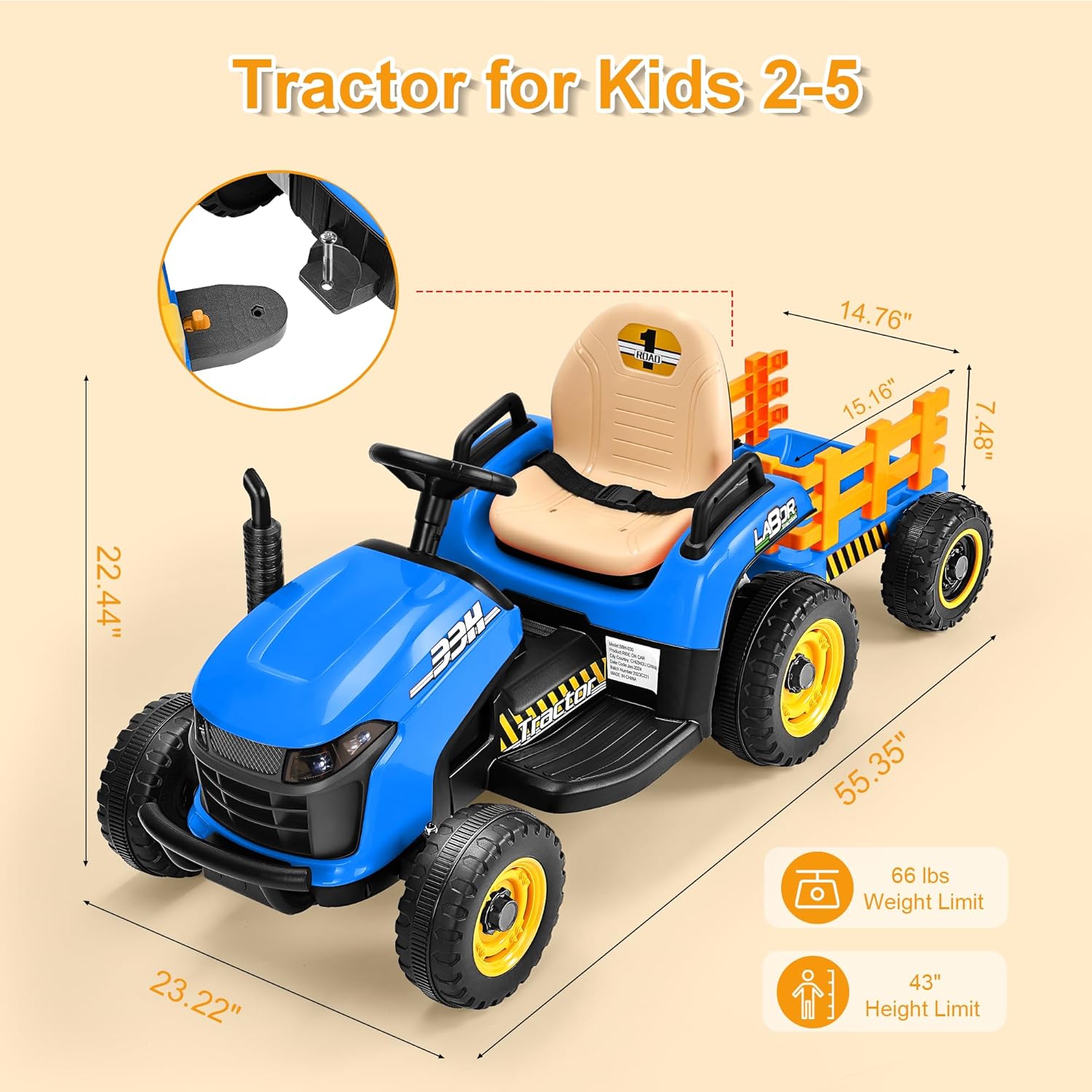
Image: A diagram illustrating the key dimensions (length, width, height) and operational limits (weight and height) for the ARBELI Ride-on Tractor.
10. Warranty and Customer Support
ARBELI is committed to providing quality products and customer satisfaction. For any questions, concerns, or assistance with your product, please refer to the contact information provided with your purchase documentation or visit the official ARBELI website. Please have your model number (BBH-030) and purchase details ready when contacting support.


