
1. Introduction
Thank you for choosing the ANDOLL HOME FT-3S 4L Automatic Cat Feeder. This manual provides detailed instructions for the safe and efficient use of your new pet feeder. Please read all instructions carefully before use and retain this manual for future reference.
Safety Precautions
- This appliance is for indoor use only.
- Do not immerse the main unit in water or other liquids.
- Use only dry pet food with a kibble size between 2-12mm (0.07-0.5 inches).
- Keep out of reach of children and pets to prevent tampering.
- Always unplug the feeder before cleaning.
- Ensure the power adapter is securely connected.
2. Package Contents
Please check the package contents to ensure all items are present:
- Pet Feeder Body
- Food Storage Tank
- Feeding Bowl (Stainless Steel)
- 5V DC Power Adapter
- Desiccant Bag (pre-installed or separate)
- Instruction Manual (this document)
3. Product Overview
Familiarize yourself with the components of your automatic pet feeder.

Image 3.1: Main view of the ANDOLL HOME FT-3S 4L Automatic Cat Feeder, showing the food tank, control panel, and feeding bowl.

Image 3.2: Diagram illustrating the fresh food sealing mechanism, including the desiccant box and sealing ring.

Image 3.3: Illustration of the smooth food dispensing system, designed to prevent food blockages.
4. Setup
4.1 Assembly
- Place the main feeder body on a flat, stable surface.
- Attach the feeding bowl to the base of the feeder. Ensure it clicks into place securely.
- Open the lid of the food storage tank and fill it with dry pet food. Ensure the kibble size is between 2-12mm (0.07-0.5 inches).
- Close the lid firmly to maintain food freshness and prevent pets from accessing food.
4.2 Power Supply
The feeder supports two power options:
- Primary Power: Connect the 5V DC power adapter to the feeder's power port and plug it into a wall outlet.
- Backup Power: For power outage protection, install three (3) D-cell alkaline batteries (not included) into the battery compartment at the bottom of the feeder. This ensures continuous operation in case of a power interruption.

Image 4.1: Illustration of the dual power supply options for the feeder.
4.3 Initial Settings
Upon first power-up, the display will illuminate. You may need to set the current time before programming feeding schedules.
- Refer to the control panel (Image 3.1) for buttons such as SET, +, -, FEED.
- Unlock the screen if necessary by pressing and holding the appropriate button (usually SET or a dedicated unlock button) for a few seconds.
- Use the SET button to navigate through time settings (hour, minute) and the + / - buttons to adjust values.
5. Operating Instructions
5.1 Programming Feeding Schedules
The feeder allows you to schedule up to 8 meals per day, with customizable portion sizes for each meal.

Image 5.1: Overview of scheduling capabilities, including tank capacity, kibble size, and meal frequency.

Image 5.2: The large screen display for easy viewing and operation of settings.
- Press the SET button to enter the feeding schedule programming mode.
- Use the + / - buttons to select the meal number (e.g., F1 for the first meal).
- Press SET again to adjust the feeding time (hour and minute) for the selected meal. Use + / - to change values.
- Press SET to move to the portion size setting. Use + / - to select the desired number of portions (up to 50 portions per meal).
- Repeat for additional meals (F2, F3, etc.) as needed.
- After setting all desired meals, press and hold SET to save and exit programming mode.

Image 5.3: Example of a programmed feeding schedule for healthy pet diet.
5.2 Custom Voice Recording
You can record a 10-second voice message that will play 3 times at each scheduled feeding time to call your pet.

Image 5.4: The feeder's custom voice recording feature in action.
- Locate the record button (often labeled with a microphone icon or integrated with the SET button).
- Press and hold the record button. The feeder will indicate when recording starts (e.g., a beep or flashing icon).
- Speak your message clearly into the microphone for up to 10 seconds.
- Release the record button to save the message. The feeder will indicate successful saving.
5.3 Manual Feeding
To dispense food immediately outside of scheduled times:
- Press the FEED button once to dispense one portion of food.
- Press the FEED button multiple times to dispense additional portions as needed.
6. Maintenance
Regular cleaning ensures hygiene and optimal performance of your feeder.
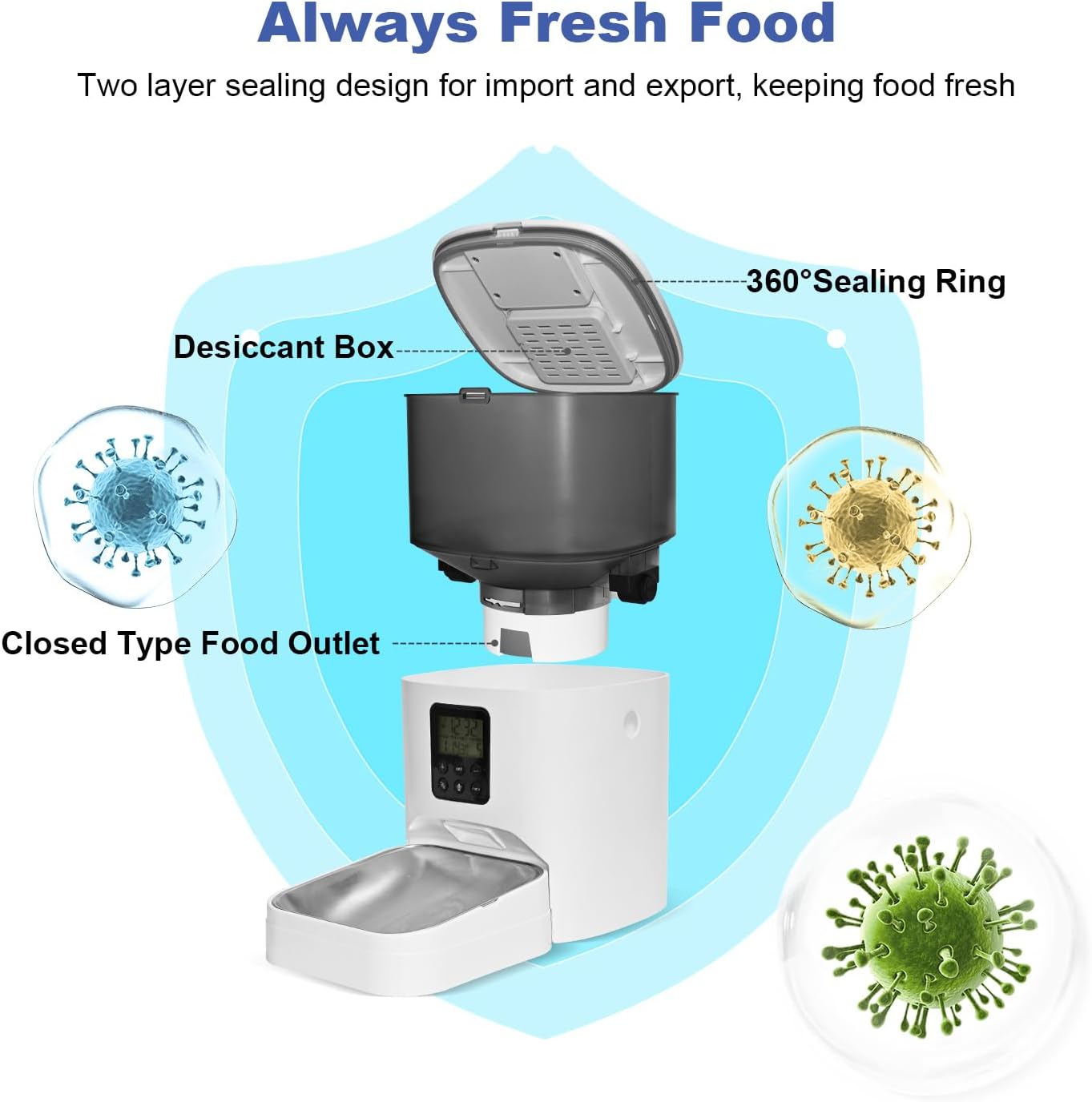
Image 6.1: Disassembled components for easy cleaning.
6.1 Cleaning Instructions
- Unplug the feeder from the power outlet and remove any backup batteries.
- Remove the food storage tank and the feeding bowl from the main body.
- The food storage tank and feeding bowl can be hand-washed with mild soap and water. Rinse thoroughly and dry completely before reassembling.
- Wipe the main feeder body with a soft, damp cloth. Do not immerse the main body in water.
- Ensure all parts are completely dry before reassembling and refilling with food.
6.2 Desiccant Replacement
The desiccant bag helps keep food fresh. Replace it periodically (e.g., every 1-2 months) or when it appears saturated.
- Locate the desiccant box, typically integrated into the lid of the food tank (refer to Image 3.2).
- Remove the old desiccant bag and insert a new one.
- Close the desiccant box securely.
7. Troubleshooting
If you encounter issues with your feeder, refer to the following common problems and solutions:
| Problem | Possible Cause | Solution |
|---|---|---|
| Feeder does not power on. | Power adapter not connected; batteries depleted or incorrectly installed. | Ensure power adapter is securely plugged in. Check and replace D-cell batteries if using backup power. |
| Food is not dispensing. | Food blockage; food tank empty; incorrect kibble size; dispensing mechanism jammed. | Check food level. Ensure kibble size is within 2-12mm. Clear any food blockages in the dispenser (refer to Image 3.3). Clean the dispensing mechanism. |
| Scheduled meals are not dispensing. | Incorrect time setting; feeding schedule not programmed correctly. | Verify the current time setting. Re-program the feeding schedule following Section 5.1. |
| Voice recording is not playing. | No recording saved; volume too low. | Ensure a voice message has been successfully recorded (Section 5.2). Check if there is a volume setting and adjust if available. |
| Pet is able to open the lid. | Lid not securely closed. | Ensure the lid is firmly closed and latched after refilling food. |
8. Specifications
- Model: FT-3S
- Brand: ANDOLL HOME
- Capacity: 4 Liters
- Material: BPA Free ABS, Stainless Steel
- Dimensions (LxWxH): 7 x 7 x 13 inches
- Item Weight: 5 Pounds
- Kibble Size Compatibility: 2-12mm (0.07-0.5 inches)
- Max Meals Per Day: Up to 8
- Max Portions Per Meal: Up to 50
- Voice Recording: 10 seconds
- Power Supply: 5V DC Adapter (included), 3 x D-cell Alkaline Batteries (not included)
- Target Species: Cat (suitable for small and medium animals)
9. Warranty and Support
9.1 Warranty Information
This ANDOLL HOME FT-3S Automatic Cat Feeder comes with a 1-year manufacturer's warranty from the date of purchase. This warranty covers defects in materials and workmanship under normal use. It does not cover damage caused by misuse, accident, unauthorized modification, or neglect.
9.2 Customer Support
For technical assistance, warranty claims, or any questions regarding your ANDOLL HOME FT-3S Automatic Cat Feeder, please contact ANDOLL HOME customer support through the retailer where the product was purchased or refer to the contact information provided on the product packaging or official brand website.