
BOSGAME BOSGAME P2
BOSGAME Mini PC P2 User Manual
Model: BOSGAME P2 (Intel i9-12900H, 32GB DDR4, 1TB PCIe Gen 3 SSD)
Introduction
The BOSGAME Mini PC P2 is a compact yet powerful desktop computer designed for a wide range of applications, from gaming and content creation to office work and home entertainment. Featuring a 12th Gen Intel i9-12900H processor, ample memory, and high-speed storage, it offers robust performance in a small form factor. This manual provides essential information for setting up, operating, maintaining, and troubleshooting your Mini PC P2.

Figure 1: Front and side view of the BOSGAME Mini PC P2, showcasing its compact design and various ports.
What's in the Box
Upon opening the package, please verify that all the following items are included:
- Mini PC P2 12900H *1
- User Manual *1
- HDMI Cable *1
- 19V 6.3A, 120W, Power Adapter *1
- VESA Mount *1

Figure 2: All components included in the BOSGAME Mini PC P2 package, including the mini PC, power adapter, HDMI cable, VESA mount, and user manual.
Setup Guide
Follow these steps to set up your BOSGAME Mini PC P2:
- Connect to Power: Plug the 19V 6.3A power adapter into the DC jack on the back of the Mini PC and then into a power outlet.
- Connect to Display: Use the provided HDMI cable to connect the Mini PC to your monitor or TV. The Mini PC supports up to three displays via HDMI 2.0, DP, and USB-C (Thunderbolt 4).
- Connect Peripherals: Connect your keyboard, mouse, and other USB devices to the available USB 3.2 Gen 2 ports on the front and back of the Mini PC.
- Network Connection: For wired internet, connect an Ethernet cable to one of the dual 2.5GbE RJ45 LAN ports. For wireless, the Mini PC supports Wi-Fi 6E and Bluetooth 5.2.
- Power On: Press the power button located on the front of the Mini PC. The system will boot up.
- Initial Setup: Follow the on-screen instructions to complete the operating system setup (Windows or Linux).

Figure 3: Detailed view of the front and back ports of the Mini PC P2, including USB, HDMI, DisplayPort, LAN, and power input.
VESA Mount Installation (Optional)
The BOSGAME Mini PC P2 can be mounted to the back of a compatible monitor using the included VESA mount for a clutter-free setup.
- Attach Mount to PC: Secure the VESA mount to the Mini PC using the provided screws.
- Attach PC to Display: Fix the bracket with the Mini PC attached to the VESA mounting holes on the back of your display using screws.
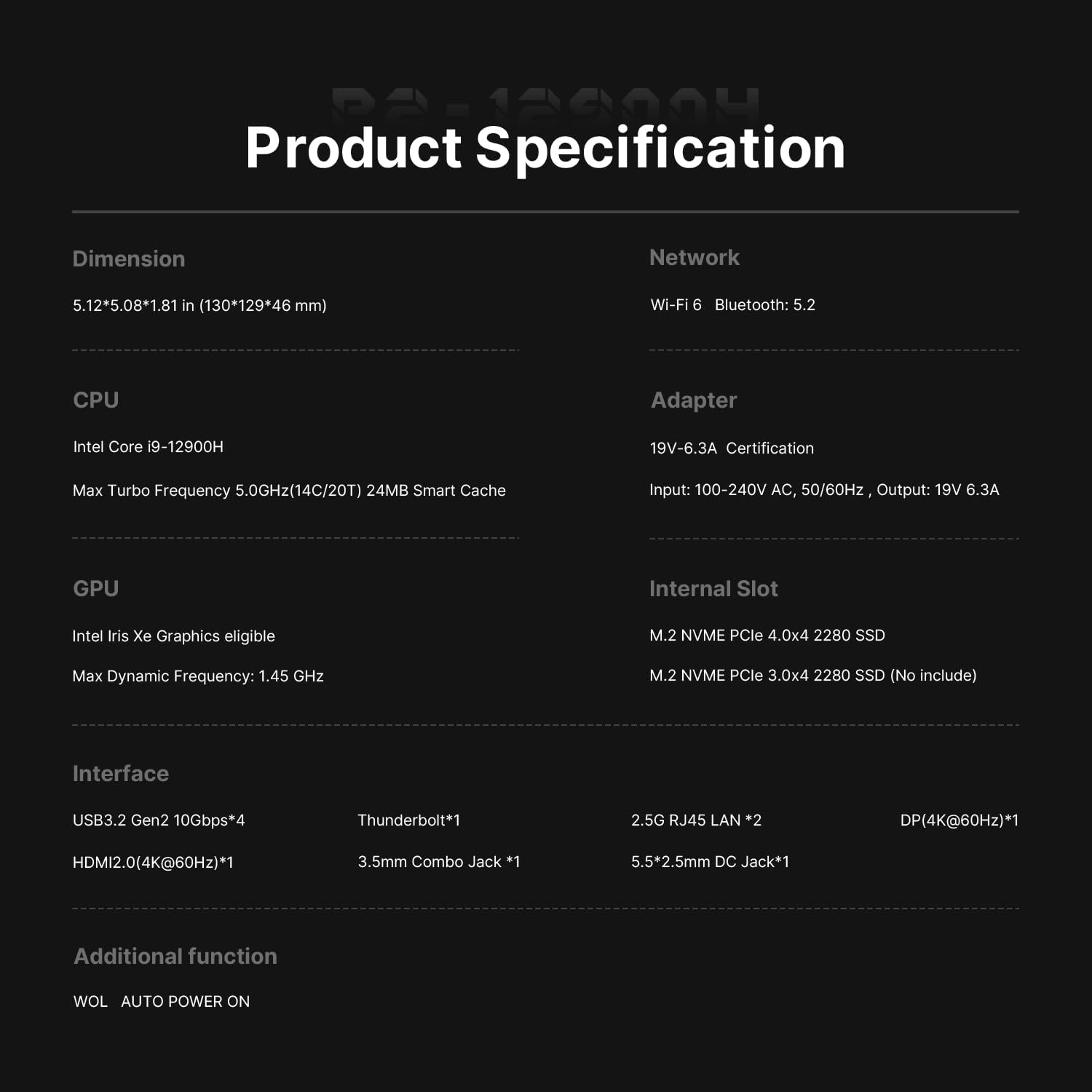
Figure 4: Illustration of how to install the BOSGAME Mini PC P2 using the VESA mount on the back of a monitor.
Operating Instructions
Connectivity
The Mini PC P2 offers extensive connectivity options:
- USB Ports: 4 x USB 3.2 Gen 2 ports for high-speed data transfer and peripheral connections.
- USB-C (Thunderbolt 4): One USB-C port supporting PD 3.0 power supply, 8K@60Hz video output, and 40Gbps data transmission.
- Display Outputs: HDMI 2.0 (4K@60Hz) and DP (4K@60Hz) ports for connecting multiple monitors.
- LAN Ports: Dual 2.5GbE RJ45 LAN ports for robust wired network connections.
- Wireless: Integrated Wi-Fi 6E for fast and stable wireless internet, and Bluetooth 5.2 for connecting wireless peripherals.
- Audio: 3.5 mm headphone jack for audio output.

Figure 5: Overview of the BOSGAME Mini PC P2's core features, highlighting its powerful processor, memory, storage, and connectivity options.
Multi-Display Setup
The Mini PC P2 supports up to three independent displays, enhancing productivity and immersive experiences. Connect monitors to the HDMI, DisplayPort, and USB-C (Thunderbolt 4) outputs.

Figure 6: A visual representation of the BOSGAME Mini PC P2 connected to and driving three external monitors for an expanded workspace.
Performance Overview
The 12th Gen Intel i9-12900H processor with 14 cores and 20 threads provides significant processing power for demanding tasks. The integrated Intel Iris Xe Graphics supports up to 8K resolution, suitable for various visual applications.
Video 1: A demonstration of the BOSGAME Mini PC P2's performance using Cinebench R23, showcasing its multi-core processing capabilities.
Operating System Compatibility
The BOSGAME P2 is compatible with a variety of operating systems, including Windows 10, Windows 11, and Linux distributions, allowing users flexibility in their computing environment.

Figure 7: The BOSGAME Mini PC P2 demonstrating compatibility with a wide range of software applications, indicating its versatility for different user needs.
Maintenance
To ensure the longevity and optimal performance of your Mini PC P2, consider the following maintenance tips:
- Keep it Clean: Regularly clean the exterior of the Mini PC with a soft, dry cloth. Ensure ventilation holes are free from dust and obstructions to prevent overheating.
- Software Updates: Keep your operating system and drivers updated to the latest versions to ensure security, stability, and performance improvements.
- Proper Shutdown: Always shut down the Mini PC properly through the operating system rather than simply unplugging it to prevent data corruption.
- Environmental Conditions: Operate the Mini PC in a well-ventilated area, away from direct sunlight, excessive heat, or moisture.

Figure 8: The BOSGAME Mini PC P2 depicted in a quiet environment, emphasizing its low noise operation, which is maintained with proper ventilation.
Troubleshooting
This section addresses common issues you might encounter with your Mini PC P2.
| Problem | Possible Cause | Solution |
|---|---|---|
| No display output | Loose cable connection, incorrect input source on monitor, power issue. |
|
| System not powering on | Power adapter issue, faulty power button. |
|
| Slow performance | Too many background applications, insufficient RAM, overheating, corrupted system files. |
|
| Fan noise is loud | Dust accumulation, high CPU load, fan malfunction. |
|
Specifications
| Feature | Detail |
|---|---|
| Brand | BOSGAME |
| Model Number | BOSGAME P2 |
| Processor | 12th Gen Intel Core i9-12900H (14 Cores, 20 Threads, up to 4.4 GHz) |
| RAM | 32GB DDR4 3200MHz SODIMM (Dual-channel, expandable up to 64GB) |
| Storage | 1TB PCIe Gen 3 x 4 SSD (Dual M.2 SSD slots, up to 4TB x 2) |
| Graphics | Intel Iris Xe Graphics (Supports up to 8K resolution) |
| Wireless Connectivity | Wi-Fi 6E, Bluetooth 5.2 |
| LAN Ports | Dual 2.5GbE RJ45 LAN |
| USB Ports | 4 x USB 3.2 Gen 2 |
| USB-C Port | 1 x USB-C (Thunderbolt 4, PD 3.0, 8K@60Hz video, 40Gbps data) |
| Video Outputs | 1 x HDMI 2.0, 1 x DP Port (Supports Triple Displays) |
| Audio Jack | 1 x 3.5 mm headphone jack |
| Power Input | DC Jack (19V 6.3A, 120W) |
| Dimensions | Approx. 5 x 5 x 1.8 inches (130 x 129 x 46 mm) |
| Operating System | Supports Windows 10/11 and Linux |

Figure 9: A comprehensive table summarizing the technical specifications of the BOSGAME Mini PC P2.
Warranty and Support
BOSGAME provides a Three-Year limited warranty for the Mini PC P2. For any pre-sale or after-sale inquiries, technical assistance, or warranty claims, please do not hesitate to contact BOSGAME customer service. Lifetime professional customer service is available to ensure your satisfaction.
You can typically find contact information on the official BOSGAME website or through your purchase platform.
Ask a question about this manual
Ask about setup, troubleshooting, compatibility, parts, safety, or missing instructions. Manuals+ will review the question and use this page’s manual context to help answer it.