
CLY SL-SP06
CLY Solar 6-in-1 RGB Spotlights Outdoor Garden User Manual
Model: SL-SP06 | Brand: CLY
1. Introduction
Thank you for choosing the CLY Solar 6-in-1 RGB Spotlights. This product is designed to provide versatile and energy-efficient lighting for your outdoor spaces, including gardens, patios, lawns, and pathways. Featuring 10 colors, 12 dynamic modes, and remote control functionality, these IP66 waterproof spotlights are built for durability and ease of use. Please read this manual carefully before installation and operation to ensure optimal performance and longevity of your solar lights.
2. Product Overview
2.1 Package Contents
Ensure all components are present in your package:
- 6 x Solar Spotlights
- 1 x Control Box
- 1 x Remote Control
- 1 x Instruction Manual
- Ground Stakes and Wall Mounting Screws/Anchors
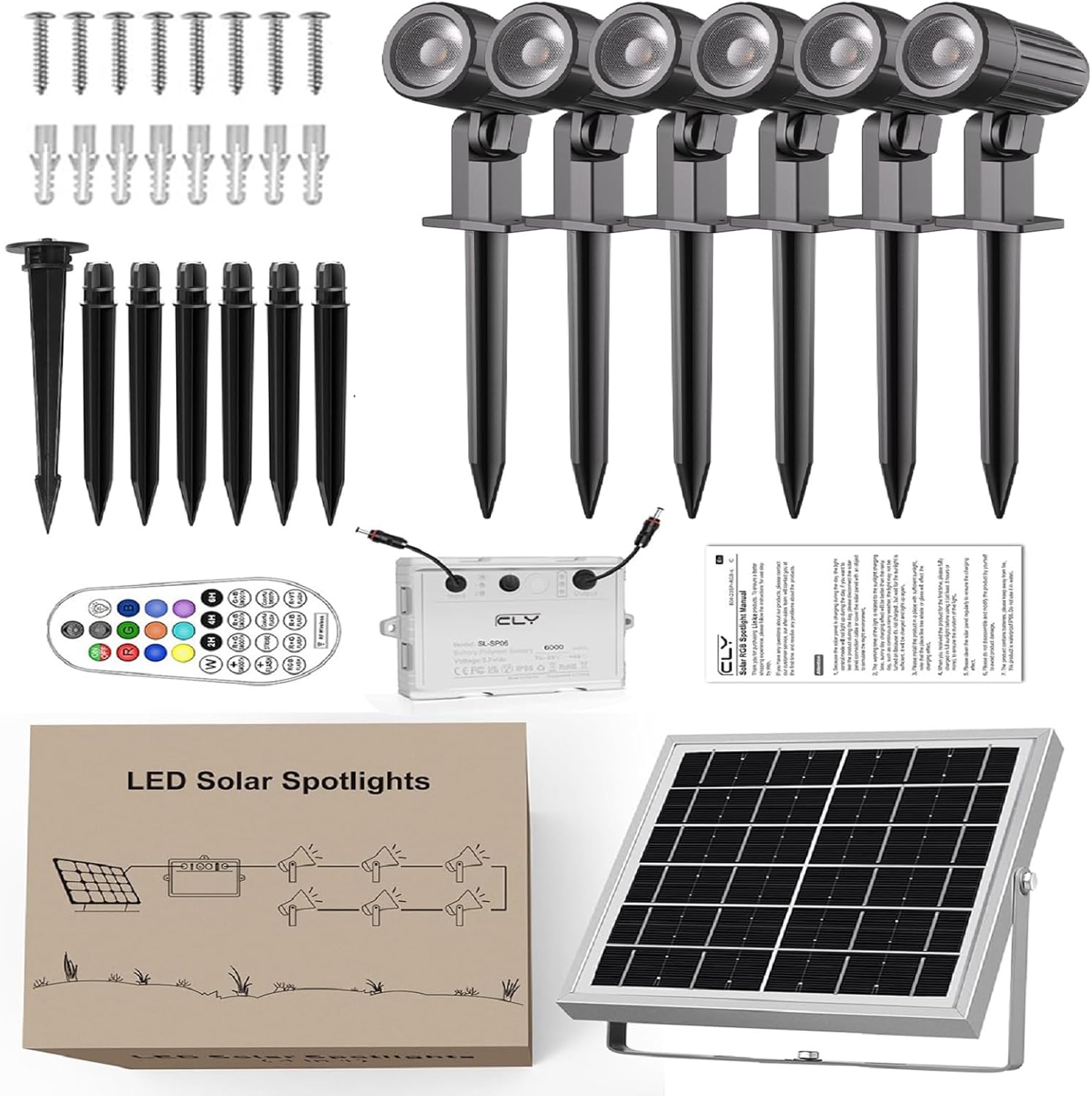
Figure 2.1: Included Components
2.2 Key Features
- Energy Saving Solar Power: Equipped with a 6V/6W solar panel and 6000mAh battery for automatic charging during the day and illumination at night.
- Vibrant RGB Lighting: Offers 10 static colors and 12 dynamic lighting modes to suit various moods and occasions.
- Dual Brightness Levels: Adjustable between high and low brightness settings.
- RF 360° Remote Control: Control lights from up to 12 meters away without direct line of sight.
- Timing Function: Set lights to automatically turn off after 2, 4, or 6 hours.
- Memory Function: Remembers the last light setting when turned on again.
- Durable & Waterproof: IP66 rated for resistance against rain, snow, and extreme temperatures (-25°C to 55°C).
- Flexible Installation: Can be embedded in the ground or wall-mounted.
- Long Cable Length: 5M (16.4ft) cable between solar panel and control box, and 2.5M (8.2ft) cables for each spotlight, totaling 18M (59.06ft) for flexible placement.
3. Setup and Installation
3.1 Choosing an Installation Location
For optimal performance, select a location for the solar panel that receives direct sunlight for 8-10 hours daily. The spotlights can be placed in desired areas, utilizing the long cable for flexibility.

Figure 3.1: Solar Panel Placement for Optimal Charging
3.2 Installation Methods
The CLY Solar Spotlights offer two primary installation methods:
Method 1: Ground Insertion
- Attach the ground stakes to the bottom of each spotlight and the solar panel stand.
- Firmly insert the assembled spotlights and solar panel into soft ground in your desired locations.
Method 2: Wall Mounting
- Use the provided screws and anchors to fix the base of the spotlights and solar panel stand to a wall or other solid surface.
- Ensure the mounting surface is stable and can support the weight of the lights.

Figure 3.2: Product Dimensions and Cable Lengths

Figure 3.3: Installation Options (Wall Mounted and Ground Inserted)
3.3 Connecting Components
Connect the solar panel cable to the "Input" port on the control box. Connect each spotlight cable to the "Output" ports on the control box. Ensure all connections are secure and waterproof.
Adjust the solar panel to face the sun directly for maximum charging efficiency. The light heads can be adjusted 180° to illuminate different directions.
4. Operating Instructions
4.1 Automatic Operation
The CLY Solar Spotlights are designed for automatic operation. During the day, the solar panel charges the internal battery. At dusk, the lights will automatically turn on. At dawn, they will turn off and begin charging again.

Figure 4.1: Day and Night Automatic Operation
4.2 Remote Control Functions
Use the included RF 360° remote control to customize your lighting experience. The remote can operate the lights from up to 12 meters (39.3 feet) away, even through obstacles like walls.
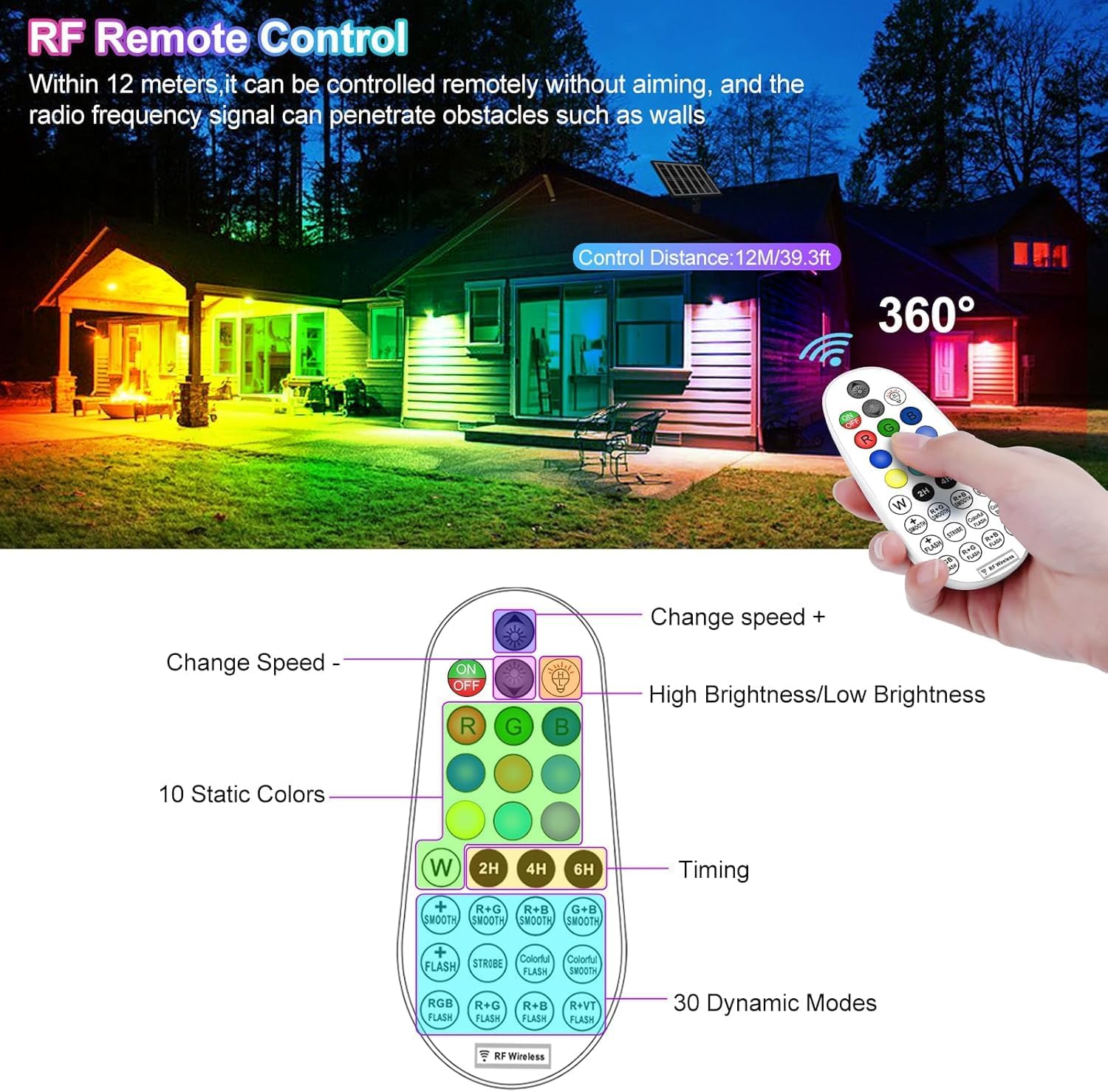
Figure 4.2: Remote Control Layout and Functions
- ON/OFF: Turns the lights on or off.
- H/L (High/Low Brightness): Toggles between two brightness levels.
- RGBW Buttons: Select Red, Green, Blue, or Warm White static colors.
- Color Buttons: Choose from 10 static colors (Red, Green, Blue, Warm White, Purple, Orange, Indigo, Yellow, Cyan, Magenta).
- Timing (2H/4H/6H): Sets the lights to turn off automatically after 2, 4, or 6 hours.
- Dynamic Modes:
- Smooth/Flash/Strobe: Cycles through various color-changing effects.
- R+B/R+G/G+B: Specific color combinations for dynamic effects.
- Speed +/-: Adjusts the speed of dynamic modes.
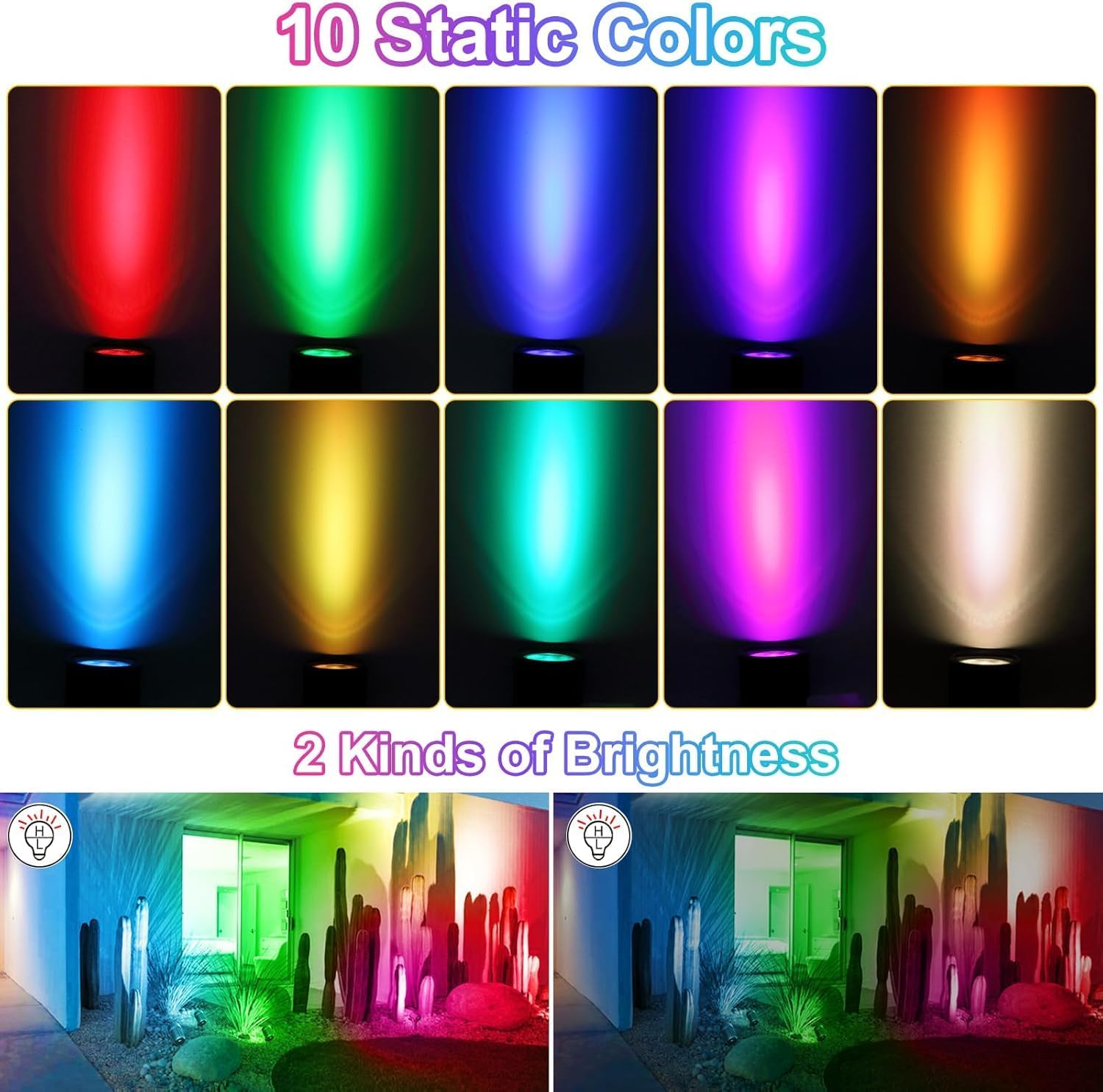
Figure 4.3: 10 Static Colors and 2 Brightness Levels

Figure 4.4: 12 Dynamic Lighting Modes
4.3 Memory Function
The lights feature a memory function. When the lights are turned off, they will retain the last selected color, brightness, or dynamic mode setting and resume that setting when turned on again.

Figure 4.5: Timing and Memory Functions
5. Maintenance
To ensure the long-term performance of your CLY Solar Spotlights, follow these maintenance guidelines:
- Clean Solar Panel: Regularly wipe the solar panel with a soft, damp cloth to remove dust, dirt, and debris. A clean panel ensures maximum sunlight absorption and charging efficiency.
- Check Connections: Periodically inspect all cable connections to the control box and spotlights to ensure they remain secure and free from corrosion.
- Clear Obstructions: Ensure no trees, bushes, or other objects are shading the solar panel, especially during peak sunlight hours.
- Battery Care: While the battery is designed for longevity, avoid prolonged periods of storage without charging. If storing for an extended time, ensure the battery is fully charged before storage and recharge every few months.
- Weather Resistance: The lights are IP66 waterproof and designed to withstand temperatures from -25°C to 55°C. No special winterization is typically required, but clearing heavy snow from the solar panel is recommended for continued operation.

Figure 5.1: Durability Features (Cold, Waterproof, Heat Resistant)
6. Troubleshooting
If you encounter issues with your CLY Solar Spotlights, please refer to the following common problems and solutions:
| Problem | Possible Cause | Solution |
|---|---|---|
| Lights do not turn on at night. |
|
|
| Lights are dim or only stay on for a short time. |
|
|
| Remote control is not working. |
|
|
| Settings (color, mode, timer) are not retained. |
|
|
6.1 Control Box Indicator Lights
The control box features indicator lights to provide status information:
- Brightness Indicator Light: Green for low brightness, Red for high brightness.
- Charging Indicator Light: Red light stays on during charging.
- Working Indicator Light: Green light indicates the battery box is working normally.
- Battery Indicator Lights:
- 30% power: 1 light on
- 70% power: 2 lights on
- 100% power: 3 lights on
- Less than 30% power: No indicator lights.
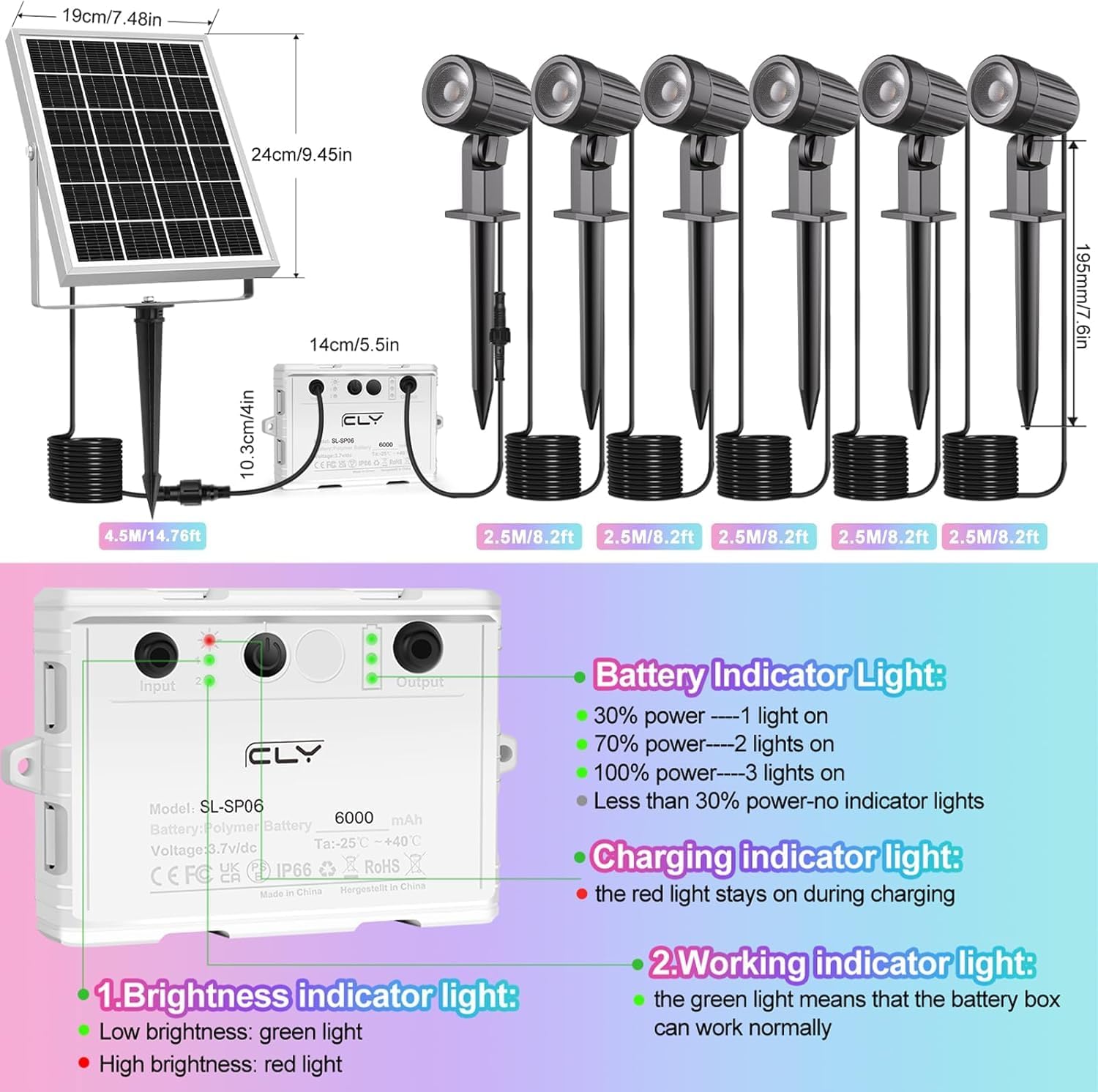
Figure 6.1: Control Box Indicator Lights
7. Specifications
| Brand | CLY |
| Model Number | SL-SP06 |
| Color | RGB (Red, Green, Blue) |
| Material | Aluminum, Plastic |
| Power Source | Solar Powered |
| Solar Panel | 6V/6W |
| Battery Capacity | 6000mAh |
| Water Resistance Level | IP66 |
| Operating Temperature | -25°C to 55°C (-13°F to 131°F) |
| Control Method | Remote Control (RF 360°) |
| Remote Control Distance | Up to 12m (39.3ft) |
| Cable Length (Solar Panel to Control Box) | 4.5M (14.76ft) |
| Cable Length (Control Box to Spotlights) | 2.5M (8.2ft) per spotlight |
| Number of Lights | 6 |
| Product Dimensions | 7.6"L x 7.7"W x 9.45"H (approximate, assembled) |
| Item Weight | 3.94 pounds |
| Included Batteries | 1 CR5 battery (for remote) |
8. Warranty and Support
CLY provides a 2-year replacement service for this product. If you experience any issues or have questions regarding your CLY Solar Spotlights, please do not hesitate to contact our customer service team.
You can find our service email address in the physical instruction manual included with your product. Alternatively, you may contact us through the Amazon platform, and we will endeavor to reply within 24 hours.
We are committed to providing reliable and satisfactory high-quality lighting products and excellent customer support.
Related documentsSL-SP06


Ask a question about this manual
Ask about setup, troubleshooting, compatibility, parts, safety, or missing instructions. Manuals+ will review the question and use this page’s manual context to help answer it.