
1. Introduction
This manual provides essential information for the safe and effective operation of your SIGLENT SDS802X HD Digital Oscilloscope. Please read this manual thoroughly before using the instrument and keep it for future reference.
The SDS800X HD series oscilloscopes are high-resolution digital storage oscilloscopes featuring 12-bit Analog-Digital Converters, excellent noise performance, and a 7-inch capacitive touch screen. They are designed for precise signal analysis in various applications.
2. Safety Information
WARNING:
- Always connect the instrument to a properly grounded power outlet.
- Do not operate the oscilloscope in wet or damp conditions.
- Ensure the power cord is undamaged and correctly rated for your region.
- Do not attempt to service the instrument yourself. Refer all servicing to qualified personnel.
- Avoid blocking ventilation openings to prevent overheating.
3. Package Contents
Verify that all items listed below are included in your package:
- SIGLENT SDS802X HD Digital Oscilloscope
- Power cable x 1
- USB cable x 1
- Probe x CH (Quantity depends on model, e.g., 2 for 2-channel models)
- Calibration certificate
- Quick Start Guide
4. Product Features
The SIGLENT SDS802X HD Digital Oscilloscope offers a range of advanced features for precise signal analysis:
- High Resolution: 12-bit vertical resolution for enhanced signal detail.
- Bandwidth: 70 MHz frequency band.
- Channels: 2 analog channels.
- Sampling Rate: Real-time sampling rate up to 2 GSa/s.
- Memory Depth: Up to 50 Mpts maximum memory length.
- Waveform Capture Rate: Up to 500,000 wfm/s (Sequence mode).
- Display: 7-inch capacitive touch screen with multi-touch gestures.
- Trigger System: Innovative digital trigger system with high sensitivity and low jitter, supporting Edge, Slope, Pulse width, Window, Runt, Interval, Dropout, Pattern, Video (HDTV supported), Qualified, Nth edge, Delay, Setup/Hold time.
- Connectivity: Supports external mouse control and remote web control over LAN.
- Analysis Tools: Includes History waveform recording, Search and Navigate functions, Mask Test, Bode Plot, and Power Analysis.
- Measurement & Math: Extensive measurement and math capabilities.
- Optional Features: Options for a 25 MHz arbitrary waveform generator and serial decoding.

Figure 4.1: Key features of the SDS800X HD series, including 12-bit resolution, extensive memory, and diverse triggering options.

Figure 4.2: Visual comparison demonstrating the enhanced detail provided by 12-bit vertical resolution compared to 8-bit.
5. Setup
5.1 Unpacking and Inspection
Carefully remove the oscilloscope and all accessories from the packaging. Inspect the instrument for any signs of damage during transit. If any damage is found, contact your dealer or SIGLENT customer service immediately.
5.2 Connecting Power
- Ensure the power switch on the front panel is in the OFF (O) position.
- Connect the provided power cable to the AC power input on the rear panel of the oscilloscope.
- Plug the other end of the power cable into a grounded AC power outlet.

Figure 5.1: Front and rear panel overview, indicating power input and connectivity options.
5.3 Probe Connection and Compensation
- Connect the probe to one of the analog input channels (CH1 or CH2) on the front panel.
- Attach the probe's ground clip to the ground terminal.
- Connect the probe tip to the probe compensation output terminal (usually a square wave test point).
- Power on the oscilloscope.
- Adjust the probe compensation trimmer until a flat-top square wave is displayed on the screen.

Figure 5.2: Example setup showing the oscilloscope connected to a circuit for measurement.
6. Operating Instructions
6.1 Basic Interface Navigation
The SDS802X HD features a 7-inch capacitive touch screen. You can interact with the oscilloscope using touch gestures, physical buttons, or an external USB mouse.
- Touch Screen: Tap, swipe, and pinch-to-zoom for intuitive control.
- Knobs and Buttons: Dedicated knobs for vertical scale (VOLTS/DIV), horizontal scale (SEC/DIV), and position, along with function buttons for common operations.
- External Mouse: Connect a USB mouse to navigate menus and adjust settings.

Figure 6.1: Main display and control panel layout of the SDS802X HD oscilloscope.
6.2 Acquiring Waveforms
- Connect Signal: Connect your signal source to the desired input channel (e.g., CH1).
- Auto Setup: Press the Auto Setup button for automatic scaling and triggering.
- Manual Adjustment: Use the vertical (VOLTS/DIV) and horizontal (SEC/DIV) knobs to adjust the waveform's amplitude and time base. Use the position knobs to move the waveform vertically or horizontally.
6.3 Triggering
The trigger system stabilizes repetitive waveforms and captures single-shot events.
- Trigger Mode: Press the Trigger button to access trigger settings. Common modes include Edge, Pulse, and Video.
- Trigger Level: Adjust the trigger level knob to set the voltage threshold at which the trigger occurs.
- Trigger Source: Select the channel or external source that will trigger the acquisition.
6.4 Measurements and Analysis
The oscilloscope provides various automatic measurements and analysis functions.
- Measure: Press the Measure button to display automatic measurements like Vpp, Vmax, Frequency, Period, etc.
- Math Functions: Access functions like Add, Subtract, Multiply, Divide, FFT (Fast Fourier Transform) for advanced waveform analysis.
- History Mode: Record and review past waveforms.
- Serial Decoding (Optional): Decode various serial bus protocols like I2C, SPI, UART, CAN, LIN.
- Power Analysis (Optional): Perform detailed power measurements.
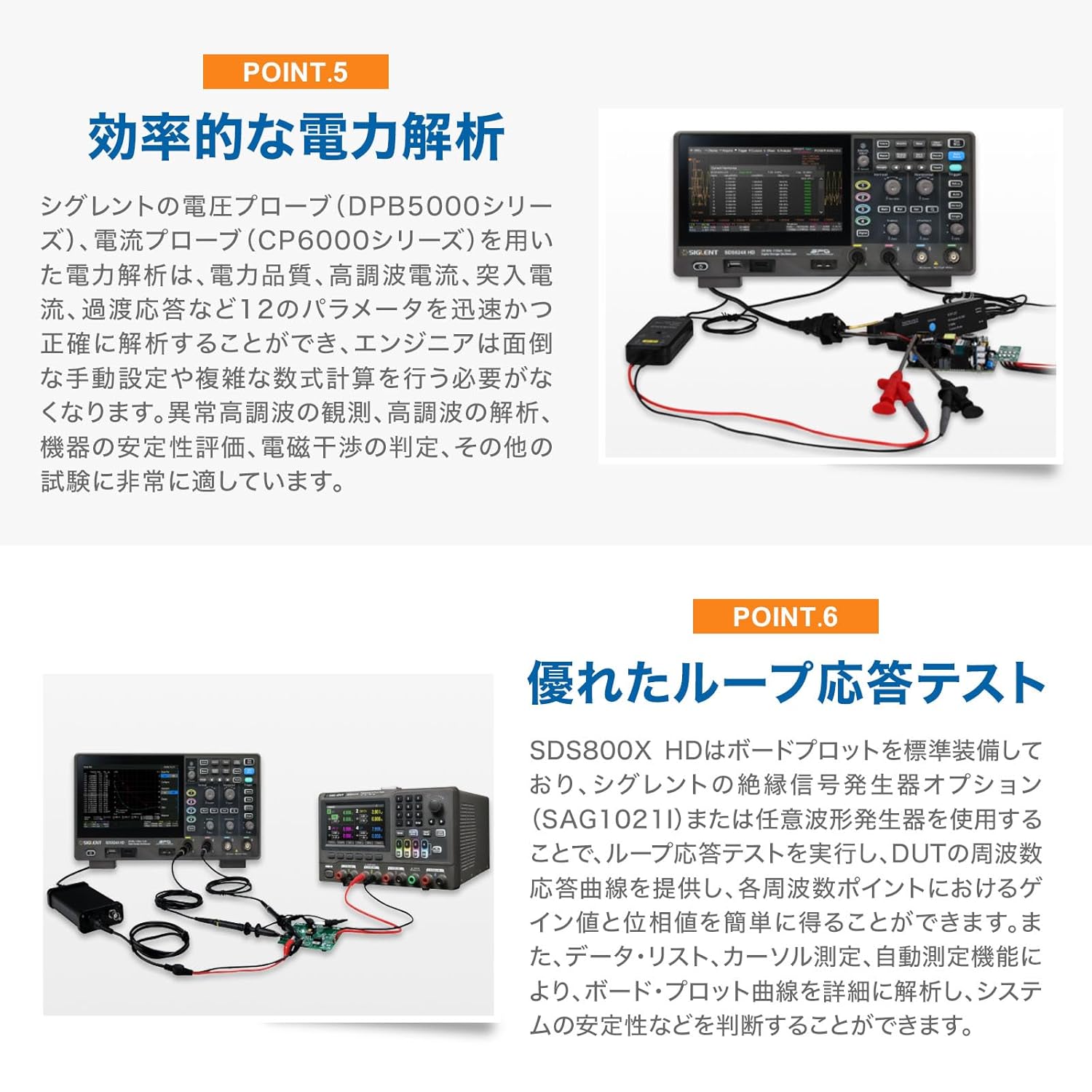
Figure 6.2: Examples of advanced analysis capabilities such as FFT, power analysis, and loop response testing.
7. Maintenance
7.1 Cleaning the Instrument
To clean the exterior of the oscilloscope, use a soft cloth dampened with a mild detergent solution. Do not use abrasive cleaners or solvents that could damage the plastic parts. Ensure the instrument is powered off and unplugged before cleaning.
7.2 Storage
When not in use for extended periods, store the oscilloscope in a dry, dust-free environment, away from direct sunlight and extreme temperatures. Use the original packaging or a suitable protective case for transport.
7.3 Calibration
The oscilloscope is factory calibrated. For optimal performance, periodic calibration by qualified service personnel is recommended. Refer to the calibration certificate for details.
8. Troubleshooting
This section provides solutions to common issues you might encounter.
| Problem | Possible Cause | Solution |
|---|---|---|
| No display after power on | Power cable not connected; Power switch off; Faulty power outlet | Check power cable connection; Ensure power switch is ON; Test power outlet with another device. |
| No waveform displayed | Probe not connected; Input signal too small/large; Incorrect trigger settings | Connect probe correctly; Adjust VOLTS/DIV; Use Auto Setup or adjust trigger level/mode. |
| Waveform unstable or rolling | Incorrect trigger level; Wrong trigger source; Signal noise | Adjust trigger level; Select correct trigger source; Use noise reduction features or filter. |
| Touch screen unresponsive | Temporary software glitch; Screen dirty | Restart the oscilloscope; Clean the screen with a soft, dry cloth. |
9. Specifications
Detailed technical specifications for the SIGLENT SDS802X HD Digital Oscilloscope:
| Parameter | Value |
|---|---|
| Model | SDS802X HD |
| Bandwidth | 70 MHz |
| Analog Channels | 2 |
| Vertical Resolution | 12-bit |
| Real-time Sample Rate | Up to 2 GSa/s |
| Memory Depth | 50 Mpts |
| Waveform Capture Rate | 500,000 wfm/s (Sequence mode) |
| Display | 7-inch Capacitive Touch Screen |
| Item Model Number | SDS802X HD |
| Package Dimensions | 15.47 x 10.75 x 9.13 inches |
| Item Weight | 8.02 Pounds |
| Manufacturer | Siglent Technologies |

Figure 9.1: Physical dimensions and core specifications of the SDS800X HD series.
10. Warranty and Support
SIGLENT products are designed and manufactured to the highest quality standards. For warranty information and technical support, please refer to the official SIGLENT website or contact your local distributor.
Manufacturer: Siglent Technologies
For the latest documentation, software updates, and support resources, visit the Official Siglent Website.