
De'Longhi ECAM29063SB
Contents
De'Longhi Magnifica Evo Automatic Espresso & Cappuccino Machine
Model: ECAM29063SB
Introduction
Welcome to the world of authentic espresso and cappuccino with your new De'Longhi Magnifica Evo machine. This automatic espresso machine is designed to bring the café experience directly to your home, offering a variety of beverages with ease. This manual provides essential information for the proper use, maintenance, and care of your appliance, ensuring years of enjoyment.

The De'Longhi Magnifica Evo Automatic Espresso & Cappuccino Machine, showcasing its sleek design and integrated milk frother.
Safety Instructions
Please read all instructions carefully before using the appliance. Keep this manual for future reference.
- Ensure the voltage indicated on the appliance corresponds to your main voltage.
- Do not immerse the appliance, power cord, or plug in water or other liquids.
- Always unplug the machine from the power outlet before cleaning, maintenance, or if it will be unused for a long period.
- Do not operate the appliance with a damaged cord or plug, or if it malfunctions or has been damaged in any manner.
- Keep children away from the appliance during operation. Hot surfaces and steam can cause burns.
- Use only cold, fresh water in the water tank.
- Do not use the appliance outdoors.
Unpacking and Initial Setup
1. Unpacking
Carefully remove the machine from its packaging. Retain the packaging materials for future transport or storage.
2. Initial Cleaning
Before first use, wash all removable components (water tank, milk carafe, drip tray, grounds container) with warm water and mild detergent. Rinse thoroughly.
3. Filling the Water Tank
Remove the water tank from the back of the machine. Fill it with fresh, cold water up to the MAX level indicator. Replace the tank securely.
4. Filling the Bean Hopper
Open the lid of the bean hopper located on top of the machine. Pour fresh coffee beans into the hopper. Do not use ground coffee, instant coffee, or caramelized beans in the bean hopper.
5. Power Connection
Plug the power cord into a suitable grounded electrical outlet.
6. First Use / Priming
Follow the on-screen prompts or indicator lights for the initial priming cycle. This process flushes the internal circuits and prepares the machine for brewing.
Operating Instructions
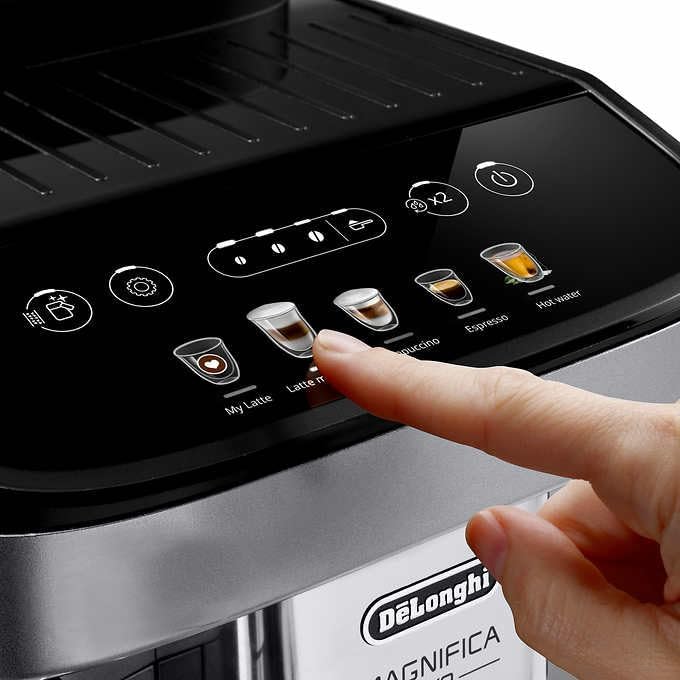
Control Panel Overview
The Magnifica Evo features an intuitive one-touch display panel for easy selection of beverages.
The control panel of the Magnifica Evo, showing various one-touch beverage options including Espresso, Cappuccino, Latte Macchiato, Hot Water, and My Latte.
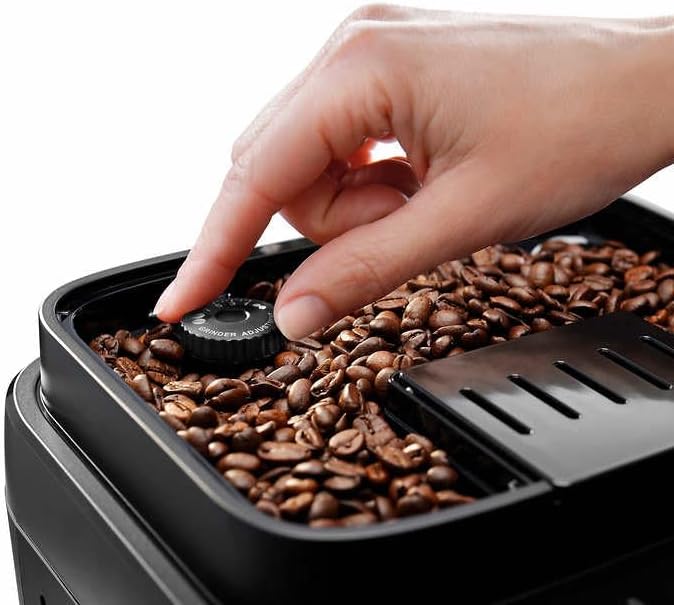
Grinder Adjustment
The built-in conical burr grinder offers 13 grind settings, allowing you to fine-tune the grind for optimal extraction based on your coffee beans.

A hand adjusting the grind setting dial located within the coffee bean hopper.
Making Espresso and Coffee
- Ensure the water tank is filled and the bean hopper contains fresh beans.
- Place a cup under the coffee spouts.
- Select your desired beverage (e.g., Espresso) from the control panel. The machine will automatically grind the beans and brew your coffee.
Using the LatteCrema System
The LatteCrema System automatically textures milk for perfect cappuccinos and latte macchiatos. It can also be stored in the refrigerator when not in use.
The LatteCrema System attached to the machine, frothing milk directly into a glass.
- Fill the milk carafe with fresh milk up to the indicated level.
- Attach the milk carafe to the machine's frothing spout.
- Place a cup under the coffee spouts and milk spout.
- Select your desired milk-based beverage (e.g., Cappuccino, Latte Macchiato). The machine will automatically dispense milk foam and then coffee.
Personalizing with My Latte
The 'My Latte' function allows you to customize and save your preferred milk and coffee quantities for a personalized beverage experience.
Maintenance and Cleaning
Regular cleaning ensures the longevity and optimal performance of your Magnifica Evo.
General Cleaning
- Wipe the exterior of the machine with a soft, damp cloth.
- Empty and clean the drip tray and grounds container daily. These parts are removable and dishwasher-safe.
LatteCrema System Cleaning
After each use, perform the automatic cleaning cycle for the milk carafe. For thorough cleaning, disassemble the carafe and wash all components with warm water and mild detergent. All parts of the LatteCrema system are detachable and dishwasher-safe.
Descaling
The machine will indicate when descaling is required. Follow the instructions in the machine's display or refer to the full descaling guide provided with your appliance. Use only De'Longhi descaling solution.
Troubleshooting
This section addresses common issues you might encounter.
| Problem | Possible Cause | Solution |
|---|---|---|
| Machine does not turn on. | Power cord not connected; no power from outlet. | Check power cord connection; test outlet with another appliance. |
| Coffee is not hot enough. | Cups are cold; machine not preheated. | Warm cups with hot water; allow machine to fully preheat. |
| Milk frother not producing foam. | Milk carafe not clean; milk type unsuitable; carafe not properly attached. | Clean milk carafe thoroughly; use cold, fresh milk (dairy or suitable alternative); ensure carafe is securely attached. |
| Machine displays an error message. | Specific internal issue. | Refer to the machine's display for specific error codes and consult the full manual or De'Longhi support. |
| Coffee grounds container full message, but it's empty. | Container removed too quickly or sensors are dirty. | Ensure container is removed for at least 5 seconds when emptying. Clean sensors if accessible. |
Specifications
- Brand: De'Longhi
- Model Name: Magnifica Evo
- Item Model Number: ECAM29063SB
- Color: Chrome
- Product Dimensions: 17.2"D x 9.45"W x 14.17"H
- Item Weight: 27 pounds
- Coffee Maker Type: Espresso Machine
- Operation Mode: Fully Automatic
- Special Features: Built-in Conical Burr Grinder, LatteCrema System, Auto-cleaning, One-Touch Recipe
- Filter Type: Reusable
- Included Components: LatteCrema System, Removable and Dishwasher Safe Parts
Warranty and Support
For warranty information and customer support, please refer to the warranty card included with your product or visit the official De'Longhi website. Keep your proof of purchase for warranty claims.
De'Longhi Official Website: www.delonghi.com
Ask a question about this manual
Ask about setup, troubleshooting, compatibility, parts, safety, or missing instructions. Manuals+ will review the question and use this page’s manual context to help answer it.