
1. Introduction
This manual provides detailed instructions for the installation, operation, and maintenance of your VOONOA VN007 2CAM Magnetic Wireless Backup Camera System. This system is designed to enhance visibility and safety for various vehicles, including RVs, trailers, trucks, and cars, by offering dual camera views, a high-definition monitor, and convenient wireless functionality.
Key features include a 7-inch 1080P HD DVR monitor, two magnetic solar wireless cameras with 15000mAh rechargeable batteries, IP69K waterproofing, IR night vision, and adjustable parking assist lines. The system offers a true wireless experience with a signal range of up to 300 ft and supports DVR recording.
2. What's in the Box
- 7 Inch 1080P LCD monitor x 1
- Solar Wireless Camera x 2
- Charger + Charging Cable x 1
- Cigarette Lighter Charger x 1
- User Manual x 1
3. Setup Guide
3.1 Camera Installation
The solar wireless cameras feature a magnetic base for quick and easy attachment to any magnetic surface on your vehicle. Ensure the mounting surface is clean and free of debris for optimal adhesion.

Image: Magnetic camera installation on a vehicle's rear, highlighting the strong magnetic base for quick setup.
The camera's angle can be adjusted to achieve the desired viewing perspective. Secure the angle using the lock nut on the side of the camera unit.

Image: A hand adjusting the angle of the magnetic camera, demonstrating its flexibility for optimal positioning.
3.2 Monitor Placement
The 7-inch HD monitor can be mounted on your dashboard or windshield using the provided mounts. Choose a location that offers clear visibility without obstructing your view of the road.

Image: Three different mounting positions for the monitor inside a vehicle, showing dashboard and windshield options.
3.3 Powering the System
Connect the monitor to your vehicle's cigarette lighter socket using the provided charger. The camera units are powered by their internal 15000mAh rechargeable batteries, which are supplemented by solar charging.
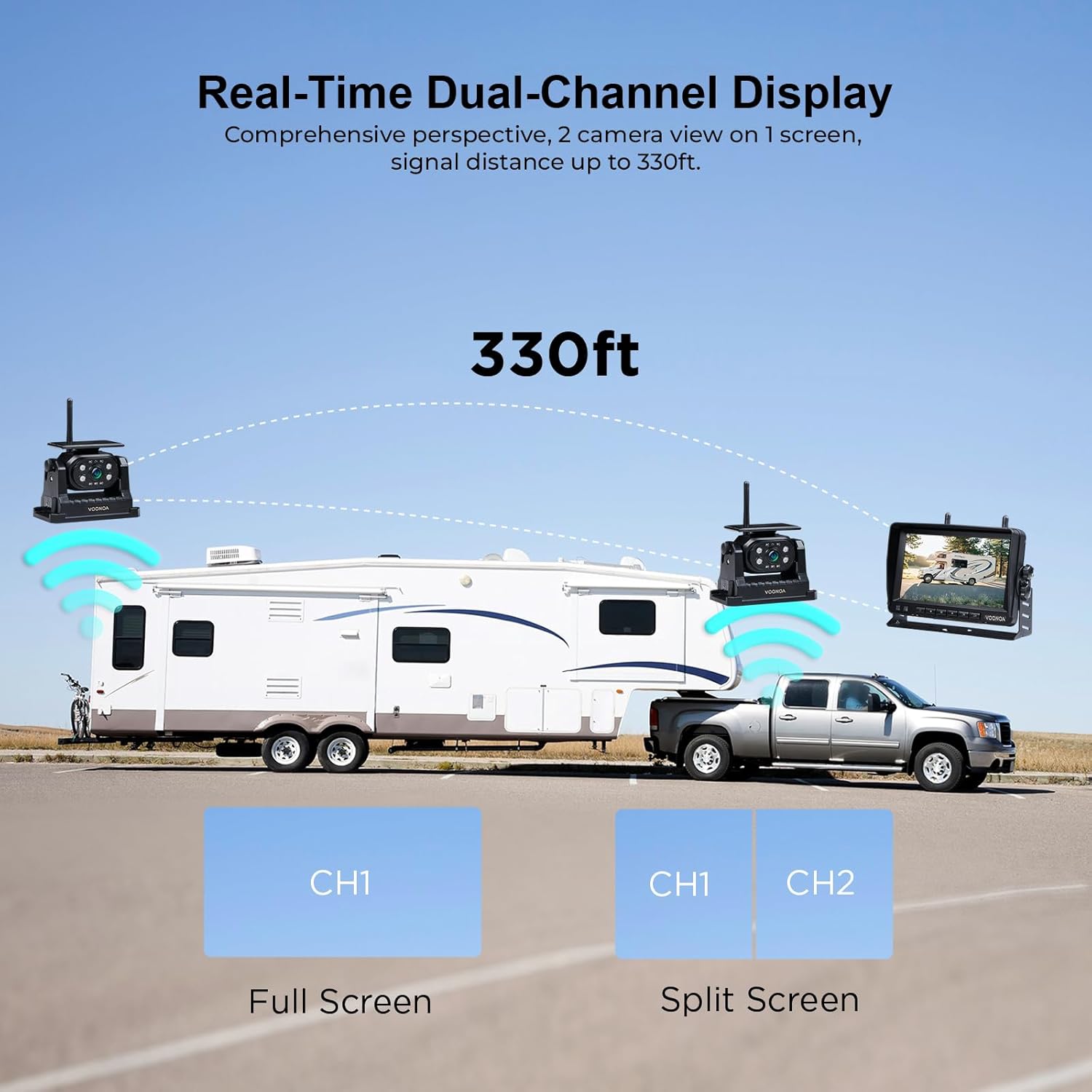
Image: A hand plugging the monitor's power adapter into a vehicle's cigarette lighter socket, illustrating the power connection.
3.4 Initial Charging
Before first use, it is recommended to fully charge the camera batteries using the provided charger and charging cable. The 15000mAh battery pack can last over 24 hours on a single charge.

Image: Various methods of charging the camera, including at home with a wall adapter, in the car, and with a portable power bank.
3.5 Video Demonstration of Setup
Video: A demonstration of the VEKOOTO VK7 Backup Camera Kit, showing the components and basic setup.
4. Operating Instructions
4.1 Dual Channel Display
The monitor supports two channels, allowing you to view feeds from both cameras simultaneously in a split-screen mode or switch between full-screen views of each camera. This provides a comprehensive perspective of your surroundings.

Image: The 7-inch monitor displaying a split-screen view from two cameras, labeled CH1 and CH2, showing different perspectives.
4.2 Remote Camera Control
The camera automatically enters sleep mode when the monitor is powered off, eliminating the need for manual shutdown. This innovative feature allows for effortless control by simply turning the monitor on or off.
Image: A hand turning on/off the cigarette lighter adapter, which controls the monitor and puts the camera into sleep mode.
4.3 Adjustable Parking Assist Lines
Customize the backup lines on the monitor for easier parking, reversing, and hitching. These lines can be adjusted for width, height, and vertical position to suit your specific vehicle and preferences.

Image: The monitor displaying adjustable reversing lines with options for width, height, and vertical adjustment.
4.4 DVR and Loop Recording
The system includes a DVR function with automatic loop recording, ensuring continuous capture of video footage. This feature automatically overwrites older files when the memory card is full, providing seamless recording.

Image: The monitor showing a video playback icon, indicating the DVR and loop recording capabilities of the system.
4.5 Infrared Night Vision
The cameras are equipped with IR night vision, allowing for clear visibility in low-light conditions or complete darkness, enhancing safety during nighttime operations.

Image: A split view showing a clear night vision image on the monitor from the camera, highlighting the infrared capability.
4.6 Video Demonstrations of Operation
Video: A demonstration of controlling the VOONOA RV camera remotely, showcasing the ease of use.
Video: A demonstration of the VOONOA RV camera system with adjustable backup assist lines, highlighting customization options.
Video: A demonstration of the VOONOA trailer camera system's DVR recording function.
5. Maintenance
5.1 Solar Panel Charging
The integrated solar panel helps maintain the camera's battery charge during sunny days. However, solar charging is a supplementary power source and should not be relied upon as the sole means of charging, especially in low light conditions or extended periods of non-use. For optimal battery health, it is recommended to use the wired charger for at least 4-5 hours periodically.

Image: The solar panel on top of the camera unit, indicating its charging function. Note that charging efficiency is affected by light intensity, temperature, and panel angle.
5.2 Battery Life
The 15000mAh battery provides over 24 hours of continuous operation on a full charge. To maximize battery lifespan, ensure regular charging and avoid prolonged storage in a fully discharged state.
6. Troubleshooting
If you encounter any issues with your VOONOA backup camera system, please refer to the detailed troubleshooting section in the included User Manual. Common issues and their solutions are typically covered there. Ensure all connections are secure and that both the camera and monitor are adequately charged.
7. Specifications
- Product Dimensions: 9 x 8 x 5 inches
- Item Weight: 5.94 pounds
- Batteries: 6 Lithium Ion batteries required (included)
- Special Features: 1080P 7 Inch Wireless RV Camera System, Adjustable Parking Assist Line, DVR Recording, Wide View Angle Lens, IP69 Waterproof, IR Night Vision Semi Truck Camera System, Magnetic Solar Wireless RV Camera System
- Display Technology: LCD or LED
- Other Display Features: Wireless
- Screen Size: 7 Inches
- Compatible Devices: RV Truck Trailer Camper Fifth 5th Wheels
- Installation Type: Magnetic Hitch Camera + Monitor Plug and Play
- Voltage: 12 Volts (DC)
- Optical Sensor Technology: CMOS or CCD
- Lens Type: Wide Angle
- Real Angle of View: 170 Degrees
- Connector Type: 2.4G Digital Wireless
8. Warranty & Support
VOONOA offers unlimited technical support and a 2-year replacement service for the VOONOA 2 magnetic wireless backup camera with 7-inch monitor system. For further details, please consult the manual book included in your package or contact VOONOA customer support.