
Retevis B63S
Retevis B63S Professional Walkie Talkie User Manual
Model: B63S
1. Introduction
Thank you for choosing the Retevis B63S Professional Walkie Talkie. This ultra-slim and lightweight two-way radio system is designed for reliable and clear communication in various professional environments such as hotels, retail stores, and security operations. This manual provides essential information for the proper setup, operation, and maintenance of your device.
2. Package Contents
Please check the package carefully to ensure all items are present:
- 6 x Retevis B63S Walkie Talkies (with 1620 mAh Li-ion Battery)
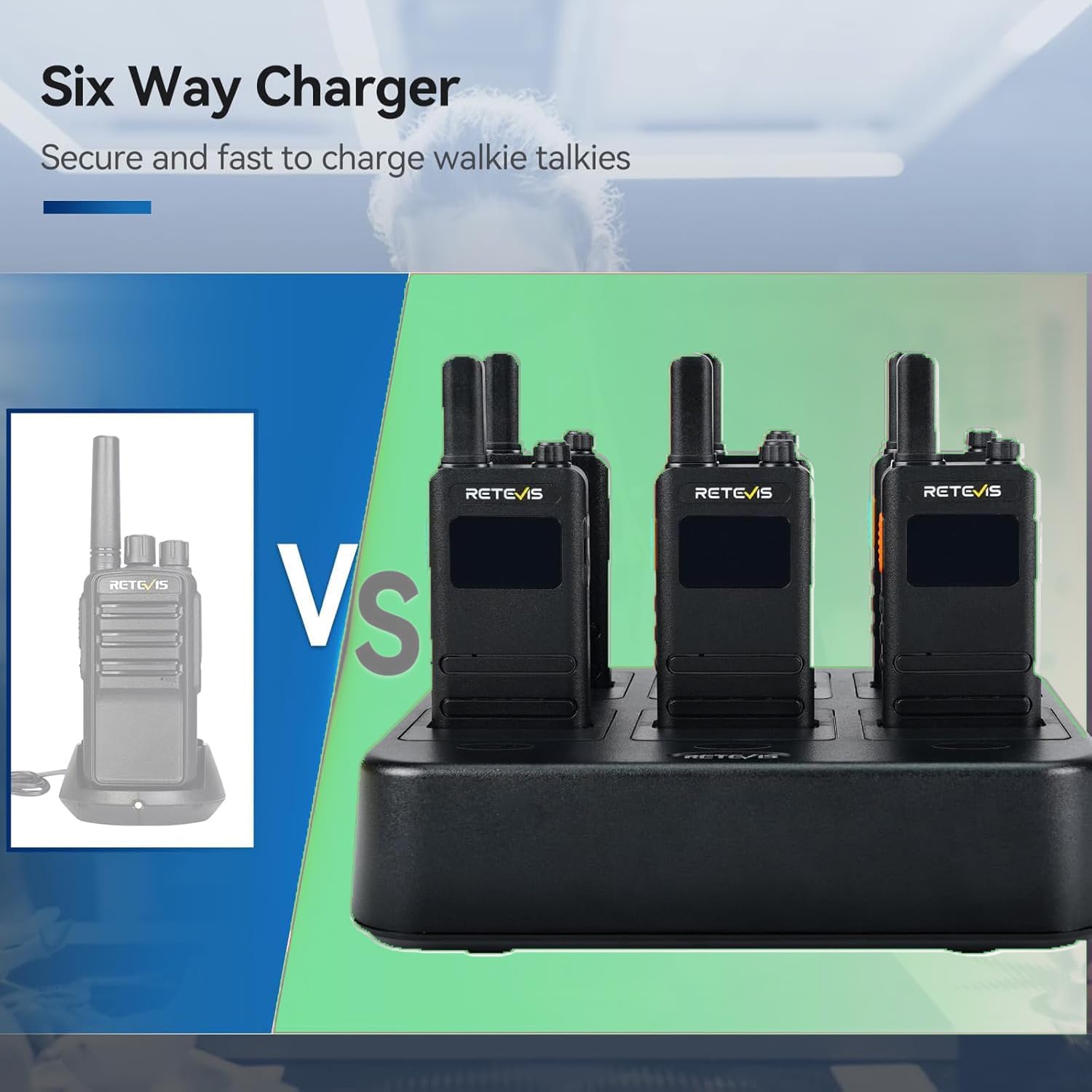
- 1 x 6-Way Charger
- 6 x Belt Clips
- 6 x Earpieces
- 1 x Power Adapter for 6-Way Charger
- 1 x Multilingual User Manual

3. Product Overview
3.1 Key Features
- Ultra-Slim Design: Measuring 14.8 x 5 x 1.5 cm and weighing only 105g, the B63S is highly portable.
- LCD Screen: Provides clear display of battery status, channel information, and activated functions.
- PMR446 License-Free: Ready to use out of the box without requiring a license.
- 16 Channels: Offers multiple communication channels for diverse operational needs.
- VOX Function: Enables hands-free communication when an earpiece is connected.
- Emergency Alarm: A dedicated function for urgent situations.
- 1620 mAh Li-ion Battery: Provides extended operating hours and standby time.
- 6-Way Charger: Convenient and efficient charging for multiple units simultaneously.
3.2 Physical Characteristics


4. Setup
4.1 Initial Charging
Before first use, fully charge all walkie talkies. The included 6-way charger allows for convenient simultaneous charging.
- Connect the power adapter to the 6-way charger and plug it into a power outlet.
- Place each B63S walkie talkie into an available slot on the charger.
- The charging indicator on the walkie talkie (or charger, if applicable) will show charging status. Ensure the devices are fully charged before use.

4.2 Attaching Accessories
- Belt Clip: Securely attach the belt clip to the back of the walkie talkie for easy carrying.
- Earpiece: Plug the earpiece into the audio jack on the side of the walkie talkie. This enhances call quality and enables hands-free operation.
5. Operating Instructions
5.1 Power On/Off
Rotate the Power/Volume knob clockwise to turn the walkie talkie on. Rotate it counter-clockwise until a click is heard to turn it off.
5.2 Volume Adjustment
Rotate the Power/Volume knob to adjust the listening volume to a comfortable level.
5.3 Channel Selection
Use the Channel Selector knob to choose one of the 16 available channels. Ensure all radios intended for communication are set to the same channel.

5.4 Transmitting and Receiving
- To transmit, press and hold the Push-to-Talk (PTT) button on the side of the walkie talkie. Speak clearly into the microphone. Release the PTT button to finish transmitting.
- To receive, simply ensure your walkie talkie is on and set to the correct channel. The radio will automatically receive incoming transmissions.
5.5 VOX Function (Hands-Free Operation)
The VOX (Voice Operated Exchange) function allows you to transmit without pressing the PTT button. This is particularly useful when using an earpiece.
- Activate the VOX function via the menu or a dedicated button (refer to your specific device's button layout).
- When VOX is active, the radio will automatically transmit when it detects your voice.
- Adjust VOX sensitivity if needed to prevent accidental transmissions or missed speech.

5.6 Emergency Alarm
In an emergency, you can activate the alarm function:
- Long press the designated emergency key (refer to your device's button layout for the specific key).
- This will activate both a local alarm on your device and transmit an alarm signal to other radios on the same channel.

6. Maintenance
6.1 General Care
- Keep the walkie talkie dry. Do not expose it to rain, moisture, or liquids.
- Clean the device with a soft, damp cloth. Do not use harsh chemicals or cleaning solvents.
- Avoid extreme temperatures. Do not store the device in very hot or cold environments.
- Do not attempt to disassemble or modify the walkie talkie. This will void the warranty.
6.2 Battery Care
- Use only the specified 1620 mAh Lithium-ion battery and charger provided by Retevis.
- Do not short-circuit the battery terminals.
- Do not dispose of batteries in fire.
- If the walkie talkie will not be used for an extended period, charge the battery to approximately 50% and store it in a cool, dry place. Recharge every three months to maintain battery health.
7. Troubleshooting
If you encounter issues with your Retevis B63S walkie talkie, please refer to the following common problems and solutions:
| Problem | Possible Cause | Solution |
|---|---|---|
| No power | Battery depleted; Power/Volume knob off; Battery not properly installed. | Charge the battery; Rotate Power/Volume knob clockwise; Reinstall battery correctly. |
| Cannot transmit or receive | Different channels; Out of range; Low battery; PTT button malfunction. | Ensure all radios are on the same channel; Move closer to other radios; Charge battery; Check PTT button for obstruction or damage. |
| Distorted or unclear audio | Volume too low/high; Weak signal; Interference; Earpiece issue. | Adjust volume; Move to an area with better signal; Avoid sources of interference; Ensure earpiece is fully plugged in and functional. |
| VOX not working | VOX not activated; VOX sensitivity too low. | Activate VOX function; Increase VOX sensitivity. |
| Charging issues | Charger or adapter faulty; Poor contact. | Check charger and adapter connections; Ensure walkie talkie is seated correctly in the charger. |
If the problem persists after trying these solutions, please contact Retevis customer support.
8. Specifications
| Feature | Detail |
|---|---|
| Brand | Retevis |
| Model Number | B63S |
| Frequency Range | 446 MHz (PMR446) |
| Number of Channels | 16 |
| Maximum Range | Up to 2 Kilometers (environment dependent) |
| Battery Type | 1620 mAh Lithium-ion (included) |
| Voltage | 3.7 Volts |
| Dimensions (L x W x H) | 14.5 x 5 x 1.3 cm |
| Item Weight | 103 Grams |
| Water Resistance Level | Not waterproof |
| Compatible Devices | Devices with PMR446 connectivity protocol |
9. Warranty and Support
9.1 Manufacturer's Warranty
Retevis offers the following warranty for the B63S walkie talkie:
- 2-Year Warranty: Applies to the radio body.
- 1-Year Warranty: Applies to accessories (e.g., batteries, chargers, earpieces).
- 30-Day Return Policy: You may return the product within 30 days without reason.
9.2 Post-Warranty Service
Beyond the warranty period, maintenance services are still available. Buyers will be responsible for any associated costs.
9.3 Customer Support
For any questions, issues, or warranty claims, please contact Retevis customer support via Amazon. We aim to respond within 12 hours.
10. Important Safety Information
- Do not operate the radio in explosive atmospheres (e.g., flammable gases, dust particles, metallic powders).
- Turn off your radio before entering any area with potential explosive hazards.
- Do not use unauthorized accessories. Use only Retevis-approved batteries, chargers, and accessories.
- Do not expose the radio to direct sunlight for extended periods or place it near heating appliances.
- Maintain a safe distance from medical devices such as pacemakers.
- Observe all local regulations regarding radio usage.
- Keep the radio out of reach of children.
Related documentsB63S


Ask a question about this manual
Ask about setup, troubleshooting, compatibility, parts, safety, or missing instructions. Manuals+ will review the question and use this page’s manual context to help answer it.