
Introduction
Thank you for choosing the SMY Lighting 10-Pack Recessed LED Deck Lights Kit. This kit provides bright, warm white LED lighting designed for outdoor use, enhancing the ambiance and safety of your decks, stairs, and garden areas. The included 65W low voltage transformer features a built-in timer and photocell sensor for automated operation, ensuring energy efficiency and convenience.
This manual provides detailed instructions for installation, operation, and maintenance to ensure optimal performance and longevity of your lighting system. Please read this manual thoroughly before installation and retain it for future reference.
Safety Information
Please observe the following safety precautions to prevent injury or damage to the product:
- Electrical Safety: Always turn off the power at the fuse box or circuit breaker before installing or servicing the transformer and lights.
- Outdoor Use Only: This product is designed for outdoor use. Do not install in locations where it may be submerged in water.
- Voltage Compatibility: The transformer converts 120V AC household voltage to 12V DC safety voltage. Ensure all connected lights are compatible with 12V DC.
- Wattage Limit: The transformer has a maximum power output of 65W. Do not exceed this wattage when connecting lights.
- Grounding: Mount the transformer at least 1 foot (30cm) above ground.
- Waterproof Rating: The lights and power supply are IP67 rated, meaning they are protected against temporary immersion in water. However, proper installation is crucial to maintain this rating.
- Cable Protection: Protect all cables from sharp objects, heat, and heavy traffic.
Package Contents
Verify that all components are present before beginning installation:
- 10 x Recessed LED Deck Lights
- 1 x 65W Low Voltage Transformer with Timer and Photocell Sensor (Model: HZT-LVT002)
- Necessary connecting cables and accessories (pre-attached to lights/transformer)
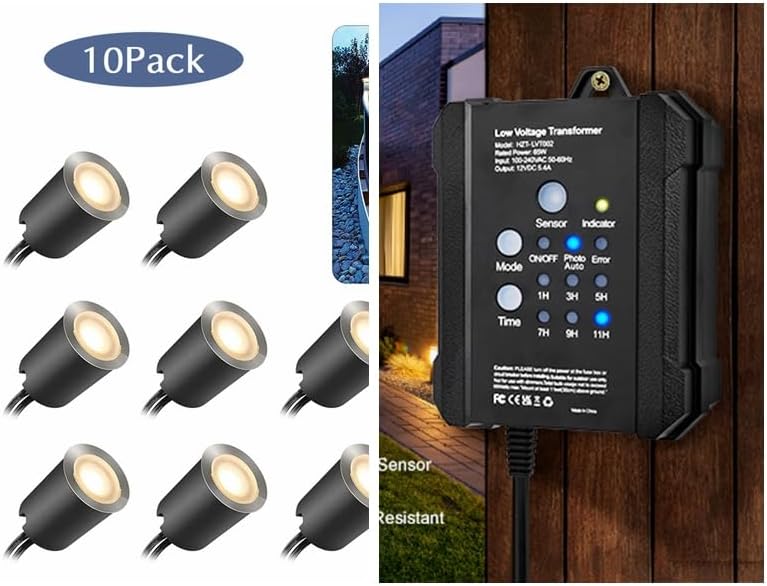
Figure 1: Kit contents including 10 LED deck lights and the 65W low voltage transformer.
Specifications
| Feature | Detail |
|---|---|
| Product Type | Recessed LED Deck Lights Kit |
| Light Quantity | 10 Lights |
| Light Source | LED (0.6W/pcs) |
| Light Color | Warm White |
| Transformer Power | 65W (Max) |
| Input Voltage | 120V AC |
| Output Voltage | 12V DC |
| Waterproof Rating | IP67 (Lights & Transformer) |
| Material | Acrylic/ABS, 304 Stainless Steel (Lights) |
| Features | Dusk-to-Dawn Photocell Sensor, Countdown Timer (1/3/5/7/9/11 hours), Memory Function, Overload/Short Circuit Protection |
Installation Guide
Follow these steps for proper installation of your deck lights and transformer:
1. Planning and Placement
- Choose Locations: Determine the desired locations for each deck light. Consider areas that require illumination for safety or ambiance, such as stairs, deck edges, or pathways.
- Transformer Placement: Select a suitable outdoor location for the transformer. It should be mounted vertically at least 1 foot (30cm) above ground level, protected from direct heavy rain, and within reach of a 120V AC outdoor power outlet. Ensure the photocell sensor on the transformer is not obstructed and can detect ambient light changes effectively.
- Cable Routing: Plan the routing of the low voltage cables from the transformer to each light. Ensure cables are protected and not a tripping hazard.

Figure 2: Examples of deck light placement on stairs and deck surfaces.
2. Installing the Transformer
- Mounting: Use appropriate screws (not included) to securely mount the transformer to a wall or sturdy post. Ensure it is mounted vertically with the sensor facing upwards and unobstructed.
- Power Connection: Do NOT plug the transformer into the outlet yet.

Figure 3: The 65W low voltage transformer.

Figure 4: Transformer mounted outdoors, highlighting its weatherproof features.
3. Installing the Deck Lights
- Drilling Holes: For recessed installation, drill appropriate sized holes (refer to product dimensions for exact size, typically around 1 inch / 25mm diameter) at each planned light location. Ensure the depth is sufficient for the light body.
- Inserting Lights: Gently push each LED deck light into its drilled hole until it sits flush with the surface. The black protecting shell can be used for embedded installation on floor/stone stairs for added safety.
- Connecting Lights: Connect the cables from each light to the main low voltage cable coming from the transformer. The lights feature durable and stable copper 2-pin connectors for easy and secure connections. Ensure all connections are tight and waterproof.

Figure 5: Recessed deck lights ready for installation and an example of installed lights on stairs.

Figure 6: Detail of a single deck light and its application in different outdoor environments.
4. Final Connection
- Once all lights are connected to the low voltage cable and the transformer is mounted, plug the transformer into a grounded 120V AC outdoor power outlet.
Operating Instructions
The 65W transformer features a built-in photocell sensor and a programmable timer for automated operation.
Photocell Sensor (Dusk-to-Dawn)
- The transformer is equipped with a photocell sensor that automatically detects ambient light levels.
- When set to "Auto" mode, the lights will turn on automatically at dusk and turn off at dawn.
- Ensure the sensor is not obstructed by objects or debris for accurate light detection.
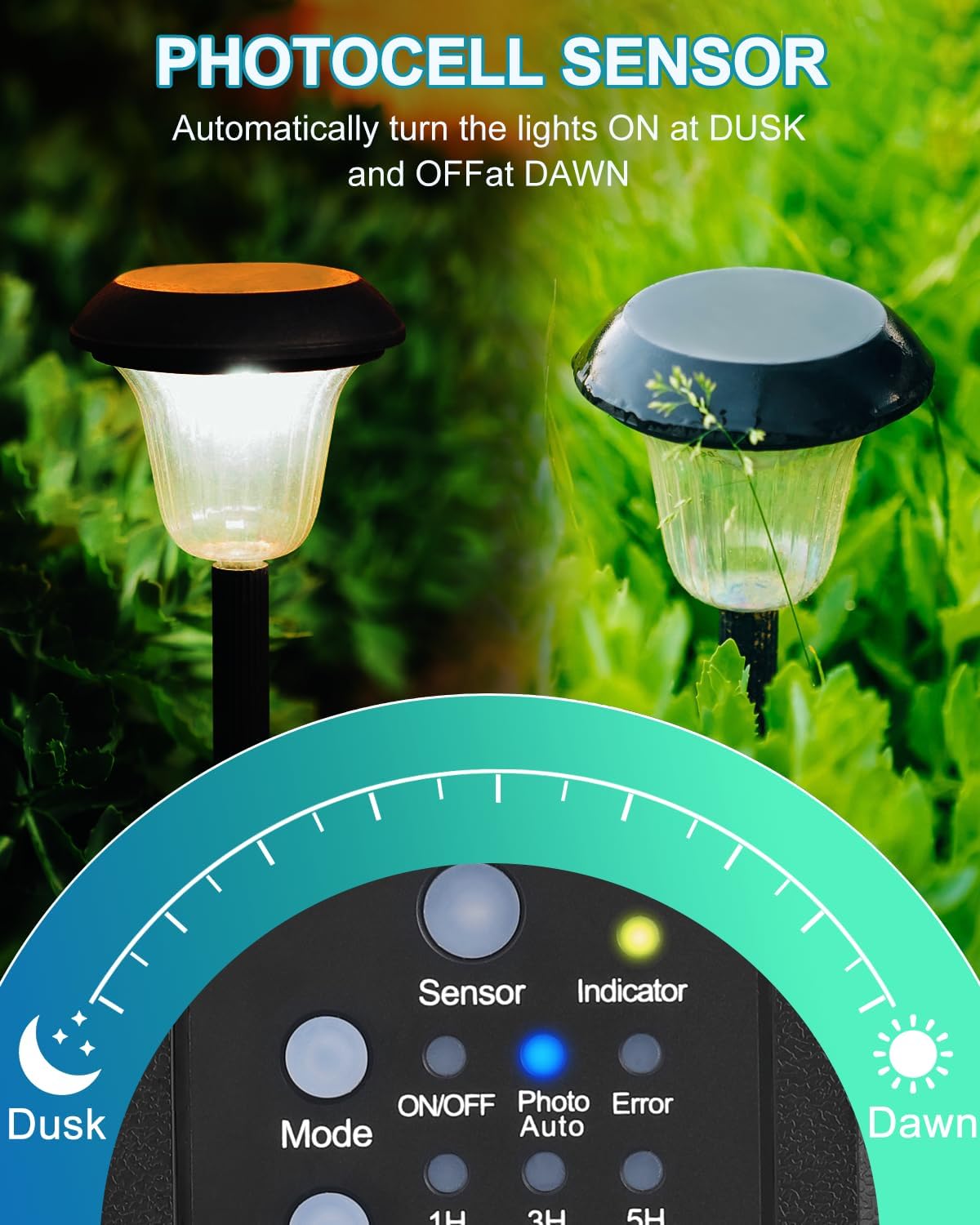
Figure 7: Photocell sensor operation for automatic dusk-to-dawn lighting.
Timer Function
The transformer allows you to set a countdown timer for the lights to turn off after a specified duration from dusk.
- Mode Button: Press the "Mode" button to cycle through the operating modes: ON/OFF, Photo (Dusk-to-Dawn), and Auto (Dusk-to-Dawn with Timer).
- Time Setting: When in "Auto" mode, press the "Time" button to select the desired countdown duration: 1, 3, 5, 7, 9, or 11 hours. The corresponding indicator light will illuminate.
- Operation: If you select a timer setting (e.g., 3H), the lights will turn on at dusk and automatically turn off 3 hours later.
- Memory Function: The transformer retains your last selected timer mode even after a power outage.

Figure 8: Setting the timer function on the transformer.
Maintenance
Regular maintenance ensures the longevity and optimal performance of your SMY Lighting kit:
- Cleaning: Periodically clean the surface of the deck lights and the transformer with a soft, damp cloth to remove dirt, dust, and debris. Do not use abrasive cleaners or solvents.
- Photocell Sensor: Ensure the photocell sensor on the transformer remains clean and unobstructed for accurate dusk-to-dawn operation.
- Cable Inspection: Regularly inspect all cables and connections for any signs of damage, fraying, or loose connections. Repair or replace damaged components immediately.
- Water Drainage: Ensure that the areas around the recessed lights have proper drainage to prevent water accumulation.
Troubleshooting
If you encounter issues with your SMY Lighting kit, refer to the following common problems and solutions:
| Problem | Possible Cause | Solution |
|---|---|---|
| Lights do not turn on. | No power to transformer. Photocell sensor obstructed or in bright area. Loose connections. Faulty light or transformer. | Check power outlet and circuit breaker. Ensure sensor is clean and in a dark area at dusk. Verify all cable connections are secure. Test individual lights/transformer if possible. |
| Lights flicker or are dim. | Insufficient power (too many lights connected). Loose connections. Damaged cable. | Ensure total wattage of lights does not exceed 65W. Check and secure all connections. Inspect cables for damage and replace if necessary. |
| Lights stay on during the day. | Photocell sensor obstructed or dirty. Transformer not in "Auto" or "Photo" mode. | Clean the photocell sensor. Ensure it is not in shadow. Press the "Mode" button to select "Photo" or "Auto" mode. |
| Timer function not working. | Transformer not in "Auto" mode. Incorrect timer setting. | Ensure the transformer is set to "Auto" mode. Press the "Time" button to select the desired countdown duration. |
If the problem persists after attempting these solutions, please contact SMY Lighting customer support for further assistance.
Warranty and Support
For information regarding warranty coverage, technical support, or replacement parts, please refer to the official SMY Lighting website or contact their customer service directly. Keep your purchase receipt as proof of purchase for warranty claims.
SMY Lighting Store: Visit the SMY Lighting Store on Amazon