Important Safety Instructions
Please read all instructions before using your Ninja PB051GB Coffee Maker. Failure to follow these instructions may result in property damage, personal injury, or death.
- Always ensure the coffee maker is unplugged before cleaning or performing maintenance.
- Do not immerse the appliance, power cord, or plug in water or other liquids.
- Use only cold water in the water reservoir. Do not use hot water or other liquids.
- Keep hands and cords away from hot surfaces.
- This appliance is for household use only. Do not use outdoors.
- Do not operate any appliance with a damaged cord or plug, or after the appliance malfunctions or has been damaged in any manner.
- Exercise extreme caution when dispensing hot beverages.
- Ensure the brew basket or pod adapter is securely in place before brewing.
Product Overview
The Ninja PB051GB is a versatile single-serve coffee maker designed for both ground coffee and K-Cup pods. It features a built-in milk frother and offers multiple brew sizes and styles.
Included Components
- Ninja PB051GB Coffee Maker
- Built-in Frother
- Ninja Scoop
- Removable Brew Basket
- Ninja Pod Adapter
- Permanent Filter
- 56-oz. Removable Water Reservoir
Key Features
- Dual Brewing: Compatible with both ground coffee and K-Cup pods.
- Integrated Frother: Fold-away frother for hot or cold milk/milk alternatives.
- Multiple Brew Sizes: 6, 8, 10, 12 oz for pods; 6, 8, 10, 12, 14, 24 oz for grounds.
- Four Brew Styles: Classic, Rich, Over Ice, and Specialty.
- Thermal Flavor Extraction DUO: Ensures optimal flavor for both grounds and pods.
- Compact Design: Space-saving footprint for countertops.
- On-Board Storage: Convenient storage for brew basket and pod adapter.

Image: The Ninja PB051GB coffee maker in Glacier Blue, showcasing its ability to brew both hot and iced coffee, and compatibility with coffee pods and ground coffee.

Image: An exploded view of the Ninja PB051GB coffee maker, illustrating the built-in frother, Ninja Scoop, removable brew basket, Ninja pod adapter, and permanent filter.
Setup and First Use
Unpacking and Initial Cleaning
- Remove all packaging materials and stickers from the coffee maker.
- Wash the water reservoir, brew basket, permanent filter, Ninja pod adapter, and Ninja Scoop in warm, soapy water. Rinse thoroughly and air dry.
- Wipe the exterior of the coffee maker with a damp cloth.
- Place the coffee maker on a clean, dry, and level surface.
First Clean Cycle
Before brewing your first beverage, run a clean cycle to prime the system.
- Fill the water reservoir to the MAX fill line with fresh water.
- Ensure the brew basket is empty and no pod is inserted. Close the brew head.
- Place a large mug or carafe (at least 24 oz) on the drip tray.
- Plug in the coffee maker. The power button will illuminate.
- Press the "Clean" button (if available, otherwise select the largest brew size and run a cycle without coffee).
- Discard the water after the cycle is complete. Your coffee maker is now ready for use.
Operating Instructions
Brewing with Ground Coffee
- Fill the water reservoir with fresh water to your desired brew size.
- Open the brew head and insert the removable brew basket with the permanent filter.
- Use the Ninja Scoop to add ground coffee to the permanent filter. Refer to the scoop markings for recommended amounts based on brew size.
- Close the brew head firmly.
- Place your mug or travel mug on the drip tray.
- Select your desired brew size (6, 8, 10, 12, 14, or 24 oz) using the "Size" button.
- Select your desired brew style (Classic, Rich, Over Ice, or Specialty) using the "Style" button.
- Press the "Brew" button to start brewing.
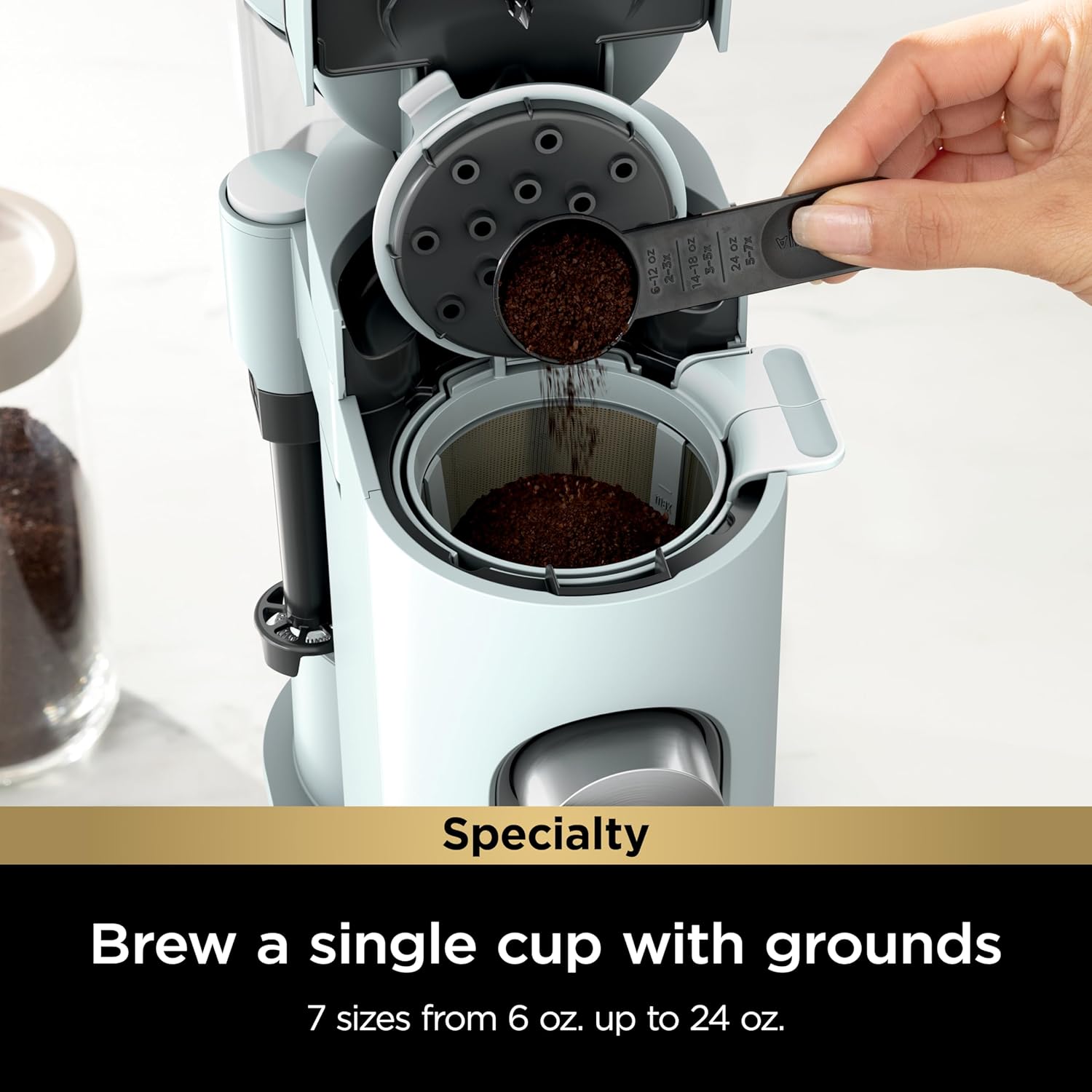
Image: A hand adding ground coffee into the permanent filter of the Ninja PB051GB coffee maker, illustrating the process of brewing with grounds.
Brewing with Coffee Pods
- Fill the water reservoir with fresh water to your desired brew size.
- Open the brew head and insert the Ninja pod adapter.
- Place a K-Cup compatible coffee pod into the adapter.
- Close the brew head firmly.
- Place your mug on the drip tray.
- Select your desired brew size (6, 8, 10, or 12 oz) using the "Size" button.
- Select your desired brew style (Classic, Rich, Over Ice, or Specialty) using the "Style" button.
- Press the "Brew" button to start brewing.

Image: A hand inserting a coffee pod into the Ninja pod adapter of the coffee maker, demonstrating pod brewing.
Using the Built-in Milk Frother
- Pour cold or hot milk/milk alternative into a mug.
- Position the mug under the frother arm.
- Lower the frother arm into the milk.
- Press and hold the frother button (if applicable) or manually pump the frother until desired froth consistency is achieved.
- Lift the frother arm and wipe clean immediately after use.

Image: A hand operating the fold-away built-in milk frother to create foam in a glass mug, demonstrating its use for specialty beverages.
Brew Styles Explained
- Classic: A balanced and smooth coffee brew.
- Rich: A more intense coffee concentrate, ideal for milk-based drinks.
- Over Ice: Brews a concentrated coffee directly over ice to prevent dilution.
- Specialty: A super-rich coffee concentrate (4 oz) for lattes, cappuccinos, and other coffeehouse-style beverages.

Image: Four different coffee beverages representing the Classic, Rich, Over Ice, and Specialty brew styles available from the Ninja PB051GB coffee maker.

Image: Diagram explaining Thermal Flavor Extraction DUO, showing consistent temperature, even saturation, and precise brew cycles for optimal flavor in both pods and grounds.
Care and Maintenance
Daily Cleaning
- Water Reservoir: Empty and rinse daily. Wash with warm, soapy water weekly.
- Brew Basket & Permanent Filter: Remove and rinse after each use. Wash with warm, soapy water daily.
- Ninja Pod Adapter: Remove and rinse after each pod use. Wash with warm, soapy water daily.
- Frother: Wipe the frother whisk immediately after each use with a damp cloth. For deeper cleaning, the frother whisk can be removed and washed with warm, soapy water.
- Drip Tray: Empty and clean the drip tray and grid regularly.
- Exterior: Wipe the exterior of the coffee maker with a soft, damp cloth.
Descaling
Over time, mineral deposits (scale) can build up in your coffee maker, affecting performance and flavor. The "Clean" indicator light will illuminate when descaling is recommended.
- Ensure the brew basket is empty and no pod is inserted.
- Pour 16 oz of white vinegar into the water reservoir, then fill the rest of the reservoir with water up to the MAX fill line.
- Place a large mug or carafe (at least 24 oz) on the drip tray.
- Press the "Clean" button. The descaling cycle will begin.
- Once the cycle is complete, discard the solution.
- Rinse the water reservoir thoroughly and fill it with fresh water to the MAX fill line.
- Run two full water-only cycles (select 24 oz brew size) to rinse the system.
- The "Clean" light should turn off. If it remains on, repeat the descaling process.
Troubleshooting Guide
| Problem | Possible Cause | Solution |
|---|---|---|
| Coffee not brewing. | No water in reservoir; brew head not closed; power issue. | Fill reservoir; ensure brew head is fully closed; check power connection. |
| "Add Water" light is on. | Water reservoir is low or empty. | Fill the water reservoir with fresh water. |
| Coffee tastes weak or watery. | Insufficient coffee grounds; incorrect brew style; descaling needed. | Increase coffee grounds; select "Rich" or "Specialty" brew; descale the machine. |
| Coffee overflows from brew basket. | Too many coffee grounds; filter clogged; brew basket not seated correctly. | Reduce grounds; clean permanent filter; ensure brew basket is properly inserted. |
| Frother not producing foam. | Frother whisk is dirty or clogged; incorrect milk type. | Clean frother whisk thoroughly; use cold, fresh milk or milk alternative. |
| "Clean" light remains on after descaling. | Descaling cycle not fully completed or insufficient rinsing. | Repeat the descaling process and ensure two full water-only rinse cycles are performed. |
Specifications
| Feature | Detail |
|---|---|
| Model Number | PB051GB |
| Brand | Ninja |
| Dimensions (D x W x H) | 13.07" x 5.51" x 13.31" |
| Weight | 6.23 pounds |
| Voltage | 120V |
| Water Reservoir Capacity | 56 oz |
| Brew Sizes (Pods) | 6, 8, 10, 12 oz |
| Brew Sizes (Grounds) | 6, 8, 10, 12, 14, 24 oz |
| Brew Styles | Classic, Rich, Over Ice, Specialty |
| Special Features | Auto Shut-Off, Milk Frother, Permanent Filter, Programmable |

Image: The Ninja PB051GB coffee maker with its dimensions (13.31" H x 5.51" W x 13.07" D) indicated, highlighting its space-saving design.
Warranty and Support
Your Ninja PB051GB Coffee Maker comes with a limited warranty. For specific warranty details, please refer to the warranty card included with your product or visit the official Ninja website. For customer support, replacement parts, or service inquiries, please contact Ninja Customer Service.
Website: www.ninjakitchen.com
Phone: Refer to your product registration or the Ninja website for current contact numbers.


