
1. Introduction
This manual provides essential information for the proper setup, operation, and maintenance of your MOOER MSC10 Pro Electric Guitar Kit. Please read these instructions carefully to ensure optimal performance and longevity of your instrument. This kit is designed for beginners and practice, offering a versatile platform for various musical styles.
2. What's Included
Your MOOER MSC10 Pro Electric Guitar Kit comes with the following components:
- MOOER MSC10 Pro Electric Guitar (Pitch Black)
- Gig Bag
- 3 Guitar Picks
- 2M Guitar Cable
- Tremolo Arm
- 2 Wrenches (for adjustments)
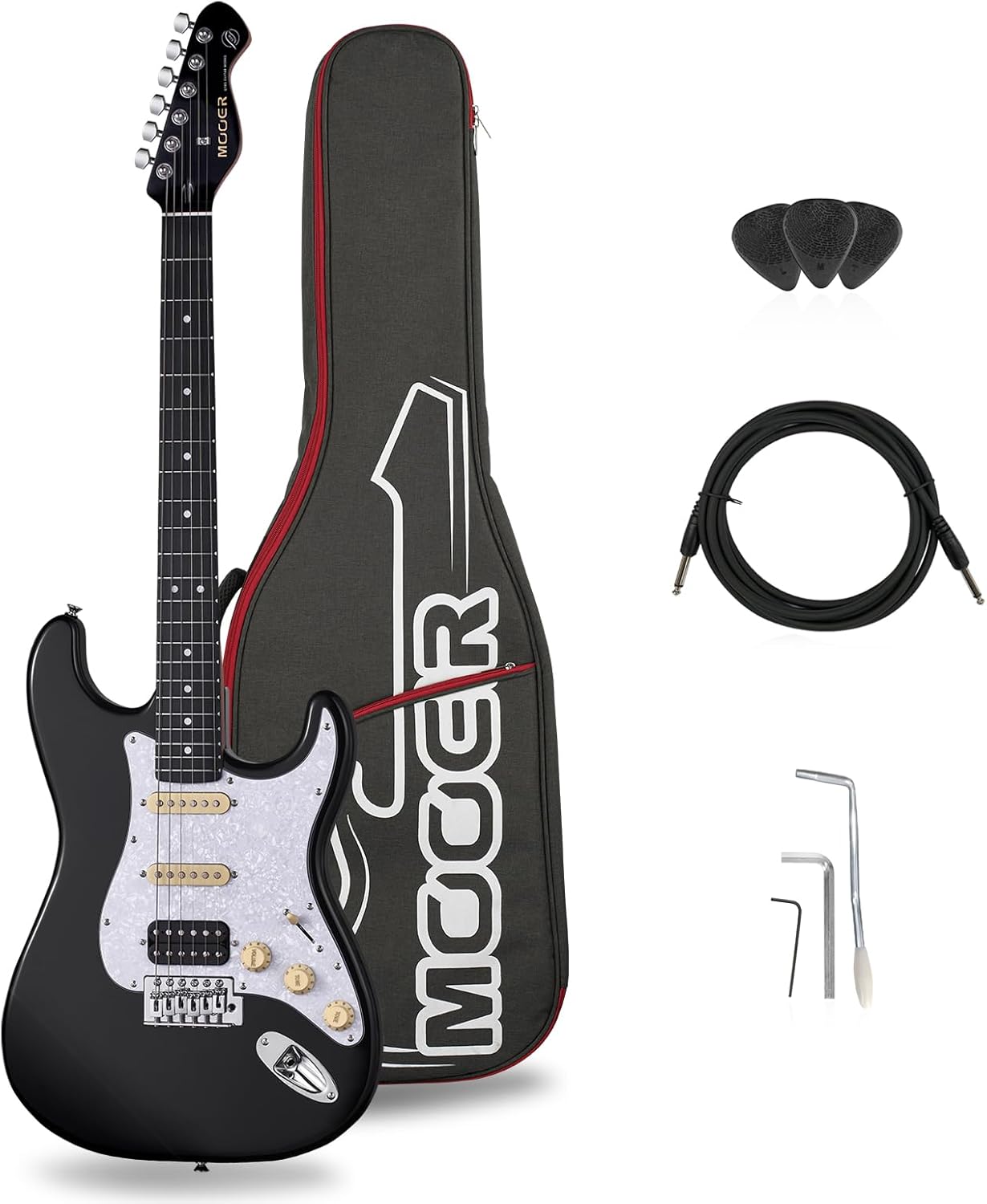
Figure 2.1: Contents of the MOOER MSC10 Pro Electric Guitar Kit. This image displays the electric guitar, a soft gig bag, three guitar picks, a guitar cable, a tremolo arm, and two adjustment wrenches.

Figure 2.2: Visual representation of the accessories included with the guitar kit, highlighting the gig bag, picks, cable, tremolo arm, and wrenches.
3. Product Overview
The MOOER MSC10 Pro Electric Guitar is crafted with attention to detail, combining quality materials for a balanced tone and comfortable playability.
3.1 Body and Neck Construction
- Body: Made from solid poplar wood, contributing to a resonant tone. The body features a high-gloss finish.
- Neck: Constructed from roasted maple with a satin finish, providing stability and resistance to warping. The neck has a standard C-shape for comfortable grip.
- Fretboard: Tech ebony fingerboard with white shell dotted inlays and 22 nickel silver frets.
- Nut: Custom bone nut for enhanced sustain and tone.
- Truss Rod: Dual-action steel truss rod for neck relief adjustments.

Figure 3.1: Detailed view of the guitar's construction, highlighting key materials and components such as the roasted maple neck and poplar body.
3.2 Pickups and Controls
The guitar features an HSS (Humbucker-Single-Single) pickup configuration, offering a wide range of tonal possibilities:
- Neck Pickup: MSC-1N Singlecoil
- Middle Pickup: MSC-1M Singlecoil
- Bridge Pickup: MHB-1B Dual-coil Humbucker
- Controls: One volume control dial and two tone control dials for sound shaping.
- Pickup Selector: Five-way switch to select different pickup combinations.

Figure 3.2: The guitar's control layout, illustrating the HSS pickups, 5-way selector switch, volume, and tone knobs.
3.3 Hardware
- Tuning Pegs: Six MTN-1 chrome tuning pegs for stable tuning.
- Bridge: Vintage MVT-1 6-hole tremolo bridge, allowing for pitch modulation effects.
- Strap Pin: Sturdy chrome strap pin for attaching a guitar strap.

Figure 3.3: The guitar's headstock, featuring MTN-1 chrome tuning pegs and the MOOER GGW logo.
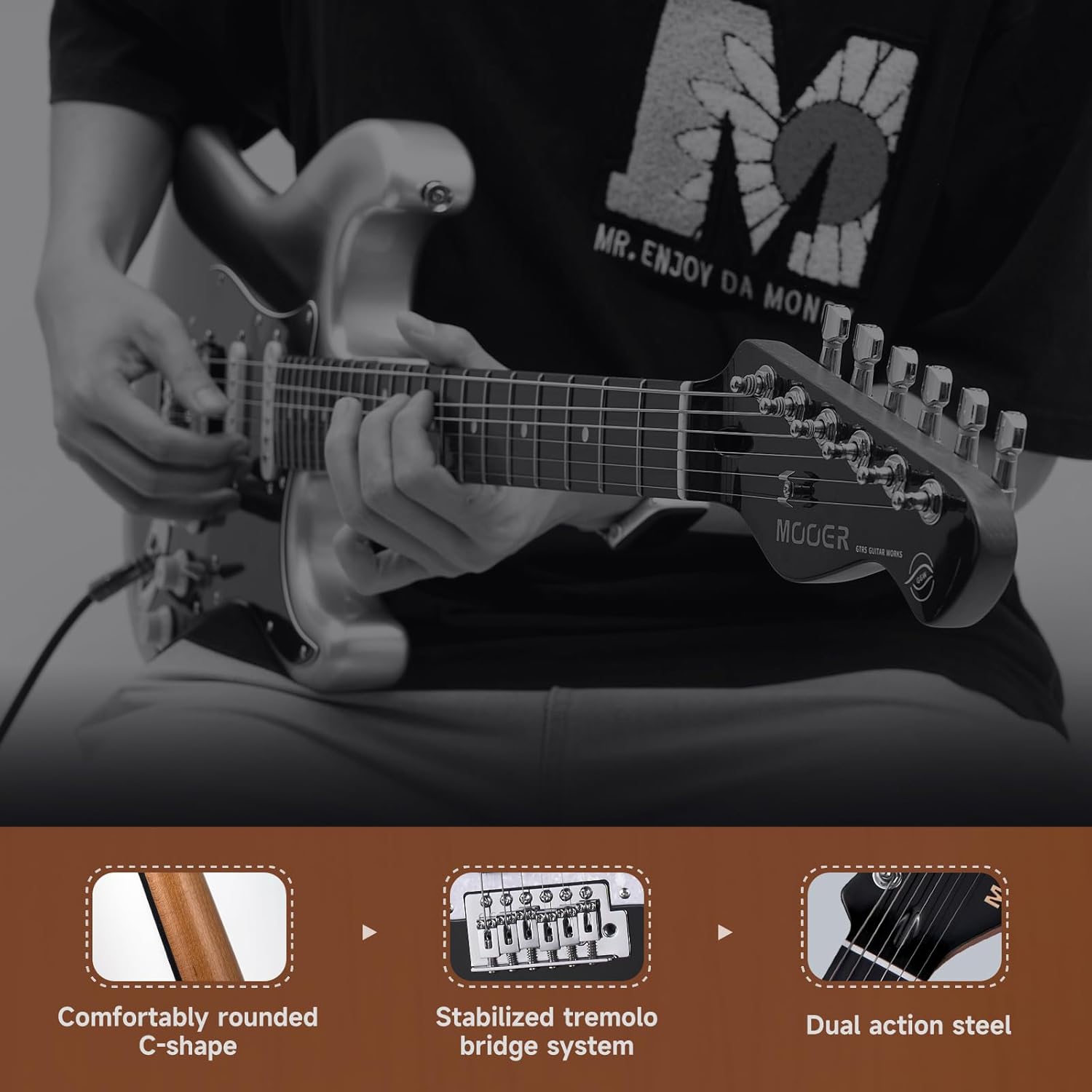
Figure 3.4: Ergonomic features of the guitar, including the C-shape neck and stable tremolo bridge.
4. Setup
4.1 Unpacking and Inspection
- Carefully remove all components from the packaging.
- Inspect the guitar and accessories for any signs of damage during transit. If any damage is found, contact customer support immediately.
- Retain the original packaging for future transport or storage.
4.2 Connecting to an Amplifier
- Ensure your amplifier is turned off and its volume is set to minimum.
- Connect one end of the included 2M guitar cable to the output jack on your MOOER guitar.
- Connect the other end of the cable to the input jack on your amplifier.
- Turn on your amplifier and gradually increase the volume to a desired level.
4.3 Tuning the Guitar
Before playing, ensure your guitar is properly tuned. You will need an electronic tuner (not included) for accurate tuning.
- Pluck each string individually.
- Use the MTN-1 chrome tuning pegs on the headstock to adjust the pitch of each string until it matches the desired note (standard tuning: E-A-D-G-B-e, from thickest to thinnest string).
- Repeat the process a few times as new strings may stretch and go out of tune initially.
4.4 Installing the Tremolo Arm
The tremolo arm allows for pitch bending effects. To install:
- Locate the threaded hole on the Vintage MVT-1 6-hole tremolo bridge.
- Gently screw the tremolo arm clockwise into the hole until it is secure but still allows for free movement. Do not overtighten.
5. Operating Your Guitar
5.1 Using the 5-Way Pickup Switch
The 5-way switch allows you to select different pickup combinations, providing a variety of tones:
- Position 1 (Bridge): Activates the MHB-1B Humbucker pickup for a full, powerful sound, often used for rock and heavier genres.
- Position 2 (Bridge & Middle): Combines the bridge humbucker with the middle single-coil pickup, offering a brighter, more articulate tone.
- Position 3 (Middle): Activates the MSC-1M Middle Singlecoil pickup for a balanced, clear tone.
- Position 4 (Middle & Neck): Combines the middle and neck single-coil pickups, producing a warm, bell-like tone.
- Position 5 (Neck): Activates the MSC-1N Neck Singlecoil pickup for a warm, smooth tone, ideal for blues and jazz.

Figure 5.1: Explanation of the 5-way pickup switch settings and their corresponding active pickups.
5.2 Volume and Tone Controls
- Volume Knob: Controls the overall output level of the guitar. Turn clockwise to increase volume, counter-clockwise to decrease.
- Tone Knobs: These two knobs adjust the treble frequencies. Turning them counter-clockwise will reduce treble, resulting in a warmer, darker sound. Turning them clockwise will increase treble for a brighter sound.
5.3 Using the Tremolo Bridge
The Vintage MVT-1 tremolo bridge allows you to momentarily change the pitch of the notes. Gently push down on the tremolo arm to lower the pitch, or pull up (if set up for it) to raise the pitch. Use sparingly and with control to avoid going out of tune.
6. Maintenance
6.1 Cleaning
- Body and Neck: Wipe down the body and neck with a soft, lint-free cloth after each use to remove sweat and fingerprints. For a deeper clean, use a guitar-specific polish or cleaner.
- Fretboard: Periodically clean the tech ebony fretboard with a specialized fretboard cleaner and conditioner to prevent drying and cracking.
- Strings: Wipe strings with a clean cloth after playing to remove oils and extend their life.
6.2 String Replacement
Strings should be replaced regularly, typically every 1-3 months depending on usage, or when they sound dull or show signs of corrosion. Replace one string at a time to maintain neck tension.
- Loosen the old string until it can be removed from the tuning peg and bridge.
- Insert the new string through the bridge and wind it around the tuning peg post.
- Tighten the string while ensuring it is properly seated in the nut and bridge saddle.
- Stretch the new string gently and tune it to pitch. Repeat for all strings.
6.3 Truss Rod Adjustment
The dual-action steel truss rod allows for adjustment of the neck's relief. This should only be done if you notice excessive fret buzz or high action, and preferably by an experienced technician. Incorrect adjustment can damage the neck.
6.4 Storage
When not in use, store your guitar in the included gig bag to protect it from dust, humidity changes, and minor impacts. Avoid extreme temperatures and direct sunlight.
7. Troubleshooting
| Issue | Possible Cause | Solution |
|---|---|---|
| No sound from amplifier | Cable not connected, amplifier off, volume low, faulty cable/pickup. | Check cable connections, ensure amplifier is on and volume up. Test with a different cable or amplifier if possible. |
| Fret buzz | Low action, uneven frets, neck relief issues, worn strings. | Check string height at the bridge. Consider professional setup for neck relief or fret leveling. Replace old strings. |
| Guitar won't stay in tune | New strings stretching, improper string winding, faulty tuning pegs, nut friction, tremolo use. | Stretch new strings thoroughly. Ensure strings are wound correctly. Lubricate nut slots. Use tremolo gently. |
| Weak or inconsistent sound | Dirty pickup switch/pots, loose wiring, pickup height. | Rotate pickup switch and knobs repeatedly to clean contacts. Check for loose connections (professional service recommended). Adjust pickup height. |
8. Specifications
The following table details the technical specifications of the MOOER MSC10 Pro Electric Guitar:

Figure 8.1: Comprehensive specifications for the guitar's neck and body components.
| Feature | Detail |
|---|---|
| Model Number | MSC10Pro_BK |
| Body Material | Poplar |
| Neck Material | Roasted Maple |
| Fretboard Material | Tech Ebony Wood |
| Scale Length | 25.5 inches |
| Number of Frets | 22 |
| Pickup Configuration | H-S-S (Humbucker-Single-Single) |
| Bridge System | Vintage MVT-1 6-hole Tremolo |
| Tuning Pegs | MTN-1 Chrome |
| Nut Material | Bone |
| Truss Rod | Dual Action Steel |
| Color | Pitch Black |
| Item Weight | 14.07 pounds |
| Package Dimensions | 43 x 16 x 4.4 inches |
9. Warranty and Support
For warranty information and customer support, please refer to the documentation provided with your purchase or visit the official MOOER website. Keep your proof of purchase for any warranty claims.
For additional resources and product information, you may visit the MOOER Store on Amazon.
10. Product Demonstration
Watch this video for a demonstration of the MOOER MSC10 Pro Electric Guitar in use, showcasing its sound and playability.
Video 10.1: A demonstration of the MOOER MSC10 Pro Electric Guitar's sound and performance capabilities. This video features musicians playing the guitar in various styles.