
1. Product Overview
The WEDBAG Microcontroller Panel (Model 3000, Part Number 100005506) is a direct replacement control panel designed for use with Compair Gardner Denver Air Compressor systems. It is compatible with DELCOS PRO, DELCOS 3000, and DELCOS 3100 series compressors. This panel serves as the primary interface for monitoring and controlling the air compressor's operations, ensuring efficient and reliable performance.
This manual provides essential information for the proper installation, operation, and maintenance of your new microcontroller panel.
2. Setup and Installation
Installation of the microcontroller panel should be performed by qualified personnel. Ensure all safety precautions are followed, including disconnecting power to the air compressor before beginning any work.
2.1 Safety Precautions
- Always disconnect the main power supply to the air compressor before installation or maintenance.
- Verify that the replacement panel is compatible with your specific compressor model (DELCOS PRO, DELCOS 3000, DELCOS 3100).
- Wear appropriate personal protective equipment (PPE).
- Do not attempt to modify the panel or its wiring.
2.2 Installation Steps
- Power Disconnection: Turn off and lock out the main power supply to the air compressor. Confirm zero voltage with a multimeter.
- Access Old Panel: Carefully open the compressor's control cabinet to access the existing microcontroller panel.
- Disconnect Wiring: Document or photograph all wiring connections to the old panel before disconnecting them. Label wires if necessary.
- Remove Old Panel: Unscrew or unclip the old panel from its mounting.
- Install New Panel: Position the WEDBAG Microcontroller Panel in the designated slot. Secure it using the appropriate screws or clips.
- Connect Wiring: Reconnect all wires to the new panel according to your documentation. Ensure all connections are secure and correct.
- Close Cabinet: Close and secure the control cabinet.
- Power Restoration: Restore power to the air compressor.
- Initial Test: Power on the compressor and observe the panel's display and functionality.

Figure 1: Front view of the WEDBAG Microcontroller Panel, showing the display, control buttons, and indicator lights. This is the primary user interface for the air compressor.
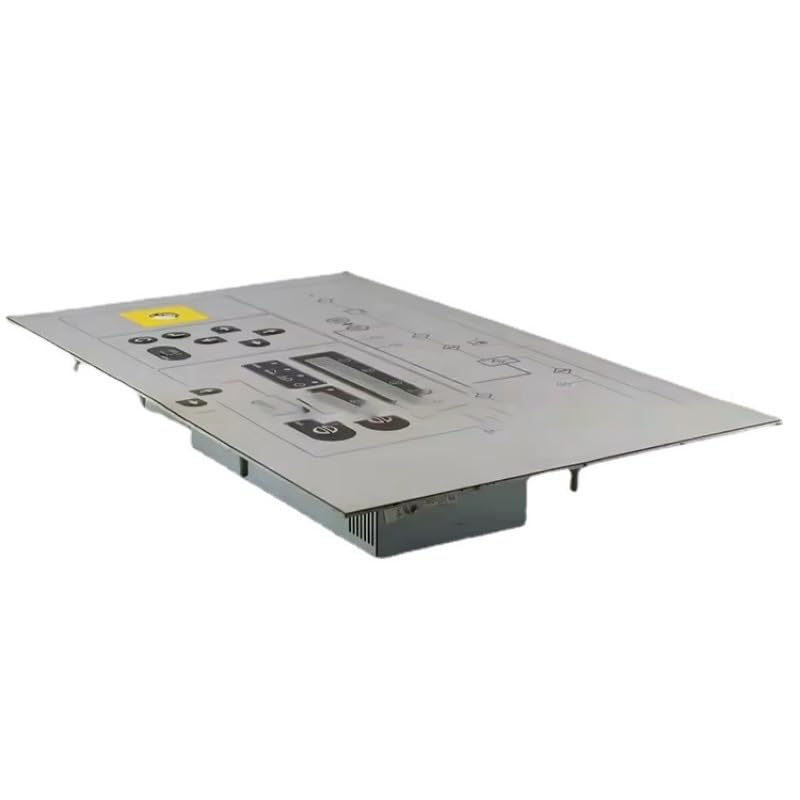
Figure 2: Angled view of the WEDBAG Microcontroller Panel, illustrating its depth and the rear connectors for wiring. Proper connection of these terminals is crucial for functionality.
3. Operating Instructions
The WEDBAG Microcontroller Panel provides intuitive control over your air compressor. Specific operational details may vary slightly depending on the DELCOS system version (PRO, 3000, 3100) and the compressor's configuration.
3.1 Basic Functions
- Power Button: Typically used to start and stop the compressor.
- Display Screen: Shows real-time operational data such as pressure, temperature, running hours, and error codes.
- Navigation Buttons (Up/Down/Left/Right): Used to navigate through menus and adjust settings.
- Enter/Confirm Button: Used to select options or confirm settings.
- Emergency Stop: A dedicated button (often red) for immediate shutdown in emergencies.
3.2 Monitoring Parameters
The panel's display allows monitoring of critical compressor parameters:
- System Pressure
- Air End Temperature
- Motor Current/Load
- Operating Hours
- Service Indicators
- Alarm and Fault Codes
Refer to your specific Compair Gardner Denver Air Compressor manual for detailed instructions on navigating menus and interpreting all displayed parameters.
4. Maintenance
Proper maintenance of the microcontroller panel ensures its longevity and reliable operation. This section outlines general care for the panel itself.
4.1 Cleaning
- Regularly wipe the panel's surface with a soft, dry, lint-free cloth.
- For stubborn dirt, slightly dampen the cloth with water or a mild, non-abrasive cleaner. Do not spray liquids directly onto the panel.
- Avoid using harsh chemicals, solvents, or abrasive materials, as these can damage the display or buttons.
4.2 Inspection
- Periodically inspect the panel for any signs of physical damage, such as cracks, loose buttons, or faded display.
- Ensure all connections remain secure and free from corrosion. (This should only be done by qualified personnel with power disconnected.)
5. Troubleshooting
This section provides basic troubleshooting steps for common issues related to the microcontroller panel. For complex problems, consult a qualified technician or the compressor manufacturer's service manual.
| Problem | Possible Cause | Solution |
|---|---|---|
| Panel display is blank | No power to the panel; Loose wiring connection; Panel malfunction | Check compressor's main power supply; Verify all wiring connections are secure (with power off); If connections are good, panel may need replacement. |
| Buttons are unresponsive | Stuck buttons; Internal panel issue | Gently press buttons to ensure they are not stuck; If issue persists, panel may require service or replacement. |
| Incorrect readings on display | Sensor malfunction; Calibration issue; Wiring problem | Consult the compressor's service manual for sensor diagnostics; Check sensor wiring; Contact technical support. |
| Error code displayed | Compressor fault; Sensor error; System anomaly | Note the specific error code and consult your Compair Gardner Denver Air Compressor manual for its meaning and recommended action. |
6. Specifications
- Product Type: Microcontroller Panel
- Application: Air Compressor Control
- Compatibility: Compair Gardner Denver Air Compressors (DELCOS PRO, DELCOS 3000, DELCOS 3100)
- Part Number: 100005506
- Model: 3000
- Brand: WEDBAG
- Manufacturer: FYSRO
- Material: Copper (internal components)
- UPC: 635393550339
- Country of Origin: China
- Date First Available: April 12, 2024
7. Warranty Information
For specific warranty terms and conditions regarding your WEDBAG Microcontroller Panel, please refer to the documentation provided at the time of purchase or contact the seller directly. Warranty coverage typically addresses manufacturing defects under normal operating conditions.
8. Support
If you require technical assistance, have questions about installation, or need to report a defect, please contact the seller or manufacturer. When contacting support, please have your product model (3000), part number (100005506), and purchase details readily available.
For issues related to the air compressor itself, consult the original equipment manufacturer's manual or their authorized service center.