
1. Introduction
Thank you for choosing the SinLoon Mini 3-Key Programmable Mechanical Keyboard. This compact and versatile device is designed to enhance your productivity and gaming experience with customizable functions and vibrant RGB lighting. This manual provides detailed instructions for setup, operation, and maintenance to ensure optimal performance.
2. Product Features
- 3 Programmable Keys: Customize each key for various functions, macros, or shortcuts.
- Hot-Swappable Switches: Easily replace key switches to match your preferred typing feel.
- RGB Backlighting: Choose from 7 colors and 2 lighting modes (gradient or touch-activated).
- USB-C Connectivity: Reliable wired connection for stable performance.
- Ergonomic Design: Comfortable for extended use, suitable for gamers and designers.
- Durable Construction: Made with ABS alloy material for longevity.
- Plug and Play: Basic functions work immediately upon connection.
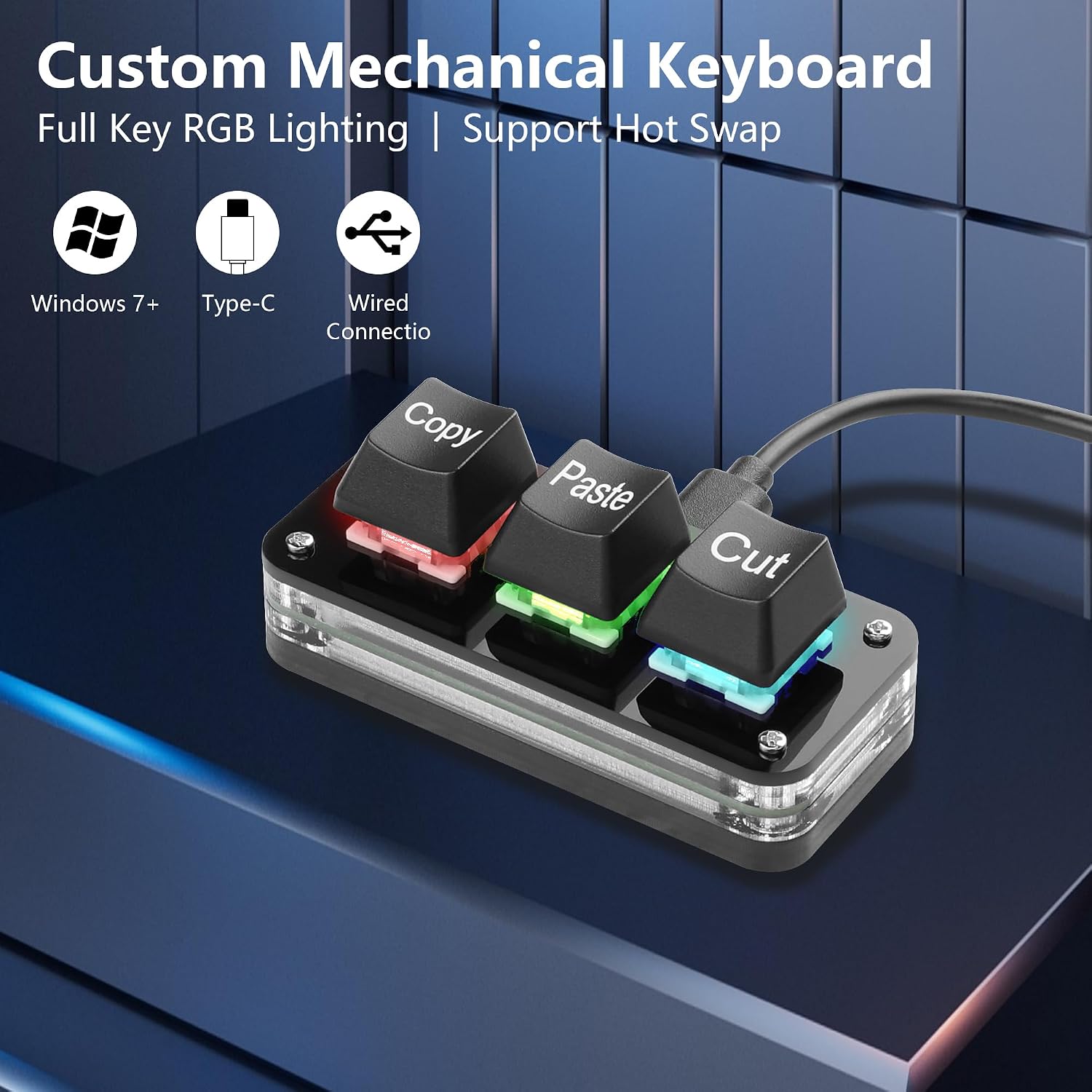
Image: The SinLoon Mini 3-Key Programmable Mechanical Keyboard showcasing its RGB lighting and hot-swap capability.
3. Package Contents
Please check the package for the following items:
- 1 x SinLoon Mini 3-Key Programmable Mechanical Keyboard
- 1 x USB-C Cable (1.5m long)
- 4 x Small Self-Adhesive Anti-Slip Pads
- 1 x User Manual
4. Setup
4.1 Initial Connection
- Connect the provided USB-C cable to the port on the SinLoon Mini Keyboard.
- Plug the other end of the USB-C cable into an available USB port on your computer (PC, laptop).
- The keyboard is plug-and-play for basic functions (default Cut, Copy, Paste). Your operating system should automatically recognize the device.

Image: The mini keyboard highlighting its default Cut, Copy, Paste functions and simple plug-and-play operation.
4.2 Applying Anti-Slip Pads
To prevent the keyboard from sliding during use, attach the four small self-adhesive anti-slip pads to the four corners on the underside of the keyboard.

Image: Illustration of the non-slip mat application process on the keyboard's base.
5. Operating Instructions
5.1 Custom Key Programming
The SinLoon Mini Keyboard allows you to customize the function of each of its three keys using dedicated software. The default functions are Cut (Ctrl+X), Copy (Ctrl+C), and Paste (Ctrl+V).
- Software Download: Access the programming software by visiting the official link: https://sikaicase.com/blogs/news/before-software-setting.
- Compatibility: The software is compatible with Windows 7 and above.
- Installation: Download and install the software on your Windows system.
- Configuration: Open the application. Ensure your keyboard is connected via the USB-C cable. The software interface allows you to assign various functions such as shortcut keys, multimedia controls (play, pause, volume), custom scripts, and more.
- Saving Settings: Once programming is complete, the settings are stored directly on the device. You do not need to keep the software running in the background or reconfigure when changing computers.
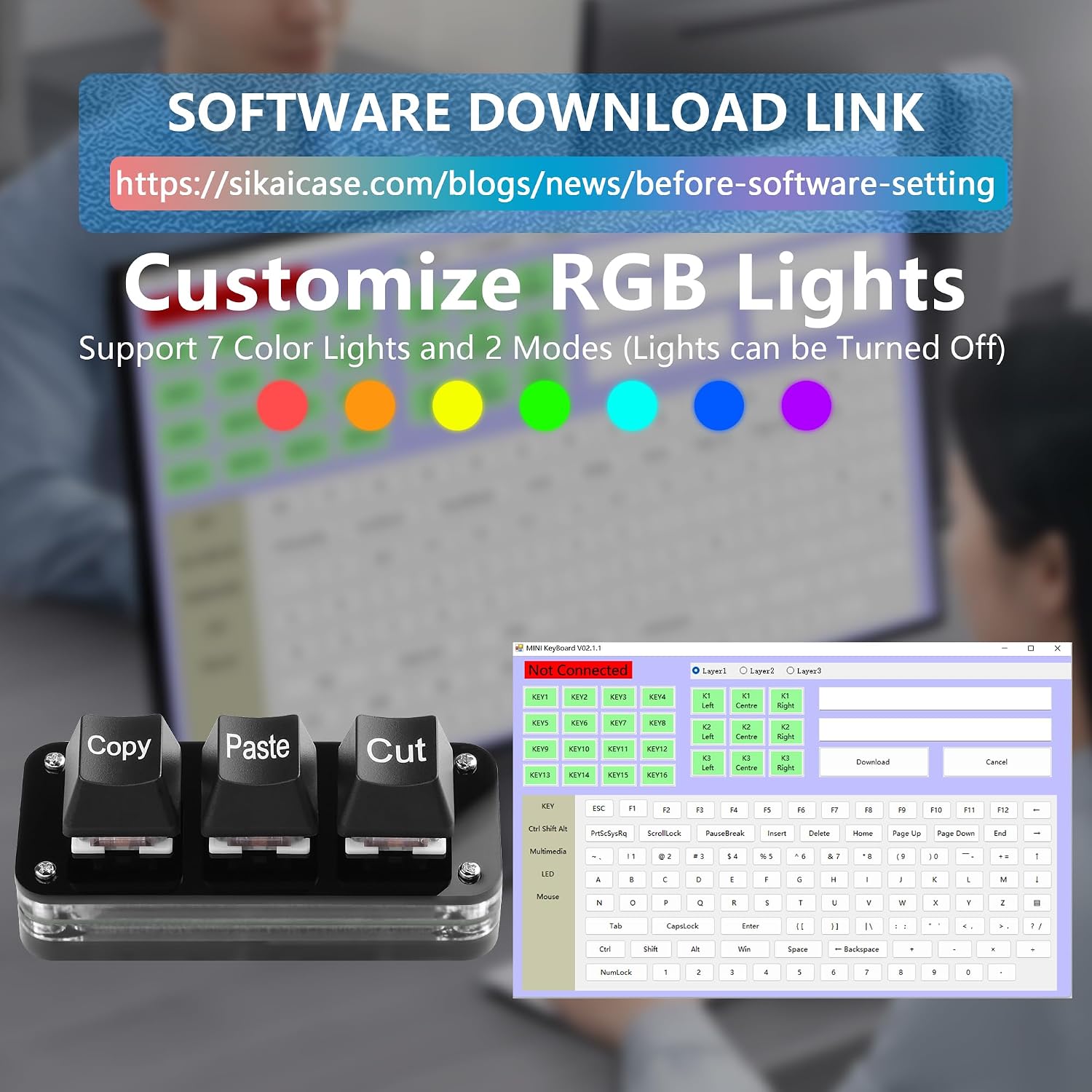
Image: The software interface for customizing key functions and RGB lighting.
5.2 Note for Mac Users
If you intend to use the keyboard with a Mac system, you must perform the initial key programming on a Windows computer. Once configured on Windows, the settings will be saved to the keyboard's internal memory, allowing it to function with your Mac without needing the software or further configuration on the Mac itself. A USB-C cable connection is always required for operation.
5.3 RGB Lighting Customization
The programming software also allows you to customize the RGB backlighting. You can choose from 7 different colors and select between 2 lighting modes: a gradient effect or a light that activates upon key press. The lighting can also be turned off if preferred.
5.4 Hot-Swappable Keys
The keyboard features hot-swappable sockets, allowing you to easily change the mechanical switches and keycaps without soldering. This provides flexibility to customize the tactile feel and appearance of your keyboard.

Image: The mini keyboard integrated into various work and gaming setups, demonstrating its versatility.
6. Maintenance
To ensure the longevity and optimal performance of your SinLoon Mini Keyboard, follow these maintenance guidelines:
- Cleaning: Use a soft, dry cloth to wipe the surface of the keyboard. For deeper cleaning, you may use a slightly damp cloth with mild soap, ensuring no liquid enters the key switches or internal components.
- Dust Removal: Use compressed air to remove dust and debris from between the keycaps.
- Avoid Liquids: Do not expose the keyboard to excessive moisture or spill liquids on it, as it is not waterproof.
- Storage: Store the keyboard in a cool, dry place when not in use.
7. Troubleshooting
If you encounter any issues with your SinLoon Mini Keyboard, please refer to the following common solutions:
- Keyboard Not Recognized:
- Ensure the USB-C cable is securely connected to both the keyboard and your computer.
- Try connecting the keyboard to a different USB port on your computer.
- Test the keyboard on another computer to rule out system-specific issues.
- Key Functions Not Working as Expected:
- Verify that you have correctly programmed the keys using the software.
- Ensure the software settings have been saved to the device.
- If using on a Mac, confirm that programming was done on a Windows PC first.
- RGB Lighting Issues:
- Check the software settings to ensure the desired color and mode are selected.
- Confirm that the lighting has not been accidentally turned off in the software.
For further assistance, please refer to the software download page or contact SinLoon customer support.
8. Specifications
| Feature | Specification |
|---|---|
| Model Name | Mini |
| Model Number | SL2024367 |
| Number of Keys | 3 |
| Connectivity Technology | USB-C (Wired) |
| Key Switch Type | Linear, Soft Touch, or Click Touch (Hot-Swappable) |
| Backlight | RGB (7 colors, 2 modes) |
| Material | ABS Alloy, ABS Plastic Plate |
| Color | Black |
| Compatible Operating Systems | Windows 7/8/10/XP/Vista (Programming requires Windows) |
| Compatible Devices | PC, Laptop, Smartphone, Tablet |
| Cable Length | 1.5 meters |
| Dimensions (Approx.) | 7.5 cm (Length) x 3.3 cm (Width) x 3 cm (Height) |
| Water Resistance Level | Not waterproof |

Image: Detailed dimensions of the SinLoon Mini 3-Key Keyboard.
9. Warranty and Support
Specific warranty information for this product is not provided in the available data. For details regarding warranty coverage, returns, or technical support, please contact the seller or manufacturer directly through their official channels.