
1. Introduction
Thank you for choosing the Brilagi BG0499 Smart Dimmable LED Ceiling Light. This product combines energy-efficient LED technology with smart control features, including Wi-Fi connectivity, remote control, and voice assistant compatibility. This manual provides essential information for safe installation, operation, and maintenance of your new ceiling light.
2. Safety Information
Please read all safety instructions carefully before installation and use. Keep this manual for future reference.
- Ensure the power supply is disconnected before installation, cleaning, or maintenance.
- Installation should be performed by a qualified electrician in accordance with local electrical codes.
- Do not expose the light fixture to excessive moisture or direct water spray.
- This product is designed for indoor use only.
- Do not attempt to disassemble or modify the light fixture, as this will void the warranty and may cause electrical hazards.
- Keep the remote control and small parts out of reach of children.
3. Package Contents
Verify that all components are present in the package:
- 1 x Brilagi BG0499 Smart Dimmable LED Ceiling Light Unit
- 1 x Remote Control
- 1 x User Manual (this document)
- Mounting hardware (screws, anchors - typically included, though not explicitly listed in JSON)
4. Setup and Installation
Follow these steps for proper installation:
- Power Disconnection: Before starting, ensure the main power supply to the installation area is turned off at the circuit breaker.
- Mounting: Securely attach the mounting bracket (if separate) to the ceiling using appropriate screws and anchors. Ensure the mounting surface can support the weight of the fixture.
- Electrical Connection: Connect the AC adapter wires from the ceiling light to your household electrical wiring (Live, Neutral, Earth) according to local electrical codes. Ensure all connections are secure and insulated. This fixture requires a 230V AC power source.
- Fixture Attachment: Carefully attach the ceiling light fixture to the mounting bracket, ensuring it is firmly secured.
- Power Restoration: Once installation is complete, restore power at the circuit breaker.
5. Operating Instructions
5.1 Remote Control Operation
The included remote control allows for convenient adjustment of the light's settings.
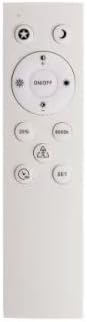
Image of the remote control for the Brilagi BG0499 Smart Dimmable LED Ceiling Light, showing buttons for power, dimming, color temperature adjustment, and scene modes.
- Power On/Off: Press the ON/OFF button to turn the light on or off.
- Dimming: Use the brightness adjustment buttons (typically marked with sun icons or +/-) to increase or decrease light intensity.
- Color Temperature Adjustment: Use the color temperature buttons (e.g., 'K' or sun/moon icons) to cycle through or adjust the color temperature between 2700K (warm white) and 6500K (cool white).
- Scene Modes: Some remotes include preset scene buttons (e.g., '25%', '50%', '100%', '6000K') for quick access to specific brightness or color temperature settings.
5.2 Wi-Fi Connectivity and App Control
For optimal operation and smart features, connect your ceiling light to Wi-Fi using the Immax NEO PRO app.
- Download the Immax NEO PRO app from the App Store (iOS) or Google Play Store (Android).
- Register or log in to your Immax NEO PRO account.
- Ensure your mobile device is connected to a 2.4 GHz Wi-Fi network.
- Follow the in-app instructions to add a new device. The light may need to be put into pairing mode (often by cycling power on/off a few times).
- Once connected, you can control the light's brightness, color temperature, set schedules, and create custom scenes from your smartphone or tablet.
5.3 Voice Assistant Integration
The Brilagi BG0499 is compatible with popular voice assistants:
- Amazon Alexa: Enable the Immax NEO PRO skill in your Alexa app and link your accounts.
- Google Assistant: Link your Immax NEO PRO account through the Google Home app.
- Apple Siri: Use Siri Shortcuts configured through the Immax NEO PRO app.
Refer to the respective voice assistant's documentation for detailed setup instructions.
6. Maintenance
To ensure the longevity and optimal performance of your Brilagi BG0499 ceiling light, follow these maintenance guidelines:
- Cleaning: Disconnect power before cleaning. Wipe the fixture with a soft, dry, or slightly damp cloth. Do not use abrasive cleaners, solvents, or harsh chemicals, as these can damage the finish or electrical components.
- Inspection: Periodically check for any signs of damage to the fixture or wiring. If any damage is found, disconnect power and contact a qualified technician.
- No User-Serviceable Parts: The LED components are integrated and not user-replaceable. Do not attempt to open the light fixture.
7. Troubleshooting
If you encounter issues with your Brilagi BG0499 ceiling light, refer to the following common solutions:
- Light does not turn on:
- Check if the power supply is connected and the circuit breaker is on.
- Ensure the remote control batteries are not depleted.
- Verify that the light is not in a scheduled 'off' state via the app.
- Light flickers or behaves erratically:
- A brief flicker may occur during the initial power-on. This is normal.
- Check for loose electrical connections. Disconnect power before inspecting.
- Ensure the light is connected to a stable Wi-Fi network for optimal smart functionality.
- Cannot connect to Wi-Fi:
- Ensure your Wi-Fi network is 2.4 GHz. This device may not support 5 GHz networks.
- Check your Wi-Fi password.
- Move the light closer to your Wi-Fi router or consider a Wi-Fi extender.
- Try resetting the light to pairing mode (refer to app instructions for specific steps, often involves cycling power).
- Remote control not working:
- Replace the batteries in the remote control.
- Ensure there are no obstructions between the remote and the light.
If problems persist, contact Brilagi customer support.
8. Specifications
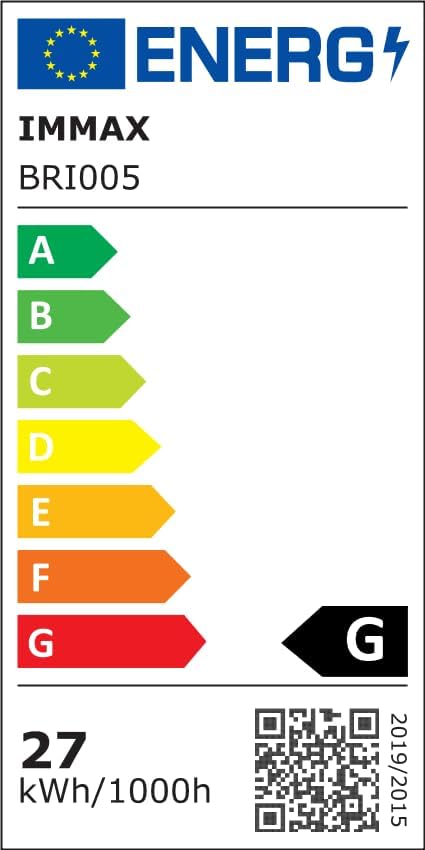
Energy efficiency label for the Brilagi BG0499 Smart Dimmable LED Ceiling Light, indicating an energy class G and 27 kWh/1000h consumption. Includes a QR code linking to the EPREL database. For more details, visit: https://eprel.ec.europa.eu/qr/1426130
| Feature | Specification |
|---|---|
| Brand | Brilagi |
| Manufacturer | Brilagi |
| Product Model Number | BG0499 |
| Product Dimensions | 43 x 43 x 5.5 cm |
| Color | White |
| Shape | Disc |
| Material | Metal |
| Number of Light Sources | 1 |
| Included Components | Remote Control |
| Voltage | 230 Volts |
| Power Source | AC Adapter |
| Type of Light Source | Dimmable LED Ceiling Light |
| Electrical Power (Wattage) | 28 Watts |
| Other Features | Color Change, Remote Control, Wi-Fi Connectivity |
| Indoor/Outdoor Use | Indoor |
| Light Color | White (Adjustable 2700-6500K) |
| Software Updates Guaranteed Until | Unknown |
9. Warranty and Support
Brilagi products are designed for quality and reliability. For warranty information, please refer to the terms and conditions provided at the point of purchase or visit the official Brilagi website. If you require technical assistance or have questions not covered in this manual, please contact Brilagi customer support through their official channels.


