1. Introduction
Thank you for choosing the StageSound Stage GoFree Portable Bluetooth Speaker. This manual provides detailed instructions to help you set up, operate, and maintain your speaker, ensuring you get the best possible audio experience. The Stage GoFree speaker delivers immersive sound with powerful bass, features a tough and waterproof design, advanced Bluetooth 5.3 connectivity, and a long-lasting battery with power bank functionality.
2. What's in the Box
Please check the package contents to ensure all items are present:
- Stage GoFree Bluetooth Speaker
- Auxiliary Cable
- USB C Charging Cable
- User Manual (this document)
3. Product Overview
The Stage GoFree speaker features a retro-inspired design with a durable black finish and a distinctive gold bird logo on the front mesh grille. A dynamic light bar is integrated below the grille, offering various customizable light modes.

Figure 3.1: Front view of the StageSound Stage GoFree speaker, showcasing its black finish, mesh grille, gold bird logo, and integrated light bar.
3.1. Controls and Ports
The speaker's controls are conveniently located on the top panel, while the connectivity ports are protected by a rubber flap on the side.
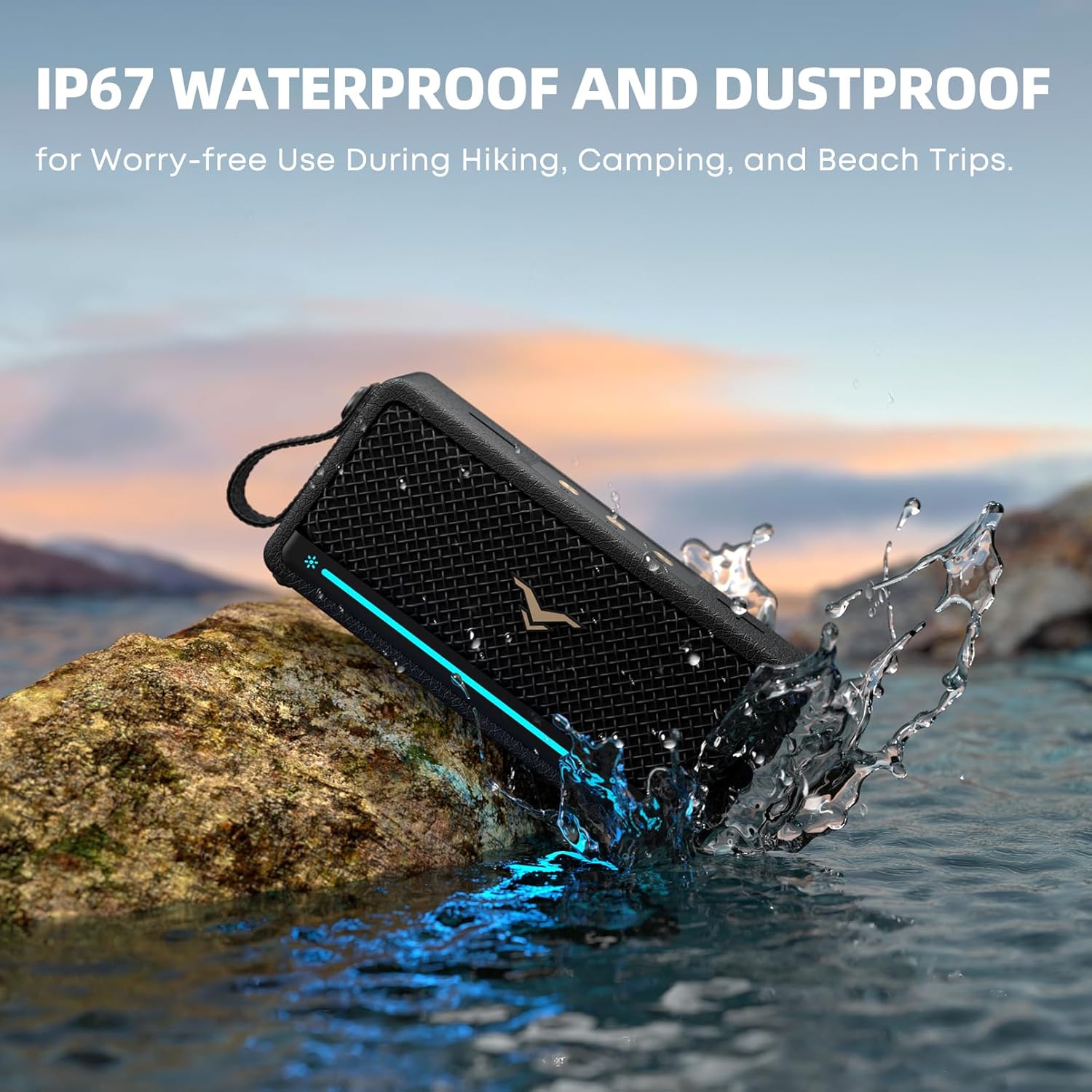
Figure 3.2: Top view of the speaker, highlighting the control buttons.
- Power Button: Press and hold to turn the speaker on/off.
- Bluetooth Button: Press to enter Bluetooth pairing mode.
- Mode Button (M): Cycles through EQ modes (Treble, Bass, Normal).
- Volume Up (+): Increases volume.
- Volume Down (-): Decreases volume.

Figure 3.3: Side view of the speaker with the protective flap open, revealing the connectivity ports.
- USB-A Port: For USB drive playback and power bank function.
- USB-C Port: For charging the speaker.
- AUX-in Port (3.5mm): For wired audio connection.
3.2. Internal Components and Features

Figure 3.4: Internal diagram illustrating the speaker's components, including the oversized passive radiator for enhanced bass.
The Stage GoFree is engineered for powerful audio, featuring a 3x-sized passive radiator for deep bass and advanced SoundX 2.0 technology for minimal distortion. It delivers 40W (peak) output.
4. Setup
4.1. Charging the Speaker
Before first use, fully charge your Stage GoFree speaker. Use the provided USB-C charging cable and connect it to a compatible USB power adapter (not included). The battery display function can be activated by pressing the light button twice. A full charge takes approximately 2 hours, providing up to 12 hours of playtime depending on volume and usage.
4.2. Powering On/Off
To power on the speaker, press and hold the Power button until the indicator lights illuminate. To power off, press and hold the Power button again until the lights turn off.
5. Operating Instructions
5.1. Bluetooth Pairing
- Turn on the Stage GoFree speaker. The light bar will indicate it is in pairing mode.
- On your device (smartphone, tablet, computer), enable Bluetooth and search for available devices.
- Select "Stage GoFree" from the list.
- Once connected, the speaker will emit an audible confirmation, and the light bar will change its pattern.
The speaker utilizes Bluetooth 5.3 technology for a stable connection up to 33 feet (or up to 100 feet in optimal conditions).
5.2. True Wireless Stereo (TWS) Pairing
You can pair two Stage GoFree speakers together for an immersive stereo sound experience.

Figure 5.1: Two Stage GoFree speakers wirelessly paired for a stereo experience.
- Ensure both Stage GoFree speakers are powered on and not connected to any Bluetooth device.
- On one speaker (this will be the primary speaker), press and hold the Bluetooth button for 3 seconds. It will enter TWS pairing mode.
- The primary speaker will automatically search for the secondary speaker. Once connected, both speakers will emit an audible confirmation.
- Now, connect your device to the primary speaker via Bluetooth as described in Section 5.1. Audio will play through both speakers in stereo.
5.3. Wired Connections (AUX & USB)
- AUX-in: Connect your audio device to the speaker's 3.5mm AUX-in port using the provided auxiliary cable. The speaker will automatically switch to AUX mode.
- USB Playback: Insert a USB drive containing audio files into the USB-A port. The speaker supports plug-and-play functionality for music playback.
5.4. Light Modes
The Stage GoFree features a beat-synced light show with 5 customizable modes. Press the dedicated light control button to cycle through the modes:

Figure 5.2: The speaker's light bar showcasing different customizable light modes.
- Rainbow
- Rhythm
- Crossing
- Amber
- Single
- Off
5.5. Hands-Free Calling
The built-in microphone allows for hands-free calls. When a call comes in, the music will pause. Press the Bluetooth button to answer or end a call. The music will resume after the call ends.
5.6. EQ Modes
The speaker offers adjustable bass and treble modes for personalized sound settings. Press the 'M' (Mode) button to cycle through the available EQ modes: Treble Mode, Bass Mode, and Normal Mode.
5.7. Power Bank Function
The Stage GoFree speaker can also function as a power bank. Connect your mobile device to the speaker's USB-A port using a compatible charging cable to charge your device on the go.
6. Maintenance
6.1. Cleaning
Wipe the speaker with a soft, damp cloth. Do not use harsh chemicals or abrasive cleaners. Ensure the protective rubber flap over the ports is securely closed before cleaning or exposing to water.
6.2. Water and Dust Resistance

Figure 6.1: The speaker demonstrating its IP67 waterproof capability.
The Stage GoFree speaker has an IP67 waterproof and dustproof rating. This means it is protected from dust ingress and can withstand immersion in water up to 1 meter for 30 minutes. Always ensure the port cover is tightly sealed before exposing the speaker to water or dust.
6.3. Storage
Store the speaker in a cool, dry place away from direct sunlight and extreme temperatures when not in use for extended periods.
7. Troubleshooting
| Problem | Possible Cause | Solution |
|---|---|---|
| Speaker does not turn on | Low battery | Charge the speaker fully. |
| No sound | Volume too low; Device not connected; Incorrect input mode | Increase volume on both speaker and device; Re-pair Bluetooth or check AUX/USB connection; Press 'M' button to cycle modes. |
| Bluetooth pairing failed | Speaker not in pairing mode; Device too far; Interference | Press Bluetooth button to enter pairing mode; Move device closer (within 33-100 ft); Turn off other Bluetooth devices. |
| TWS pairing failed | Speakers already connected to other devices; Too far apart | Disconnect both speakers from any Bluetooth devices; Ensure speakers are within close proximity for TWS pairing. |
| Poor sound quality | Low battery; Device volume too high (distortion); EQ setting | Charge speaker; Reduce device volume; Adjust EQ mode using 'M' button. |
8. Specifications
| Feature | Detail |
|---|---|
| Model Name | Stage GoFree |
| Speaker Type | Portable Speaker |
| Speaker Maximum Output Power | 40 Watts (Peak) |
| Connectivity Technology | Bluetooth 5.3, Auxiliary, USB |
| Bluetooth Range | 33 Feet (up to 100 feet in optimal conditions) |
| Water Resistance Level | IP67 (Waterproof & Dustproof) |
| Battery Life | 12 Hours (depends on volume) |
| Battery Capacity | 4000 Milliamp Hours |
| Charging Time | 2 Hours |
| Product Dimensions (D x W x H) | 1.97"D x 2.95"W x 6.89"H |
| Item Weight | 1.2 Pounds |
| Material | Acrylonitrile Butadiene Styrene (ABS), Metal |
| Special Features | Bass Boost, Built-in Microphone, Built-In Powerbank, Stereo Pairing, USB Port, Beat-Synced Light Show |
9. Warranty & Support
9.1. Warranty Information
The StageSound Stage GoFree Portable Bluetooth Speaker comes with a 12-month free warranty from the date of purchase. This warranty covers manufacturing defects and workmanship under normal use.
9.2. Customer Support
StageSound is committed to 100% customer satisfaction and offers lifetime friendly customer service. If you encounter any issues or have questions regarding your product, please do not hesitate to reach out to our support team. We are here to help and ensure a pleasant experience.
For support, please visit our official website or contact us via:
- Email: support@stagesound.com (example)
- Website: StageSound Official Store