
XTRONS IQP92M245P
XTRONS IQP92M245P Autoradio
User Manual
Introduction
This manual provides detailed instructions for the installation, operation, and maintenance of your XTRONS IQP92M245P Autoradio. This advanced car navigation system features Android 12, a 9-inch QLED display, Octa-core processor, 8GB RAM, and 256GB ROM, offering seamless integration with your vehicle's existing systems.
It is designed for specific Mercedes-Benz models, including:
- Mercedes Classe A W169 (2004-2012)
- Mercedes Classe B W245 (2005-2011)
- Mercedes VITO/VIANO W639 (2006-2018)
- Mercedes SPRINTER W906 (2006-2012)

Figure 1: Front view of the XTRONS IQP92M245P Autoradio, highlighting its Octa-core processor, Android 12, QLED display, 8GB RAM, 256GB ROM, Wireless Carplay, Wireless Android Auto, DSP, HD Output, and Optical Output capabilities.
Setup and Installation
The XTRONS IQP92M245P is designed for dashboard mounting and comes with all necessary cabling. Professional installation is recommended to ensure proper functionality and avoid damage to your vehicle's electrical system.
Package Contents:
- XTRONS IQP92M245P Autoradio Unit
- Power Harness and Connectors
- GPS Antenna
- USB Cables
- User Manual (this document)
- Other accessories as specified in the packing list
Installation Steps (General):
- Preparation: Ensure the vehicle's ignition is off and the battery is disconnected before starting installation.
- Remove Old Unit: Carefully remove the existing car stereo or navigation unit from the dashboard.
- Connect Wiring: Connect the provided power harness, speaker wires, GPS antenna, and other necessary cables to the corresponding ports on the Autoradio and your vehicle's wiring. Refer to the wiring diagram provided with your specific unit for detailed connections.
- Test Functionality: Before fully securing the unit, reconnect the battery and perform a quick test of basic functions (power on, audio, display).
- Mounting: Securely mount the XTRONS IQP92M245P into the dashboard opening. Ensure all clips and screws are properly fastened.
- Final Assembly: Reassemble any dashboard trim panels removed during the process.
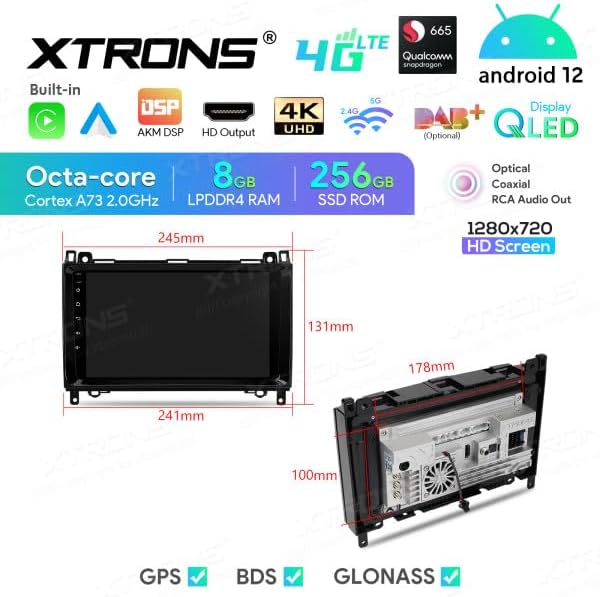
Figure 2: Dimensional diagram of the Autoradio unit, showing front panel measurements (245mm width, 131mm height) and chassis depth (178mm) with a 100mm mounting depth.

Figure 3: The XTRONS IQP92M245P Autoradio seamlessly integrated into a Mercedes-Benz vehicle's dashboard, displaying the navigation and music interface.
Operating Instructions
The XTRONS IQP92M245P operates on Android 12, providing a familiar and intuitive user experience. The 9-inch capacitive touchscreen allows for smooth navigation through menus and applications.
Key Features and Functions:
- Navigation: Utilize built-in GPS with support for various map types (e.g., Street maps). Connect to Wi-Fi or 4G for online map services and traffic updates.
- Bluetooth: Connect your smartphone for hands-free calling and audio streaming.
- Wireless Carplay & Android Auto: Seamlessly integrate your iPhone or Android device for access to navigation, music, messages, and more directly on the unit's screen.
- Multimedia Playback: Play audio and video files from USB drives or internal storage. Supports various formats.
- Radio: Access FM/AM radio stations.
- DSP (Digital Signal Processor): Fine-tune your audio experience with advanced sound settings and equalizer controls.
- HD Output & Optical Output: Connect to external displays or high-fidelity audio systems for enhanced entertainment.
- Internet Connectivity: Built-in Wi-Fi and 4G support (with optional SIM card/dongle) for online applications, browsing, and updates.
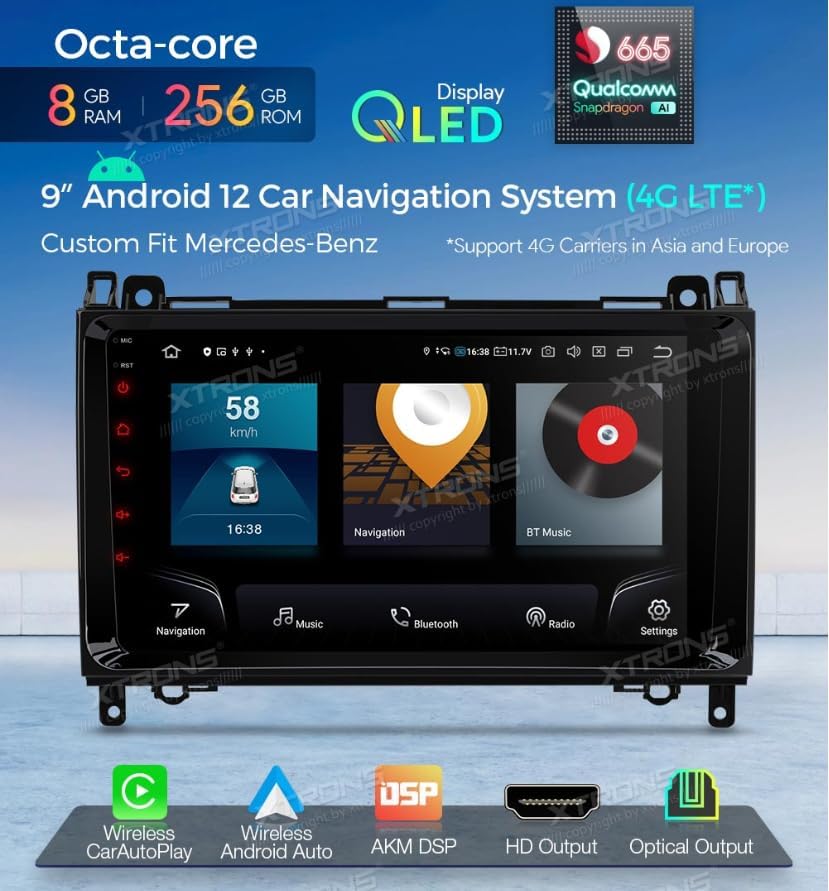
Figure 4: The main user interface of the Autoradio, displaying quick access to navigation, Bluetooth music playback, and system settings.
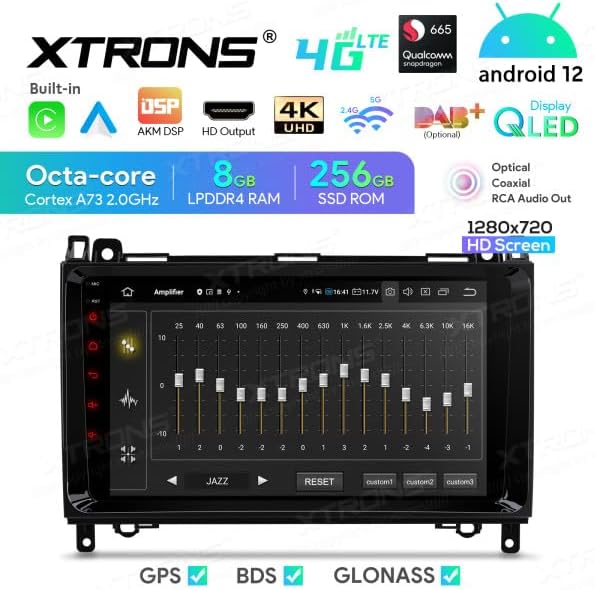
Figure 5: The advanced equalizer interface, allowing users to customize audio frequencies for optimal sound quality, with preset options and custom profiles.
Maintenance
Proper maintenance ensures the longevity and optimal performance of your XTRONS IQP92M245P Autoradio.
- Screen Cleaning: Use a soft, lint-free cloth specifically designed for electronic screens. Do not use abrasive cleaners or solvents. Gently wipe the screen to remove dust and fingerprints.
- Software Updates: Periodically check for software updates from the XTRONS official website or through the unit's system settings (if available). Keeping the software updated can improve performance and add new features.
- Avoid Extreme Temperatures: Do not expose the unit to extreme hot or cold temperatures for prolonged periods, as this can affect its electronic components.
- Ventilation: Ensure that the ventilation openings of the unit are not blocked to prevent overheating.
Troubleshooting
If you encounter issues with your XTRONS IQP92M245P, refer to the following common troubleshooting steps:
| Problem | Possible Cause | Solution |
|---|---|---|
| Unit does not power on. | Loose power connection, blown fuse, vehicle battery issue. | Check power cables and connections. Inspect vehicle fuses. Ensure vehicle battery is charged. |
| No sound from speakers. | Speaker wires disconnected, volume too low, mute enabled, incorrect audio source. | Verify speaker wire connections. Increase volume. Disable mute. Select correct audio source. |
| GPS signal lost or inaccurate. | GPS antenna obstructed or disconnected, poor satellite reception. | Ensure GPS antenna is properly connected and has a clear view of the sky. Move to an open area. |
| Bluetooth not connecting. | Bluetooth off on unit or phone, pairing mode not active, interference. | Ensure Bluetooth is enabled on both devices. Put unit in pairing mode. Try re-pairing. Reduce interference. |
| Touchscreen unresponsive. | Software glitch, screen calibration issue. | Restart the unit. If issue persists, perform a factory reset (refer to advanced settings, note this will erase data). |
If the problem persists after attempting these solutions, please contact XTRONS customer support for further assistance.
Specifications
Detailed technical specifications for the XTRONS IQP92M245P Autoradio:
| Feature | Detail |
|---|---|
| Brand | XTRONS |
| Model | IQP92M245P |
| Operating System | Android 12 |
| Screen Size | 9 Inches |
| Display Type | QLED, Capacitive Touchscreen |
| Processor | Octa-core (Qualcomm Snapdragon 665 implied from image) |
| RAM | 8 GB |
| Internal Storage (ROM) | 256 GB |
| Connectivity Technology | USB, Wi-Fi, 4G, Bluetooth, Android Auto, Apple Carplay |
| Special Features | Bluetooth, DSP, HD Output, Optical Output |
| Vehicle Service Type | Car |
| Map Type | Street |
| Mounting Type | Dashboard Mount |
| Included Components | Autoradio and cabling |
Ask a question about this manual
Ask about setup, troubleshooting, compatibility, parts, safety, or missing instructions. Manuals+ will review the question and use this page’s manual context to help answer it.