
Introduction
This manual provides detailed instructions for the proper setup, operation, and maintenance of your XZL UHF Wireless Microphone system. Please read this manual thoroughly before using the product to ensure optimal performance and longevity. The XZL U50 system offers clear and pure voice amplification with accurate voice capture, designed for various applications including karaoke, stage performances, lectures, weddings, and church events.

Image: The XZL wireless microphone system provides clear and pure voice amplification, capturing sound accurately without background noise or howling.
Package Contents
Verify that all items listed below are included in your package:
- 2 x Rechargeable Handheld Microphones (Gray and Green)
- 1 x 1/4" UHF Receiver
- 1 x USB-C Dual Charging Cord
- 1 x 6.35mm to 3.5mm Adapter
- 2 x Foam Microphone Covers
- 1 x PU Storage Case
- 2 sets of Anti-slip Rings
- 1 x Instruction & Warranty Manual

Image: All components included in the XZL UHF Wireless Microphone system package.
Product Overview and Features
The XZL U50 wireless microphone system is designed for ease of use and reliable performance. Key features include:
- UHF Wireless Transmission: Provides stable and interference-free connection up to 120 feet.
- Rechargeable Design: Microphones and receiver feature built-in 1800mAh batteries, offering up to 12 hours of working time.
- Plug-and-Play: Simple setup for immediate use with compatible audio equipment.
- Durable Construction: Microphones feature an anti-slip steel mesh head, high-performance cardioid capsule, and solid matte metal body (aluminum enclosure).
- Unidirectional Polar Pattern: Focuses on sound from the front, reducing background noise.

Image: Detailed view of the microphone's construction, emphasizing its quality components.

Image: The system provides instant and long-distance UHF transmission, ensuring a seamless and smooth wireless connection.
Setup Instructions
Follow these steps to set up your XZL UHF Wireless Microphone system:
- Charge the Microphones and Receiver: Before first use, ensure both microphones and the UHF receiver are fully charged using the provided USB-C dual charging cord. Refer to the 'Charging' section for details.
- Power On: Turn on both the microphone(s) and the UHF receiver. The power button is typically located on the body of the microphone and the receiver.
- Connect Receiver: Plug the 1/4" receiver directly into the 'MIC IN' or 'Microphone Input' jack of your compatible audio device (e.g., karaoke machine, PA system, amplifier). If your device has a 3.5mm input, use the included 6.35mm to 3.5mm adapter.
- Automatic Pairing: The microphones and receiver are designed for automatic pairing. Once both are powered on and within range, they should connect automatically.
- Adjust Volume: Adjust the volume on your audio device to a suitable level. Note that the microphones themselves do not have volume controls.
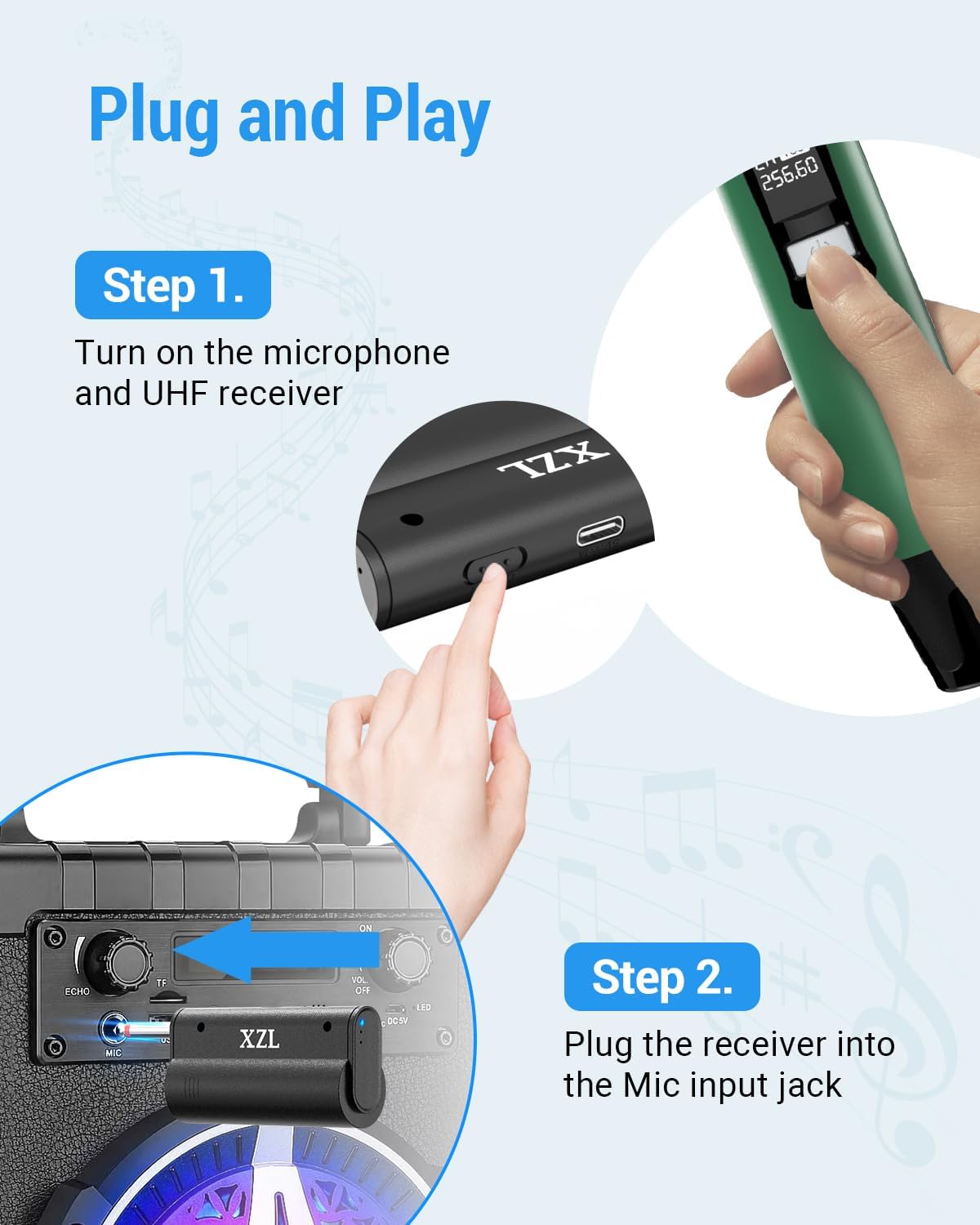
Image: Step-by-step guide for the plug-and-play setup of the XZL wireless microphone system.
Operating Instructions
Once set up, operating your XZL wireless microphone system is straightforward:
- Power On/Off: Press and hold the power button on each microphone and the receiver to turn them on or off.
- Usage Distance: For optimal performance, maintain a clear line of sight between the microphone and the receiver. The effective range is up to 120 feet.
- Microphone Handling: Hold the microphone approximately 2-6 inches from your mouth for best sound quality. Avoid covering the microphone grille with your hand.
- Avoiding Feedback: Position speakers in front of the microphone, not behind it, to prevent audio feedback (howling).
- Simultaneous Use: Both microphones can be used simultaneously with the single receiver.

Image: The XZL wireless microphones provide an astonishing audio performance, ideal for karaoke singing.
Charging
The XZL U50 microphones and receiver are equipped with rechargeable batteries.
- Charging Cable: Use the included USB-C dual charging cord. This cable allows you to charge both microphones or one microphone and the receiver simultaneously.
- Connection: Connect the USB-C ends to the charging ports on the microphones and receiver, and the USB-A end to a standard USB power adapter (not included) or a powered USB port.
- Charging Indicator: The devices will typically show an indicator light (e.g., red for charging, off or green for fully charged). Refer to the device's display for specific charging status.
- Battery Life: A full charge provides approximately 12 hours of working time.

Image: The XZL microphones and receiver are rechargeable using the included USB-C dual charging cord.
Maintenance
Proper maintenance ensures the longevity and performance of your wireless microphone system:
- Cleaning: Use a soft, dry cloth to clean the exterior of the microphones and receiver. Do not use harsh chemicals or abrasive cleaners.
- Storage: When not in use, store the microphones and receiver in the provided PU storage case to protect them from dust, moisture, and physical damage.
- Battery Care: To maintain battery health, avoid fully discharging the batteries frequently. Recharge them regularly, even if the system is not used for extended periods.
- Environmental Conditions: Avoid exposing the devices to extreme temperatures, direct sunlight, or high humidity.
Troubleshooting
If you encounter issues with your XZL UHF Wireless Microphone system, refer to the following common problems and solutions:
| Problem | Possible Cause | Solution |
|---|---|---|
| No sound from microphone | Microphone or receiver is off; Low battery; Receiver not properly connected; Audio device volume too low. | Ensure both microphone and receiver are powered on. Charge batteries. Re-plug receiver firmly into the 'MIC IN' jack. Increase volume on your audio device. |
| Sound cutting in/out or interference | Out of range; Obstructions between microphone and receiver; Low battery; Other wireless devices causing interference. | Move closer to the receiver. Ensure a clear line of sight. Charge batteries. Move away from other electronic devices that may cause interference. |
| Microphone not charging | Faulty charging cable; Power source issue; Charging port damage. | Try a different USB-C cable. Connect to a different USB power adapter or port. Contact support if the issue persists. |
| Cannot change frequency | The XZL U50 model does not support manual frequency adjustment. | This model is designed for automatic pairing on a fixed frequency. No user adjustment is possible. |
Specifications
| Feature | Detail |
|---|---|
| Brand | XZL |
| Model Name | U50 |
| Connectivity Technology | UHF Wireless |
| Connector Type | 6.35 mm Jack |
| Recommended Uses | Karaoke, Stage Performance, Lecture, Wedding, Church |
| Compatible Devices | Karaoke Machine, PA System |
| Color | Gray and Green |
| Polar Pattern | Unidirectional |
| Microphone Form Factor | Handheld |
| Power Source | Battery Powered (Rechargeable) |
| Battery Capacity | 1800mAh (Built-in) |
| Working Time | Up to 12 hours |
| Number of Channels | 1 (per microphone, dual system) |
| Enclosure Material | Aluminum |
| Item Dimensions | 1.38 x 1.38 x 9.25 inches |
| Manufacturer | Hengmaoyuan Electronic Technology Co., Ltd. |
Warranty and Support
Your XZL UHF Wireless Microphone system comes with a warranty. Please refer to the 'Instructions & Warranty Manual' included in your package for specific warranty terms, conditions, and duration. For technical support or any inquiries not covered in this manual, please contact the retailer or manufacturer directly using the contact information provided in your warranty documentation.
