
Lamomo LMM-0018-WU-SE-1PUS-JP
Lamomo Motion Sensor Outdoor Lights User Manual
Brand: Lamomo | Model: LMM-0018-WU-SE-1PUS-JP
1. Introduction
Thank you for choosing Lamomo Motion Sensor Outdoor Lights. This product is designed to provide reliable and efficient outdoor lighting with advanced motion sensing and dusk-to-dawn capabilities. Crafted from durable aluminum and tempered glass, it is built to withstand various weather conditions, ensuring long-lasting performance for your patio, front door, garage, or porch.
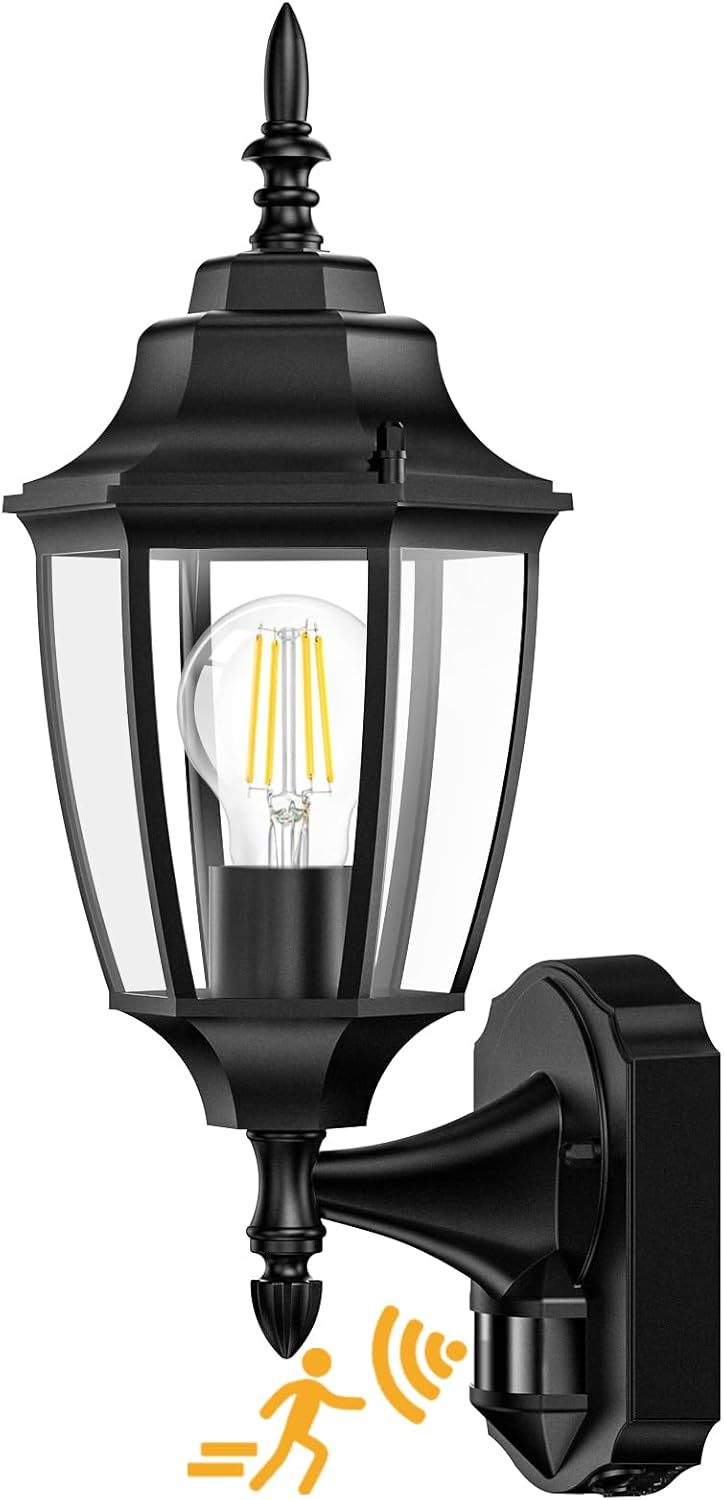
Figure 1: Lamomo Motion Sensor Outdoor Light (Black, 1 Pack)
2. Safety Information
- Always turn off power at the circuit breaker before installation, maintenance, or bulb replacement.
- Ensure all wiring connections are secure and comply with local electrical codes. If unsure, consult a qualified electrician.
- Do not exceed the maximum wattage specified for the bulb (60 watts).
- Handle glass components with care to prevent breakage.
- Keep the product away from flammable materials.
- This product is designed for outdoor use only.
3. Package Contents
Verify that all components are present before beginning installation:
- 1 x Wall Lantern
- 1 x User Manual
- Mounting Hardware (including screws and wire nuts)
4. Specifications
| Feature | Detail |
|---|---|
| Brand | Lamomo |
| Model Number | LMM-0018-WU-SE-1PUS-JP |
| Color | Black |
| Material | Tempered Glass, Aluminum |
| Style | Traditional |
| Light Fixture Form | Sconce |
| Product Dimensions | 5"L x 4"W x 2"H (Fixture only) |
| Overall Product Dimensions | 7.48 x 6.3 x 13.39 inches |
| Item Weight | 2.71 pounds |
| Specific Uses | Outdoor use only |
| Power Source | Corded Electric |
| Special Features | Waterproof, Weather Resistant, Sealed Bottom, Motion Sensor |
| Control Method | Remote (via sensor settings) |
| Light Source Type | LED, Incandescent (E26 base) |
| Voltage | 120 Volts (AC) |
| Wattage | 60 watts (max) |
| Bulb Base | E26 |
| Switch Type | Push Button (on sensor) |
| Water Resistance Level | Waterproof |
| Mounting Type | Wall Mount |
| Assembly Required | Yes |
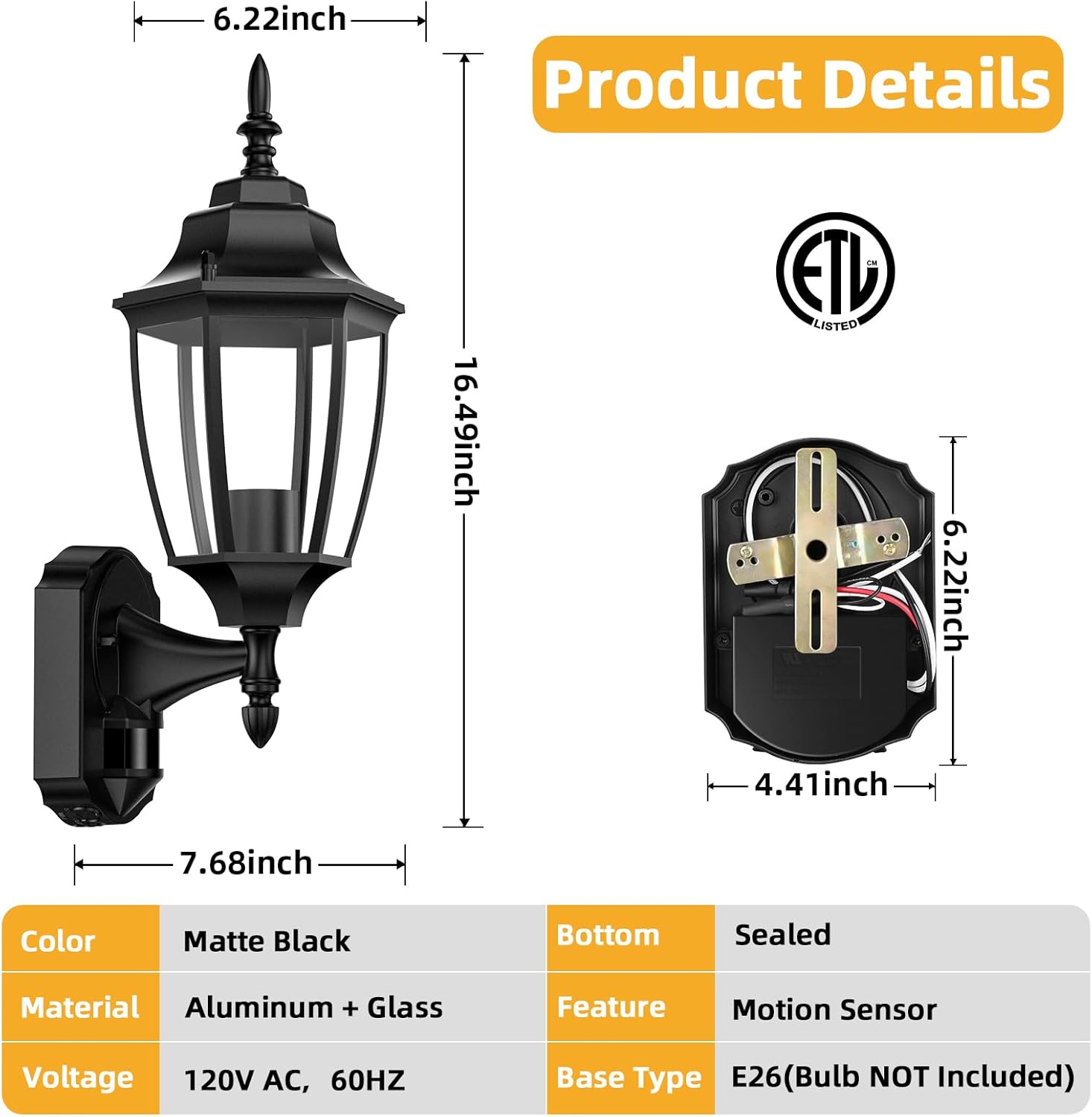
Figure 2: Detailed product dimensions and material information.
5. Setup and Installation
The Lamomo Motion Sensor Outdoor Light is designed for easy installation. All necessary mounting hardware is included. Follow these steps for a successful setup:
- Prepare the Installation Area: Ensure power is turned off at the circuit breaker. Remove any existing light fixture.
- Attach Mounting Bracket: Secure the provided mounting bracket to your electrical box using the screws.
- Wire Connections: Connect the fixture's wires to your household wiring. Typically, white to neutral, black to live, and copper (ground) to copper (ground). Use the provided wire nuts to secure connections.
- Mount the Fixture: Carefully align the fixture with the mounting bracket and secure it in place.
- Install Bulb: Insert an E26 base bulb (not included) into the socket. The bottom of the fixture is sealed to keep bugs out, and bulbs can be replaced by tightening/loosening fixing nuts.
- Seal the Fixture: Apply silicone sealant around the base of the fixture where it meets the wall to prevent water intrusion.
- Restore Power: Turn the power back on at the circuit breaker.
Video 1: Overview of the Lamomo Outdoor Wall Sconce, demonstrating its features and installation process.

Figure 3: Various E26 bulb types compatible with the fixture (bulb not included).
6. Operating Modes
The Lamomo Motion Sensor Outdoor Light features three distinct lighting modes, controlled by switches and dials located on the sensor unit at the bottom of the fixture:
- TEST Mode: This mode allows you to adjust the sensitivity of the motion detector. The light will turn on for approximately 5 seconds when motion is detected, regardless of ambient light levels. This is useful for testing the sensor's range and sensitivity settings.
- AUTO Mode (Motion Sensor): In this mode, the motion detector automatically turns the light on at dusk when movement is sensed within its coverage area (up to 30 feet, 180° detection angle). The light remains on as long as motion is detected. After motion stops, the light will stay on for a predetermined time (adjustable from 5 seconds to 3 minutes) before turning off automatically.
- PC Mode (Dusk to Dawn Sensor): In PC mode, the light turns on automatically at dusk and turns off at dawn, regardless of motion. This provides continuous illumination during nighttime hours.
Adjustable settings for AUTO mode include:
- Time: Adjusts how long the light stays on after motion stops (5 seconds to 3 minutes).
- Sensitivity: Adjusts the detection range and sensitivity of the motion sensor.

Figure 4: Visual explanation of the three lighting modes and sensor controls.

Figure 5: Illustration of the advanced PIR motion sensor's detection range and angle.
7. Maintenance
To ensure optimal performance and longevity of your Lamomo outdoor light, follow these maintenance guidelines:
- Cleaning: Regularly wipe down the fixture with a soft, damp cloth to remove dust, dirt, and debris. Avoid abrasive cleaners or solvents that could damage the finish or glass.
- Bulb Replacement: Turn off power at the circuit breaker before replacing the bulb. Allow the bulb to cool completely. Unscrew the old bulb and screw in a new E26 base bulb (max 60 watts).
- Inspection: Periodically inspect the fixture for any signs of wear, damage, or loose connections. Ensure the sealed bottom remains intact to prevent insect entry.
- Weather Resistance: The fixture is designed to be waterproof and weather-resistant. However, extreme weather conditions may require additional inspection.
8. Troubleshooting
| Problem | Possible Cause | Solution |
|---|---|---|
| Light does not turn on. | No power, faulty bulb, incorrect mode setting. | Check circuit breaker. Replace bulb. Ensure switch is not in "OFF" position or in a mode not suitable for current light conditions. |
| Motion sensor not detecting. | Sensitivity too low, obstruction, incorrect mode. | Adjust sensitivity dial. Clear any obstructions from sensor's view. Ensure in "AUTO" or "TEST" mode. |
| Light stays on continuously. | Constant motion, sensor malfunction, "PC" mode selected. | Check for continuous motion in sensor's range. If in "PC" mode, switch to "AUTO" or "TEST". If problem persists, contact support. |
| Light flickers. | Loose bulb, unstable power, incompatible bulb. | Tighten bulb. Check electrical connections. Ensure bulb is compatible with motion sensor fixtures. |
9. Warranty and Support
This Lamomo product comes with a 24-month limited warranty. For warranty claims, technical support, or any questions regarding your product, please contact Lamomo customer service through the retailer's platform or the official Lamomo website. Please have your model number (LMM-0018-WU-SE-1PUS-JP) and purchase details ready for faster assistance.
Ask a question about this manual
Ask about setup, troubleshooting, compatibility, parts, safety, or missing instructions. Manuals+ will review the question and use this page’s manual context to help answer it.