
Greadio CD318
Greadio Portable CD Player User Manual
Model: CD318
1. Product Overview
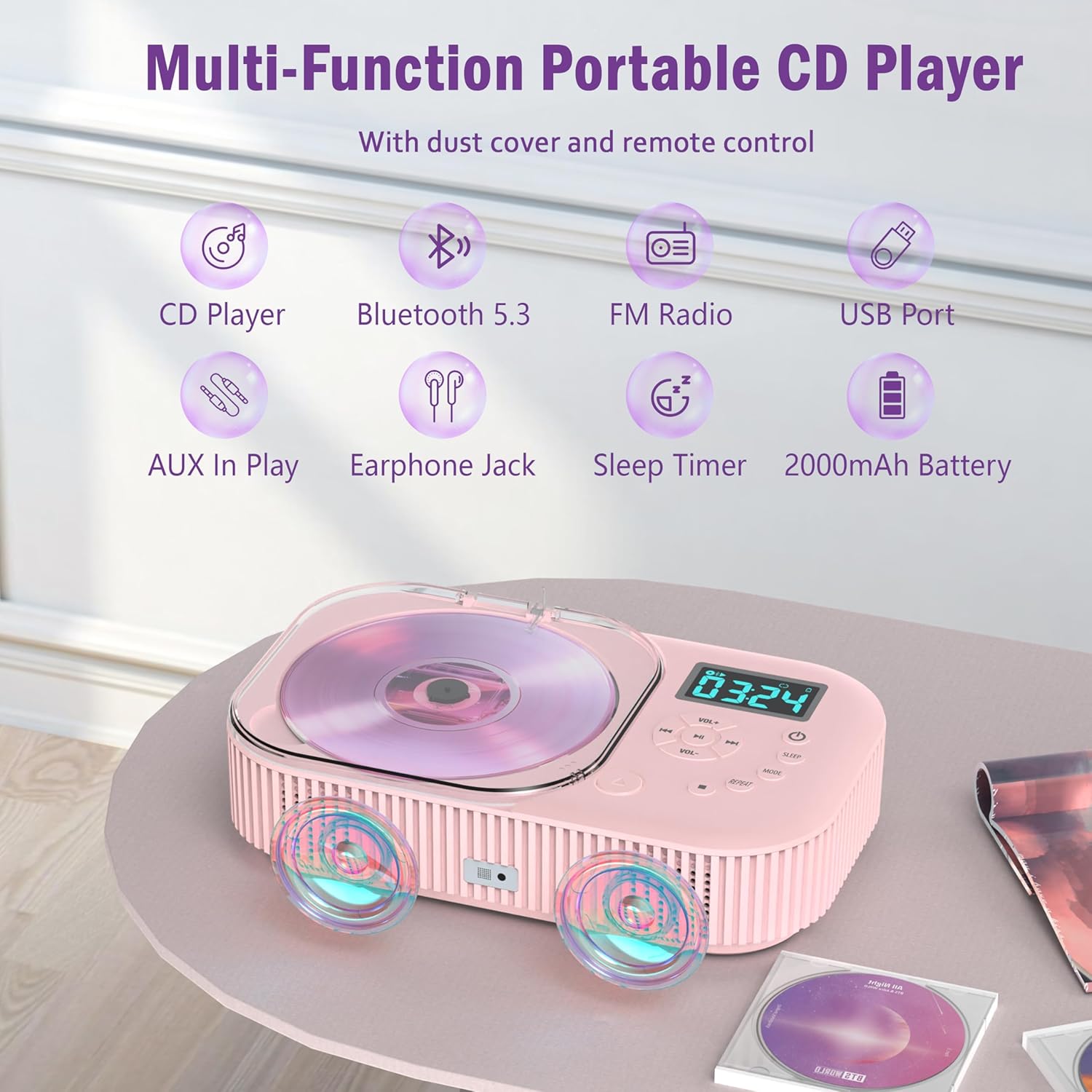
The Greadio Portable CD Player (Model CD318) is a versatile audio device designed for both home and car use. It features dual built-in speakers, Bluetooth 5.3 connectivity, FM radio, USB and AUX input, and a rechargeable 2000mAh battery. The player supports various CD formats and includes anti-skip protection for uninterrupted playback.
2. What's in the Box
- Portable CD Player (Model CD318) x 1
- Remote Control x 1
- Type-C Charging Cord x 1
- AUX Cable x 1
- User Manual x 1
3. Setup
3.1 Powering the Device
The CD player is equipped with a built-in 2000mAh rechargeable battery, allowing for portable use. Before first use, it is recommended to fully charge the device.
- Connect the provided Type-C charging cord to the charging port on the back of the CD player.
- Connect the other end of the Type-C charging cord to a compatible USB power source (e.g., wall charger, car charger, power bank). An adapter is not included.
- A full charge typically takes approximately 3 hours (with a 5V 2A adapter).

3.2 Initial Power On
Locate the ON/OFF switch on the back of the device and slide it to the "ON" position. The display will light up.
4. Operating Instructions
4.1 CD Playback
- Ensure the CD player is powered on.
- Press the MODE button until "CD" appears on the display.
- Press the button near the CD cover to open it.
- Carefully place a CD (CD, CD-R, CD-RW) onto the spindle with the label side facing up.
- Close the CD cover firmly until it clicks. The player will begin reading the disc.
- Press the Play/Pause button to start or pause playback.
- Use the Previous/Next buttons to skip tracks. Long press these buttons to fast forward or rewind.

4.2 Bluetooth Mode
The CD player can function as a Bluetooth receiver, allowing you to stream audio wirelessly from your phone, tablet, or laptop.
- Press the MODE button until "BT" appears on the display. The "BT" indicator will blink, indicating it's in pairing mode.
- On your Bluetooth device (phone, tablet, etc.), enable Bluetooth and search for available devices.
- Select "CD Player" from the list of devices to connect. Once connected, the "BT" indicator on the CD player will stop blinking and remain solid.
- You can now play audio from your device through the CD player's speakers. Use the Previous/Next buttons on the CD player or remote to switch tracks.

4.3 FM Radio
- Press the MODE button until "FM" appears on the display.
- Use the Previous/Next buttons to tune to your desired FM frequency.
- To preset a station, press the REPEAT button to enter preset settings. Use Previous/Next to select a storage location (P01-P99), then press REPEAT again to confirm.

4.4 USB Playback
- Insert a USB flash drive into the USB port on the back of the CD player.
- Press the MODE button until "USB" appears on the display.
- The player will automatically detect and play audio files from the USB drive.
4.5 AUX Input
- Connect an external audio device (e.g., smartphone, MP3 player) to the AUX input port on the back of the CD player using the provided AUX cable.
- Press the MODE button until "AUX" appears on the display.
- Audio from your external device will now play through the CD player's speakers.

4.6 Remote Control Operation
The included remote control allows for convenient operation from a distance of up to 33 feet.
- Power: Turn the device on/off.
- Mode: Switch between CD, Bluetooth, FM, USB, and AUX modes.
- Volume +/-: Adjust the volume level.
- Previous/Next: Skip tracks or tune FM stations.
- Play/Pause: Start or pause playback.
- Repeat: Cycle through repeat modes (Repeat All, Repeat One, Random).
- EQ: Select different equalizer modes (Pop, Rock, Jazz, Classic, Flat).
- Sleep: Set the sleep timer.

4.7 Sleep Timer
The sleep timer allows you to set the player to automatically turn off after a specified duration.
- Short press the SLEEP button to enter the sleep timing settings.
- Press the SLEEP button repeatedly to select the desired sleep time (10, 20, 30, 40, 50, 60, 70, 80, 90 minutes).
- Wait for five seconds for the setting to confirm automatically. The player will turn off after the selected time.

5. Maintenance
- Keep the device clean by wiping it with a soft, dry cloth. Avoid using abrasive cleaners or solvents.
- Do not expose the CD player to extreme temperatures, humidity, or direct sunlight.
- Handle CDs carefully by the edges to prevent scratches. Store them in their cases when not in use.
- If the lens needs cleaning, use a specialized CD lens cleaner disc.
6. Troubleshooting
| Problem | Possible Cause | Solution |
|---|---|---|
| Device does not power on. | Battery is depleted; ON/OFF switch is off. | Charge the device fully. Ensure the ON/OFF switch on the back is in the "ON" position. |
| CD skips or does not play. | CD is dirty, scratched, or inserted incorrectly; anti-skip buffer overwhelmed. | Clean the CD. Ensure the CD is placed correctly. Avoid excessive vibration during playback. |
| No sound from speakers. | Volume is too low; device is muted; incorrect mode selected. | Increase volume. Check if the device is muted. Ensure the correct mode (CD, BT, FM, USB, AUX) is selected. |
| Bluetooth pairing fails. | Device is too far; Bluetooth is not enabled on external device; incorrect pairing procedure. | Ensure the CD player is in Bluetooth mode and within range. Enable Bluetooth on your external device and re-scan. |
| FM radio reception is poor. | Weak signal; interference. | Adjust the position of the device. Try tuning to a stronger station. |
7. Specifications
- Model Number: CD318
- Brand: Greadio
- Connectivity Technology: Bluetooth 5.3, Auxiliary, USB
- Color: Pink
- Speaker Type: Stereo
- Power Source: Battery Powered, Type-C Powered
- Battery: 1 Lithium Polymer battery (included), 2000mAh
- Charging Time: Approx. 3 hours (5V 2A)
- CD Playback Time: 6+ hours
- Bluetooth Playback Time: 8+ hours
- USB Playback Time: 7+ hours
- Earphone Mode Playback Time: 12+ hours
- Anti-Skip Protection: 40 seconds for CD, 120 seconds for MP3
- Item Weight: 1.26 pounds
- Package Dimensions: 10.08 x 7.4 x 2.48 inches
- Country of Origin: China
8. Warranty & Support
Greadio offers a 12-month warranty for this product. For any questions or support needs, please contact our U.S. based customer service team, available 24/7.
Contact information can typically be found on the product packaging or the official Greadio website.
Related documentsCD318


Ask a question about this manual
Ask about setup, troubleshooting, compatibility, parts, safety, or missing instructions. Manuals+ will review the question and use this page’s manual context to help answer it.