
Introduction
This manual provides essential information for setting up, operating, and maintaining your BMAX B3 Pro Mini PC. The BMAX B3 Pro is a compact and efficient mini-desktop computer designed for various applications, from office work and online education to home entertainment. It features an Intel N4500 processor, 8GB RAM, 256GB SSD, and comes pre-installed with Windows 11 Pro.
Package Contents
Verify that all items are present in the package before proceeding with setup.
- BMAX B3 Pro Mini PC
- VESA Mount and Screws
- User Manual
- HDMI Cable (59 inches)
- EU Plug Power Adapter
- SATA Cable (for 2.5-inch drive expansion)

Image: Contents of the BMAX B3 Pro Mini PC retail package.
Product Overview
The BMAX B3 Pro Mini PC is designed for compact performance. Below are its key features and physical specifications.
Dimensions and Design
- Dimensions: 12.5 x 11.2 x 4.4 cm (4.9 x 4.4 x 1.7 inches)
- Weight: 270 grams (approximately 0.6 lbs)
- Color: Space Grey
- Material: Durable Plastic Shell
- Mounting: Supports VESA mounting for attachment behind a monitor or wall mounting. Can also be placed on a desk.

Image: BMAX B3 Pro Mini PC demonstrating its micro size and portable design, including desktop, VESA mount, and portability examples.

Image: Space-saving options for the BMAX B3 Pro Mini PC.
Ports and Connectivity
- USB Ports: 2x USB 3.0 Type-A, 2x USB 2.0 Type-A (Total 4 USB ports)
- Video Output: 2x HDMI 2.0 (supports dual 4K@60Hz display)
- Network: Gigabit Ethernet (RJ45), Wi-Fi 5 (802.11ac/b/g/n), Bluetooth 5.0
- Audio: 3.5mm Audio Jack
- Power: DC 12V/2A input
- Other: Clear CMOS button, Power button

Image: Detailed view of the BMAX B3 Pro Mini PC's multi-expansion interface and ports.
Setup Instructions
- Connect to Power: Plug the EU Plug Power Adapter into the DC 12V/2A port on the Mini PC and then into a power outlet.
- Connect to Display: Use an HDMI cable to connect your monitor(s) to the HDMI 2.0 ports on the Mini PC. The device supports dual 4K@60Hz displays.
- Connect Peripherals: Connect your keyboard and mouse to the available USB ports.
- Network Connection: For a wired connection, connect an Ethernet cable to the RJ45 port. For wireless, the device supports Wi-Fi 5 and Bluetooth 5.0, which can be configured after initial boot.
- Power On: Press the power button located on the front of the Mini PC.
- Initial Setup: Follow the on-screen instructions to complete the Windows 11 Pro setup.

Image: BMAX B3 Pro Mini PC connected to a dual 4K display setup.
Operating Instructions
Operating System
The BMAX B3 Pro comes with Windows 11 Pro pre-installed. It also supports Linux distributions like Ubuntu, allowing for flexible operating system choices.

Image: Multi-system compatibility of the BMAX B3 Pro Mini PC.
Daily Use
The Mini PC is suitable for a wide range of daily tasks:
- Office Work: Efficiently handles office applications, document editing, and presentations.
- Online Education: Stable performance for virtual classes and learning platforms.
- Home Entertainment: Functions as a media center for streaming 4K content.
- Light Gaming: Capable of running less demanding games.
- Photo/Video Editing: Suitable for basic photo and video editing tasks.

Image: Wide applicability of the BMAX B3 Pro Mini PC in different scenarios.
Maintenance
Cooling System
The B3 Pro features an integrated smart cooling fan system that automatically adjusts its speed based on system load. This ensures effective heat dissipation, keeping the Mini PC cool and stable even under continuous operation. The design aims for low noise and energy efficiency (6W TDP).

Image: Internal view of the BMAX B3 Pro Mini PC's smart cooling fan.
Storage Expansion
The Mini PC includes a 256GB M.2 SSD for fast boot times and application loading. For additional storage, it offers two flexible M.2 slots that support both SATA and NVMe SSDs up to 2TB (not included). The device has an easy-opening design for 2.5-inch hard drive installation.

Image: Internal view demonstrating easy storage expansion with M.2 slots.
Troubleshooting
- No Power:
- Ensure the power adapter is securely connected to both the Mini PC and a working power outlet.
- Verify the power outlet is functional.
- No Display:
- Check HDMI cable connections to both the Mini PC and the monitor.
- Ensure the monitor is powered on and set to the correct input source.
- Try a different HDMI cable or monitor if available.
- Slow Performance:
- Close unnecessary applications running in the background.
- Check for available Windows updates and install them.
- Ensure sufficient free space on the SSD.
- Consider adding more storage if frequently running out of space.
- Network Connectivity Issues:
- For wired connections, ensure the Ethernet cable is properly connected to both the Mini PC and the router/modem.
- For Wi-Fi, check if the Wi-Fi adapter is enabled and connected to the correct network. Restart your router if necessary.
- Ensure Bluetooth devices are within range and properly paired.
- System Not Responding:
- Press and hold the power button for 5-10 seconds to force a shutdown. Restart the Mini PC.
- If issues persist, consider using the BMAX Factory Reset option (refer to the BMAX Smart Recovery image for guidance).
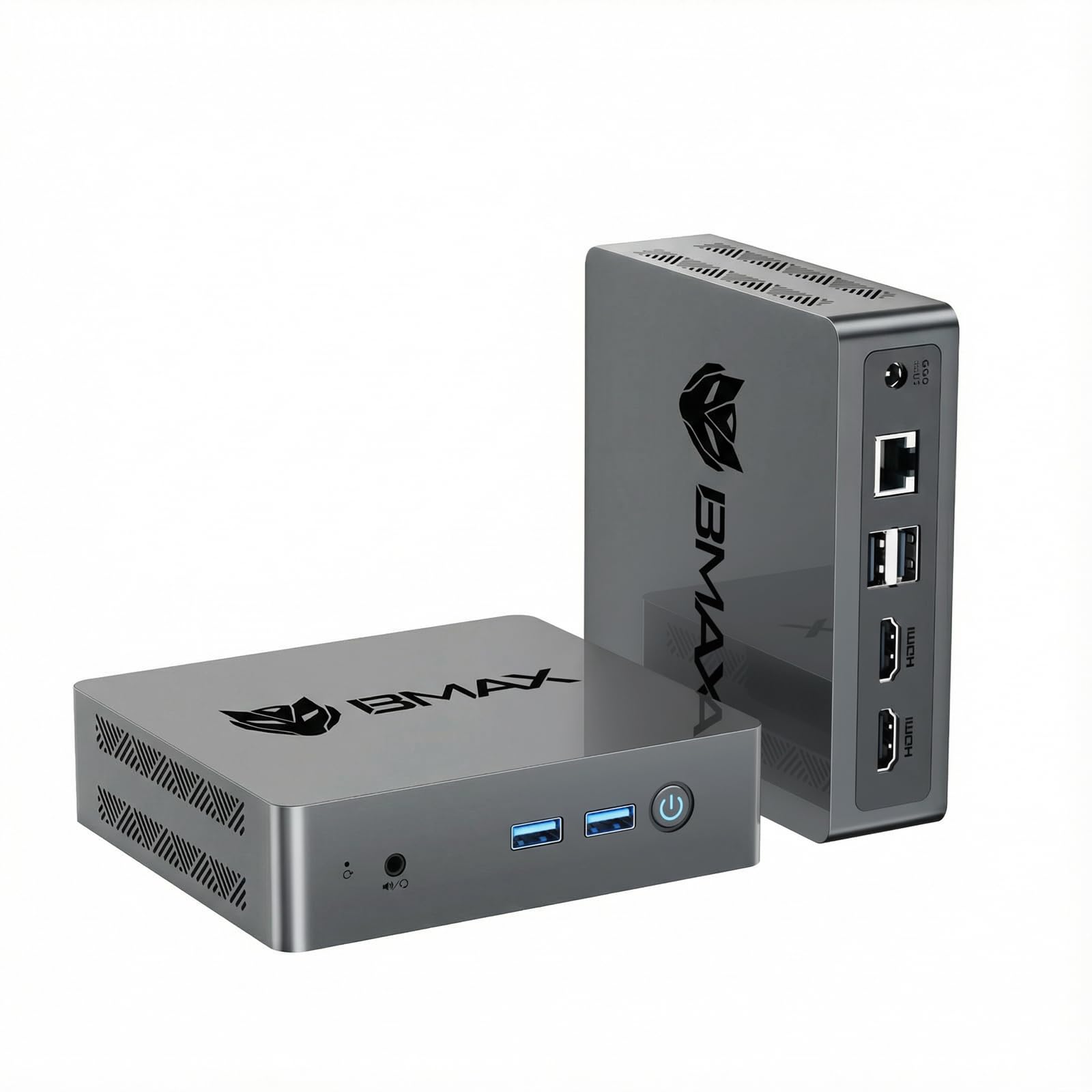
Image: BMAX Smart Recovery interface for system restoration.
Specifications
| Feature | Detail |
|---|---|
| Model Name | B3 Pro |
| Processor | Intel Celeron Processor N4500 (2 Cores, 2 Threads, up to 2.8 GHz) |
| Graphics | Intel UHD Graphics (Max Frequency 750MHz) |
| RAM | 8GB LPDDR4 2133MHz (Onboard) |
| Storage | 256GB M.2 SSD (SATA) |
| Expandable Storage | 2x M.2 slots (SATA & NVMe PCIe 3.0x4, up to 2TB) |
| Operating System | Windows 11 Pro (Pre-installed), supports Linux (Ubuntu) |
| Video Output | 2x HDMI 2.0 (Dual 4K@60Hz) |
| USB Ports | 2x USB 3.0 Type-A, 2x USB 2.0 Type-A |
| Network | Gigabit Ethernet, Wi-Fi 5 (802.11ac), Bluetooth 5.0 |
| Audio | 3.5mm Audio Jack |
| Power Consumption | 6W TDP |
| Dimensions | 12.5 x 11.2 x 4.4 cm |
| Weight | 270 g |
| Cooling Method | Smart Cooling Fan (Air) |

Image: Overview of BMAX B3 Pro Mini PC technical specifications.
Warranty and Support
BMAX provides comprehensive support for its products:
- Warranty: 12 months manufacturer's warranty against material defects.
- Returns: 30-day free return policy.
- Technical Support: Lifetime technical support is available.
- Customer Service: 24/7 customer service.
For support, log in to your Amazon account, navigate to "My Orders," and select "Ask a question about the product."

Image: BMAX After-Sales Support information.


