
1. Introduction
Thank you for choosing the Radtel RT-890 Full Band Ham Two-Way Radio and Radtel Platinum Series Rainproof Heavy Duty Shoulder Speaker Mic. This comprehensive user manual provides detailed instructions for the proper setup, operation, and maintenance of your new communication device. The RT-890 is designed for amateur radio enthusiasts, offering a wide frequency range, advanced features like Air Copy Frequency, and robust construction.
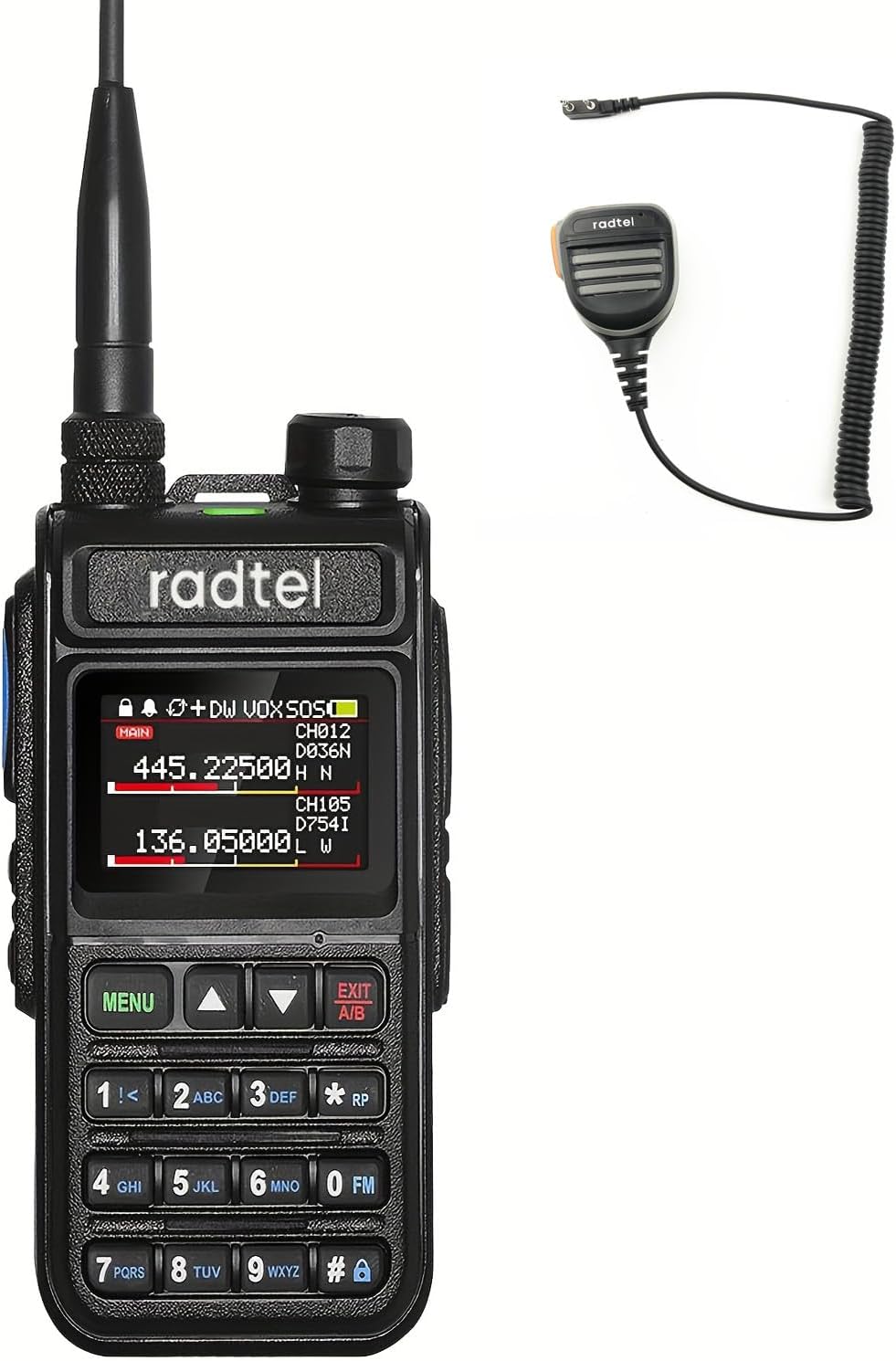
Figure 1: Radtel RT-890 Two-Way Radio with Platinum Series Speaker Mic.
2. Package Contents
Please verify that all items listed below are present in your package. If any items are missing or damaged, please contact Radtel customer support.
- 1x Radtel RT-890 Radio
- 1x Li-ion Battery (1100mAh)
- 1x Dual band Flex Antenna
- 1x Desktop Charger
- 1x Belt clip
- 1x Lanyard
- 1x Radtel Platinum Series Rainproof Heavy Duty Shoulder Speaker Mic
3. Product Features
The Radtel RT-890 radio and Platinum Series speaker mic offer a range of features designed for optimal performance and user convenience:
- All Band Frequency: 144-148Mhz/420-450Mhz TX/RX. Full Band 136-660MHZ Scanning Receive, AM: 108-136Mhz Rx, FM: 64-108mhz Rx.
- Air Copy Frequency: One-key frequency copy function allows the radio to quickly copy another radio's frequency and CTCSS/DCS tone for immediate communication (within 1 meter distance).
- NOAA Weather Alert: Supports NOAA U.S. Weather Channel reception for critical weather alerts.
- Type-C Charging: Convenient Type-C charging port (USB-C cable not included).
- Power Output: High/Middle/Low power settings for versatile use.
- 999 Channels: Extensive channel storage capacity.
- Color LCD Display: Clear and vibrant display with Dual band, dual display, and dual standby capabilities.
- Frequency Measurement: Ability to measure and copy frequencies from other radios.
- Included Accessories: Comes with a Li-ion battery, dual band flex antenna, desktop charger, belt clip, and lanyard.
4. Setup Guide
4.1 Component Identification

Figure 2: Key components of the Radtel RT-890 radio.
- Antenna: For transmitting and receiving signals.
- Power On Button: To turn the radio on or off.
- PTT Button (Push-to-Talk): Press and hold to transmit, release to receive.
- Side Key 1 & 2: Programmable function keys.
- Headset/Programming Port: For connecting external audio accessories or programming cable.
- Type C Charging Port: For charging the radio's battery.
- Keypad: For manual frequency input, menu navigation, and function selection.
4.2 Initial Assembly and Charging
- Attach the Antenna: Screw the dual band flex antenna clockwise onto the antenna connector at the top of the radio until secure.
- Install the Battery: Align the Li-ion battery with the battery compartment on the back of the radio and slide it into place until it clicks.
- Charge the Battery:
- Connect the desktop charger to a power outlet.
- Place the radio (with battery installed) into the desktop charger. The charging indicator light will illuminate.
- Alternatively, connect a Type-C USB cable (not included) directly to the radio's Type C Charging Port for direct charging.
- Charge the battery fully before first use (approximately 3-4 hours). The indicator light will change when charging is complete.
- Attach Belt Clip/Lanyard: Secure the belt clip or lanyard as desired for convenient carrying.
- Connect Speaker Mic: Plug the Radtel Platinum Series Shoulder Speaker Mic into the headset/programming port on the side of the radio.


Figure 3: Radtel Platinum Series Shoulder Speaker Mic (front and side views).
5. Operating Instructions
5.1 Power On/Off
To power on the radio, rotate the Power On button (top right knob) clockwise until you hear a click and the display illuminates. To power off, rotate it counter-clockwise until it clicks off.
5.2 Frequency and Channel Selection
The RT-890 features a color LCD display with dual band and dual standby capabilities, allowing you to monitor two frequencies simultaneously.

Figure 4: Clear Color LCD Display of the RT-890.
- VFO Mode (Frequency Mode): Directly input frequencies using the keypad. Press the "MENU" button to access settings.
- Channel Mode: Navigate through the 999 stored channels using the UP/DOWN arrow keys.
- Switching Bands (A/B): Use the "EXIT A/B" button to switch between the upper (A) and lower (B) display frequencies. The active frequency will be indicated.
5.3 Air Copy Frequency (Auto Frequency Capture)
This unique feature allows for quick synchronization with other radios.

Figure 5: Fast Copy Frequency in action.
- Place the RT-890 radio within 1 meter of the radio you wish to copy.
- Access the "Air Copy Frequency" function via the menu (refer to your full manual for exact menu navigation).
- Activate the function. The RT-890 will scan and automatically copy the other radio's frequency and CTCSS/DCS tone, enabling immediate communication.
5.4 Transmitting and Receiving
- Receiving: Ensure the radio is powered on and tuned to the desired frequency or channel. The radio will automatically receive signals.
- Transmitting: Press and hold the PTT (Push-to-Talk) button on the side of the radio or on the shoulder speaker mic. Speak clearly into the microphone. Release the PTT button to return to receive mode.
5.5 NOAA Weather Alert & AM Air Band Reception
The RT-890 supports reception of NOAA U.S. Weather Channels and AM Air Band frequencies.

Figure 6: RT-890 receiving Air Band frequencies.
- NOAA Weather Alert: Access this feature through the radio's menu to enable alerts for severe weather conditions.
- AM Air Band: Tune to frequencies between 108-136Mhz to listen to aircraft communications.
- FM Radio: Tune to frequencies between 64-108Mhz to listen to broadcast FM radio.
6. Maintenance
- Cleaning: Use a soft, damp cloth to clean the radio and speaker mic. Do not use harsh chemicals or abrasive cleaners.
- Battery Care:
- Always use the provided charger.
- Do not overcharge or deep discharge the battery.
- Store the battery in a cool, dry place when not in use for extended periods.
- If the radio will not be used for a long time, remove the battery.
- Water Resistance: The Platinum Series Speaker Mic is rainproof. The RT-890 radio is water resistant. Avoid submerging either device in water.
- Antenna Care: Do not bend or force the antenna, as this can damage the radio's internal components.
7. Troubleshooting
| Problem | Possible Cause | Solution |
|---|---|---|
| Radio does not power on. | Battery is low or not installed correctly. | Ensure battery is fully charged and properly seated. |
| Cannot transmit or receive. | Incorrect frequency/channel, antenna not attached, or PTT not pressed. | Verify frequency/channel, ensure antenna is secure, press PTT firmly when transmitting. |
| Poor audio quality. | Low battery, weak signal, or speaker mic connection issue. | Charge battery, move to an area with better signal, check speaker mic connection. |
| Air Copy Frequency not working. | Radios too far apart (over 1 meter) or target radio not transmitting. | Ensure radios are within 1 meter. Verify the target radio is active. |
8. Specifications
| Feature | Detail |
|---|---|
| Model Number | RT-890 |
| Brand | Radtel |
| Frequency Range (TX/RX) | 144-148Mhz / 420-450Mhz |
| Frequency Range (Scanning Receive) | 136-660Mhz (AM: 108-136Mhz Rx, FM: 64-108Mhz Rx) |
| Number of Channels | 999 |
| Special Feature | NOAA Weather Alert, Air Copy Frequency |
| Water Resistance Level | Water Resistant (Radio), Rainproof (Speaker Mic) |
| Battery Capacity | 1100mAh Li-ion |
| Charging Port | Type-C |
| FCC ID | 2AZSA-RT470X |
9. Warranty and Support
Radtel products are designed for reliability and performance. For warranty information, technical support, or service inquiries, please contact Radtel customer support through their official website or the retailer where the product was purchased. Please retain your proof of purchase for warranty claims.
For more information and updates, visit the official Radtel store: Radtel Store on Amazon.