
Nokia TA-1547
Nokia 105 4G User Manual
Model: TA-1547
Introduction
The Nokia 105 4G is a reliable and easy-to-use mobile phone designed for clear communication and essential features. It supports 4G VoLTE for enhanced call quality and includes features like FM radio and games for entertainment. Its user-friendly interface with zoomed menus and Readout text-to-speech function makes navigation simple.
What's in the Box
- Nokia 105 4G Mobile Phone
- Power Adapter
- USB Cable
- 1 Lithium Ion battery (pre-installed or included separately)
Setup
1. Inserting the SIM Card and Battery
Ensure the phone is powered off before inserting or removing the SIM card or battery.
- Remove the back cover of the phone by gently prying it open from the notch.
- If the battery is installed, remove it.
- Locate the SIM card slot(s). The Nokia 105 4G supports Dual SIM. Insert your SIM card(s) into the designated slot(s) with the gold contacts facing down.
- Insert the battery, aligning the contacts.
- Replace the back cover, pressing firmly until it clicks into place.
2. Charging the Battery
The phone comes with a rechargeable Lithium Ion battery. For optimal performance, fully charge the battery before first use.
- Connect the USB cable to the phone's micro USB port (located at the bottom).
- Connect the other end of the USB cable to the power adapter.
- Plug the power adapter into a wall outlet.
- The battery indicator on the screen will show charging progress. A full charge takes approximately 3 hours.
- Once fully charged, disconnect the charger.

Figure 1: Front view of the Nokia 105 4G, highlighting the display and physical keypad.

Figure 2: Back view of the Nokia 105 4G, illustrating the textured design.
Operating Instructions
Power On/Off
- To power on, press and hold the Power key (usually the red end call button) until the Nokia logo appears.
- To power off, press and hold the Power key, then select 'Power off' from the options.
Making Calls
- From the home screen, enter the phone number using the keypad.
- Press the Call key (usually the green button) to initiate the call.
- To end a call, press the End Call key (red button).
Sending Messages
- From the main menu, navigate to 'Messages'.
- Select 'Create message' or 'New message'.
- Enter your message using the keypad.
- Enter the recipient's phone number or select from contacts.
- Select 'Send'.
Menu Navigation
Use the navigation pad (center button with directional arrows) to move through menus and select options. The Nokia 105 4G features zoomed menus and Readout text-to-speech for easier navigation.
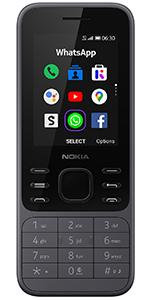
Figure 3: Example of the phone's menu interface with application icons.
FM Radio and Games
- To access FM radio, navigate to the 'FM Radio' application in the menu. You can listen to FM radio without attaching earphones.
- The phone comes with pre-installed games. Access them via the 'Games' menu option.
Maintenance
- Keep the device dry. Precipitation, humidity, and all types of liquids or moisture can contain minerals that will corrode electronic circuits.
- Do not use or store the device in dusty or dirty areas.
- Do not store the device in high temperatures. High temperatures can shorten the life of electronic devices, damage batteries, and warp or melt certain plastics.
- Do not store the device in cold temperatures. When the device returns to its normal temperature, moisture can form inside the device and damage electronic circuits.
- Do not attempt to open the device other than as instructed in this manual.
- Do not drop, knock, or shake the device. Rough handling can break internal circuit boards and fine mechanics.
- Only use a soft, clean, dry cloth to clean the surface of the device.
Troubleshooting
| Problem | Possible Solution |
|---|---|
| Phone does not power on or is stuck in a loop. | Ensure the battery is properly inserted and charged. Try removing and reinserting the battery. If the issue persists, contact customer support. |
| Cannot make or receive calls/texts. | Check if the SIM card is correctly inserted. Verify that your network carrier is supported by the Nokia 105 4G (GSM carriers like T-Mobile and T-Mobile subsidiaries are compatible; AT&T, Cricket, Verizon, or their subsidiaries are not). Check network signal strength. |
| Low call volume. | Adjust the call volume using the phone's settings. Ensure the speaker is not obstructed. |
| Battery drains quickly. | Ensure the phone is fully charged. Reduce screen brightness. Close unused applications. Battery life can vary based on usage. |
| Messages not opening. | Restart the phone. Check if there is sufficient memory. If the issue persists, it might be a software glitch; consider a factory reset (back up data first) or contact support. |
Specifications
| Feature | Detail |
|---|---|
| Model Name | 105 4G (TA-1547) |
| Brand | Nokia |
| Product Dimensions | 4.78 x 1.97 x 0.57 inches |
| Item Weight | 3.35 ounces |
| Color | Charcoal |
| Screen Size | 1.8 Inches |
| Resolution | 160 x 120 |
| Battery Capacity | 1450 mAh (Lithium Ion) |
| Phone Talk Time | Up to 24 Hours |
| Charging Time | Approximately 3 Hours |
| Memory Storage Capacity | 128 MB |
| RAM Memory Installed Size | 512 MB |
| Wireless Carrier Compatibility | Unlocked GSM carriers (e.g., T-Mobile and T-Mobile subsidiaries). Not compatible with AT&T, Cricket, Verizon, or their subsidiaries. |
| Cellular Technology | 4G |
| Connectivity Technology | Bluetooth, USB |
| Special Features | Basic Phone, Dual SIM, Expandable Memory, FM Radio, LED Flashlight, Games |
| Audio Jack | 3.5 mm |
| Manufacturer | HMD Global Oy |
| Country of Origin | China |
Warranty and Support
For warranty information and technical support, please refer to the documentation provided with your purchase or visit the official Nokia support website. Keep your proof of purchase for warranty claims.
For further assistance, you may contact Nokia customer service directly.
Related documentsTA-1547


Ask a question about this manual
Ask about setup, troubleshooting, compatibility, parts, safety, or missing instructions. Manuals+ will review the question and use this page’s manual context to help answer it.