
1. Introduction
This manual provides essential information for setting up, operating, and maintaining your OSCAL Flat 1C smartphone. Please read it carefully to ensure proper use and to maximize the device's performance and longevity.

Image: The OSCAL Flat 1C smartphone, showcasing its sleek design.
2. Package Contents
Verify that all items are present in your product package:
- OSCAL Flat 1C Smartphone
- USB Type-C Cable
- Power Adapter
- SIM Ejector Tool
- Quick Start Guide (this manual)

Image: Contents of the OSCAL Flat 1C retail box, including the phone, charger, and cable.
3. Device Overview
Familiarize yourself with the physical components of your OSCAL Flat 1C smartphone.

Image: An overview of the OSCAL Flat 1C highlighting key features like RAM, ROM, camera, battery, screen size, Face ID, and Android 13.
Key Components:
- Front Camera: For selfies and video calls.
- Display: 6.56-inch HD+ screen for clear visuals.
- Volume Buttons: Adjust media and call volume.
- Power Button: Turn the device on/off, lock/unlock the screen.
- SIM/SD Card Tray: Insert your SIM cards and microSD card.
- USB Type-C Port: For charging and data transfer.
- Rear Camera: Capture high-quality photos and videos.
- Speaker: Audio output.
4. Setup
4.1. Inserting SIM and MicroSD Cards
- Locate the SIM card tray on the side of your phone.
- Insert the SIM ejector tool into the small hole next to the tray and push gently until the tray pops out.
- Place your Nano-SIM card(s) and/or microSD card into the designated slots on the tray. Ensure the gold contacts face downwards.
- Carefully push the tray back into the phone until it clicks into place.
4.2. Initial Power On and Setup
- Press and hold the Power button until the OSCAL logo appears.
- Follow the on-screen instructions to select your language, connect to Wi-Fi, and set up your Google account.
- You will be prompted to set up a screen lock (PIN, pattern, or password) and Face ID.
4.3. Setting up Face ID
Face ID allows you to unlock your phone using facial recognition.
- Go to Settings > Security & privacy > Face unlock.
- Follow the on-screen prompts to register your face. Ensure you are in a well-lit area and hold the phone at eye level.
- For optimal security, Face ID should be used in conjunction with a strong PIN or pattern.
5. Operating Instructions
5.1. Android 13 and Doke_OS 4.0
Your OSCAL Flat 1C runs on Android 13 with the Doke_OS 4.0 interface, offering intuitive graphics and fluid controls.

Image: Screenshots of the Android 13 and Doke_OS 4.0 user interface, showing various apps and widgets.
- Navigation: Use gestures or the traditional three-button navigation bar (configurable in Settings).
- Notifications: Swipe down from the top of the screen to access notifications and quick settings.
- Widgets: Customize your home screen with widgets for quick access to information.
- Floating Window: Doke_OS 4.0 supports floating windows for enhanced multitasking.
5.2. Connectivity
- Wi-Fi: Connect to wireless networks via Settings > Network & internet > Wi-Fi. Supports 2.4G and 5G dual-band Wi-Fi.
- Bluetooth: Pair with Bluetooth devices (headphones, speakers) via Settings > Connected devices > Bluetooth. Supports Bluetooth 4.2.
- Mobile Data (4G): Ensure your SIM card is active and mobile data is enabled in Settings > Network & internet > Mobile network.
- OTG (On-The-Go): Connect USB devices like flash drives or keyboards using an OTG adapter (sold separately).
5.3. Storage and Performance
The OSCAL Flat 1C is equipped with a Unisoc SC 9863A 8-core processor, 4GB RAM, and 32GB ROM, expandable up to 1TB via a TF card.

Image: Diagram illustrating the 4GB RAM (2GB + 2GB virtual) and 32GB ROM, with 1TB TF card expansion capability.
- RAM Management: The 4GB RAM allows for smooth multitasking.
- Storage Management: The 32GB internal storage provides space for apps and files. Expand storage with a microSD card for additional capacity.
6. Camera Usage
Capture memorable moments with the OSCAL Flat 1C's cameras.

Image: Visual representation of the OSCAL Flat 1C's 8MP rear camera and 5MP front camera, with example photos.
- Rear Camera: The 8MP Samsung back camera captures detailed photos and vibrant colors.
- Front Camera: The 5MP front camera is ideal for selfies and video calls.
- Video Recording: Record videos in 1080P resolution.
- Camera App: Open the Camera app from your home screen or app drawer. Tap to focus, pinch to zoom, and use various modes like Photo, Video, and Portrait.
7. Battery Management
Your OSCAL Flat 1C is equipped with a 4700mAh battery designed for extended use.
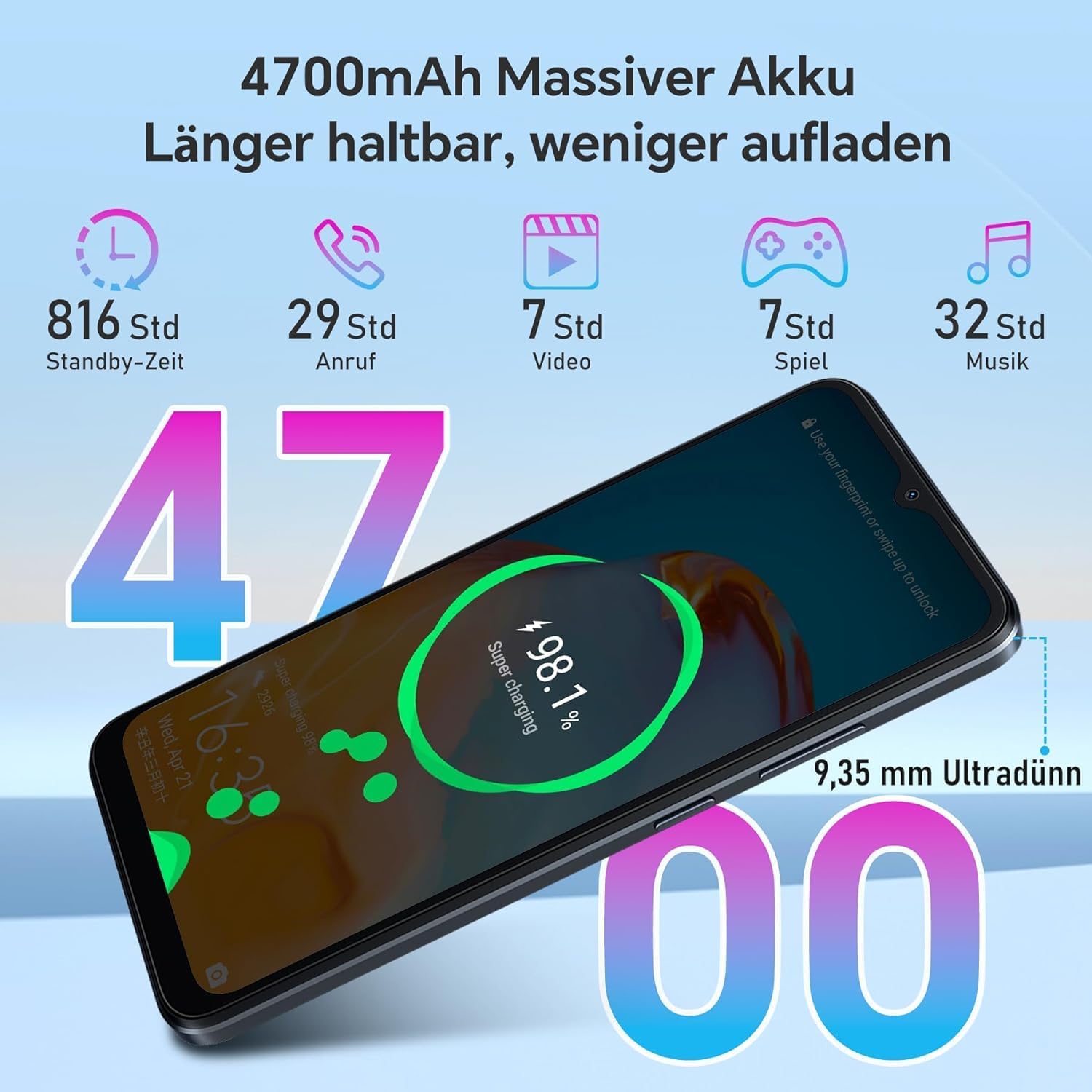
Image: Infographic showing the 4700mAh battery and estimated usage times for standby, calls, video, gaming, and music playback.
- Charging: Use the provided Type-C cable and power adapter to charge your device.
- Battery Life: Expect up to 34 days standby, 29 hours talk time, 32 hours music playback, and 7 hours video playback on a single charge.
- Battery Saver: Enable Battery Saver mode in Settings > Battery to extend battery life when needed.
8. Specifications
Detailed technical specifications for the OSCAL Flat 1C smartphone:
| Feature | Specification |
|---|---|
| Model | Flat 1C |
| Display Size | 6.56 inches HD+ |
| Processor | Unisoc SC 9863A 8-core |
| RAM | 4 GB |
| Internal Storage (ROM) | 32 GB |
| Expandable Storage | Up to 1 TB (TF card) |
| Operating System | Android 13 with Doke_OS 4.0 |
| Rear Camera | 8 MP Samsung |
| Front Camera | 5 MP |
| Battery Capacity | 4700 mAh |
| Charging Port | USB Type-C |
| Connectivity | 4G, Wi-Fi (2.4G/5G), Bluetooth 4.2 |
| Navigation | GPS, GLONASS, Galileo |
| Security Features | Face ID |
| Weight | 192 g |
9. Maintenance
Follow these guidelines to keep your OSCAL Flat 1C in optimal condition:
- Cleaning: Use a soft, lint-free cloth to clean the screen and body. Avoid harsh chemicals.
- Software Updates: Regularly check for and install system updates via Settings > System > System update to ensure your device has the latest features and security patches.
- Avoid Extreme Conditions: Do not expose the phone to extreme temperatures, direct sunlight for prolonged periods, or excessive moisture.
- Protect the Screen: Consider using a screen protector and a protective case to prevent scratches and damage.
10. Troubleshooting
Here are solutions to common issues you might encounter:
- Device not turning on: Ensure the battery is charged. Connect the phone to the charger for at least 10 minutes, then try powering it on again.
- Apps crashing or freezing: Close background apps. If the issue persists, restart the phone. Consider clearing the app's cache or reinstalling it.
- Poor Wi-Fi connection: Restart your Wi-Fi router and your phone. Ensure you are within range of the Wi-Fi signal.
- SIM card not detected: Ensure the SIM card is correctly inserted into the tray. Restart the phone.
- Battery draining quickly: Reduce screen brightness, disable unnecessary features like GPS or Bluetooth when not in use, and check battery usage in Settings > Battery to identify power-hungry apps.
11. Warranty and Support
Your OSCAL Flat 1C smartphone comes with a 12-month warranty period from the date of purchase. This warranty covers manufacturing defects under normal use.
For warranty claims, technical support, or further assistance, please contact OSCAL customer service through their official website or the retailer where you purchased the device. Keep your proof of purchase for warranty validation.
For more information, visit the official OSCAL website: www.oscal.global


