
Gerrit ZW60
ZW60 Smartwatch User Manual
Model: ZW60 | Brand: Gerrit
1. Product Overview
The ZW60 Smartwatch is a versatile wearable device designed to enhance your daily life with its advanced features. It combines communication, health monitoring, and fitness tracking capabilities in a sleek, round design. With its vibrant AMOLED display and robust connectivity, it's an ideal companion for both men and women seeking a smart and active lifestyle.
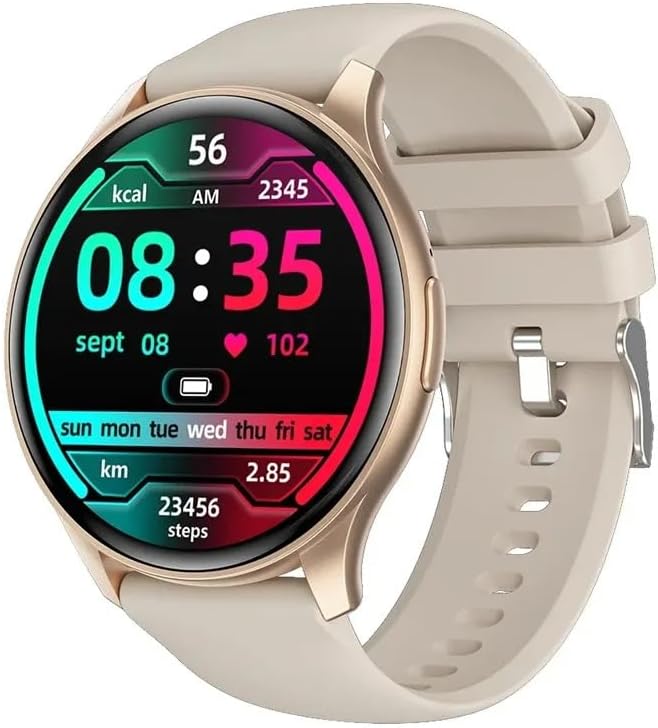
The ZW60 Smartwatch in gold with a beige strap, showcasing its main display with time, date, heart rate, and step count.
Key Features
- 1.43-inch AMOLED Display: Ultra-clear, high-resolution screen (466x466px) for vivid visuals.
- Bluetooth 5.3 Connectivity: Stable and efficient connection for calls and data sync.
- Integrated Bluetooth Call Function: Make and receive calls directly from your wrist.
- Comprehensive Health Monitoring: Includes heart rate, sleep, and blood pressure monitoring.
- Activity Tracking: Monitors steps, calories burned, and distance.
- Multiple Sports Modes: Supports various exercise types for accurate tracking.
- Music Playback Control: Manage your phone's music directly from the watch.
- Message Push & Alarm Clock: Receive notifications and set reminders.
- Life Waterproof: Designed to withstand daily splashes and sweat.
- Wide Compatibility: Supports both iOS and Android operating systems.

The ZW60 Smartwatch is designed with an ultra-thin body and an always-on screen, available in multiple colors.

Detailed view of the ZW60's 1.43-inch AMOLED screen, Bluetooth call capability, diverse menu styles, and integrated heart rate and blood oxygen monitoring.
2. Setup Guide
2.1 Unboxing and Initial Charge
Upon unboxing your ZW60 Smartwatch, it is recommended to fully charge the device before first use. Connect the magnetic charging cable to the charging contacts on the back of the watch and plug the USB end into a standard USB power adapter (5V/1A recommended).
- Remove the smartwatch and all accessories from the packaging.
- Locate the magnetic charging cable.
- Align the magnetic end of the cable with the charging pins on the back of the watch until it snaps into place.
- Plug the USB-A end of the cable into a USB power source.
- The watch screen will display a charging indicator. Allow approximately 2-3 hours for a full charge.
2.2 App Installation and Pairing
To unlock the full potential of your ZW60 Smartwatch, you need to install the companion application on your smartphone and pair the devices via Bluetooth.
- Download the App: Scan the QR code provided in the watch's quick start guide or search for the official app (e.g., 'FitCloudPro' or similar, refer to product packaging for exact name) in your smartphone's app store (Apple App Store for iOS, Google Play Store for Android).
- Enable Bluetooth: Ensure Bluetooth is enabled on your smartphone.
- Open the App: Launch the downloaded application on your phone.
- Add Device: Follow the in-app instructions to add a new device. The app will search for available smartwatches. Select 'ZW60' from the list of found devices.
- Confirm Pairing: A pairing request may appear on both your phone and the watch. Confirm the pairing on both devices.
- Complete Setup: Once paired, the app will guide you through initial settings such as personal information, notification preferences, and watch face customization.
3. Operating Instructions
3.1 Basic Navigation
- Touchscreen: Swipe left/right, up/down to navigate through menus and features. Tap to select.
- Side Button: Typically used to wake the screen, return to the home screen, or access the main menu. Long press may power on/off or access quick settings.
3.2 Making and Receiving Calls
The ZW60 Smartwatch supports Bluetooth calling, allowing you to make and receive calls directly from your wrist when connected to your smartphone.
- Dialing: Access the 'Dialer' or 'Phone' app on your watch. You can dial numbers directly or select contacts synced from your phone.
- Answering Calls: When a call comes in, the watch will vibrate and display the caller ID. Tap the green icon to answer or the red icon to reject.
- Volume Control: Adjust call volume using the on-screen controls during a call.
3.3 Music Playback Control
Control music playing on your smartphone directly from your ZW60 Smartwatch.
- Open the 'Music Control' feature on your watch.
- You can play/pause, skip tracks (next/previous), and adjust volume.
3.4 Health Monitoring
The ZW60 Smartwatch is equipped with a PPG biological tracking optical sensor to monitor various health metrics.

The ZW60 Smartwatch provides continuous health monitoring, including heart rate, blood oxygen, and blood pressure, allowing you to track your health status anytime.
- Heart Rate Monitor: Access the heart rate app on the watch to measure your current heart rate. The watch can also provide continuous monitoring.
- Sleep Monitor: Wear the watch to bed to track your sleep patterns, including deep sleep, light sleep, and awake times. Data is synced to the app.
- Blood Pressure Monitor: Use the dedicated app on the watch to take blood pressure readings. Note: This is for reference only and not a medical device.
3.5 Activity Tracking and Sports Modes
Track your daily activity and specific workouts with precision.
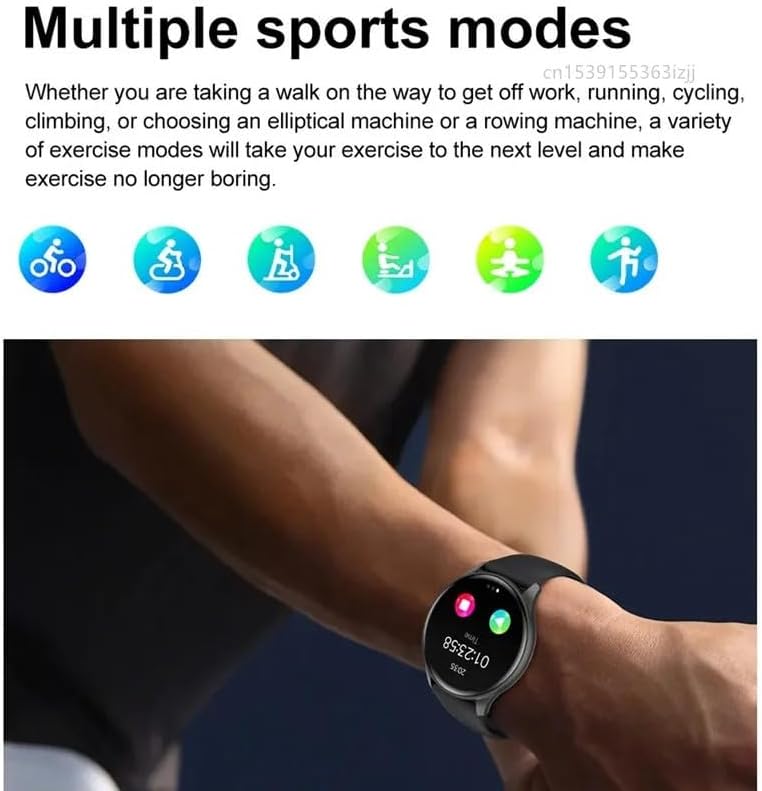
The ZW60 Smartwatch offers multiple sports modes to track various activities, from walking and running to cycling and yoga, enhancing your exercise experience.
- Daily Activity: The watch automatically tracks your steps, distance, and calories burned throughout the day. View summaries on the watch or in the app.
- Sports Modes: Select a specific sports mode (e.g., running, cycling, walking, yoga) before starting your workout for more accurate data collection.
3.6 Notifications and Alarms
- Message Push: Enable app notifications in the companion app to receive alerts for calls, SMS, and social media messages directly on your watch.
- Alarm Clock: Set alarms through the app, and your watch will vibrate to alert you at the scheduled time.
4. Care and Maintenance
Proper care ensures the longevity and optimal performance of your ZW60 Smartwatch.
- Cleaning: Regularly wipe the watch screen and strap with a soft, dry, lint-free cloth. For stubborn dirt, a slightly damp cloth can be used, then dry thoroughly. Avoid harsh chemicals or abrasive materials.
- Water Resistance: The ZW60 is rated as 'life waterproof'. This means it is resistant to splashes, rain, and sweat. It is not suitable for swimming, showering with hot water, or diving. Do not press buttons underwater.
- Battery Care: Avoid fully discharging the battery frequently. Charge the watch when the battery level is low. Store the watch in a cool, dry place if not used for extended periods, and charge it periodically to prevent deep discharge.
- Avoid Extreme Temperatures: Do not expose the watch to extreme hot or cold temperatures, as this can damage the battery and internal components.
5. Troubleshooting
If you encounter issues with your ZW60 Smartwatch, refer to the following common problems and solutions:
| Problem | Possible Solution |
|---|---|
| Watch won't turn on | Ensure the watch is fully charged. Connect it to the charger for at least 30 minutes. If still unresponsive, try a soft reset by long-pressing the side button for 10-15 seconds. |
| Cannot pair with phone | Ensure Bluetooth is enabled on your phone and the watch. Make sure the watch is not already paired with another device. Restart both the watch and phone. Clear Bluetooth cache on your phone if necessary. Try pairing through the app, not directly from phone's Bluetooth settings. |
| Health data inaccurate | Ensure the watch is worn snugly on your wrist, about one finger's width above the wrist bone. Clean the sensor on the back of the watch. Avoid excessive movement during measurements. Remember, the watch is not a medical device. |
| Battery drains quickly | Reduce screen brightness. Turn off continuous heart rate monitoring if not needed. Limit the number of app notifications. Ensure the watch is not constantly searching for a Bluetooth connection. |
| Notifications not received | Check if notifications are enabled in the companion app and in your phone's settings for the specific apps. Ensure the watch is connected via Bluetooth. Disable 'Do Not Disturb' mode on both watch and phone. |
6. Technical Specifications
Detailed specifications for the ZW60 Smartwatch:

The ZW60 Smartwatch is powered by a low-power chip, ensuring efficient operation and powerful performance.
| Feature | Specification |
|---|---|
| Model Number | ZW60 |
| Brand | Gerrit |
| Display Type | AMOLED |
| Screen Size | 1.43 inches |
| Resolution | 466 x 466 pixels |
| Bluetooth Version | 5.3 |
| Processor | MediaTek |
| Battery Capacity | 220-300 mAh |
| RAM | <128 MB |
| ROM | <128 MB |
| Compatibility | iOS, Android OS |
| Water Resistance Level | Life Waterproof |
| Case Material | Alloy |
| Strap Material | Silicone Gel |
| Supported Functions | Pedometer, Sleep Monitor, Heart Rate Monitor, Answer Call, Dial Call, Remote Control, Message Push, Alarm Clock, Fitness Tracker, Message Reminder, Call Reminder |
7. Warranty and Support
The ZW60 Smartwatch is covered by the manufacturer's standard warranty. Please refer to the warranty information provided with your purchase or visit the official Gerrit website for details regarding warranty terms, conditions, and support contact information.
For technical assistance, troubleshooting beyond this manual, or service inquiries, please contact Gerrit customer support through their official channels.
Related documentsZW60

Ask a question about this manual
Ask about setup, troubleshooting, compatibility, parts, safety, or missing instructions. Manuals+ will review the question and use this page’s manual context to help answer it.