
Introduction
Welcome to the Ymiko Automatic Fish Feeder instruction manual. This document provides detailed guidance on the proper setup, operation, and maintenance of your new automatic fish feeder. Please read this manual thoroughly before use to ensure optimal performance and longevity of the product.
Product Overview
Key Features:
- Versatile Food Options: Dispenses dry, granular, and flake fish food.
- Convenient Feeding: Offers automatic or manual feeding for flexible schedules.
- Universal Fit: Suitable for various aquarium sizes with options for individual placement or installation.
- Durable Construction: Made from sturdy, stable plastic material.
- Simple Setup: Easy to install and operate.
- Moisture Prevention: Unique design prevents food from getting wet or clogged.
Package Contents:
Before proceeding with setup, please verify that all items are present in the package:
- 1 x Automatic Fish Feeder (Battery Not Included)
- 1 x Food Vessel
- 1 x Accessory (Mounting Clamp)
- 2 x Screw
- 1 x Adhesive Tape

Image: All components of the Ymiko Automatic Fish Feeder, including the main unit, food vessel, mounting clamp, screws, and adhesive tape.
Setup
Battery Installation:
- The feeder requires 2 AA batteries (not included).
- Open the battery compartment cover located on the back of the unit.
- Insert the batteries, ensuring correct polarity (+/-).
- Close the battery compartment cover securely.

Image: Rear view of the Ymiko Automatic Fish Feeder, highlighting the battery compartment and control buttons.
Installation Methods:
The feeder offers two installation options: clamping to the aquarium rim or adhesive mounting.
Method 1: Clamp Installation
- Attach the clamp accessory to the feeder unit using the provided screws.
- Position the feeder on the edge of your aquarium. Ensure the food dispenser opening is directly above the water surface.
- Tighten the adjustment screw on the clamp until the feeder is securely fastened to the aquarium rim.

Image: Side view of the Ymiko Automatic Fish Feeder, illustrating the clamp mechanism for aquarium rim attachment.
Method 2: Adhesive Installation
- Clean the desired mounting surface on your aquarium lid or side.
- Peel the protective film from the adhesive tape.
- Attach the adhesive tape to the bottom of the feeder's base.
- Press the feeder firmly onto the cleaned surface for several seconds to ensure a strong bond.
Filling the Food Vessel:
- Open the food vessel cover.
- Fill the vessel with your preferred dry, granular, or flake fish food. Do not overfill.
- Close the food vessel cover securely.

Image: The Ymiko Automatic Fish Feeder mounted on an aquarium, showing the food vessel filled with fish food.
Operating Instructions
Setting Feeding Frequency:
- The feeder offers two automatic feeding intervals: every 12 hours or every 24 hours.
- Locate the "12H/24H" button on the back of the unit (refer to the image in the Battery Installation section).
- Press the button once for a 12-hour feeding cycle. An indicator light will confirm the setting.
- Press the button again for a 24-hour feeding cycle. The indicator light will confirm the setting.
- The first feeding will occur immediately after setting the frequency.
Manual Feeding:
To dispense food manually at any time, press the yellow button on the side of the unit. One press will dispense a single portion of food.
Adjusting Food Dispensing Amount:
- The feeder features an adjustable slider on the food vessel to control the amount of food dispensed per cycle.
- Slide the adjustment lever to increase or decrease the opening size, thereby controlling the portion size.
- Observe the first few feedings and adjust as necessary to prevent overfeeding.
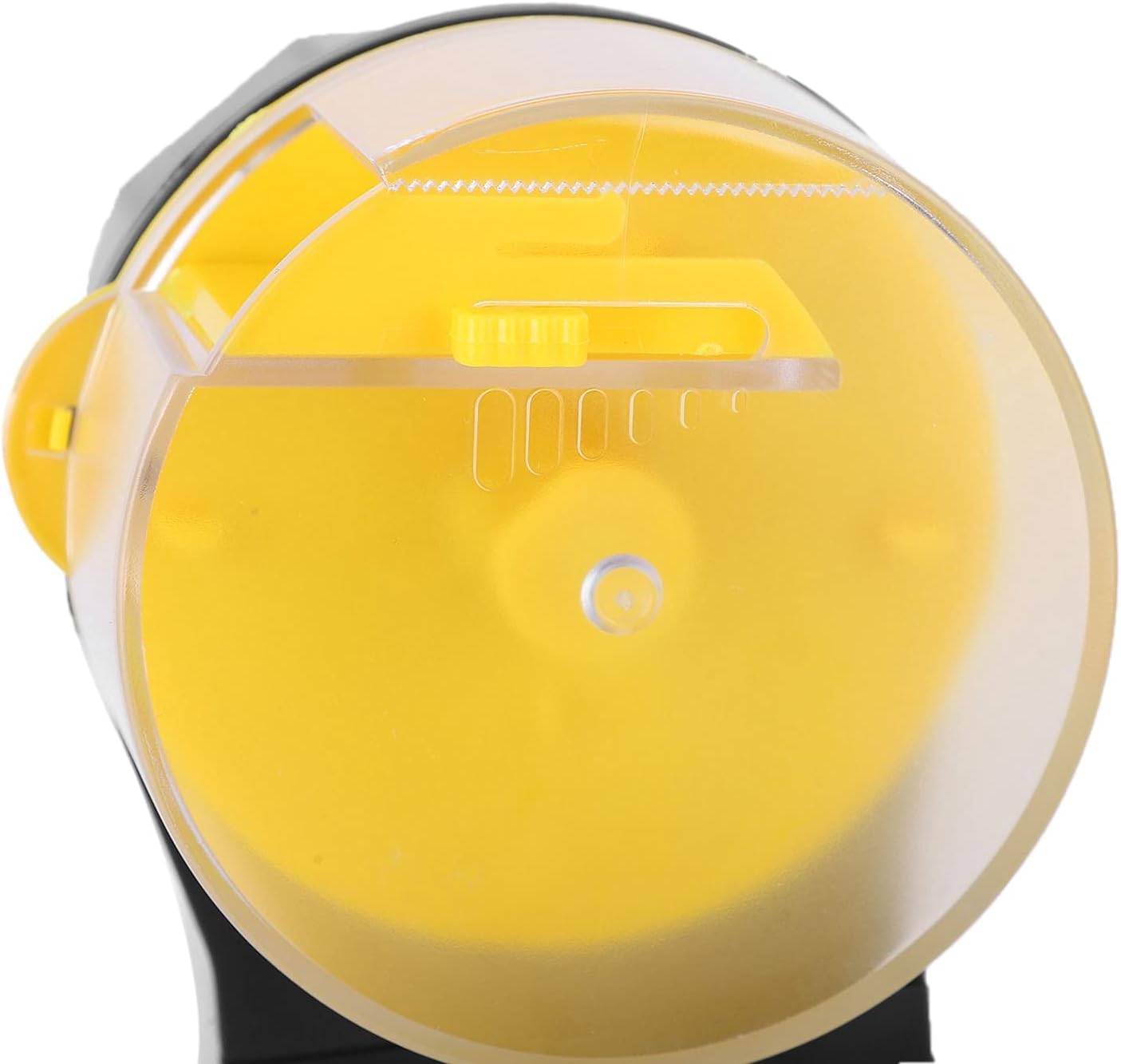
Image: Top view of the Ymiko Automatic Fish Feeder, highlighting the adjustable slider for controlling food portion size.

Image: The Ymiko Automatic Fish Feeder actively dispensing food into an aquarium, demonstrating its function.
Maintenance
Cleaning the Food Vessel:
- Regularly clean the food vessel to prevent food residue buildup and maintain hygiene.
- Remove the food vessel from the main unit.
- Wash the vessel with warm water and a mild, non-toxic detergent. Rinse thoroughly.
- Ensure the vessel is completely dry before refilling with food and reattaching to the feeder.
Battery Replacement:
Replace batteries when the indicator light dims or the feeder stops operating. Follow the battery installation steps outlined in the Setup section.
Troubleshooting
Feeder Not Dispensing Food:
- Check battery level and replace if necessary.
- Ensure the food vessel is not empty.
- Verify that the food is not clumped or stuck. Break up any clumps.
- Check if the dispensing mechanism is obstructed by debris.
Food Getting Wet or Clogged:
- Ensure the feeder is positioned correctly, with the dispenser opening clear of water splashes.
- Verify the food vessel cover is securely closed.
- Use dry, appropriate fish food. Avoid using moist or sticky foods.
Inconsistent Feeding Times:
- Check battery level and replace if needed.
- Re-set the feeding frequency according to the Operating Instructions.
Specifications
- Product Dimensions: 5.91 x 5.91 x 3.54 inches
- Item Weight: 11.6 ounces
- Manufacturer: Ymiko
- Model Number: Ymikosrncb5gyzk
- Power Supply: 2 x AA Batteries (not included)
- Material: Plastic
- Feeding Frequency: 12 hours or 24 hours
Warranty and Support
For warranty information or technical support, please refer to the retailer's policy or contact Ymiko customer service through their official channels. Keep your purchase receipt for warranty claims.