Introduction
Welcome to the user manual for your Samsung 75-inch QN95C Neo QLED 4K TV. This guide provides essential information for setting up, operating, maintaining, and troubleshooting your television. The Samsung QN95C features Neo QLED technology for stunning picture quality, 4K resolution, and a 144Hz refresh rate for smooth gaming performance. It also includes advanced audio features like Dolby Atmos for an immersive sound experience.

Image: Front view of the Samsung QN95C Neo QLED 4K TV, showcasing its slim bezel and vibrant display.
Setup
1. Unpacking and Placement
Carefully remove the TV and its components from the packaging. The box typically includes the TV unit and a stand. Ensure you have a clean, flat surface for assembly. Place the TV in a location with adequate ventilation and away from direct sunlight or heat sources.
2. Attaching the Stand (if applicable)
If you are not wall-mounting, attach the provided stand to the TV according to the instructions in the separate quick setup guide. Ensure all screws are securely fastened.
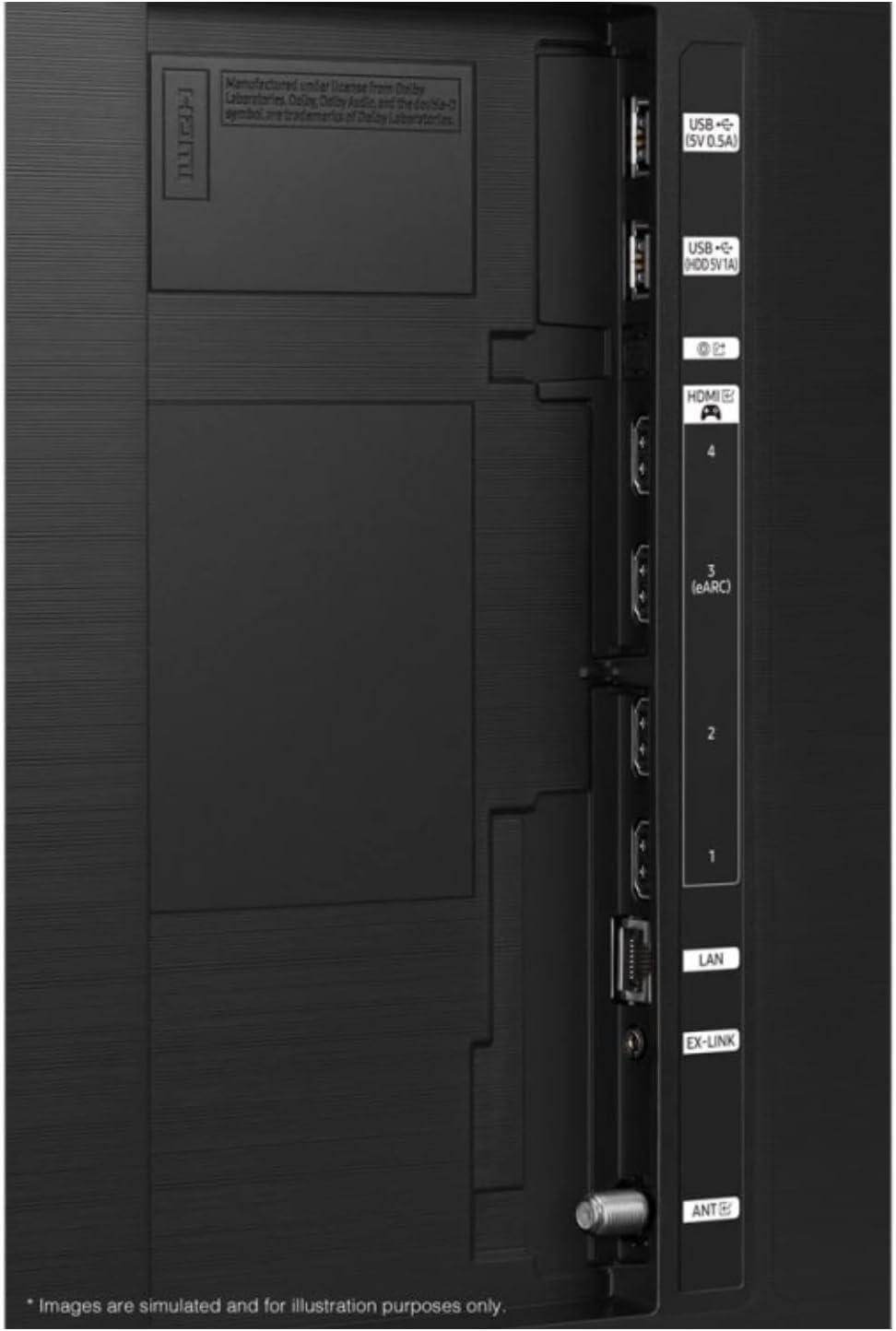
Image: Side profile of the Samsung QN95C Neo QLED 4K TV, illustrating its slim design and the attached stand.
3. Connecting External Devices
Connect your external devices such as cable boxes, gaming consoles, or sound systems to the appropriate ports on the back of the TV.
- HDMI: For high-definition audio and video. Your TV features multiple HDMI ports, including one with eARC for enhanced audio return channel functionality.
- USB: For connecting USB storage devices (5V 0.5A and 5V 1A ports available).
- LAN: For a wired internet connection.
- ANT: For connecting an antenna for over-the-air broadcasts.

Image: Detailed view of the TV's back panel, highlighting the HDMI, USB, LAN, and ANT ports for connecting various devices.
4. Initial Power On and Configuration
Plug the power cord into the TV and then into a wall outlet. Press the power button on the TV or remote control. The TV will guide you through the initial setup process, which typically includes:
- Language Selection: Choose your preferred language.
- Network Connection: Connect to your home Wi-Fi network or use a wired LAN connection.
- Smart Setup Options: You will be presented with options to set up your TV using a smartphone (Quick and Easy) or via the remote control (Step-by-Step). Follow the on-screen prompts for your chosen method.
- Channel Scan: If using an antenna, the TV will scan for available channels.
- Account Setup: Sign in to your Samsung account or create a new one to access Smart TV features and apps.
Operating Your TV
1. Basic Controls
Use the remote control to navigate the TV's interface. Common functions include:
- Power: Turn the TV on or off.
- Volume: Adjust the sound level.
- Channel: Change TV channels (if an antenna is connected).
- Source/Input: Switch between connected external devices (e.g., HDMI 1, HDMI 2).
- Home Button: Access the Smart Hub for apps, settings, and other features.
2. Smart TV Features
Your Samsung QN95C is a Smart TV, offering access to a wide range of online content and applications. Supported internet services include a web browser and YouTube. You can download additional apps from the Samsung App Store.
3. Picture Settings
To optimize your viewing experience, you can adjust various picture settings:
- Picture Mode: Select from modes like Standard, Dynamic, Movie, or Filmmaker Mode.
- Brightness/Contrast: Fine-tune the display's luminance and contrast levels.
- Color/Tint: Adjust color saturation and hue.
- Sharpness: Enhance the detail of the image.
- Expert Settings: Access advanced calibration options for professional adjustments.
4. Sound Settings
The TV supports Dolby Atmos for an immersive audio experience. You can customize sound settings:
- Sound Mode: Choose from various sound modes (e.g., Standard, Adaptive Sound, Amplify).
- Equalizer: Manually adjust frequency bands.
- Dolby Atmos: Ensure this feature is enabled for compatible content to experience spatial audio.
- Q-Symphony: If you have a compatible Samsung soundbar, enable Q-Symphony to synchronize the TV speakers and soundbar for richer, more immersive audio.
5. Gaming Features
The QN95C is optimized for gaming with a 144Hz refresh rate. Ensure your gaming console is connected to an HDMI port that supports high refresh rates. Activate Game Mode in the TV settings for reduced input lag and optimized picture settings for gaming.
Maintenance
1. Cleaning Your TV
To maintain the clarity and longevity of your TV, follow these cleaning guidelines:
- Screen: Gently wipe the screen with a soft, dry microfiber cloth. For stubborn smudges, lightly dampen the cloth with distilled water or a screen-specific cleaning solution (never spray directly onto the screen).
- Frame and Stand: Use a soft, dry cloth to wipe dust from the TV frame and stand.
- Do Not Use: Avoid using abrasive cleaners, alcohol, benzene, or thinners, as these can damage the TV's surface.
2. Software Updates
Regularly check for and install software updates to ensure your TV has the latest features, performance improvements, and security patches. You can usually find this option in the TV's settings menu under Support > Software Update.
Troubleshooting
If you encounter issues with your TV, try the following solutions before contacting service.
| Problem | Possible Solution |
|---|---|
| No power | Ensure the power cord is securely plugged into both the TV and a working wall outlet. Try a different outlet. |
| No picture, but sound is present | Check the input source. Ensure all cables are securely connected. Try restarting connected devices. |
| No sound, but picture is present | Check the volume level. Ensure mute is not activated. Verify audio output settings (TV speakers, external sound system). Check audio cables. |
| Remote control not working | Replace the batteries. Ensure there are no obstructions between the remote and the TV. Try pairing the remote again if it's a Bluetooth remote. |
| Cannot connect to Wi-Fi | Check your router and modem. Restart your router. Ensure the Wi-Fi password is correct. Try moving the TV closer to the router or using a wired LAN connection. |
| Picture quality issues (e.g., blurry, distorted) | Check the resolution of the input source. Adjust picture settings. Ensure cables are not damaged. |
Specifications
Below are the key specifications for the Samsung QN95C Neo QLED 4K TV (QN75QN95CAFXZA):
| Feature | Detail |
|---|---|
| Brand | Samsung |
| Model Name | QN95C |
| Screen Size | 75 Inches |
| Display Technology | QLED |
| Resolution | 4K |
| Special Feature | Flat |
| Aspect Ratio | 16:9 |
| Connectivity Technology | Wi-Fi |
| Supported Internet Services | Browser, YouTube |
| Included Components | Stand, TV |
| ASIN | B0D19GL7JP |
| Date First Available | April 9, 2024 |
Warranty and Support
As this product is a renewed item, warranty terms may differ from new products. Please refer to the specific warranty information provided at the time of purchase or contact the seller directly for details regarding your renewed product's warranty coverage.
For technical support, product registration, or further assistance, please visit the official Samsung support website or contact Samsung customer service. Have your TV's model number (QN75QN95CAFXZA) and serial number ready when seeking support.


