
Stokk T1
Contents
Stokk T1 UV Countertop Reverse Osmosis Water Filter Instruction Manual
Model: T1
1. Introduction
This manual provides comprehensive instructions for the Stokk T1 UV Countertop Reverse Osmosis Water Filter. It covers the proper setup, operation, maintenance, and troubleshooting procedures to ensure the device functions correctly and provides high-quality filtered water. Please read this manual thoroughly before using the product.
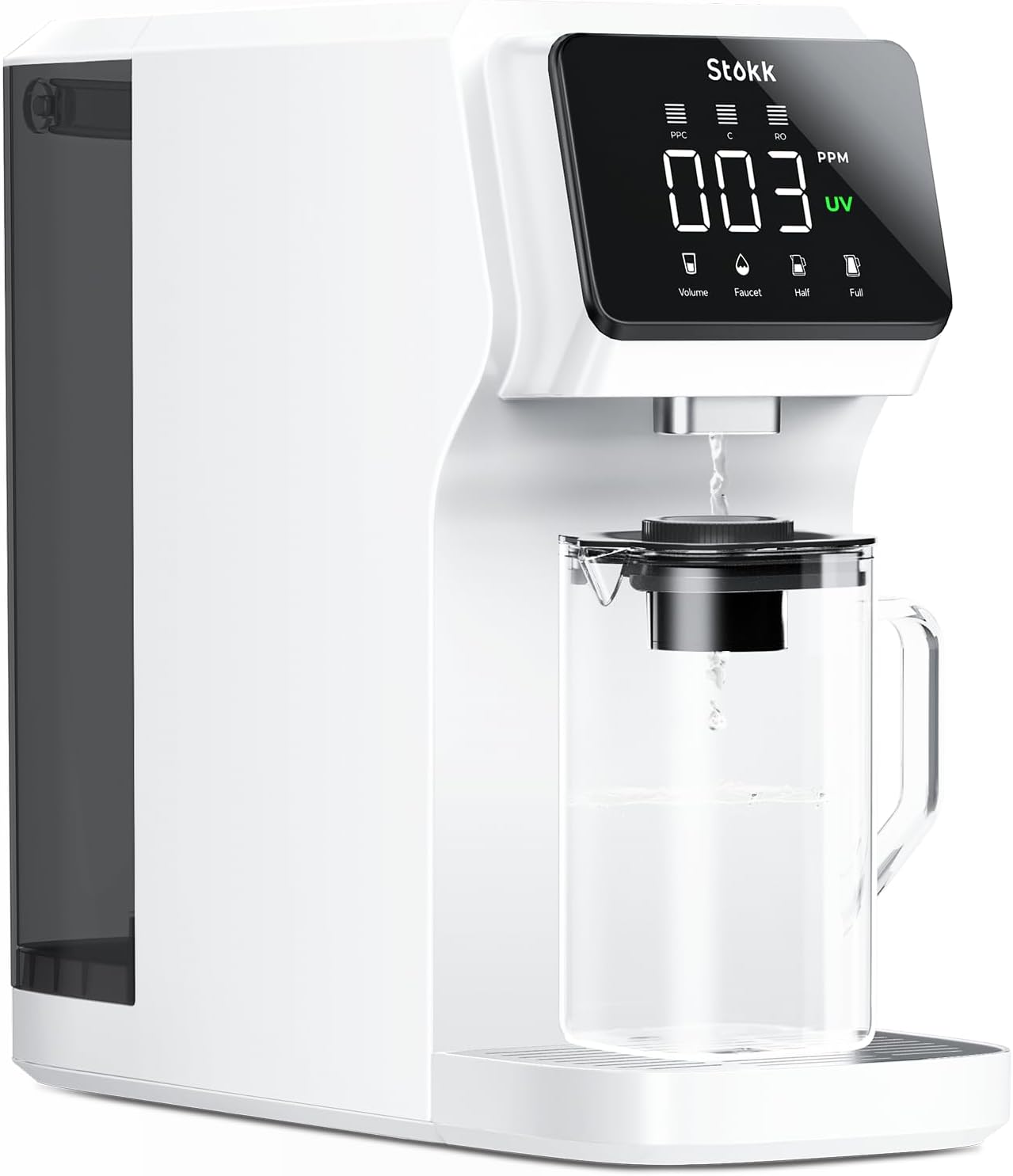
Figure 1.1: Stokk T1 UV Countertop Reverse Osmosis Water Filter.
2. Safety Information
Observe the following safety precautions to prevent injury or damage to the device:
- Ensure the power cord is properly connected to a grounded electrical outlet.
- Do not immerse the unit in water or other liquids.
- Keep the device away from direct sunlight, heat sources, and corrosive substances.
- Do not operate the unit if the power cord or plug is damaged.
- Only use the device with potable tap water.
- Keep out of reach of children.
- Ensure adequate ventilation around the unit.
3. Product Overview
3.1 Components
The Stokk T1 system includes the main unit, a removable raw water tank, a filtered water carafe with an alkaline boost filter, and the internal filtration cartridges.
3.2 Control Panel
The control panel provides real-time information and allows for various dispensing options.

Figure 3.1: Smart Control Panel. Displays TDS levels, filter life indicators (PPC, C, RO), UV light status, and water volume selection buttons (Volume, Faucet, Half, Full).
4. Setup
4.1 Unpacking and Placement
- Carefully remove all components from the packaging.
- Place the unit on a flat, stable, and dry surface. Ensure there is sufficient clearance around the unit, especially for accessing the rear water tank.

Figure 4.1: Product Dimensions. The unit measures approximately 18.31 inches (L) x 7.32 inches (W) x 16.26 inches (H).
4.2 Initial Cleaning
Before first use, clean the raw water tank and the filtered water carafe with mild soap and water. Rinse thoroughly.
4.3 Filling the Raw Water Tank
- Remove the plastic lid from the back of the unit.
- Grasp the internal handle of the raw water tank. Pull horizontally backward approximately two to three inches to release it, then lift straight up to remove.
- Empty any residual water from the tank if present.
- Fill the tank with potable tap water up to the indicated maximum fill line.
- Carefully reinsert the tank into the unit. Ensure it aligns correctly and push it forward horizontally until it clicks into place. Replace the plastic lid.
4.4 First Use and Flushing
After filling the tank and plugging in the unit, the system will automatically begin filtering. For optimal taste and to remove any manufacturing residues, it is recommended to flush the system by dispensing and discarding at least 6-8 full tanks of water before consuming. This process ensures the filters are fully saturated and the water quality is at its best.
5. Filtration System Overview
The Stokk T1 employs a 6-stage filtration process combined with UV light purification to deliver clean and safe drinking water.

Figure 5.1: 6-Stage Reverse Osmosis & Ultraviolet Technology. The filtration stages include Pre-activated Carbon (PPC), 0.0001µm RO Membrane, Coconut-Shell Activated Carbon (C), UV Light, and a Remineralization & Alkaline Filter.
5.1 Filtration Stages
- PPC Filter (Pre-activated Carbon): Removes larger particles, sediment, rust, and chlorine.
- RO Membrane (Reverse Osmosis): Filters out dissolved solids, heavy metals, PFAS, fluoride, and other contaminants down to 0.0001 microns.
- C Filter (Coconut-Shell Activated Carbon): Further absorbs odors and residual chlorine, enhancing water taste and clarity.
- UV Light: Provides an additional layer of purification by sterilizing bacteria and viruses.
- Alkaline Boost Carafe: The included carafe contains a remineralization filter that raises the pH value of the RO water and adds essential minerals.

Figure 5.2: Mineral Enhanced Carafe. The carafe infuses essential minerals into the filtered water.
5.2 Contaminant Removal
The Stokk T1 system is designed to efficiently remove a wide range of contaminants.
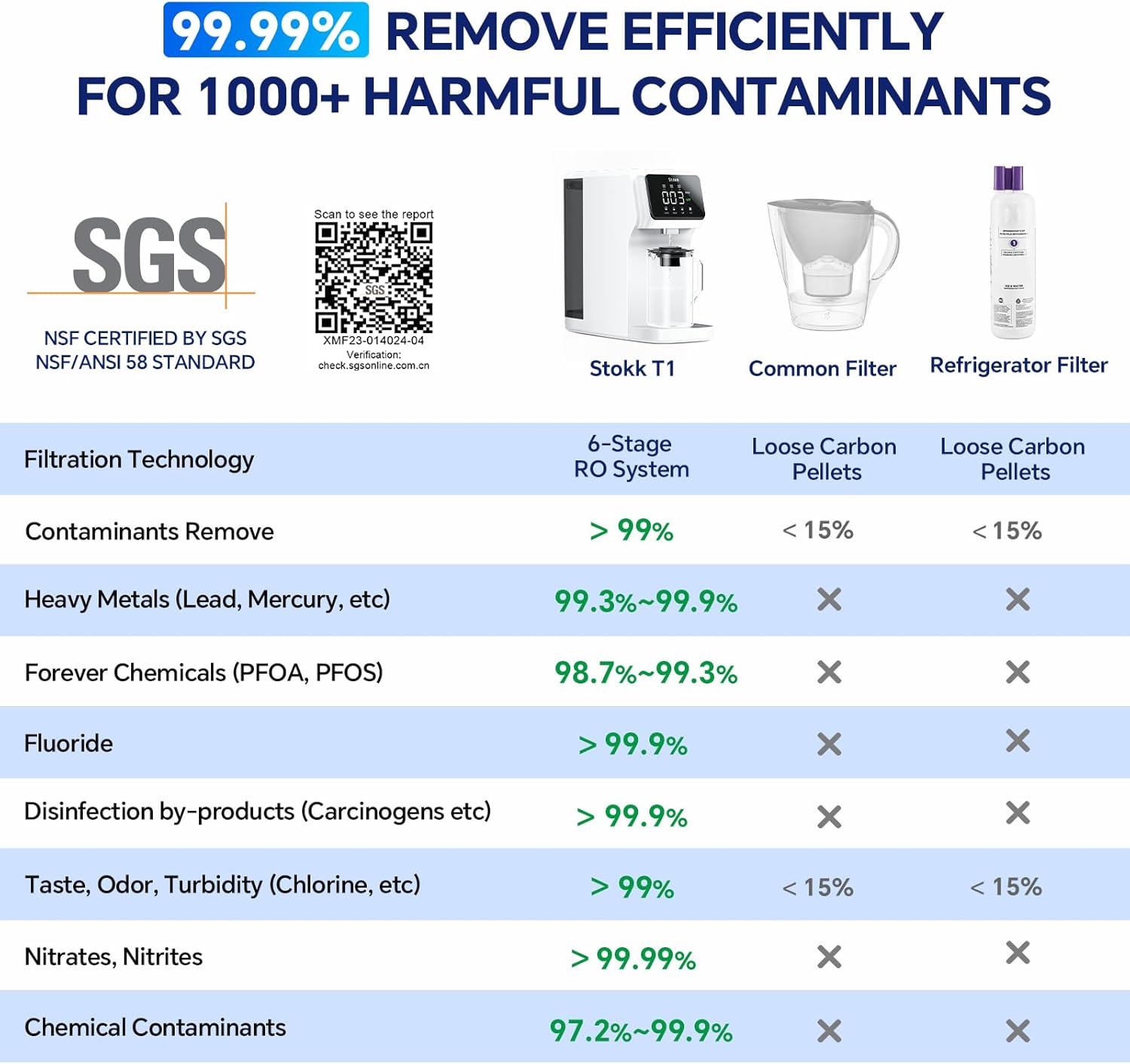
Figure 5.3: Contaminant Removal Efficiency. The Stokk T1 6-stage RO system removes over 99% of various contaminants, including heavy metals, PFAS, and fluoride.
5.3 Certifications
The Stokk T1 is tested and certified to meet various standards for water filtration.

Figure 5.4: SGS Certification. The unit meets NSF/ANSI 58 & 372 American National Standards and EPA 200 standard. Scan the QR code for the SGS online test report: SGS Test Report.
6. Operation
6.1 Powering On/Off
Plug the power cord into a suitable electrical outlet. The unit will power on automatically. To turn off, unplug the unit.
6.2 Dispensing Water
Use the control panel buttons to select the desired water volume or continuous dispensing.
- Volume Options: Select from preset volumes such as 8, 16, 24, 30, 40 oz, Half Pot, or Full Pot.
- Free Dispensing: Press the 'Faucet' button for continuous flow, press again to stop.

Figure 6.1: Water Volume Options. The control panel offers multiple preset dispensing volumes and a continuous flow option.
6.3 Understanding the TDS Display
The control panel displays the Total Dissolved Solids (TDS) level of the purified water in parts per million (PPM). A lower TDS reading indicates higher water purity.

Figure 6.2: TDS Detection. The display provides real-time monitoring of purified water quality.
7. Maintenance
7.1 Filter Replacement
The control panel features a real-time filter lifespan detection system that reminds you when to replace filters. Timely replacement ensures optimal performance and water quality.

Figure 7.1: Internal Filter View. The PPC, RO, and C filters are easily accessible for replacement.
- PPC Filter: Replace as indicated by the filter life reminder on the display.
- RO Filter: Replace as indicated by the filter life reminder on the display.
- C Filter: Replace as indicated by the filter life reminder on the display.
Refer to the specific filter replacement instructions provided with your replacement filters for detailed steps.
7.2 Cleaning the Unit
- External Cleaning: Wipe the exterior of the unit with a soft, damp cloth. Do not use abrasive cleaners or solvents.
- Internal Tank Cleaning: Periodically remove and clean the raw water tank as described in Section 4.3.
8. Troubleshooting
If you encounter issues with your Stokk T1 water filter, refer to the following common problems and solutions:
| Problem | Possible Cause | Solution |
|---|---|---|
| E1 Error displayed | Internal sensor error, water level issue, or temporary malfunction. | Unplug the unit, drain the raw water tank, and then plug it back in to reset. If the error persists, contact customer support. |
| Water leaks from the bottom | Improperly seated raw water tank, damaged seal, or internal component issue. | Ensure the raw water tank is correctly seated and sealed. Check for any visible cracks or damage. If leaking continues, discontinue use and contact customer support. |
| Unusual taste in filtered water | New filters not adequately flushed, expired filters, or contamination. | Ensure the system has been flushed with at least 6-8 tanks of water after filter replacement. Check filter life indicators and replace any expired filters. If the taste persists, contact customer support. |
| Low water flow rate | Clogged filters, low water level in raw tank, or air in the system. | Check filter life indicators and replace any clogged filters. Ensure the raw water tank is sufficiently filled. Run a few dispensing cycles to clear any trapped air. |
9. Specifications
- Brand: Stokk
- Model Name: T1
- Product Dimensions: 18.31"L x 7.32"W x 16.26"H
- Item Weight: 14.3 Pounds
- Installation Type: Countertop
- Power Source: Corded Electric
- Lower Temperature Rating: 41 Degrees Fahrenheit (5°C)
- Upper Temperature Rating: 100 Degrees Fahrenheit (38°C)
- Maximum Flow Rate: 0.39 Liters Per Minute
- Supported Water TDS Level Maximum: 1000 PPM
- Special Features: Alkaline Mineral Boost, UV Light, TDS Reduction, Food-grade Glass Carafe, Real-time Filter Life Reminder, Water Volume Options, Taste Improving Activated Carbon, Automatic Shut-Off, Built-In TDS Meter, Change Filter Indicator.
10. Warranty and Support
Stokk provides world-class water filtration solutions and US-based customer support. If you are not satisfied with your purchase or require technical assistance, please contact our after-sales team and water specialists. Refer to your purchase documentation for specific warranty terms and contact information.
Ask a question about this manual
Ask about setup, troubleshooting, compatibility, parts, safety, or missing instructions. Manuals+ will review the question and use this page’s manual context to help answer it.