
1. Important Safety Instructions
Please read all safety instructions carefully before installing and operating your air conditioner. Keep this manual for future reference.
1.1 General Safety
- This appliance is not intended for use by persons (including children) with reduced physical, sensory or mental capabilities, or lack of experience and knowledge, unless they have been given supervision or instruction concerning use of the appliance by a person responsible for their safety.
- Children should be supervised to ensure that they do not play with the appliance.
- Do not insert fingers or other objects into the air inlet or outlet.
- Do not attempt to repair the unit yourself. Contact qualified service personnel for all repairs.
1.2 Electrical Safety
- Ensure the power supply matches the rating label on the unit.
- Do not operate the AC with wet hands.
- Always use a properly grounded power outlet.
- If the power cord is damaged, it must be replaced by the manufacturer, its service agent, or similarly qualified persons to avoid a hazard.
1.3 Installation Safety
- Installation must be performed by qualified personnel in accordance with national wiring standards.
- Ensure the installation site can support the weight of the indoor and outdoor units.
- Do not install the unit near flammable gas or combustible materials.
2. Product Overview
The Voltas 1.5 Ton 3 Star Adjustable Inverter Split AC is designed for efficient and flexible cooling. This model features an inverter compressor for energy savings and a copper condenser for enhanced durability and heat transfer. It includes a 4-in-1 adjustable mode to suit varying cooling needs.
2.1 Key Features
- Inverter Compressor: Variable speed compressor adjusts power based on heat load, optimizing energy consumption.
- Copper Condenser: Provides efficient cooling and requires low maintenance.
- 4-in-1 Adjustable Mode: Allows operation at different cooling capacities (20% to 120%) via remote control.
- Anti-Dust Filter with Anti-Microbial Coating: Helps to remove dust and inhibit the growth of germs, bacteria, and fungi.
- R32 Refrigerant: Environmentally friendly refrigerant.
- Sleep Mode: Provides quiet and comfortable cooling throughout the night.
- Memory Restart: Automatically resumes previous settings after a power cut.
- Anti-Corrosive Coating: Enhances the durability and lifespan of the unit.
- Hidden Display: Integrated display for a sleek aesthetic.
- Auto Clean Function: Self-cleans the indoor unit to ensure clean air delivery.
2.2 Components Included
- 1 Indoor Unit
- 1 Outdoor Unit
- 1 User Manual
- 1 Warranty Card
- 1 Remote Control

Figure 1: Voltas 1.5 Ton Inverter Split AC Indoor Unit, front view.
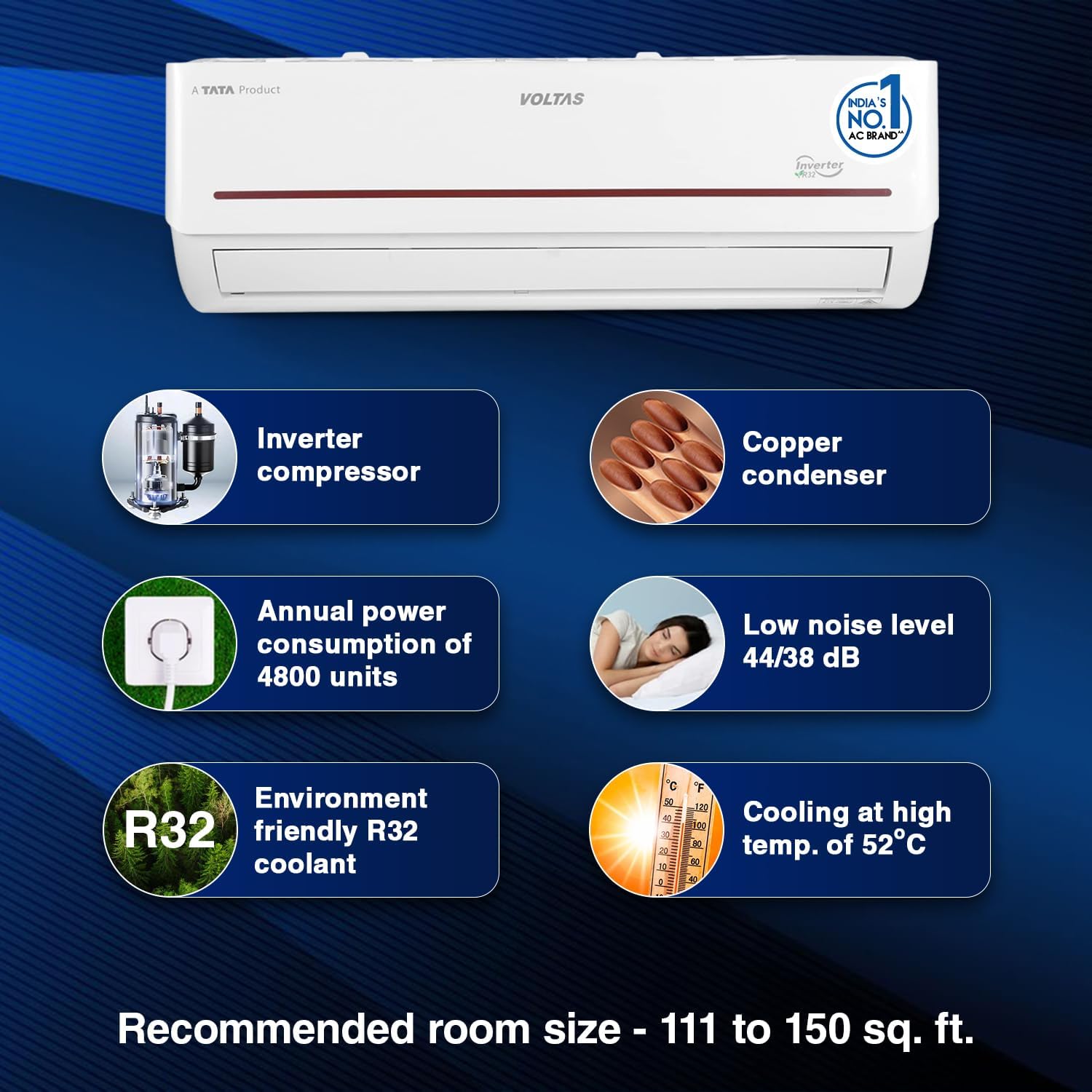
Figure 2: Infographic highlighting key features such as inverter compressor, copper condenser, annual power consumption, low noise, R32 refrigerant, and cooling capability at high temperatures.
3. Installation Guide
Proper installation is crucial for the optimal performance and longevity of your air conditioner. It is highly recommended that installation be performed by a certified and experienced technician.
3.1 Pre-Installation Checks
- Verify that the power supply meets the unit's requirements.
- Ensure the chosen location for both indoor and outdoor units allows for proper airflow and drainage.
- Check for any obstructions that might hinder air circulation.
3.2 Indoor Unit Placement
- Mount the indoor unit on a wall strong enough to support its weight.
- Ensure there is sufficient space around the unit for maintenance and air circulation.
- Avoid direct sunlight or heat sources.
3.3 Outdoor Unit Placement
- Install the outdoor unit in a well-ventilated area, away from direct sunlight or rain.
- Ensure the unit is placed on a stable, level surface to minimize vibration and noise.
- Maintain adequate clearance around the unit for proper heat dissipation.

Figure 3: Indoor unit dimensions (84 cm width, 29 cm height, 21 cm depth) and additional features like Sleep Mode, Memory Restart, Anti-Corrosive Coating, and Hidden Display.

Figure 4: Outdoor unit dimensions (83.5 cm length, 29.5 cm width, 55.5 cm height).
4. Operating Instructions
Your Voltas AC is controlled via a wireless remote control. Familiarize yourself with the remote's functions for optimal use.
4.1 Remote Control Functions
- POWER Button: Turns the unit ON or OFF.
- MODE Button: Cycles through operating modes (Cool, Fan, Dry, Auto).
- TEMP +/- Buttons: Adjusts the desired temperature.
- FAN Button: Adjusts fan speed (Low, Medium, High, Auto).
- SLEEP Button: Activates Sleep Mode for comfortable night cooling.
- TURBO Button: Provides rapid cooling.
- 4-in-1 Adjustable Mode Button: Cycles through the four adjustable cooling capacities.
4.2 Basic Operation
- Press the POWER button to turn on the AC.
- Press the MODE button to select your desired operating mode (e.g., Cool).
- Use the TEMP +/- buttons to set the desired temperature.
- Adjust the fan speed using the FAN button if needed.
4.3 4-in-1 Adjustable Cooling Mode
This feature allows you to adjust the cooling capacity of the AC to match the room's requirements, saving energy when full capacity is not needed. Press the dedicated 4-in-1 button on the remote to cycle through the modes (Mode 1 to Mode 4), which correspond to different cooling capacities.

Figure 5: Illustration of the 4-in-1 Adjustable Cooling feature, showing how the AC can run at four different cooling capacities for varying needs, controlled by the remote.
5. Maintenance
Regular maintenance ensures efficient operation and extends the lifespan of your Voltas AC unit.
5.1 Air Filter Cleaning
The air filter should be cleaned every two weeks or more frequently depending on usage and air quality.
- Turn off the AC and disconnect power.
- Open the front panel of the indoor unit.
- Remove the air filters.
- Clean the filters with a vacuum cleaner or wash them with lukewarm water and mild detergent.
- Allow filters to dry completely before reinstalling.
- Close the front panel.

Figure 6: The Anti-Dust Filter with Anti-Microbial Coating, designed to kill air microbes including germs, bacteria, and fungi.
5.2 Auto Clean Function
The Auto Clean function helps to prevent the growth of mold and bacteria inside the indoor unit by drying the evaporator coil after cooling operation. To activate, refer to your remote control's specific instructions or the main operating section.

Figure 7: Illustration of the Auto Clean Function, which self-cleans the unit to ensure clean cool air with every use.
5.3 Outdoor Unit Maintenance
- Keep the area around the outdoor unit clear of debris, leaves, and other obstructions.
- Periodically clean the outdoor coil with a soft brush or water spray to remove dirt and dust.
- Ensure the drainage pipe is not blocked.
5.4 Seasonal Maintenance
Before the cooling season, it is advisable to have a professional technician inspect the unit for refrigerant levels, electrical connections, and overall system performance.
6. Troubleshooting
Before contacting customer service, please refer to the following common issues and solutions.
| Problem | Possible Cause | Solution |
|---|---|---|
| AC does not turn on | No power supply; Remote control batteries low; Circuit breaker tripped. | Check power connection; Replace remote batteries; Reset circuit breaker. |
| Insufficient cooling | Dirty air filter; Temperature setting too high; Doors/windows open; Outdoor unit obstructed. | Clean air filter; Lower temperature setting; Close doors/windows; Clear obstructions around outdoor unit. |
| Unusual noise | Loose parts; Unit not level; Foreign object in fan. | Tighten loose parts; Ensure unit is level; Turn off and inspect for foreign objects (contact service if unsure). |
| Water leakage from indoor unit | Blocked drain pipe; Improper installation. | Clear drain pipe; Contact service for inspection. |
If the problem persists after attempting these solutions, please contact Voltas customer support.
7. Specifications
| Feature | Detail |
|---|---|
| Brand | Voltas |
| Model | 4503446-R |
| Capacity | 1.5 Tons |
| Energy Efficiency | 3 Star |
| Annual Energy Consumption | 4800 Watts (approx. 875.24 Units Per Year as per BEE label) |
| Noise Level (Indoor) | 47 Decibels (typical) |
| Installation Type | Split System |
| Refrigerant | R32 |
| Voltage | 230 Volts |
| Material | Plastic |
| Indoor Unit Dimensions (LxWxH) | 84 x 21 x 29 Centimeters |
| Outdoor Unit Dimensions (LxWxH) | 83.5 x 29.5 x 55.5 Centimeters |
| Item Weight | 41 kg 700 g |
| Special Features | Dust Filter, Remote Controlled, 4-in-1 Adjustable Mode, Auto Clean, Sleep Mode, Memory Restart, Anti-Corrosive Coating, Hidden Display |
8. Warranty and Support
Voltas provides comprehensive warranty coverage for your peace of mind.
8.1 Warranty Details
- Product Warranty: 1 Year on the complete product.
- Compressor Warranty: 10 Years on the compressor.
Please retain your purchase invoice and warranty card for any warranty claims. The warranty covers manufacturing defects under normal use conditions.

Figure 8: Visual representation of the warranty coverage: 1 Year Product Warranty and 10 Years Compressor Warranty.
8.2 Customer Support
For service requests, technical assistance, or warranty claims, please contact Voltas customer support. Refer to the contact information provided on your warranty card or visit the official Voltas website.


