1. Introduction
Thank you for choosing the HOOBRO End Table with Charging Station and 3-Drawer File Cabinet. This product combines the functionality of a narrow side table with a convenient charging station and a versatile filing cabinet, designed to enhance your home office or living space. This manual provides essential information for assembly, operation, maintenance, and safety to ensure optimal use of your new furniture.

This image displays the HOOBRO End Table, featuring a rustic brown top and drawer fronts with a black metal frame. It includes a built-in charging station and two drawers.
2. Safety Information
Please read and understand all safety instructions before assembly and use. Failure to follow these instructions may result in injury or damage to the product.
- Always follow the assembly instructions provided. Ensure the table is stable and secure before use.
- Use the braking function on the casters to prevent tipping when the file cabinet is stationary.
- Do not overload the table or drawers beyond their weight limits. Refer to specifications for details.
- Keep children away from the assembly area. Small parts can be a choking hazard.
- Ensure the power cord for the charging station is not pinched or damaged. Do not use if the cord is frayed or exposed.
- Do not expose the charging station to liquids or excessive moisture.
3. Package Contents
Before beginning assembly, verify that all components listed in the included assembly guide are present and undamaged. The package typically includes:
- Assembly Guide
- Installation Tool (e.g., Allen wrench)
- All necessary furniture panels and frame components
- Hardware pack (screws, dowels, etc.)
- Charging station unit with power cord
- Casters (for file cabinet)
- Drawer handles
4. Assembly Instructions
Assembly of the HOOBRO End Table and File Cabinet is designed to be straightforward. Follow the detailed, step-by-step instructions provided in the separate Assembly Guide included in your package. All accessories are numbered for easy identification.
General Assembly Steps:
- Unpack all components and verify against the parts list in the Assembly Guide.
- Assemble the main frame of the end table using the provided hardware.
- Install the charging station into its designated slot.
- Assemble the drawers for the end table and attach handles.
- Assemble the main body of the 3-drawer file cabinet.
- Attach the casters to the base of the file cabinet.
- Assemble the file cabinet drawers, including hanging rails for the bottom drawer, and attach handles.
- Place the assembled end table and file cabinet in your desired location.
For detailed diagrams and specific instructions, refer to the Assembly Guide included with your product.
5. Product Features
5.1. Charging Station
The integrated charging station features two 3-prong AC outlets (120V/12A) and two USB ports (5V/2A). It comes with a 4.9-foot (150cm) long power cord, allowing convenient placement. The spacing between outlets is sufficient to accommodate multiple plugs simultaneously.

A detailed view of the integrated charging station, showing two AC outlets and two USB ports in use, with a smartphone charging.
5.2. End Table Drawers
The end table component includes two sliding drawers, providing separate space for organizing small items, remote controls, or personal belongings. These drawers operate smoothly for easy access.

This image illustrates the two sliding drawers of the end table in an open position, demonstrating their capacity for storing small items.
5.3. 3-Drawer File Cabinet
The file cabinet features three spacious drawers. The bottom drawer is equipped with adjustable hanging rails, suitable for both letter and A4 size hanging file folders. All drawers utilize smooth ball-bearing slides for easy access to contents.
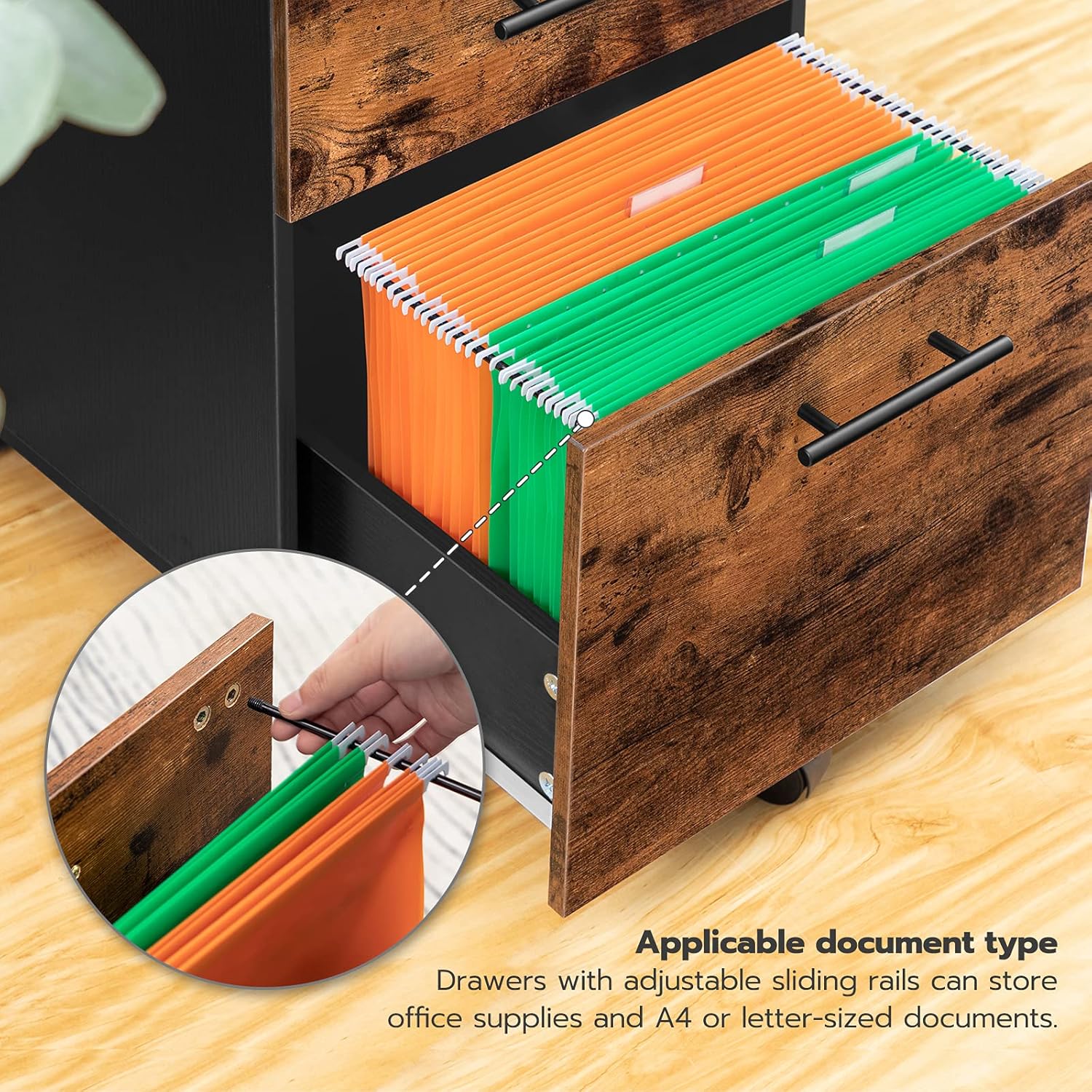
This image presents the 3-drawer file cabinet component, with the bottom drawer open to display A4/letter-sized hanging file folders.
5.4. Mobility and Stability
The file cabinet is equipped with five rotatable wheels, including two casters with a braking function for secure positioning and one center caster to prevent tipping when drawers are extended. This design allows for easy movement and stable placement as needed.
6. Operating Instructions
6.1. Using the Charging Station
- Plug the product's power cord into a standard wall outlet.
- Insert your device's AC adapter into one of the 3-prong outlets.
- Connect your device's USB cable to one of the USB ports.
- Ensure devices are properly connected and charging indicators are active.
6.2. Using the Drawers
To open a drawer, gently pull the handle. To close, push the drawer firmly until it is fully seated. For the file cabinet's bottom drawer, adjust the hanging rails to fit your letter or A4 size files.
6.3. Moving the File Cabinet
To move the file cabinet, ensure the braking casters are unlocked. Gently push or pull the cabinet to your desired location. Once positioned, engage the brakes on the two front casters to secure the cabinet in place.
7. Maintenance
Regular maintenance will help prolong the life and appearance of your HOOBRO furniture.
- Cleaning: Wipe surfaces with a soft, damp cloth. Avoid harsh chemicals or abrasive cleaners that may damage the finish.
- Dusting: Regularly dust with a dry, soft cloth.
- Hardware: Periodically check and tighten all screws and fasteners to ensure stability.
- Charging Station: Keep the charging ports free of dust and debris. Do not attempt to disassemble the charging unit.
- Spills: Clean spills immediately to prevent staining, especially on wooden surfaces.
8. Troubleshooting
8.1. Charging Station Not Working
- No Power: Ensure the main power cord is securely plugged into a functional wall outlet. Check if the wall outlet is receiving power by testing with another device.
- Device Not Charging: Verify that your device's charging cable and adapter are working correctly. Try a different cable or adapter.
- Overload: The charging station has a maximum capacity. If too many high-power devices are connected, it may trip an internal safety mechanism. Unplug some devices and try again.
8.2. Drawers Sticking or Not Sliding Smoothly
- Obstruction: Check for any items blocking the drawer slides or caught inside the drawer.
- Alignment: Ensure the drawer is properly aligned on its slides. Gently push and pull to reseat it.
- Loose Hardware: Check if any screws on the drawer slides or drawer box are loose and tighten them.
8.3. File Cabinet Not Moving Freely
- Brakes Engaged: Ensure the brakes on the casters are disengaged.
- Obstruction: Check for debris or objects on the floor obstructing the wheels.
- Damaged Caster: Inspect casters for damage. If a caster is damaged, contact customer support for replacement.
9. Specifications
| Feature | Detail |
|---|---|
| Brand | HOOBRO |
| Model | BF541BZ01-BF02WJ01G1 |
| Product Dimensions (End Table) | 15.7"D x 15.7"W x 22.6"H (40cm D x 40cm W x 57.5cm H) |
| Product Dimensions (File Cabinet) | 15.7"D x 15.7"W x 22.6"H (40cm D x 40cm W x 57.5cm H) |
| Frame Material | Wood |
| Top Material Type | Engineered Wood |
| Color | Rustic Brown and Black |
| Number of Drawers | 5 (2 for end table, 3 for file cabinet) |
| Charging Station Outlets | 2 x 3-prong AC Outlets (120V/12A) |
| Charging Station USB Ports | 2 x USB Ports (5V/2A) |
| Power Cord Length | 4.9 feet (150 cm) |
| File Compatibility | Letter/A4 size hanging file folders (bottom file cabinet drawer) |
| Mobility | 5 rotatable wheels (2 with brakes, 1 center anti-tip) |

This image shows the HOOBRO End Table with key dimensions labeled, including overall height, width, depth, and drawer heights, along with the power cord length.

This image provides a view of the 3-drawer file cabinet with its dimensions clearly marked, including height, width, depth, and individual drawer heights.
10. Warranty and Support
For warranty information, product registration, or customer support, please refer to the official HOOBRO website or contact the retailer where you purchased the product. Keep your purchase receipt for warranty claims.
You can typically find support contact information on the manufacturer's website: www.hoobro.com


