
MySmile LP221
MySmile LP221 Cordless Water Flosser Instruction Manual
Model: LP221 | Brand: MySmile
Introduction
The MySmile LP221 Cordless Water Flosser is designed to enhance your oral hygiene routine by providing a powerful and precise water stream for cleaning between teeth and below the gum line. This device features a UVC light sanitizer for hygienic operation, an OLED display for clear information, and multiple modes and pressure settings to suit individual needs. Its cordless design and large water reservoir ensure convenience and efficiency.
Safety Information
Please read all safety instructions before using the MySmile LP221 Cordless Water Flosser to ensure safe and effective operation.
- Do not immerse the device in water for prolonged periods or at high temperatures.
- Use only approved chargers.
- Keep the device out of reach of children.
- Keep the charging port tightly closed with its cover when in use.
- Charge the device using the Type-C USB charging cord provided, specified as 5V 1A standard.
Package Contents
Verify that all items are present in your MySmile LP221 Cordless Water Flosser package:
- MySmile LP221 Cordless Water Flosser Unit
- Standard Jet Tips (4x)
- Dental Plaque Tip (1x)
- Orthodontic Tip (1x)
- Periodontal Tip (1x)
- Tongue Cleaner Tip (1x)
- Type-C USB Charging Cable
- PU Travel Pouch
- Instruction Manual

Image: MySmile LP221 Water Flosser unit with various tips, charging cable, and travel pouch.
Product Features
OLED Display & Customizable Modes
The integrated OLED display provides real-time information on battery power, water temperature, current mode, and pressure level. Choose from 4 distinct modes (Soft, Normal, Strong, Pulse) and 3 pressure levels (excluding Pulse mode) to customize your flossing experience, offering 10 patterns of water flossing.
- Soft Mode (40-80 PSI): Ideal for sensitive teeth, new users, and children above 8 years old.
- Normal Mode (80-120 PSI): Suitable for daily cleaning for most users.
- Strong Mode (120-150 PSI): Designed for deep cleaning and removing stubborn stains.
- Pulse Mode (40-120 PSI): Provides gum massage, beneficial for individuals with mild periodontitis.

Image: The OLED display on the MySmile LP221, showing battery status, water temperature, and selected mode.
UVC Light Sanitizer
Maintain optimal hygiene with the built-in UVC light sanitizer. This feature performs a 120-second sterilization process, eradicating up to 99.99% of bacteria in the water tank and on the jet tips, ensuring a clean and sanitary flossing experience every time.
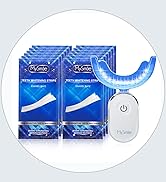
Image: Visual representation of the UVC sterilization process within the water flosser, showing bacteria elimination.
Large Water Reservoir & Long-lasting Battery
The 335ML water reservoir minimizes the need for frequent refills during a comprehensive cleaning session. The durable 1800 mAh battery provides up to 40 days of use on the lowest mode, and it is easily rechargeable via USB-C (compatible with computers, power adapters, power banks, or car adapters).
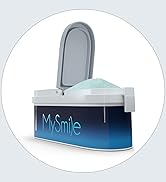
Image: Illustration of the 335ML water reservoir, highlighting its capacity for extended use.
IPX7 Waterproof Design & Portability
The IPX7 waterproof rating allows for safe use in the shower. Its compact design and included PU travel pouch make it convenient for travel, office use, or outdoor activities.

Image: The MySmile LP221 Water Flosser shown packed in a travel suitcase, demonstrating its portability.
Setup
- Charge the Device: Before first use, fully charge the water flosser using the provided Type-C USB charging cable. Connect it to a 5V 1A power source (e.g., computer, power adapter, power bank). The OLED display will indicate battery status.
- Fill the Water Tank:
- Twist the top section of the device counter-clockwise to detach it from the water reservoir.
- Fill the 335 ml water tank with warm water. Warm water is recommended for comfort.
- Reattach the top section by aligning and twisting clockwise until secure.

Image: The MySmile LP221 Water Flosser, showing the transparent water tank.
- Attach the Desired Tip: Select the appropriate jet tip for your needs (Standard, Dental Plaque, Orthodontic, Periodontal, or Tongue Cleaner). Insert the tip into the opening at the top of the device until it clicks securely into place.
- Prime the Device (First Use): For the first use, or if the device has not been used for a while, point the tip into a sink, turn the device on, and allow water to flow through until a steady stream is achieved. This removes any air from the system.
Operating Instructions
- Power On: Press and hold the power button for 2 seconds to turn on the device. The OLED display will illuminate, showing the current mode and battery level.
- Select Mode: Press the 'M' (Mode) button to cycle through the available modes: Soft, Normal, Strong, and Pulse. The selected mode will be indicated on the OLED display.
- Adjust Pressure (for Soft, Normal, Strong modes): Use the '+' and '-' buttons to adjust the water pressure level within the selected mode. There are 3 pressure levels for Soft, Normal, and Strong modes. (Pulse mode has a fixed pressure range).
- Begin Flossing:
- Lean over a sink to avoid splashing.
- Place the tip into your mouth, directing the water flow at a 90-degree angle to your gum line.
- Press the power button briefly to start the water stream.
- Move the tip along your gum line and between your teeth, pausing briefly between each tooth. Ensure the water stream reaches all areas.

Image: A user demonstrating the proper technique for using the MySmile LP221 Water Flosser.
- Finish Flossing: When you have completed your cleaning, press the power button briefly to stop the water stream, then press and hold the power button for 2 seconds to turn off the device.
Maintenance
Cleaning the Device
- After Each Use: Empty any remaining water from the reservoir. Detach the jet tip and rinse both the tip and the reservoir under running water. Allow them to air dry.
- UVC Sterilization: To activate the UVC light sanitizer, ensure the device is turned off. Press and hold the 'M' (Mode) button, then briefly press the power button. The UVC light will activate for a 120-second sterilization cycle.
- External Cleaning: Wipe the exterior of the device with a soft, damp cloth. Do not use abrasive cleaners or harsh chemicals.
- Filter Cleaning: The gravity-ball sucker at the bottom of the reservoir has a filter designed to prevent clogging. Periodically check and clean this filter to ensure optimal performance.
Storage
Store the MySmile LP221 in a cool, dry place. For travel, use the provided PU pouch to protect the device and its accessories.
Troubleshooting
| Problem | Possible Cause | Solution |
|---|---|---|
| Device does not turn on. | Low battery or device not charged. | Charge the device fully using the provided USB-C cable. Ensure the charging port cover is securely closed after charging. |
| No water stream or weak stream. | Water tank empty, air in the system, or clogged filter/tip. | Refill the water tank. Prime the device by running it into a sink until a steady stream appears. Check and clean the filter at the bottom of the reservoir and ensure the jet tip is not clogged. |
| Water leakage. | Water tank or jet tip not properly secured. | Ensure the water tank is twisted on tightly and the jet tip is clicked firmly into place. Check for any damage to seals. |
| OLED display not working. | Device malfunction. | Contact customer support for assistance. |
Specifications
| Model Number | LP221 |
| Brand | MySmile |
| Water Tank Capacity | 335 ML (11.33 Fl Oz) |
| Water Pulse Frequency | 2000-2800 times/min |
| Pressure Range | 40-150 PSI |
| Battery Capacity | 1800 mAh |
| Battery Life | Up to 40 days (on lowest mode) |
| Charging Input | Type-C USB, 5V 1A |
| Waterproof Rating | IPX7 |
| Product Dimensions | 9.25 x 3.2 x 3.5 inches |
| Item Weight | 1.01 Pounds |
Warranty and Support
Limited Warranty
MySmile products are manufactured to high-quality standards. This product is covered by a limited warranty against defects in materials and workmanship from the date of purchase. Please retain your proof of purchase for warranty claims. The warranty does not cover damage caused by improper use, accidents, or unauthorized modifications.
Customer Support
For any questions, concerns, or technical assistance, please contact MySmile customer support. Refer to the contact information provided in your product packaging or visit the official MySmile website for support resources.
Note: Statements regarding dietary supplements have not been evaluated by the FDA and are not intended to diagnose, treat, cure, or prevent any disease or health condition.
Related documentsLP221


Ask a question about this manual
Ask about setup, troubleshooting, compatibility, parts, safety, or missing instructions. Manuals+ will review the question and use this page’s manual context to help answer it.