1. Introduction
This manual provides detailed instructions for the installation, operation, and maintenance of your ISNATCH HEYTHERMO-R Additional Smart Thermostatic Valve. This device is designed to work as an extension to an existing HEYTHERMO-R Kit, allowing for smart control of individual radiators within your heating system. Please read this manual thoroughly before use to ensure proper function and safety.
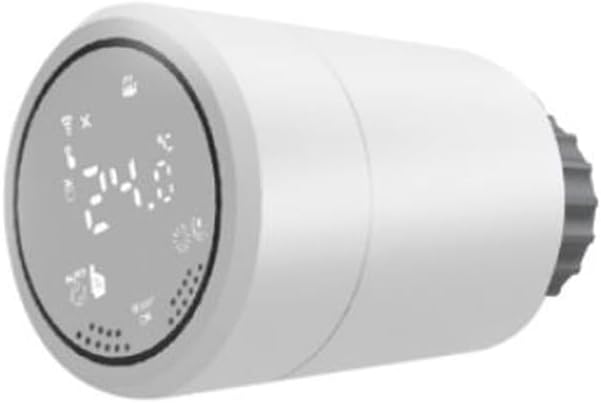
Figure 1: The ISNATCH HEYTHERMO-R Additional Smart Thermostatic Valve, showing its digital display and compact design.
2. Safety Information
- Read all instructions carefully before installing or operating the device.
- This device is intended for indoor use only.
- Do not expose the device to extreme temperatures, direct sunlight, or moisture.
- Ensure the heating system is turned off and cooled down before attempting installation or maintenance.
- Keep out of reach of children.
- Do not attempt to disassemble or repair the device yourself. Contact qualified personnel for service.
- Dispose of batteries according to local regulations.
3. Package Contents
Verify that all items are present in the package:
- ISNATCH HEYTHERMO-R Additional Smart Thermostatic Valve
- Adapter Set (RAV, RAV-L, RA)
- User Manual (this document)

Figure 2: The product packaging for the ISNATCH HEYTHERMO-R Additional Smart Thermostatic Valve, indicating its contents.
4. Setup
4.1 Battery Installation
- Gently twist and pull the front cover of the thermostatic valve to remove it.
- Insert the required batteries (typically 2x AA, not included) into the battery compartment, observing the correct polarity (+/-).
- Replace the front cover, ensuring it clicks securely into place.
- The display should illuminate, indicating the device is powered on.
4.2 Pairing with HEYTHERMO-R Kit
This additional valve requires connection to an existing ISNATCH HEYTHERMO-R Kit (sold separately) for smart functionality. Refer to your HEYTHERMO-R Kit's manual for specific instructions on adding new devices. Generally, the process involves:
- Ensure your HEYTHERMO-R Kit's hub is powered on and connected to your home Wi-Fi network.
- Open the ISNATCH smart home application on your smartphone or tablet.
- Navigate to the device addition section within the app.
- Follow the on-screen prompts to put the additional thermostatic valve into pairing mode (usually by pressing and holding a button on the valve until an indicator flashes).
- Confirm the successful pairing in the app.
5. Installation on Radiator
Before installation, ensure your radiator's existing thermostatic head is removed. Turn off your heating system and allow radiators to cool down completely.
- Identify Radiator Valve Type: Determine the type of valve on your radiator. The ISNATCH HEYTHERMO-R valve comes with several adapters (RAV, RAV-L, RA) to ensure compatibility with most standard radiator valves.
- Select Correct Adapter: Choose the adapter that fits your radiator valve. Refer to the diagram below for guidance.
- Install Adapter: Screw the selected adapter onto your radiator valve. Ensure it is hand-tightened securely.
- Mount Thermostatic Valve: Align the ISNATCH HEYTHERMO-R valve with the installed adapter. Push the valve onto the adapter and then twist it clockwise until it locks into place. You should feel a click or resistance indicating it is secure.
- Initial Calibration: The valve may perform an initial calibration cycle upon first installation or after battery replacement. Allow this process to complete.
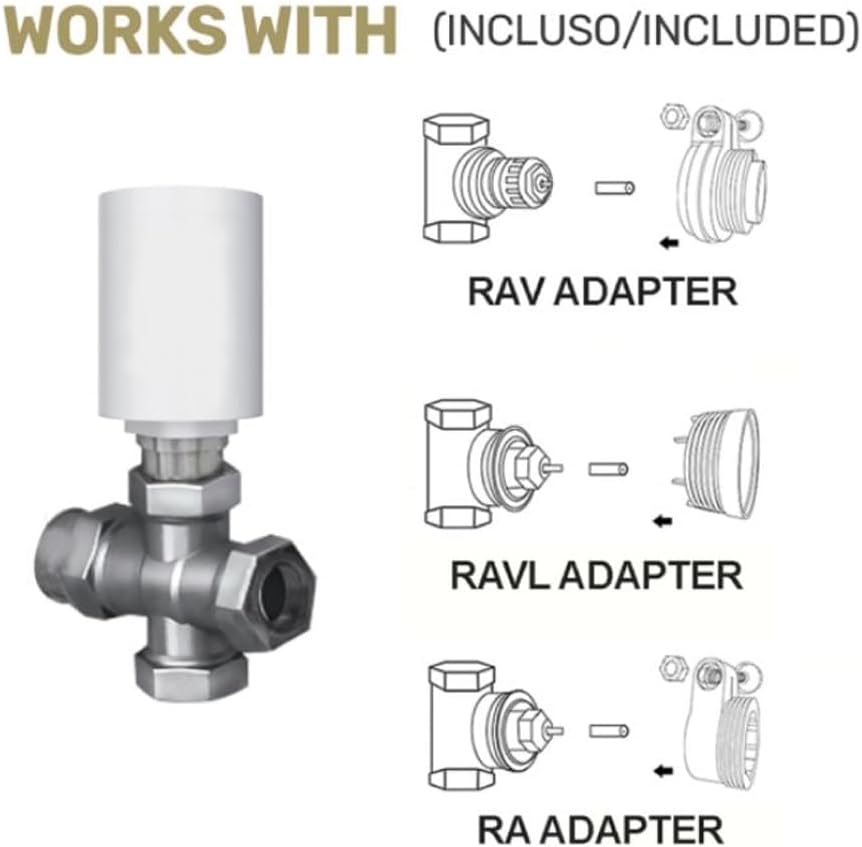
Figure 3: Diagram illustrating the RAV, RAV-L, and RA adapters included with the valve, and how they connect to different radiator valve types.

Figure 4: The ISNATCH HEYTHERMO-R Smart Thermostatic Valve correctly installed on a radiator, demonstrating its integrated appearance.
6. Operating Instructions
6.1 Manual Control
You can adjust the temperature directly on the valve:
- Temperature Adjustment: Rotate the outer ring of the valve clockwise to increase the set temperature and counter-clockwise to decrease it. The new set temperature will be displayed on the screen.
- Boost Function: Press the central button (if available) or a specific combination of rotations to activate a temporary boost mode, rapidly heating the room for a set period.
6.2 App Control
For full smart functionality, use the ISNATCH smart home application:
- Remote Temperature Control: Adjust the temperature of individual radiators from anywhere using your smartphone.
- Scheduling: Create custom heating schedules for each room or zone to optimize comfort and energy efficiency.
- Modes: Switch between various heating modes such as Comfort, Eco, Frost Protection, and Vacation mode.
- Voice Control: Integrate with compatible voice assistants (e.g., Amazon Alexa, Google Assistant) for hands-free control.
6.3 Display Indicators
The digital display provides important information:
- Current Temperature: Shows the ambient temperature detected by the valve.
- Set Temperature: Displays the target temperature.
- Battery Indicator: Shows the remaining battery life. Replace batteries when low.
- Connectivity Icon: Indicates connection status to the HEYTHERMO-R hub.
- Valve Position: May show an icon indicating if the valve is open or closed.
7. Maintenance
7.1 Cleaning
Wipe the device with a soft, dry cloth. Do not use abrasive cleaners or solvents, as these can damage the surface and electronic components.
7.2 Battery Replacement
When the battery indicator shows low power, replace the batteries promptly to ensure continuous operation. Follow the steps in Section 4.1 for battery installation.
8. Troubleshooting
| Problem | Possible Cause | Solution |
|---|---|---|
| Device not powering on | Batteries are dead or incorrectly inserted. | Check battery polarity or replace with new batteries. |
| Cannot connect to HEYTHERMO-R Kit | Valve is out of range, kit is offline, or pairing failed. | Ensure valve is within range of the kit. Check kit's internet connection. Re-attempt pairing process. |
| Incorrect temperature readings | Valve is obstructed or located in a drafty area. | Ensure the valve is not covered by curtains or furniture. Consider relocating if possible. |
| Radiator not heating/cooling as expected | Valve not fully open/closed, or system issue. | Check the valve's display for its current state. Manually adjust to maximum/minimum to test. Ensure the main heating system is operational. |
9. Specifications
- Brand: ISNATCH
- Model: 49.6830.01
- Product Type: Additional Smart Thermostatic Radiator Valve
- Compatibility: Requires ISNATCH HEYTHERMO-R Kit
- Power Supply: Battery operated (e.g., 2x AA, not included)
- Weight: Approximately 1 kg
- Connectivity: Wireless (specific protocol depends on HEYTHERMO-R Kit, e.g., Zigbee, Wi-Fi)
- Operating Temperature: 0°C to 50°C (32°F to 122°F)
10. Warranty and Support
ISNATCH products are covered by a limited warranty. For detailed warranty information, technical support, or service inquiries, please refer to the warranty card included with your product or visit the official ISNATCH website. Please have your model number (49.6830.01) and purchase date available when contacting support.
Manufacturer: ISNATCH
Website: www.isnat.ch (Example, actual website may vary)