1. Introduction
The Mammotion LUBA 2 AWD 10000 is an advanced robotic lawn mower designed for efficient and autonomous lawn care. This model is capable of managing lawns up to 2.5 acres and handling slopes up to 80% (38 degrees). It features a perimeter wire-free setup, precise RTK-GNSS and multi-sensor navigation, and convenient control via a smartphone app or voice commands. This manual provides essential information for setting up, operating, maintaining, and troubleshooting your LUBA 2 AWD 10000 to ensure optimal performance and longevity.
2. What's in the Box

Image: Contents of the Mammotion LUBA 2 AWD 10000 box, including the mower, charging station, RTK reference station, and accessories.
Upon unpacking, please verify that all the following items are present:
- LUBA 2 AWD Unit
- Quick Start Guide
- Power Supply
- Extra One Set of Blades
- Security Key Installation Kits
- Charging Station
- RTK Reference Station
- RTK Extension Cable (10m)
- RTK Power Supply
- RTK Ground Mount
3. Setup
3.1 Perimeter Wire-Free Mapping
The LUBA 2 AWD 10000 eliminates the need for physical perimeter wires. Its advanced 3D Vision and RTK Fusion-mapping System allows for precise, centimeter-level accurate positioning and virtual boundary setup.

Image: The LUBA 2 AWD 10000 utilizes a 3D Vision and RTK Fusion-mapping System for precise, wire-free lawn mapping and navigation.
To set up your lawn boundaries, use the Mammotion App to 'drive' the LUBA 2 AWD 10000 like a remote control car. This process defines the virtual boundaries for your mowing zones.

Image: Drive LUBA like a remote control car to set virtual boundaries. With 3D Vision & RTK Fusion-mapping System, precise positioning and boundary compliance are guaranteed, eliminating the need for any wiring.
3.2 Vision Module Installation
Ensure the vision module is correctly installed for optimal navigation and obstacle avoidance.

Image: Instructions for installing the vision module: Connect the vision module wires (black to black and white to white), then attach the module to the Luba using four screws and tighten with a 2.5mm hex screwdriver.
3.3 RTK Reference Station
The RTK Reference Station is crucial for maintaining centimeter-level positioning accuracy. An optional solar panel is available for charging the RTK unit, promoting environmental friendliness.
4. Operating Instructions
4.1 App and Voice Control
Control your LUBA 2 AWD 10000 conveniently through the Mammotion App or integrate it with smart home systems like Amazon Alexa or Google Home for voice commands.

Image: Control your LUBA 2 AWD 10000 via the Mammotion App or integrate with smart home systems like Alexa and Google Home for convenient operation.

Image: Use voice commands with Alexa or Google Home for 'Speak-and-Mow' functionality.
4.2 Multi-Zone and No-Go Zone Management
The Mammotion App allows you to define multiple mowing zones, each with customizable cutting heights (25-70mm) and schedules. You can also set 'no-go zones' to prevent the mower from entering specific areas.

Image: Manage multiple mowing zones with adjustable cutting heights (25-70mm) and schedules. Set no-go zones for areas to be avoided.
4.3 Terrain Navigation
The LUBA 2 AWD 10000 features an All-Wheel Drive system and adaptive suspension, enabling it to navigate challenging terrains, including steep slopes up to 80% (38 degrees), potholes, rough ground, and tall grass, while maintaining a smooth mow.

Image: The LUBA 2 AWD 10000 is designed to navigate challenging terrains including steep slopes, potholes, rough ground, and tall grass.
4.4 Mowing Schedules and Patterns
Set mowing schedules and choose from various mowing modes and patterns directly from the Mammotion App. You can even create custom lawn art designs.

Image: Adjust cutting height, set mowing schedules, choose mowing modes, and check mower status remotely via the app.

Image: The Mammotion app allows you to choose different mowing patterns and create custom designs, adjusting the mowing route, cutting height, and angle for precise lawn patterns.
4.5 Video Overview
Video: This official product video from Mammotion U.S. demonstrates the key features of the LUBA 2 AWD Robot Lawn Mower, including its wire-free setup, multi-zone management, all-wheel drive capabilities, cutting performance, smart home integration, and safety features.
5. Maintenance
5.1 Cutting System
The LUBA 2 AWD 10000 features a unique dual-cutting-disc design, offering a cutting width of 15.7 inches (400mm). Regularly inspect the blades for wear and replace them as needed to maintain optimal cutting performance. An extra set of blades is included in the box.

Image: The LUBA 2 features dual cutting discs with a 15.7-inch cutting width for efficient and precise lawn trimming.
5.2 Battery Management
The intelligent battery system detects low power levels and automatically guides the mower back to its base station for recharging. Ensure the base station is clear of obstructions for seamless docking.
6. Safety Features
6.1 Obstacle Avoidance
The LUBA 2 AWD 10000 is equipped with a triple-redundant obstacle avoidance system for enhanced safety. This system includes a physical bumper, ultrasonic radar, and binocular vision, allowing the mower to detect and avoid objects, pets, and children in its path.
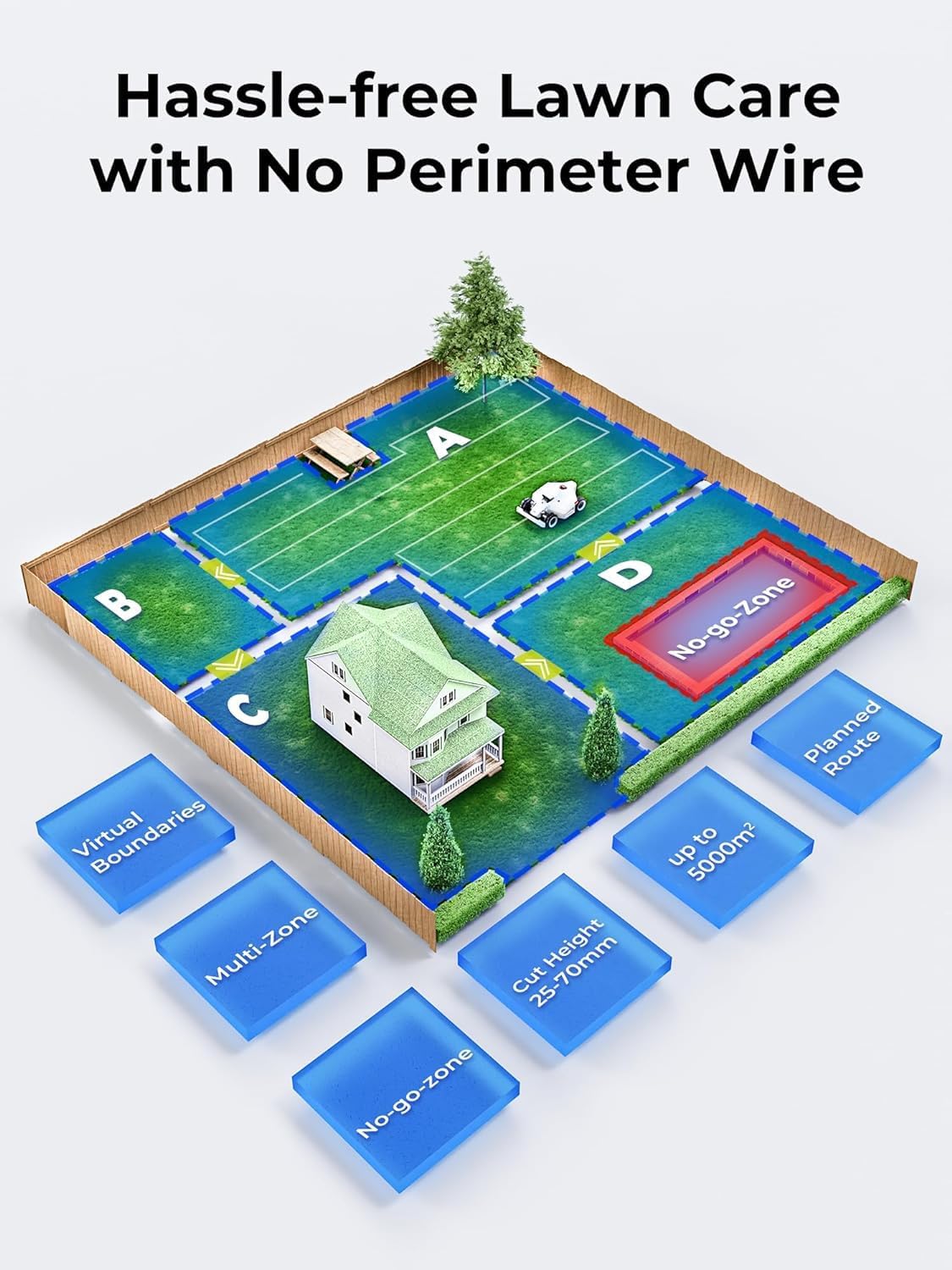
Image: The LUBA 2 AWD 10000 is equipped with a bumper, ultrasonic radar, and binocular vision for triple-redundant obstacle avoidance, ensuring safety around pets and children.
6.2 Anti-Theft and Monitoring
The mower includes a robust anti-theft system with GPS tracking, a built-in alarm, geofence alerts, and ownership authentication. In case of unauthorized movement, you will receive app notifications and can track its location.

Image: Features include AirTag compatibility, ownership authentication, geofence alarm, GPS tracking, and app notifications for real-time monitoring and theft protection.

Image: Enable yard monitoring in the visual module to access real-time yard status playback recordings and manage your yard smartly through the Mammotion APP.
7. Specifications
| Feature | Specification |
|---|---|
| Brand | Mammotion |
| Model Number | LUBA 2 AWD 10000 |
| Power Source | Battery Powered |
| Material | Plastic |
| Color | White |
| Cutting Width | 15.7 Inches (400mm) |
| Adjustable Cutting Height | 1.0" - 2.7" (2.54 cm - 6.86 cm) |
| Operation Mode | Automatic |
| Product Dimensions | 27.17"D x 20.2"W x 10.75"H |
| Item Weight | 38.9 Pounds |
| Slope Capability | Up to 80% (38 degrees) |
| Lawn Coverage | Up to 2.5 Acres |
| Smart Home Compatibility | Amazon Alexa, Google Home |
8. Troubleshooting
If you encounter issues with your LUBA 2 AWD 10000, consider the following general troubleshooting steps:
- Check App Status: Open the Mammotion App to view the mower's current status, error messages, and battery level.
- Clear Path: Ensure the mowing area and the path to the charging station are free of obstructions.
- RTK Signal: Verify that the RTK reference station has a clear view of the sky and is receiving a strong signal.
- Power Cycle: Try turning the mower off and on again.
- Consult Support: For persistent issues, refer to the support section for contact options.
9. Warranty Information
Specific warranty terms and conditions for the Mammotion LUBA 2 AWD 10000 are typically provided with your product documentation or can be found on the official Mammotion website. Please retain your proof of purchase for warranty claims. It is recommended to review the warranty details upon receipt of your product to understand coverage and procedures.
10. Support
For further assistance, technical support, or inquiries regarding your Mammotion LUBA 2 AWD 10000, please use the following resources:

Image: For assistance, contact Mammotion via email, live chat on the Mammotion App, or refer to tutorial videos on YouTube.
- Mammotion App: Utilize the built-in live chat feature within the Mammotion App for direct support.
- Email Support: Contact Mammotion customer service via email for detailed inquiries.
- Online Tutorials: Visit the official Mammotion YouTube channel for instructional videos and guides.
- Manufacturer Website: Check the Mammotion Store or official website for FAQs and additional resources.