
Introduction
The Smart Ring Health Tracker is a portable, intelligent device designed to monitor key bodily signals and provide insights into your health and fitness. Crafted from polished ceramic and durable 316 stainless steel, this ring is lightweight, comfortable, and stylish, making it barely noticeable during wear. It helps you maintain a healthier lifestyle by tracking movement data, sleep quality, and other vital metrics.
This manual provides detailed instructions on how to set up, operate, and maintain your Smart Ring Health Tracker, ensuring you get the most out of its advanced features.

Image: The Smart Ring Health Tracker, showcasing its sleek design and internal components.
Setup Guide
1. Charging the Smart Ring
Before first use, fully charge your Smart Ring. A single charge provides approximately 7 days of continuous monitoring.
- Connect the provided charging cable to the Smart Ring.
- Plug the USB end of the cable into a standard USB power adapter (not included) or a computer's USB port.
- The ring will indicate charging status (refer to app for detailed battery level).
- Charging typically takes about 60 minutes for a full charge.

Image: The Smart Ring alongside its dedicated charging cable.
2. Installing the JYouPro App
The Smart Ring requires the JYouPro application to function and display your health data.
- Download the "JYouPro" app from your device's app store (compatible with iOS and Android).
- Install the app on your smartphone or tablet.
- Open the app and follow the on-screen instructions to create an account or log in.
3. Pairing the Ring with Your Device
Once the app is installed, pair your Smart Ring with your device via Bluetooth.
- Ensure Bluetooth is enabled on your smartphone.
- Open the JYouPro app.
- Navigate to the device pairing section within the app (usually found in "Settings" or "My Device").
- The app will search for available devices. Select your Smart Ring from the list.
- Confirm the pairing request on both the app and, if prompted, on your phone.
- Once paired, the app will display "Connected" or a similar status.
Operating Instructions
1. Health Monitoring
The Smart Ring continuously monitors various health metrics using advanced sensors.
- Activity Tracking: The ring tracks your movement data, including steps, calories burned, and distance traveled.
- Sleep Quality Monitoring: It analyzes your sleep patterns to provide insights into your sleep quality.
- Vital Signs: Advanced sensors track key bodily signals to help you maintain health and balance.
All collected data is synchronized with the JYouPro app, allowing you to view daily, weekly, and monthly statistics.

Image: Screenshot of the JYouPro app displaying activity statistics and health data visualization.

Image: A person sleeping while wearing the Smart Ring, illustrating its lightweight and comfortable design for continuous wear.
2. Remote Camera Control
The Smart Ring features a convenient remote camera control function.
- Open the JYouPro app and activate the remote camera function within the app settings.
- Position your phone for the desired photo.
- Gently shake your finger while wearing the Smart Ring a few times to remotely trigger the camera shutter.

Image: Illustration of the Smart Ring's remote camera control feature, showing a user taking a photo by shaking their hand.
Maintenance
1. Cleaning Your Smart Ring
To ensure optimal performance and hygiene, regularly clean your Smart Ring.
- Wipe the ring with a soft, damp cloth.
- Avoid using harsh chemicals or abrasive materials, as these can damage the ceramic and stainless steel finish.
- Ensure the charging contacts are clean and dry before charging.
2. Water Resistance (IP68)
The Smart Ring has an IP68 waterproof rating, allowing it to be worn in various daily water-related scenarios.
- You can wear the ring while washing your hands, showering, or swimming.
- All sensors will continue to function normally even when exposed to water.
- While highly water-resistant, prolonged submersion in deep water or exposure to high-pressure water jets (e.g., diving, high-pressure washing) should be avoided to prevent potential damage.

Image: The Smart Ring submerged in water, demonstrating its IP68 waterproof and dustproof capabilities.
Troubleshooting
If you encounter issues with your Smart Ring, try the following troubleshooting steps:
| Problem | Solution |
|---|---|
| Ring not connecting to app |
|
| Inaccurate data readings |
|
| Short battery life |
|
Specifications
| Feature | Detail |
|---|---|
| Brand | Yanmis |
| Model Number | Yanmisspnxaqrbyh-12 |
| Material | Ceramic, 316 Stainless Steel |
| Color | #312 (Silver/Gold) |
| Ring Battery Capacity | 18 mAh |
| Ring Battery Life | Approx. 7 days |
| Charging Time | 60 minutes |
| Waterproof Rating | IP68 |
| Compatible App | JYouPro (iOS & Android) |
| Ring Weight | Approx. 6g (±1g) |
| Inner Diameter (Size N° 9) | 19mm / 0.75in |
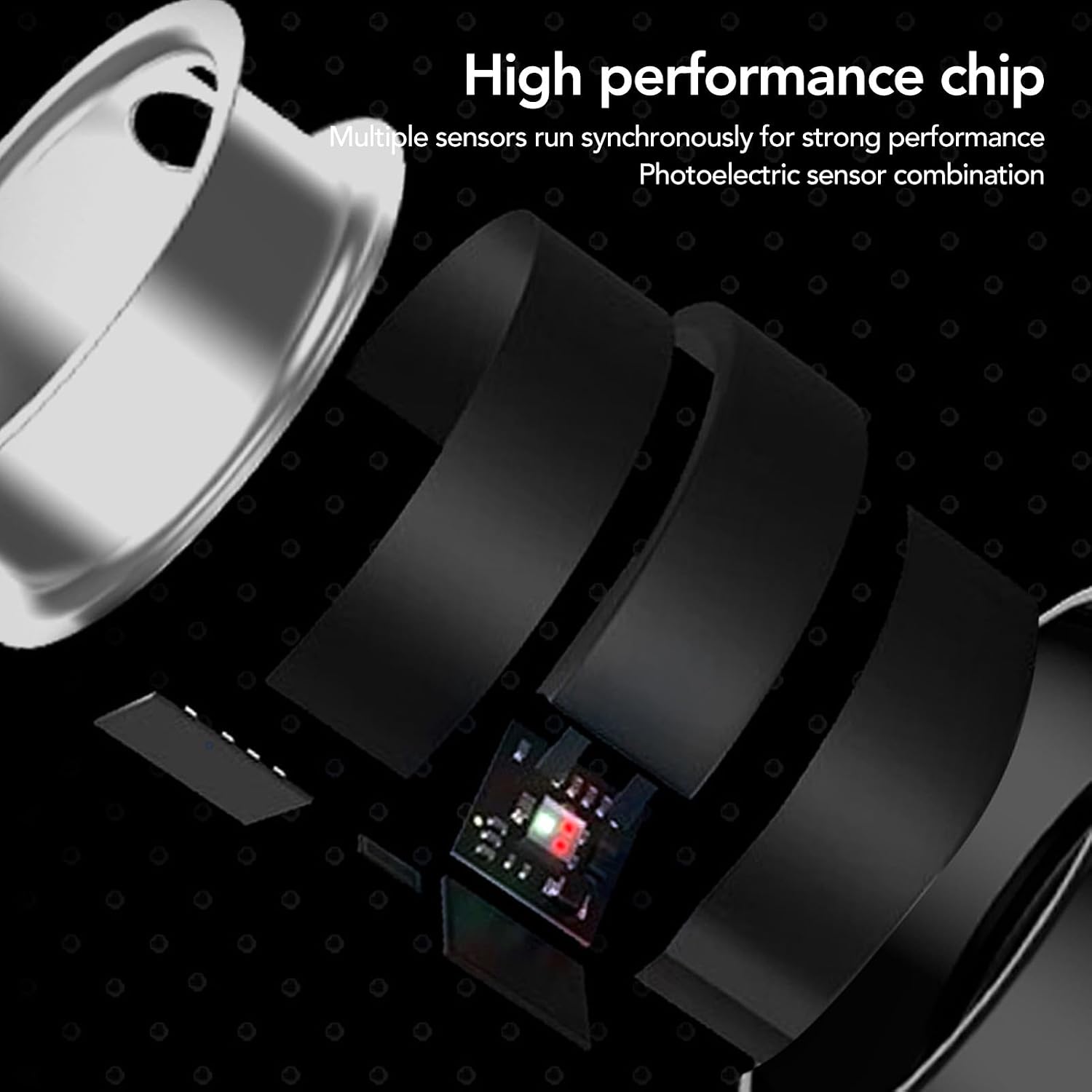
Image: An exploded view of the Smart Ring, highlighting its high-performance chip and multiple photoelectric sensors for accurate data collection.

Image: Various sizing options for the Smart Ring, emphasizing its comfortable and sensation-free wear.

Image: Close-up view of the Smart Ring, indicating an inner diameter of 19mm (0.75in) for Size N° 9.
Important Information
This Smart Ring is designed as a health and fitness tracker and is not intended for medical diagnosis, treatment, or prevention of any disease. Consult with a healthcare professional for any health concerns.


