1. Product Overview
The LG 50-Inch Class UR9000 Series 4K Smart TV offers an immersive home cinema experience with its 3840 x 2160 resolution and AI-Powered 4K upscaling. Enjoy enhanced picture detail and improved sound, along with a suite of smart features including Alexa Built-in, Bluetooth, Wi-Fi, USB, and Ethernet connectivity. This model is designed for optimal viewing and integration into your home entertainment system.
Key Features:
- Home Cinema Experience: Enjoy movies and TV shows upscaled to 4K for a sharper image and more lifelike details. FILMMAKER MODE ensures content is viewed as the director intended. HDR10 Pro provides extended contrast for vibrant visuals.
- a5 AI Processor Gen6: This AI-powered processor enhances picture detail and improves sound, upscaling content to 4K and adjusting color and picture contrast based on room lighting for optimal settings.
- LG QNED Matching: While a great sound enhancer for any LG TV, its smaller width and depth allows it to nest perfectly beneath a stand-mounted QNED TV. It is also fully compatible with the LG QNED Synergy Bracket for wall mounting.
- Crest Design: Features LG’s new crest design for a sleek and stylish look. The metal grill helps keep dust and debris out for worry-free audio enjoyment.
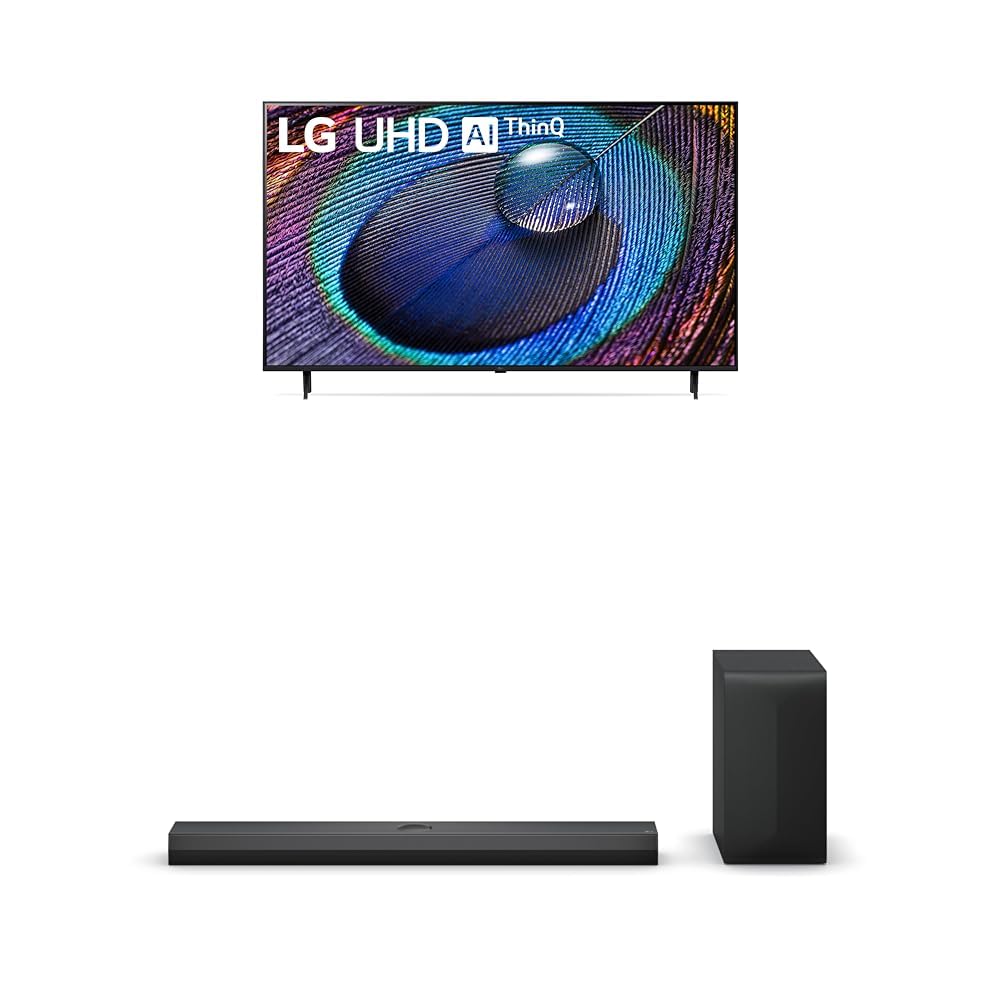
2. What's in the Box
Upon unpacking your LG UR9000 Series 4K Smart TV, ensure all components are present:
- LG 50-Inch Class UR9000 Series 4K Smart TV
- TV Stand
- Remote Control
- Power Cable
- Documentation (User Manual, Quick Start Guide, Warranty Information)
3. Setup
3.1 Attaching the Stand
- Carefully place the TV screen-down on a soft, flat surface to prevent damage.
- Align the TV stand with the mounting holes on the bottom of the TV.
- Secure the stand using the provided screws. Ensure it is firmly attached.
3.2 Wall Mounting (Optional)
If you choose to wall mount your TV, ensure you use a VESA-compatible wall mount (sold separately) and follow the instructions provided with the wall mount. Professional installation is recommended for safety.
3.3 Connecting Power
- Connect the power cable to the TV's power input port.
- Plug the other end of the power cable into a grounded electrical outlet.
3.4 Connecting External Devices
The LG UR9000 Series TV offers multiple connectivity options:
- HDMI: Connect Blu-ray players, gaming consoles, or soundbars using HDMI cables. The TV supports multiple HDMI inputs.
- USB: Plug in USB drives for media playback.
- Ethernet: For a stable internet connection, connect an Ethernet cable from your router to the TV's LAN port.
- Bluetooth: Connect compatible wireless devices such as headphones or soundbars.
3.5 Initial Setup
- Turn on the TV using the remote control.
- Follow the on-screen prompts to select your language, country, and time zone.
- Connect to your Wi-Fi network or confirm your Ethernet connection.
- Accept the terms and conditions and perform any available software updates.
- Set up your Alexa Built-in features as prompted.
4. Operating Your LG Smart TV
4.1 Remote Control Usage
The LG remote control features dedicated buttons for popular streaming services like Netflix, Disney+, and Prime Video for quick access. It also includes a scroll wheel and a mouse-like pointer function for intuitive navigation of the WebOS interface.
4.2 Navigating the Smart TV Interface (WebOS)
The WebOS interface provides a user-friendly experience. Use the remote's directional buttons or pointer to select apps, settings, and content. The home screen displays trending content and your installed applications.
4.3 Accessing Apps
Pre-installed apps include Netflix, Prime Video, Hulu, and YouTube. Additional apps can be downloaded from the LG Content Store. Simply select the app icon from the home screen to launch.
4.4 Screen Mirroring and AirPlay
You can display content from your mobile device directly on your TV screen. Use the built-in screen mirroring feature for Android devices or AirPlay for Apple devices. This allows you to share photos, videos, or even workout routines on a larger display.
4.5 Voice Control with Alexa Built-in
Utilize the integrated Alexa voice assistant for hands-free control. Press the microphone button on your remote and speak commands to change channels, adjust volume, search for content, or control smart home devices.
4.6 Gaming Features
The TV's AI-Powered 4K and 60Hz refresh rate provide a responsive gaming experience. Connect your gaming consoles via HDMI for high-quality visuals and smooth gameplay.
5. Maintenance
5.1 Cleaning the TV
- Always unplug the TV before cleaning.
- Use a soft, dry microfiber cloth to gently wipe the screen and frame.
- For stubborn marks, lightly dampen the cloth with water or a specialized screen cleaner (avoid harsh chemicals).
5.2 Software Updates
Regularly check for and install software updates to ensure optimal performance, security, and access to the latest features. Updates can usually be found in the TV's settings menu under 'Support' or 'About This TV'.
6. Troubleshooting
6.1 No Power
- Ensure the power cable is securely plugged into both the TV and the electrical outlet.
- Check if the outlet is working by plugging in another device.
- Try a different power outlet.
6.2 No Picture / Poor Picture Quality
- Verify that the correct input source is selected (e.g., HDMI 1, HDMI 2).
- Check all cable connections (HDMI, antenna, etc.) for looseness or damage.
- Adjust picture settings (brightness, contrast, color) in the TV's menu.
- If using an external device, ensure it is powered on and functioning correctly.
6.3 No Sound / Poor Sound Quality
- Increase the volume on both the TV and any connected external audio devices.
- Check audio output settings in the TV's menu to ensure the correct output (e.g., TV Speakers, Optical, Bluetooth) is selected.
- Ensure all audio cables are securely connected.
6.4 Remote Control Not Working
- Replace the batteries in the remote control.
- Ensure there are no obstructions between the remote and the TV's sensor.
- Try re-pairing the remote control if it's a smart remote (refer to the TV's on-screen guide for instructions).
7. Specifications
| Feature | Detail |
|---|---|
| Brand | LG |
| Model | UR9000 Series |
| Screen Size | 50 Inches |
| Display Technology | LED |
| Resolution | 4K (3840 x 2160) |
| Refresh Rate | 60 Hz |
| Special Features | Alexa Built-in, AI-Powered 4K, FILMMAKER MODE, HDR10 Pro, Flat Screen |
| Connectivity Technology | Bluetooth, Ethernet, USB, Wi-Fi |
| Supported Internet Services | Browser, YouTube (and various streaming apps) |
| Included Components | Stand, TV, Remote Control, Power Cable |
| Color | Black |
| First Available Date | April 8, 2024 |
8. Warranty and Support
For detailed warranty information and customer support, please refer to the warranty card included in your product packaging or visit the official LG website. You can also contact LG customer service for assistance with any product-related inquiries or technical support.