
1. Introduction
This manual provides detailed instructions for the Zunate ZK-ST21 Bluetooth 2.1 Channel Digital Power Amplifier Board. This module is designed to deliver high-quality audio amplification for various applications, featuring Bluetooth 5.1 connectivity, multiple input options, and adjustable tone controls. Please read this manual thoroughly before installation and operation to ensure proper use and optimal performance.

Image 1.1: The Zunate ZK-ST21 amplifier board and its protective bottom plates.
2. Setup
2.1 Package Contents
Verify that all components are present in the package:
- 1 x Amplifier Board
- 2 x Casing (Bottom Plates)
- 5 x Knobs
- 1 x Screwdriver
- 1 x Wiring Terminal
- 13 x Screws
- 4 x Studs
2.2 Assembly
Attach the bottom plates to the amplifier board using the provided screws and studs. Ensure all connections are secure before proceeding.
2.3 Power Supply Connection
The amplifier board requires a DC 12-30V power supply. It is recommended to use a 24-28V power supply with 10A or more for optimal performance. The board features undervoltage protection for voltages below 9V.

Image 2.1: The amplifier board with its power input section visible.
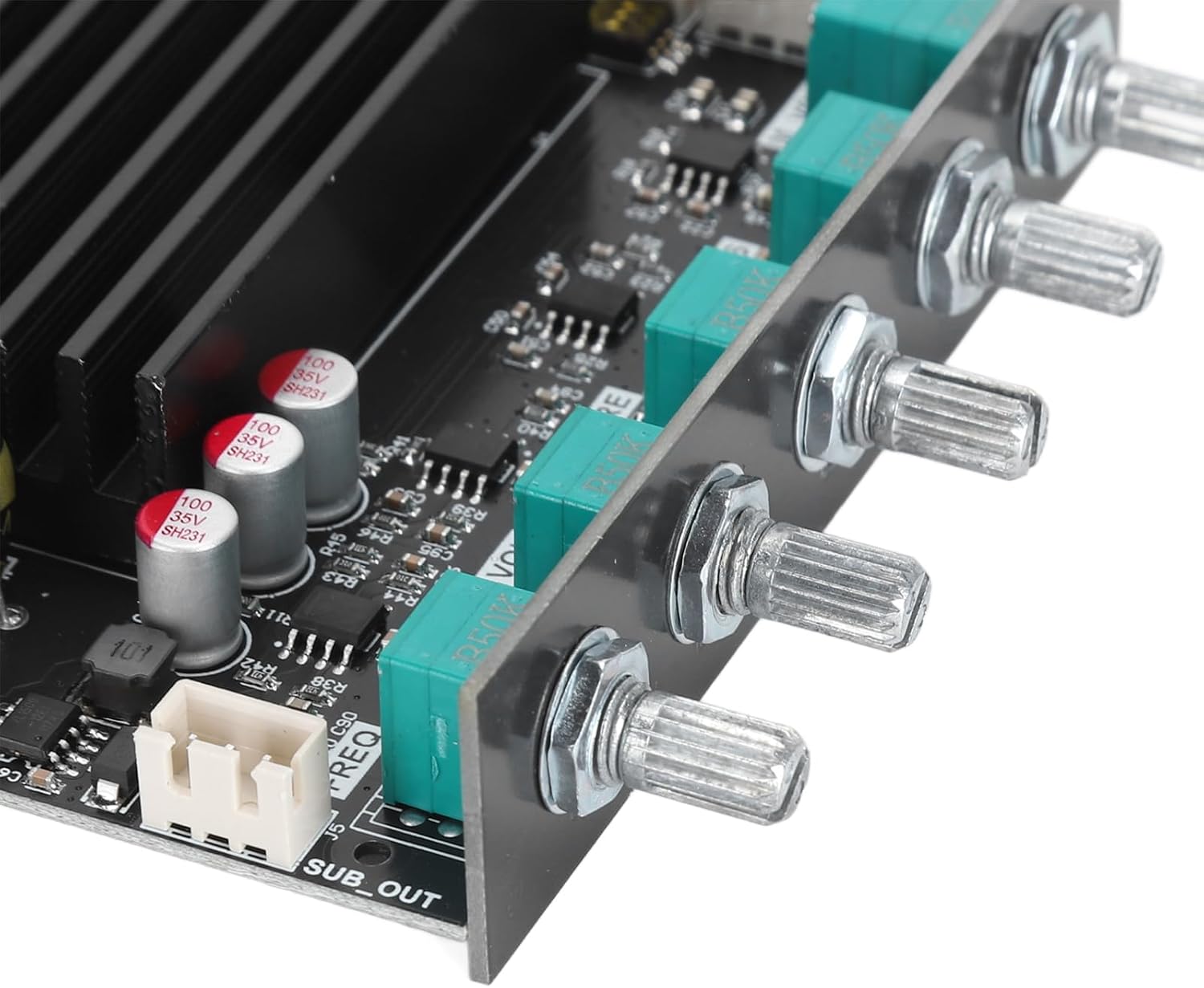
Image 2.2: Detailed view of the DC power input jack and other input ports.
2.4 Speaker Connection
Connect your speakers to the appropriate terminals on the amplifier board. The board supports 2.1 channels: left, right, and subwoofer.
- Left/Right Channels: Supports 3-8Ω speakers, up to 100W.
- Subwoofer Channel: Supports 2-8Ω speakers, up to 200W.

Image 2.3: Connection diagram for speakers and power sources.
2.5 Input Connections
The ZK-ST21 supports multiple input methods:
- Bluetooth (BT): Wireless connection for audio streaming.
- AUX: 3.5mm audio input jack for wired connections.
- U Disk: USB input for playing audio files from a USB drive.
- Sound Card: Connect as a sound card via USB.
2.6 Expansion Interfaces
The board includes interfaces for microphone and subwoofer expansion:
- MIC Extension Interface: For adding a front-stage microphone preamplifier (e.g., ZK-AMP). Ensure the dial switch is turned to the OFF position when expanding.
- Subwoofer Expansion Interface: For adding pure rear-stage power amplifier boards (e.g., ZK-1602, ZK-3002) for enhanced subwoofer output.
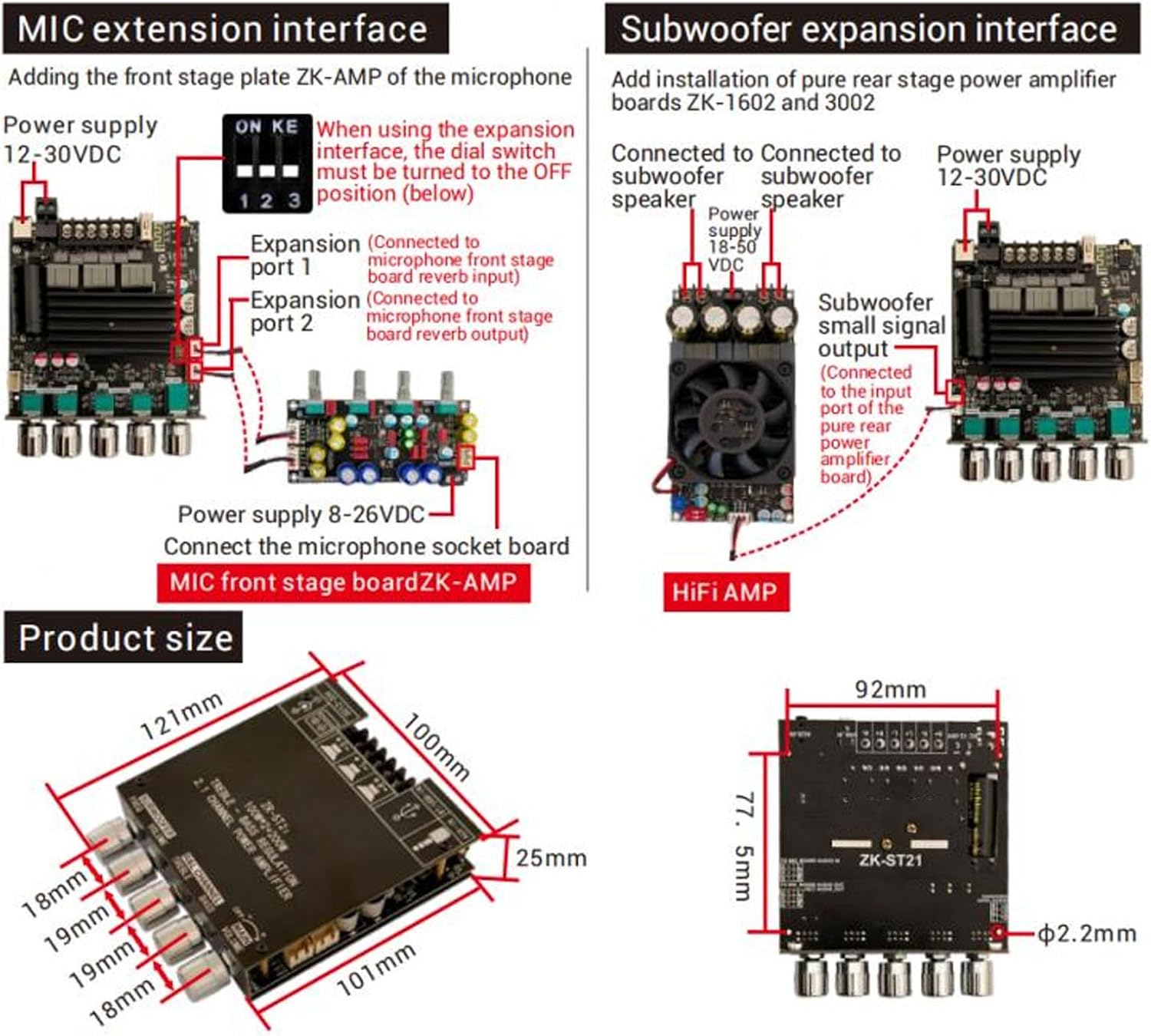
Image 2.4: Detailed diagrams for microphone and subwoofer expansion connections.
3. Operating Instructions
3.1 Power On/Off
Rotate the main volume knob clockwise to turn the amplifier on. Rotate it counter-clockwise to the end to turn it off.
3.2 Input Mode Selection
The amplifier supports BT, AUX, U disk, and sound card inputs. The input mode can be selected by cycling through the options using the appropriate control or automatically detected.
3.3 Volume Control
- Main Volume: Adjusts the overall output volume.
- Subwoofer Volume: Adjusts the volume level of the subwoofer output.
3.4 Tone Adjustment
The ZK-ST21 features independent controls for high and low frequencies to customize your audio output.
- R&L Channel Treble: Adjusts the high-frequency response for the left and right channels.
- R&L Channel Bass: Adjusts the low-frequency response for the left and right channels.
- Subwoofer Freq: Adjusts the cutoff frequency for the subwoofer, typically in the 20-200Hz range.

Image 3.1: The amplifier board showing the various adjustment knobs.

Image 3.2: Detailed view of the individual control knobs.
3.5 Bluetooth Pairing
When Bluetooth mode is selected, the amplifier will enter pairing mode. Search for 'ZK-ST21' on your Bluetooth device and connect. The transmission distance is up to 15 meters without barriers.
4. Maintenance
- Keep the amplifier board clean and free from dust. Use a soft, dry cloth for cleaning.
- Avoid exposing the device to moisture, extreme temperatures, or direct sunlight.
- Do not attempt to disassemble or repair the unit yourself. Refer to qualified personnel for service.
- Ensure proper ventilation around the amplifier to prevent overheating.
5. Troubleshooting
5.1 No Power
- Check if the power supply is correctly connected and within the 12-30V DC range.
- Ensure the main volume knob is turned on (rotated clockwise).
- Verify the power adapter is functioning correctly.
5.2 No Sound Output
- Confirm that speakers are correctly connected to the output terminals.
- Check speaker impedance and power ratings to ensure compatibility.
- Verify the input source is active and properly connected (Bluetooth paired, AUX cable inserted, U disk recognized).
- Adjust volume levels (main, subwoofer) to an audible level.
5.3 Bluetooth Connection Issues
- Ensure the amplifier is in Bluetooth mode.
- Make sure the Bluetooth device is within the 15-meter range and there are no significant obstructions.
- Try unpairing and re-pairing the device.
- Restart both the amplifier and the Bluetooth source device.
5.4 Distorted Sound
- Reduce the input volume from the source device.
- Adjust the treble and bass knobs to a neutral position or lower.
- Ensure speaker connections are secure and not short-circuited.
- Check the power supply for stability; an unstable power supply can cause distortion.
6. Specifications
| Feature | Specification |
|---|---|
| Product Model | ZK-ST21 |
| Adaptive Power Supply | DC 12-30V (Recommended: 24-28V, 10A or more) |
| Max Power Output (L/R Channel) | 105W (30V, 4Ω), 55W (30V, 8Ω) |
| Max Power Output (Subwoofer) | 208W (30V, 2Ω), 105W (30V, 4Ω) |
| Adaptive Speakers (L/R Channel) | 3-8Ω, up to 100W |
| Adaptive Speakers (Subwoofer) | 2-8Ω, up to 200W |
| Bluetooth Chip | 5.1 |
| Transmission Distance | 15 meters (barrier-free) |
| Input Methods | Bluetooth, AUX, U Disk, Sound Card |
| Number of Channels | 2.1 (Left, Right, Subwoofer) |
| Power Amplifier Chip | Two original TI TPA3221 |
| Protection Mechanisms | Input undervoltage, input anti-reverse connection, overheating, overcurrent, short circuit protection |
| Material | PCB, Aluminum Alloy |
| Dimensions (Approx.) | 121mm x 100mm x 25mm (assembled) |

Image 6.1: Approximate dimensions of the ZK-ST21 amplifier board.
7. Warranty & Support
7.1 Warranty Information
This product is covered by a manufacturer's warranty. Please refer to your purchase documentation for specific warranty terms and conditions. The manufacturer provides a 2-year warranty.
7.2 Customer Support
For technical assistance, troubleshooting, or warranty claims, please contact your retailer or the manufacturer's customer support. Contact information can typically be found on the product packaging or the retailer's website.