
1. Introduction
This manual provides detailed instructions for the installation, operation, and maintenance of your HYPERLITE 4ft LED Wraparound Light Fixture. Please read this manual thoroughly before installation and keep it for future reference. This fixture is designed to provide efficient and bright illumination for various indoor environments such as garages, closets, laundry rooms, and offices.

Image 1.1: The HYPERLITE 4ft LED Wraparound Light Fixture, showcasing its sleek design.
2. Safety Information
WARNING: Risk of electric shock. Disconnect power at the fuse or circuit breaker before installing or servicing.
- Read all instructions before installation.
- Ensure the main power supply is turned off before commencing any work.
- Installation should be performed by a qualified electrician or a person familiar with the construction and operation of the product and the hazards involved.
- Do not install on surfaces that are not structurally sound.
- Do not modify the fixture in any way.
- This fixture is designed for indoor use only.
- Ensure all connections are secure and properly insulated.
3. Package Contents
Verify that all components listed below are included in your package:
- 1 x HYPERLITE 4ft LED Wraparound Light Fixture
- 1 x 59-inch Linking cable
- 1 x Flush connector
- 4 x Wall anchors
- 2 x Small pin cross machine screws
- 3 x Wire nuts
- 2 x End caps
- 4 x Large pointed pin cross wood screws

Image 3.1: Visual representation of the light fixture dimensions and all included accessories.
4. Product Features
- Bright & Energy-Efficient: Delivers up to 6600 lumens using high-efficiency LED chips, offering significant energy savings compared to fluorescent lights.
- Adjustable Power (40W/50W/60W): Customize light output to suit different locations and preferences.
- Easy Installation: Slim design for flush mounting and a detachable small lid for quick access during installation.
- Linkable Design: Connect up to 8 fixtures using the included 59-inch connection cable for wide-ranging illumination.
- Durable Construction: Features a PC material lampshade for clear illumination and a long lifespan of up to 50,000 hours.
- 5000K Color Temperature: Provides a cool white light, ideal for task-oriented environments.
- ETL Listed: Ensures compliance with North American safety standards.

Image 4.1: Key features of the HYPERLITE 4ft LED Wraparound Light, including adjustable wattage and certifications.
5. Setup & Installation
Before beginning installation, ensure power is disconnected at the circuit breaker.
5.1. General Installation Steps
- Carefully unpack the fixture and all components.
- Determine the desired mounting location.
- Identify the appropriate installation method (Junction Box or Surface Mount).
- Follow the specific instructions for your chosen method below.
5.2. Junction Box Installation
- Position the fixture over the junction box.
- Secure the fixture to the junction box using the provided screws.
- Connect the fixture wires to the building's electrical wires: black to black (live), white to white (neutral), and green to green/bare copper (ground) using wire nuts.
- Ensure all connections are tight and properly insulated.
5.3. Surface Mount Installation
- Mark the mounting points on the ceiling or wall using the fixture as a template.
- Drill pilot holes at the marked locations. Insert wall anchors if mounting into drywall.
- Feed the electrical wires through the designated opening in the fixture.
- Secure the fixture to the surface using the provided wood screws.
- Connect the fixture wires to the building's electrical wires: black to black (live), white to white (neutral), and green to green/bare copper (ground) using wire nuts.
- Ensure all connections are tight and properly insulated.

Image 5.1: Detailed steps for both Junction Box and Surface Mount installation methods.
5.4. Linking Multiple Fixtures
The HYPERLITE fixture is designed to be linkable, allowing you to connect up to 8 lights together for extended illumination.
- Ensure power is off before linking fixtures.
- Remove the end cap from one end of the first fixture and one end of the second fixture.
- Connect the 59-inch linking cable between the two fixtures.
- Repeat for additional fixtures, up to a maximum of 8.
- Ensure all connections are secure.

Image 5.2: Illustration of how to link multiple fixtures using the provided cable.
6. Operating Instructions
6.1. Adjustable Wattage (40W/50W/60W)
This fixture features adjustable power settings, allowing you to select between 40W, 50W, and 60W to control the brightness. The wattage selection switch is located on the fixture itself.
- Ensure the power to the fixture is turned off before adjusting the wattage.
- Locate the wattage selection switch on the side or end of the fixture.
- Slide the switch to your desired wattage setting (40W, 50W, or 60W).
- Restore power to the fixture. The light will operate at the selected wattage.
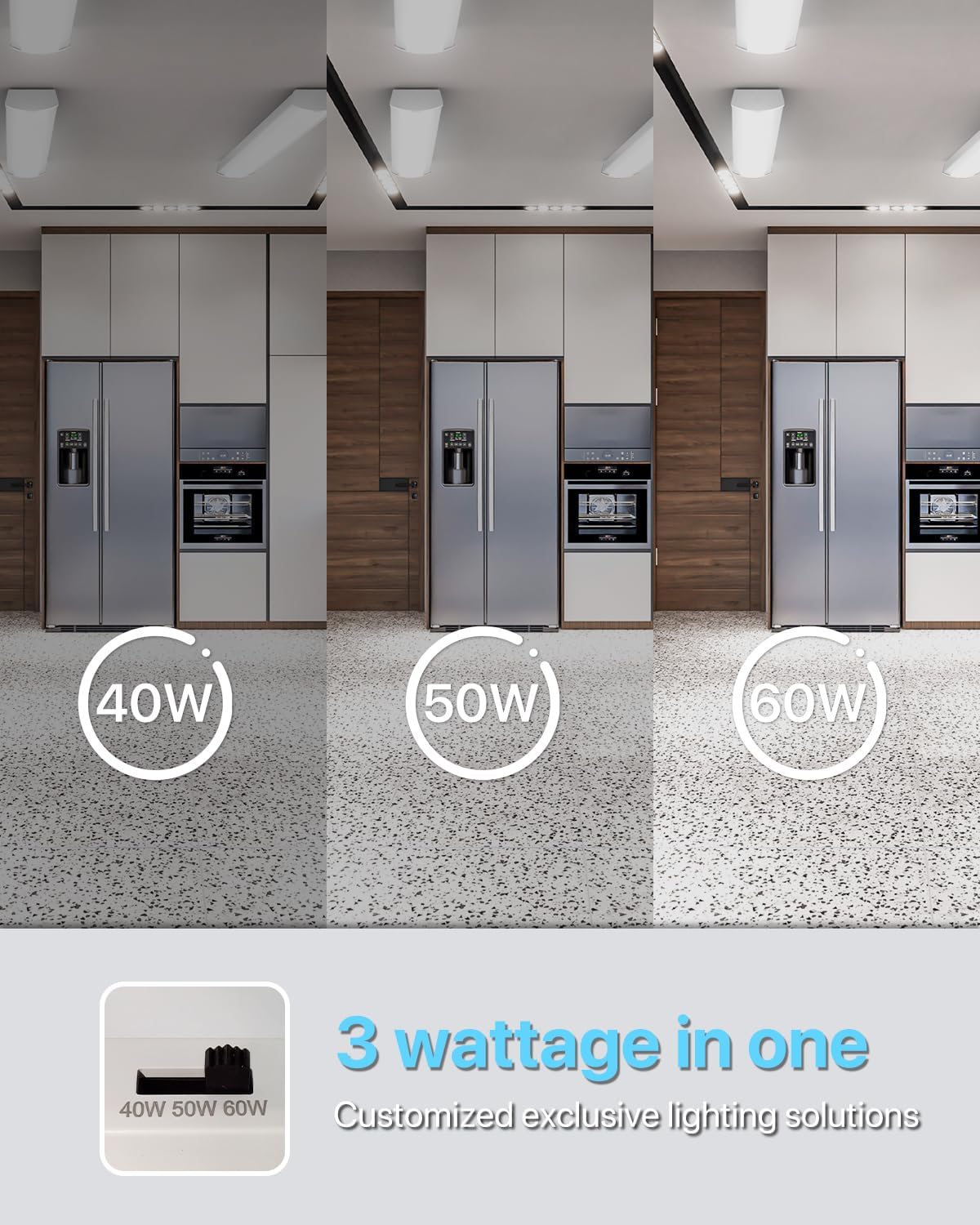
Image 6.1: Visual demonstration of the adjustable wattage feature, showing different brightness levels.
7. Maintenance
Regular maintenance ensures optimal performance and longevity of your LED fixture.
7.1. Cleaning
- Ensure the power to the fixture is turned off and the fixture has cooled down before cleaning.
- Wipe the exterior of the fixture with a soft, damp cloth.
- Do not use abrasive cleaners, solvents, or harsh chemicals, as these can damage the finish or electrical components.
- Ensure the fixture is completely dry before restoring power.
7.2. Small Lid Removal for Access
The fixture features a small detachable lid for easy access to internal components or for maintenance.
- Ensure power is off.
- Gently slide the small lid out from the end of the fixture.
- To reattach, align the lid with the grooves and slide it back into place until it snaps securely.

Image 7.1: Instructions for removing the small lid for maintenance or access.
8. Troubleshooting
If you encounter issues with your fixture, refer to the following common problems and solutions:
| Problem | Possible Cause | Solution |
|---|---|---|
| Fixture does not light up. | No power supply. Loose wiring connection. Incorrect wattage setting. | Check circuit breaker and wall switch. Ensure all wire connections are secure (power off first). Verify wattage switch is set correctly. |
| Light flickers or is dim. | Loose wiring. Incompatible dimmer switch (if applicable). | Check all wiring connections (power off first). Ensure fixture is connected to a compatible power source. |
| Linked fixtures not working. | Loose linking cable. Exceeded maximum linkable units. | Ensure linking cable is securely connected. Do not link more than 8 fixtures. |
If the problem persists after trying these solutions, please contact HYPERLITE customer service.
9. Specifications
| Attribute | Detail |
|---|---|
| Brand | HYPERLITE |
| Model Name | HP-AZ |
| Product Dimensions | 47.2"L x 5.3"W x 2"H |
| Item Weight | 3.59 pounds |
| Wattage | Adjustable 40W/50W/60W |
| Brightness | Up to 6600 Lumens (at 60W) |
| Color Temperature | 5000 Kelvin (Cool White) |
| Voltage | 120 Volts (AC) |
| Light Source Type | LED |
| Material | Acrylic |
| Installation Type | Flush Mount |
| Indoor/Outdoor Usage | Indoor |
| Special Features | Adjustable Power, Energy Efficient, Lightweight, Linkable |
| Lifespan | Up to 50,000 hours |
| Certification | ETL Listed |
10. Warranty & Support
10.1. Warranty Information
The HYPERLITE LED Wraparound Light Fixture is backed by a 3-year warranty. This warranty covers defects in materials and workmanship under normal use. Please retain your proof of purchase for warranty claims.
10.2. Customer Support
For technical assistance, troubleshooting not covered in this manual, or warranty inquiries, please contact HYPERLITE customer service. Our dedicated team is committed to providing satisfactory solutions.
Please visit the official HYPERLITE website or refer to your purchase documentation for the most current contact information.