
Introduction
This manual provides detailed instructions for the safe and efficient operation of your Renogy 100 Watt Portable Solar Panel. This high-efficiency solar panel is designed for portable power generation, ideal for camping, RVs, SUVs, and off-grid outdoor activities. Please read this manual thoroughly before use to ensure optimal performance and longevity of your product.
Safety Information
Always observe the following safety precautions to prevent injury or damage to the product:
- Do not attempt to disassemble or modify the solar panel.
- Keep the solar panel away from open flames, water, and corrosive substances.
- Ensure proper ventilation during operation to prevent overheating.
- Avoid dropping or subjecting the panel to severe impacts.
- Do not touch the electrical contacts with bare hands when the panel is exposed to sunlight.
- Use only compatible cables and connectors.
- Store the panel in a dry, cool place when not in use.
Package Contents
Verify that all items are included in your package:
- 1 x Renogy 100W E.Flex Portable Solar Panel
- 1 x User Manual
Product Features
The Renogy 100 Watt Portable Solar Panel boasts several advanced features for superior performance and convenience:
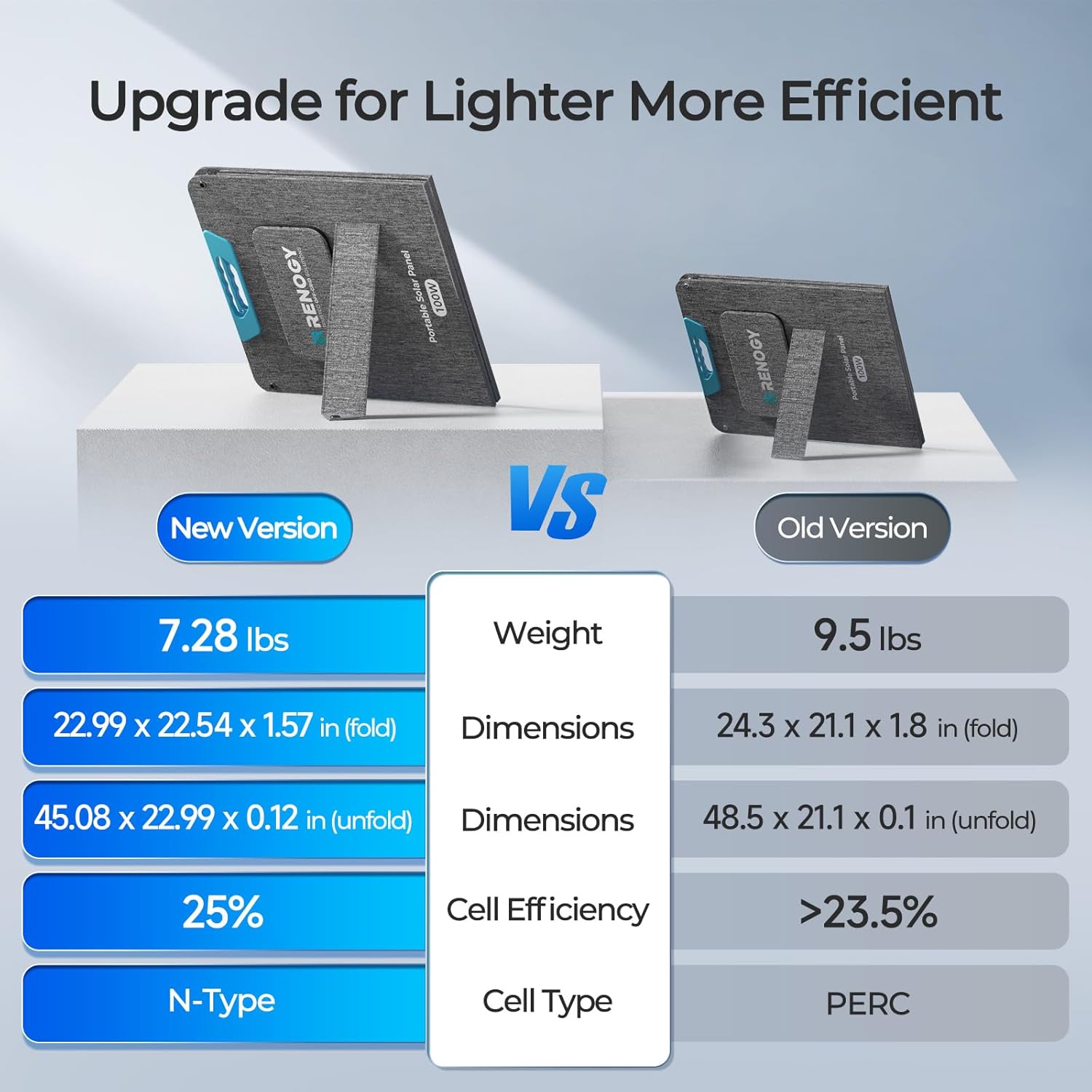
- Industry-Leading Efficiency: Upgraded with 16BB N-Type cell technology, achieving up to 25% conversion efficiency. This allows for more power generation from the same sunlight, even in limited spaces or cloudy conditions.
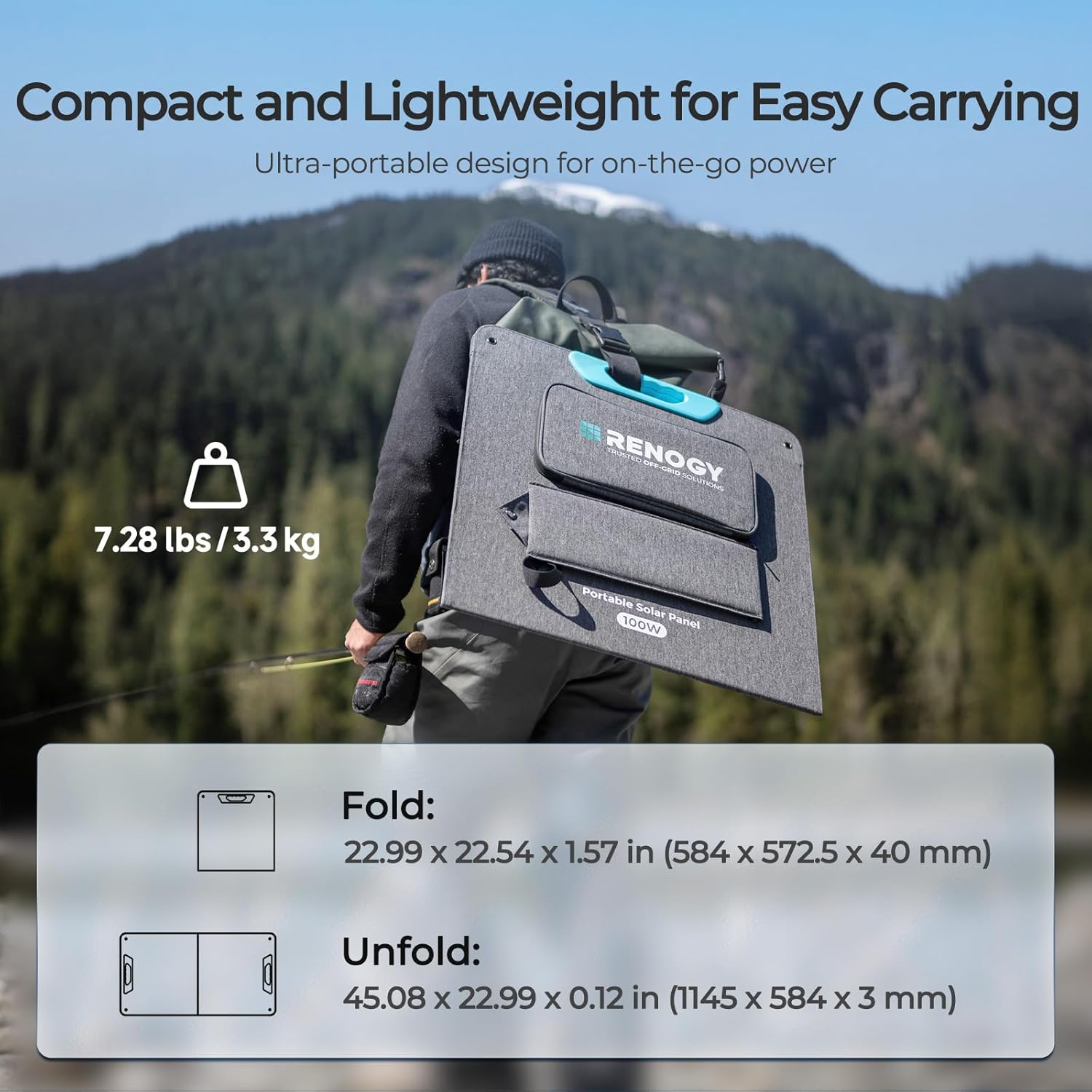
- Lightweight & Magnetic Handle Design: Weighing only 7.28 lbs (3.3 kg), it is highly portable. The innovative folding design with magnetic closure allows for easy setup and compact storage (22.99 x 22.54 x 1.57 inches when folded).
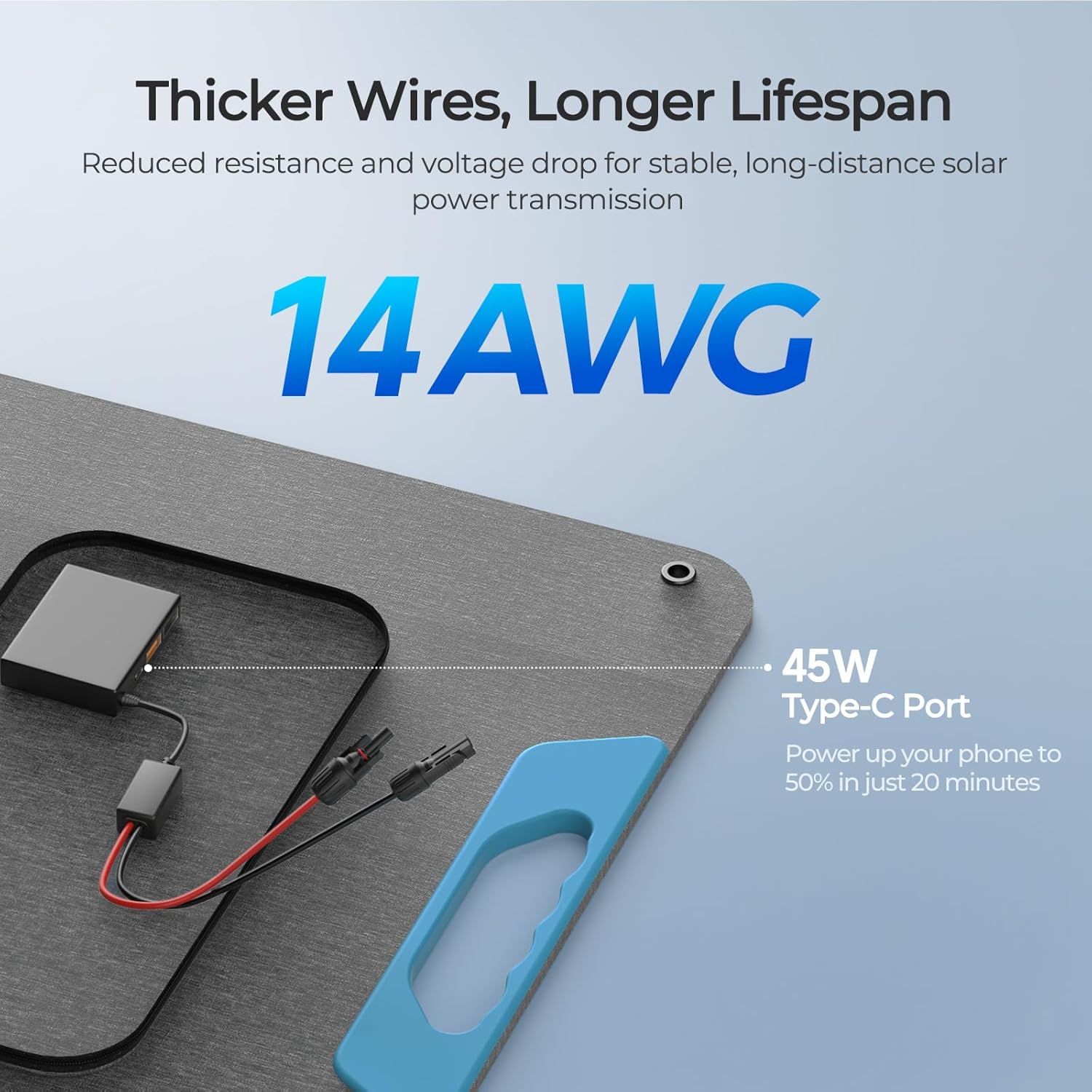
- Versatile Off-Grid Power: Equipped with 1 USB-C PD (45W max) and 2 USB-A ports (18W & 15W) for charging smartphones, tablets, laptops, and cameras. Includes MC4 output for charging portable power stations or 12V battery systems (AGM, LiFePO4, deep cycle compatible).
- Stable & Adjustable Kickstands: Features four built-in kickstands with a "small ear" design and ground studs (add-on) for stability. Offers 3-angle adjustment (40°, 50°, 60°) to optimize solar energy capture.
- IP65-Rated & Durable: Fully protected against dust and water splashes, making it suitable for various outdoor adventures.
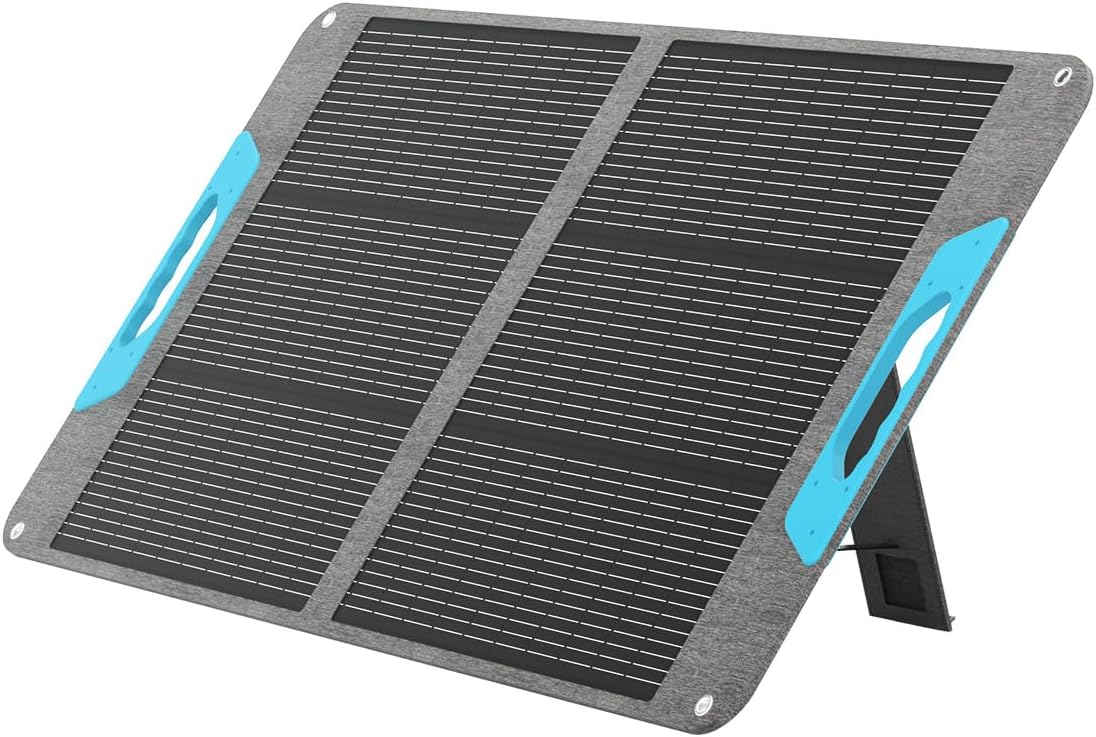
A full view of the Renogy 100 Watt Portable Solar Panel, unfolded and propped up by its integrated kickstands, ready for use.

An illustration highlighting the 25% N-Type cell efficiency of the Renogy solar panel, indicating its advanced technology for higher power conversion.
A person carrying the compact and lightweight Renogy 100W portable solar panel, demonstrating its ease of transport for outdoor activities. The image also shows its folded dimensions.

A detailed view of the solar panel's connection hub, emphasizing the 14AWG thicker wires for stable power transmission and the 45W Type-C port for fast charging.

A collage of images showing the Renogy solar panel being deployed in various outdoor settings, highlighting its durable and outdoor-ready construction.

A close-up image demonstrating the use of ground stakes (not included) with the solar panel's kickstands to ensure rock-solid stability in windy conditions.
An illustration showing the solar panel's adjustable kickstands, allowing for three different tilt angles (40°, 50°, 60°) to optimize sun exposure throughout the day.
A visual representation of the solar panel's IP65 rating, showing its resistance to dust and water splashes, suitable for various weather conditions.
Setup
- Unfolding the Panel: Carefully unfold the solar panel. The magnetic closure will release, allowing the panels to extend.
- Positioning with Kickstands: Locate the built-in kickstands on the back of the panel. Extend them to support the panel. Adjust the angle (40°, 50°, or 60°) to face the sun directly for maximum efficiency. Ensure the "small ear" design and optional ground studs are utilized for stability, especially in windy conditions.
- Connecting to Devices:
- For USB devices (smartphones, tablets, laptops, cameras): Open the accessory pouch and connect your device to the appropriate USB-C PD (45W max) or USB-A (18W & 15W) port.
- For Power Stations or 12V Battery Systems: Use the integrated MC4 output cables. Connect these to your compatible power station or charge controller for 12V battery systems. Ensure voltage and current compatibility.
- Optimal Placement: Place the solar panel in an area with direct, unobstructed sunlight. Avoid shaded areas, as even partial shading can significantly reduce output.
Operating
Once set up, the Renogy 100 Watt Portable Solar Panel will begin generating power when exposed to sunlight.
- Charging Indication: Most connected power stations or devices will indicate charging status. Refer to your device's manual for specific charging indicators.
- Monitoring Performance: For optimal performance, periodically check the panel's alignment with the sun throughout the day and adjust the kickstands as needed.
- Multi-Device Charging: You can charge up to three devices simultaneously using the USB-C and USB-A ports. The MC4 output can be used concurrently to charge a power station or battery.
- Series or Parallel Connection: For increased power output, multiple E.Flex panels can be connected in series or parallel. Refer to the diagrams below for proper connection methods.

A detailed image of the solar panel's multi-plug output, including USB-A (18W Max, 15W Max) and Type-C (45W Max) ports, demonstrating its capability to charge multiple devices simultaneously.

An illustration demonstrating the universal compatibility of the Renogy solar panel, showing its MC4 port connecting to different battery types via a charge controller and various portable power stations.

Diagrams illustrating how to seamlessly expand the power output of the E.Flex solar panel by connecting multiple units in either series or parallel configurations.
Maintenance
- Cleaning: Regularly clean the surface of the solar panel with a soft, damp cloth to remove dust, dirt, or debris. Avoid abrasive cleaners or harsh chemicals.
- Inspection: Periodically inspect the panel for any physical damage, such as cracks, dents, or frayed cables. Ensure all connections are secure.
- Storage: When not in use, fold the panel and secure it with the magnetic closure. Store it in a dry, cool environment, away from direct sunlight and extreme temperatures.
- Water Exposure: While IP65-rated for dust and splashes, avoid submerging the panel in water or exposing it to heavy rain for prolonged periods. Ensure USB ports are dry before use.
Troubleshooting
| Problem | Possible Cause | Solution |
|---|---|---|
| No power output | Insufficient sunlight; Panel is shaded; Loose connections; Damaged panel/cable. | Reposition panel in direct sunlight; Remove obstructions; Check all cable connections; Inspect panel for damage. |
| Low power output | Partial shading; Incorrect angle; Dirty panel surface; Cloudy weather. | Ensure full sun exposure; Adjust panel angle for optimal sun capture; Clean panel surface; Output will naturally be lower in cloudy conditions. |
| USB ports not charging | Device not compatible; Cable issue; Insufficient power from panel. | Verify device compatibility; Try a different USB cable; Ensure panel is receiving adequate sunlight. |
Specifications
| Brand | Renogy |
| Model Number | RPP100EF-SE |
| Material | Monocrystalline Silicon |
| Product Dimensions (Folded) | 22.99"L x 22.54"W x 1.57"H (584 x 572.5 x 40 mm) |
| Product Dimensions (Unfolded) | 45.08"L x 22.99"W x 0.12"H (1145 x 584 x 3 mm) |
| Item Weight | 7.28 lbs (3.3 kg) |
| Efficiency | 25% (N-Type Cell Technology) |
| Maximum Power | 100 Watts |
| Maximum Voltage (Voc) | 21.6 Volts |
| AC Adapter Current (Imp) | 5.66 Amps |
| USB-C Output | 45W Max (PD) |
| USB-A Output | 18W & 15W |
| Ingress Protection (IP) Rating | IP65 (Dust and Splash Resistant) |
| UPC | 840315218796 |
Warranty and Support
Renogy products typically come with a manufacturer's warranty. For specific warranty details and to register your product, please visit the official Renogy website or contact their customer support.
Contact Information:
- Renogy Official Website
- Refer to the product packaging or official website for customer service contact numbers and email.
Additional protection plans may be available from your retailer at the time of purchase.


