
Introduction
The BOYA BY-V10 is a compact and versatile 2.4G wireless microphone system designed for mobile devices with a Type-C port. This system offers high-quality audio capture for various applications such as vlogging, live streaming, interviews, and online communication. Featuring automatic pairing, smart noise reduction, and an omnidirectional pickup pattern, the BY-V10 ensures clear and reliable sound recording.
Product Overview
Package Contents
Please check that all items are present in your package:
- 1 x Transmitter (TX)
- 1 x Receiver (RX)
- 1 x Charging Cable
- 1 x User Manual
Key Features
- 2.4G Wireless Transmission: Ensures stable and reliable audio transmission up to 50 meters (without obstacles).
- Automatic Pairing: Plug-and-play functionality with no app required.
- Smart Noise Reduction: Built-in module to filter out ambient noise for improved sound quality.
- Omnidirectional Microphone: Captures sound from all directions (360°) for a natural spatial sense.
- Long Battery Life: Transmitter features a built-in rechargeable lithium battery for extended use.
- Type-C Charging Port: Receiver is powered by the external device and allows simultaneous phone charging.
- Mini Clip-on Design: Compact and lightweight transmitter with a 360° rotatable clip for convenient attachment to clothing.

Figure 1: The BOYA BY-V10 transmitter features a mini, delicate design with an omnidirectional built-in microphone, making it small and lightweight for easy portability.

Figure 2: The transmitter (TX) is equipped with a belt clip that can rotate 360 degrees, allowing for flexible and secure attachment to clothing.
Setup Instructions
1. Charging the Transmitter
Before first use, ensure the transmitter is fully charged. Connect the provided charging cable to the transmitter's charging port and a USB power source. The charging indicator will show the charging status. A full charge takes approximately 2 hours and provides about 9 hours of battery life.
2. Connecting the Receiver
Plug the receiver directly into the Type-C port of your smartphone or compatible external device. The receiver draws power directly from the connected device and does not require separate charging.
3. Automatic Pairing
Once the receiver is connected to your device and the transmitter is powered on, the system will automatically pair within 10 seconds. No manual pairing steps or app installation are required. A successful connection is indicated by a solid blue light on both the transmitter and receiver.
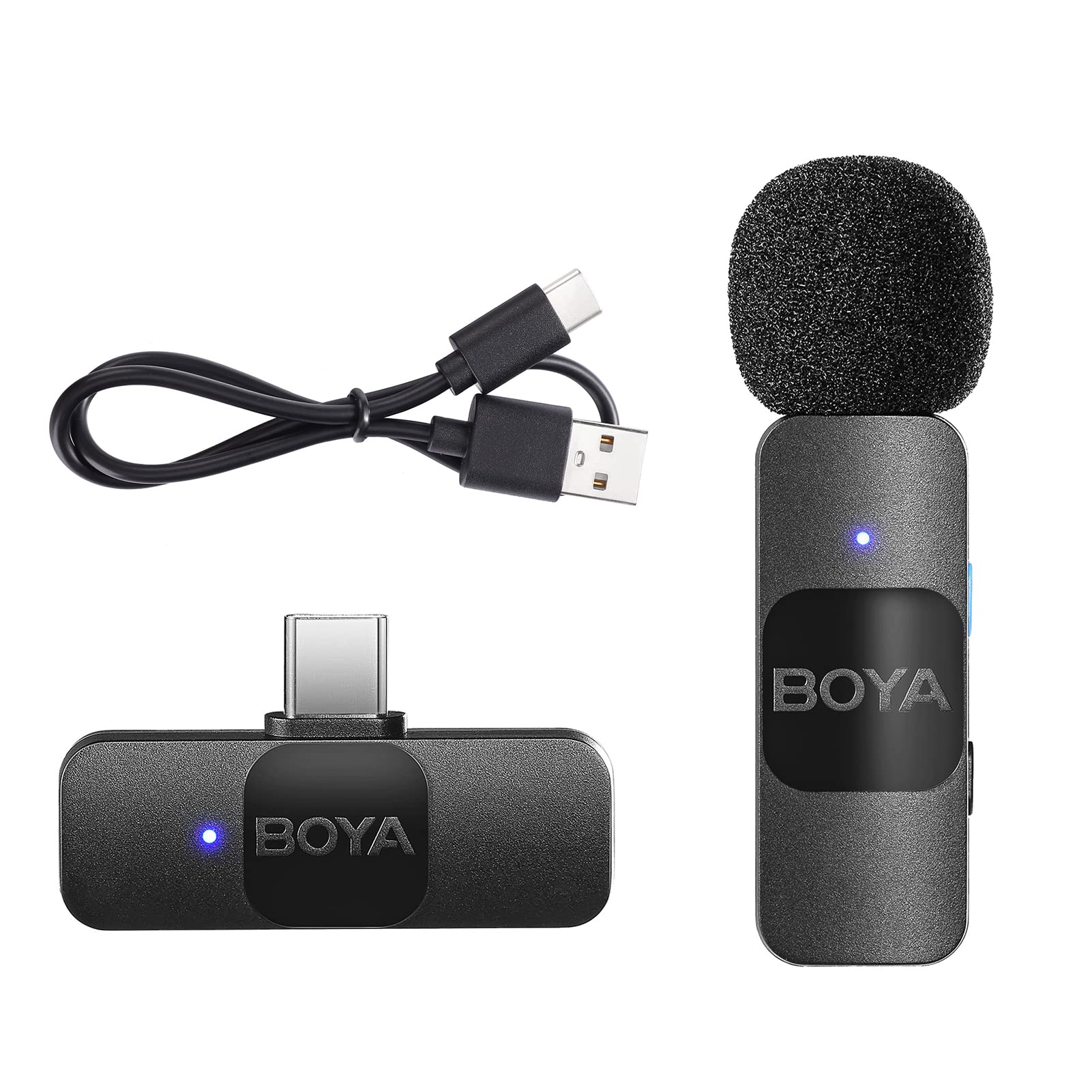
Figure 3: The transmitter and receiver automatically connect within 10 seconds after being powered on and plugged into a Type-C device, as shown with a smartphone.
Operating Instructions
1. Wearing the Transmitter
Attach the transmitter to your collar or clothing using its 360° rotatable clip. Position the microphone facing towards your mouth for optimal sound capture.
2. Using Noise Reduction (NR) Function
The BY-V10 features a smart noise reduction function. To activate or deactivate this feature, press the dedicated NR button on the transmitter. When activated, the system will intelligently filter out ambient background noise, enhancing the clarity of your voice.

Figure 4: Press the NR button on the transmitter to toggle the smart noise reduction function on or off, effectively reducing background noise as illustrated by the waveform comparison.
3. Recording and Monitoring
Once connected and paired, your smartphone will automatically recognize the BY-V10 as the audio input device. You can then use your preferred recording app, camera app, or live streaming platform to capture audio. The receiver's Type-C port also allows you to charge your mobile phone simultaneously while using the microphone system, ensuring uninterrupted recording sessions.
4. Usage Scenarios
The BOYA BY-V10 is suitable for a wide range of applications:
- Vlogging and content creation
- Live streaming
- Mobile journalism
- Video conferencing and online chatting
- Interviews

Figure 5: The BOYA BY-V10 is ideal for various applications including vlogging, mobile journalism, content creation, and live streaming, providing clear audio in diverse settings.
Maintenance
To ensure the longevity and optimal performance of your BOYA BY-V10 wireless microphone system, follow these maintenance guidelines:
- Cleaning: Use a soft, dry cloth to clean the transmitter and receiver. Avoid using harsh chemicals or abrasive materials.
- Storage: Store the device in a cool, dry place away from direct sunlight and extreme temperatures.
- Battery Care: For optimal battery health, avoid fully discharging the transmitter frequently. If storing for extended periods, charge the transmitter to about 50% every few months.
- Avoid Moisture: Do not expose the devices to water or high humidity, as this can damage internal components.
Troubleshooting
If you encounter issues with your BOYA BY-V10, please refer to the following common troubleshooting steps:
- No Sound/Poor Audio Quality:
- Ensure the receiver is fully inserted into your device's Type-C port.
- Verify that the transmitter is powered on and fully charged.
- Check if the transmitter and receiver are successfully paired (solid blue indicator lights).
- Confirm that your recording app or device settings are configured to use the external microphone.
- If experiencing static or interference, try moving closer to the receiver or away from other 2.4G wireless devices.
- Ensure the NR (Noise Reduction) function is set appropriately for your environment.
- Transmitter Not Charging:
- Use the provided charging cable.
- Try a different USB power adapter or port.
- Ensure the charging cable is securely connected to both the transmitter and the power source.
- Intermittent Connection:
- Ensure there are no significant obstacles between the transmitter and receiver.
- Stay within the recommended operating range of 50 meters.
- Avoid environments with strong 2.4G wireless interference.
Specifications

Figure 6: Physical dimensions and weights of the BOYA BY-V10 receiver (RX) and transmitter (TX).
| Feature | Specification |
|---|---|
| Brand | BOYA |
| Model | BY-V10 |
| Transmission Type | 2.4G Wireless |
| Polar Pattern | Omnidirectional |
| Frequency Response | 20Hz-16kHz |
| Signal-to-noise Ratio | 80dB |
| Sensitivity | -42dB |
| Operating Range | 50m (without obstacles) |
| RF Output Power | 6dBm |
| Transmitter's Battery Capacity | 95mAh |
| Transmitter's Charging Time | Approx. 2 hours |
| Transmitter's Battery Life | Approx. 9 hours |
| Receiver's Power Requirement | Supplied by External devices |
| Connector Type | USB Type-C |
| Compatible Devices | Smartphone |
Warranty and Support
Specific warranty information for the BOYA BY-V10 is not detailed in this manual. Please refer to the warranty card included with your product or visit the official BOYA website for the most up-to-date warranty terms and conditions.
For technical support, product inquiries, or service, please contact BOYA customer support through their official channels. You can often find support contact information on the BOYA website or within the product packaging.
Visit the official BOYA Store: BOYA Store on Amazon