Introduction
Welcome to your EasyKeys Replacement Key for CompX National AM678. This manual provides essential information for identifying your lock code, ensuring compatibility, and properly using your new replacement key. Please read these instructions carefully before use.
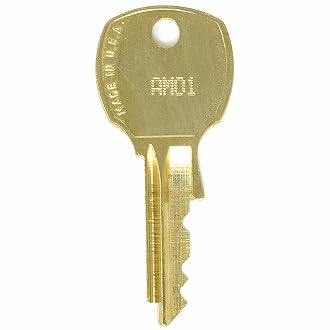
Image Description: A close-up view of the EasyKeys Replacement Key, designed for CompX National AM678 locks. The key is made of brass and features a standard key blank design.
Identifying Your Lock Code
To ensure you have the correct replacement key, it is crucial to accurately identify your lock's code. The code can typically be found in several locations:

Image Description: This diagram illustrates common locations where you can find your lock code:
- On the Key: The code (e.g., FR322) is often stamped directly on the key itself.
- On the Lock Face: For some locks, the code (e.g., FR322) is visible on the front surface of the lock cylinder.
- On a Label Inside/Behind the Lock: The code (e.g., G38) might be on a sticker or label located inside or behind the lock mechanism.
- On the Cabinet/Door Label: For furniture or cabinet locks, the code (e.g., HF321) could be on a label affixed to the cabinet or door near the lock.
Compatibility
This replacement key is specifically designed for CompX National locks with the code AM678. It is compatible with the following manufacturers and product specifications:
- Art Metal
- Art Steel
- ASCO (GCODE)
The key is cut on an NA14 D4291 key blank, suitable for CompX National Key Series AM01 - AM950.
Important: Always verify that your existing lock code and manufacturer match the product title and compatibility list before ordering to ensure proper fit and function.
Using Your Replacement Key
Your EasyKeys replacement key is pre-cut to the AM678 specification. Follow these steps for proper usage:
- Inspect the Key: Upon receiving your key, visually inspect it for any damage or manufacturing defects.
- Test the Key: Carefully insert the key into your CompX National AM678 lock. Turn the key gently to ensure it operates the lock mechanism smoothly. Do not force the key if it encounters resistance.
- Verification: If the key operates correctly, it is ready for use. If you experience any issues, refer to the Troubleshooting section.
Maintenance
To ensure the longevity and smooth operation of your key and lock:
- Keep the key clean and free from dirt or debris.
- Avoid exposing the key to harsh chemicals or extreme temperatures.
- If the lock mechanism becomes stiff, a small amount of graphite lubricant can be applied to the keyway. Do not use oil-based lubricants.
Troubleshooting
- Key does not insert fully:
- Check for obstructions in the lock's keyway. Ensure the key is oriented correctly.
- Key inserts but does not turn:
- Verify that the lock code on your key matches your lock. Ensure the lock mechanism is not jammed. Do not force the key, as this can cause damage.
- Key feels loose or wobbly:
- This may indicate wear in the lock cylinder or an incorrect key cut. Double-check the lock code and manufacturer for compatibility.
Product Specifications
| Feature | Detail |
|---|---|
| Brand | EasyKeys |
| Model Name | AM678 |
| Manufacturer | CompX National |
| Lock Type | Cam |
| Material | Brass |
| Special Features | Adjustable Fit, Custom Cut Key, Durable |
| Item Dimensions (L x W x H) | 0.5 x 0.5 x 1 inches |
| Item Weight | 0.25 Pounds (4 ounces) |
| Included Components | Key |
| Part Number | AM678-compxnational-key-480490 |
| ASIN | B0D12M8T72 |
Support
For further assistance or inquiries regarding your EasyKeys Replacement Key, please contact EasyKeys customer support.
You can visit the official EasyKeys store on Amazon for more information: EasyKeys Store.