
OMAIC BN59-01199G
Contents
OMAIC Universal Remote Control BN59-01199G for Samsung Smart TVs
User Manual
1. Introduction
This manual provides comprehensive instructions for the OMAIC Universal Remote Control, model BN59-01199G. This remote is designed as a replacement and universal control for a wide range of Samsung Smart TVs, including QLED, OLED, 4K, 8K, LCD, LED, HDTV, and 3D models. It operates using infrared technology and requires no complex programming or pairing.

Image 1.1: Front and back view of the OMAIC Universal Remote Control. The remote is black with a brushed texture on the front, featuring standard TV control buttons. The back is smooth and curved.
2. Setup and Installation
2.1 Battery Installation
The OMAIC Universal Remote Control requires two AAA batteries (not included) for operation. Follow these steps to install the batteries:
- Locate the battery compartment cover on the back of the remote control.
- Slide the battery cover downwards or in the direction indicated by an arrow to remove it.
- Insert two new AAA batteries, ensuring the positive (+) and negative (-) terminals align correctly with the markings inside the compartment.
- Replace the battery compartment cover by sliding it back into position until it clicks securely.
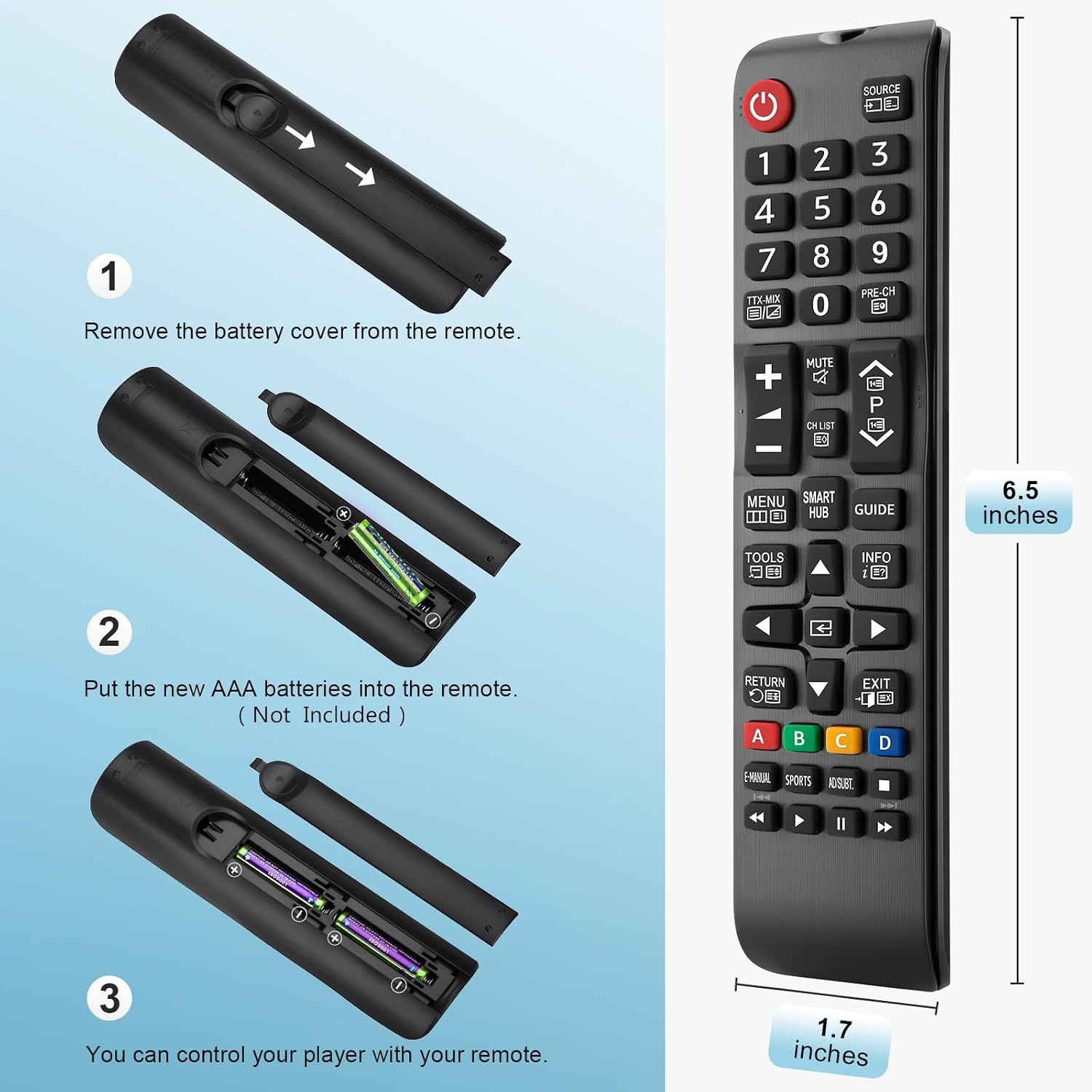
Image 2.1: A three-step diagram illustrating battery installation. Step 1 shows removing the battery cover. Step 2 shows inserting two AAA batteries into the compartment. Step 3 shows the remote ready for use after battery insertion.
2.2 Initial Use
This remote control is designed for immediate use with compatible Samsung TVs. No programming or pairing is required. Once batteries are installed, the remote is ready to operate your television.

Image 2.2: A graphic showing a checkmark next to 'Work out of the box' and a cross next to 'No Programming or Set Up Required', emphasizing the remote's ease of use.
3. Operating Instructions
3.1 Button Functions
The remote control features a standard layout for intuitive operation. Refer to the diagram below for a detailed overview of each button's function:

Image 3.1: A detailed diagram labeling the remote control buttons and their corresponding functions. Key functions include Power, Source, Number Pad, Volume Up/Down, Channel Up/Down, Mute, CH LIST, MENU, SMART HUB, TOOLS, INFO, RETURN, EXIT, Color Buttons (A, B, C, D), E-MANUAL, SPORTS, ADSUBT, and media playback controls.
- Power (Red Button): Turns the TV on and off.
- SOURCE: Displays and selects available video sources.
- TTX-MIX: Activates or mixes Teletext display information.
- Number Pad (0-9): Direct channel selection.
- PRE-CH: Returns to the previous channel.
- Volume (+/-): Adjusts the volume level.
- Channel (Up/Down Arrows): Changes channels.
- MUTE: Temporarily cuts off sound.
- CH LIST: Displays channel lists on the screen.
- MENU: Displays the main on-screen menu.
- SMART HUB: Brings up Smart Hub applications.
- GUIDE: Accesses the TV program guide.
- TOOLS: Quickly selects frequently used functions.
- INFO: Displays information on the TV screen.
- Navigation Arrows (Up/Down/Left/Right) & Enter: Navigates through menus and confirms selections.
- RETURN: Returns to the previous menu or screen.
- EXIT: Exits the current menu or application.
- Color Buttons (A, B, C, D): Shortcut keys for interactive functions, typically red, green, yellow, and blue.
- E-MANUAL: Accesses the electronic manual.
- SPORTS: Accesses sports-related content or modes.
- ADSUBT: Audio Description / Subtitle control.
- Media Playback Controls: Play, Pause, Stop, Fast Forward, Rewind.
3.2 Operating Range
The remote control operates effectively within a range of approximately 5 to 8 meters (16 to 26 feet) from the television. For optimal performance, ensure a clear line of sight between the remote control and the TV's infrared receiver.

Image 3.2: A person sitting on a couch using the remote control to operate a television, with text overlay indicating an available distance of 5-8 meters (16-26 feet) and the requirement for line-of-sight.
4. Maintenance
4.1 Cleaning
To clean the remote control, use a soft, dry cloth. For stubborn dirt, slightly dampen the cloth with water or a mild, non-abrasive cleaner. Avoid using harsh chemicals, solvents, or abrasive materials, as these can damage the remote's surface or internal components.
4.2 Battery Replacement
Replace the batteries when the remote's response becomes sluggish or it stops functioning. Always replace both AAA batteries at the same time with new ones. Do not mix old and new batteries, or different types of batteries, as this can lead to leakage or improper operation. Dispose of used batteries according to local regulations.
5. Troubleshooting
- Remote not responding:
- Ensure batteries are correctly installed with the correct polarity.
- Replace old batteries with new ones.
- Check for any obstructions between the remote and the TV's infrared receiver.
- Ensure you are within the effective operating range (5-8 meters).
- Buttons are unresponsive or sticky:
- Clean the remote's surface and around the buttons with a soft, dry cloth.
- Avoid pressing buttons with excessive force.
- Limited operating range:
- Replace batteries with fresh ones.
- Ensure there is a clear line of sight to the TV.
- Avoid strong light sources (like direct sunlight) that might interfere with the infrared signal.
6. Specifications
| Feature | Detail |
|---|---|
| Brand | OMAIC |
| Model Name | BN59-01199G |
| Connectivity Technology | Infrared |
| Compatible Devices | Samsung QLED, OLED, 4K, 8K, LCD, LED, HDTV, 3D Smart TVs (including curved frame models) |
| Number of Buttons | 40 |
| Controller Type | Button Control |
| Maximum Range | 10 Meters (33 feet) - Note: Effective operating range is typically 5-8 meters for optimal performance. |
| Color | Black |
| Batteries Required | 2 x AAA (not included) |
6.1 Compatible Samsung Remote Models
This universal remote is compatible with and can replace the following Samsung remote control models:
- BN59-01175N
- BN59-01199F
- AA59-00741A
- AA59-00786A
- AA59-00602A
- BN59-01247A
- AA59-00743A
- BN59-01175B
- AA59-00818A
- AA59-00603A
- BN59-01199G
- AA59-00622A
- AA59-00496A
- AA59-01180A
- BN59-01268D
- AA59-00666A
- AA59-01289A
- AA59-00600A

Image 6.1: The OMAIC remote control shown alongside a list of Samsung remote model numbers it is designed to replace, confirming broad compatibility.
7. Warranty and Support
7.1 Return Policy
The product includes a 30-day unlimited return policy. For any issues or dissatisfaction within this period, please contact customer support.
7.2 Customer Support
For any questions regarding your OMAIC Universal Remote Control, please contact our customer service team. We aim to respond to inquiries within 12 hours on business days.
Please refer to your purchase documentation or the retailer's website for specific contact information.
Ask a question about this manual
Ask about setup, troubleshooting, compatibility, parts, safety, or missing instructions. Manuals+ will review the question and use this page’s manual context to help answer it.