
1. Introduction
Thank you for choosing the Daitsu Artic DS9KDP Inverter A++ Split Wall-Mounted Air Conditioner. This manual provides essential information for the safe and efficient operation, installation, and maintenance of your new air conditioning unit. Please read this manual thoroughly before using the appliance and keep it for future reference.
The Daitsu Artic series features an innovative design with motorized internal blades, incorporating micro-holes for a gentle and balanced distribution of cool air throughout the room, enhancing thermal comfort. This high-performance unit offers maximum energy savings through inverter technology and uses R32 refrigerant, which has a low Global Warming Potential (GWP).
Key features include easy programming and an integrated Wi-Fi module for controlling the unit via a dedicated application. To ensure improved air quality, two standard dust filters are included, easily accessible for vertical removal from the top of the indoor unit. These synthetic fiber filters capture solid particles such as dust, pollen, and bacteria from the air. The unit's display conveniently shows temperature and operating mode, with the option to turn off the illumination if desired.
2. Safety Information
Please observe the following safety precautions to prevent personal injury or property damage. Improper operation due to ignoring instructions may cause harm or damage.
- Installation: Installation must be performed by qualified personnel in accordance with national wiring regulations. Do not attempt to install the unit yourself.
- Power Supply: Ensure the power supply matches the unit's specifications. Do not share the electrical outlet with other appliances.
- Refrigerant: This unit uses R32 refrigerant. Do not discharge refrigerant into the atmosphere. Contact a qualified service technician for any refrigerant-related issues.
- Cleaning: Always disconnect the power supply before cleaning or performing maintenance. Use a soft, dry cloth for cleaning. Do not use chemical solvents.
- Operation: Do not insert fingers or objects into the air inlet/outlet. Do not expose yourself directly to the airflow for extended periods.
- Children and Vulnerable Persons: This appliance can be used by children aged 8 years and above and persons with reduced physical, sensory or mental capabilities or lack of experience and knowledge if they have been given supervision or instruction concerning use of the appliance in a safe way and understand the hazards involved.
- Maintenance: For repairs or servicing, contact authorized service personnel. Unauthorized repairs can be dangerous and void the warranty.
3. Product Components
The Daitsu Artic DS9KDP system consists of an indoor unit and an outdoor unit. Below are images illustrating these components.
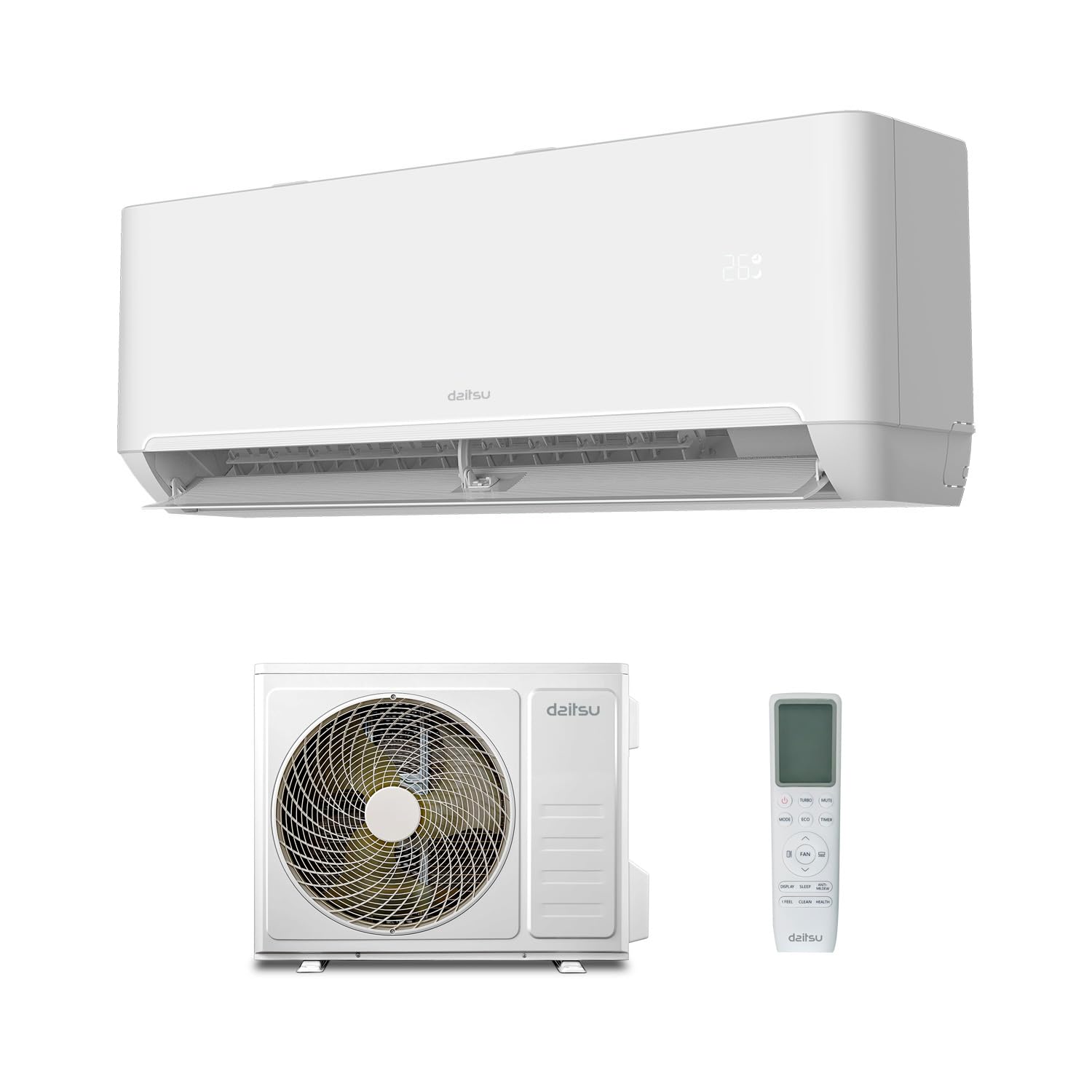
Figure 3.1: Daitsu Artic DS9KDP Indoor Unit. This image shows the white indoor unit of the Daitsu Artic DS9KDP air conditioner, designed for wall mounting. The unit features a sleek, modern appearance with the Daitsu logo centrally placed and a digital temperature display on the right side.

Figure 3.2: Daitsu Artic DS9KDP Outdoor Unit. This image displays the white outdoor unit of the Daitsu Artic DS9KDP air conditioner. It features a large circular fan grille on the left side and the Daitsu logo on the right, indicating its robust construction for external installation.
4. Setup and Installation
The installation of this air conditioning unit requires specialized knowledge and tools. It is strongly recommended that installation be carried out by a certified professional to ensure proper functioning, safety, and compliance with local regulations.
4.1 Pre-Installation Checks
- Verify that the installation site can support the weight of both indoor and outdoor units.
- Ensure adequate space for air circulation around both units.
- Confirm that the electrical supply meets the unit's power requirements (220 Volts AC).
- Check for proper drainage for condensate water.
4.2 Professional Installation Steps (Summary)
- Mounting the indoor unit on the wall, ensuring it is level and secure.
- Installing the outdoor unit on a stable surface, away from direct sunlight or obstructions.
- Connecting refrigerant piping between the indoor and outdoor units.
- Performing vacuuming and charging the system with R32 refrigerant (if necessary).
- Connecting electrical wiring according to the wiring diagram provided in the full installation manual.
- Ensuring proper drainage for both units.
- Testing the unit's operation in all modes.
4.3 Wi-Fi Module Integration
The Daitsu Artic DS9KDP includes an integrated Wi-Fi module for remote control. Refer to the separate Wi-Fi setup guide or the Daitsu mobile application instructions for detailed steps on connecting your unit to your home network and controlling it via your smartphone or tablet.
5. Operating Instructions
Your Daitsu Artic DS9KDP air conditioner offers various operating modes to suit your comfort needs. Control is typically done via the supplied remote control or the Daitsu mobile application.
5.1 Basic Operation Modes
- Cooling Mode: Reduces room temperature to the desired setting. Ideal for hot weather.
- Heating Mode: Increases room temperature. (Special function: Heating).
- Fan Mode: Circulates air without cooling or heating.
- Dry Mode: Reduces humidity in the room.
- Auto Mode: Automatically selects cooling or heating based on the ambient temperature and your set temperature.
5.2 Temperature and Fan Speed Adjustment
Use the temperature up/down buttons on your remote control or app to set your desired temperature. Adjust fan speed (low, medium, high, auto) to control airflow and noise levels.
5.3 Timer Function
Program the unit to turn on or off automatically at specific times using the timer function. This helps save energy and ensures comfort when you need it.
5.4 Wi-Fi Control
Once connected to your Wi-Fi network, you can control all functions of your air conditioner remotely via the Daitsu mobile application. This includes changing modes, adjusting temperature, setting timers, and monitoring status.
6. Maintenance
Regular maintenance ensures optimal performance, energy efficiency, and longevity of your Daitsu Artic DS9KDP air conditioner. Always disconnect the power supply before performing any maintenance.
6.1 Air Filter Cleaning
The unit is equipped with two dust filters, easily accessible for vertical removal from the top of the indoor unit. Clean these filters regularly (every 2-4 weeks, depending on usage and air quality) to maintain air quality and efficiency.
- Turn off the air conditioner and disconnect it from the power supply.
- Open the front panel of the indoor unit.
- Gently slide out the air filters from their slots.
- Clean the filters using a vacuum cleaner or wash them with lukewarm water and a mild detergent. Rinse thoroughly.
- Allow the filters to dry completely in a shaded area before reinserting them.
- Close the front panel and reconnect the power supply.
6.2 Outdoor Unit Cleaning
Periodically check the outdoor unit for any obstructions (leaves, dirt, debris) around the fan and coils. Carefully remove any blockages. Do not spray water directly onto the electrical components.
6.3 Professional Servicing
It is recommended to have your air conditioner professionally serviced at least once a year by a qualified technician. This includes checking refrigerant levels, cleaning coils, and inspecting electrical connections.
7. Troubleshooting
Before contacting customer support, please refer to the following common issues and their potential solutions.
| Problem | Possible Cause | Solution |
|---|---|---|
| Unit does not start | No power supply; Remote control batteries low; Circuit breaker tripped. | Check power connection; Replace remote batteries; Reset circuit breaker. |
| Insufficient cooling/heating | Dirty air filters; Blocked outdoor unit; Incorrect temperature setting; Doors/windows open. | Clean air filters; Clear obstructions from outdoor unit; Adjust temperature; Close doors/windows. |
| Unusual noise | Loose parts; Obstruction in fan; Unit not level. | Check for loose parts; Remove obstructions; Ensure unit is level. If noise persists, contact service. |
| Water leakage from indoor unit | Clogged drain pipe; Unit not level; Condensate pan overflow. | Check and clear drain pipe; Ensure unit is level; Contact service if issue persists. |
| Wi-Fi connection issues | Router issues; Incorrect Wi-Fi settings; App issues. | Restart router; Reconfigure Wi-Fi settings in the app; Reinstall app. |
If the problem persists after attempting these solutions, please contact qualified service personnel.
8. Specifications
Below are the technical specifications for the Daitsu Artic DS9KDP air conditioner.
| Feature | Specification |
|---|---|
| Model Number | 3nda01540 |
| Cooling Capacity (kcal/h) | 2,923 (range: 860 ~ 3,241) |
| Cooling Capacity (kW) | 2.7 (range: 0.94 - 3.30) |
| Cooling Power (W) | 3400 |
| Energy Class (Cooling/Heating) | A++ / A+ |
| Seasonal Energy Efficiency Ratio (SEER) | 3.33 |
| Indoor Unit Dimensions (H/W/D) | 275 mm / 790 mm / 192 mm |
| Product Dimensions (Overall) | 49.8 x 77.7 x 29 cm; 32.5 kg |
| Voltage | 220 Volts (AC) |
| Refrigerant Type | R-32 |
| Filter Type | Dust filters (synthetic fibers) |
| Special Function | Heating |
| Color | White |
| Manufacturer | Daitsu by Fujitsu |
9. Warranty and Support
For detailed warranty information, please refer to the warranty card included with your product or visit the official Daitsu website. For technical support, service requests, or to purchase spare parts, please contact your authorized Daitsu dealer or the Daitsu customer service center in your region.
Online Resources: For additional information, FAQs, and software updates for the Wi-Fi control, please visit the official Daitsu website: www.daitsu.es


