
1. Introduction
This manual provides essential information for the safe and efficient operation of your Hisense 43E63NT 43-inch 4K UHD Smart TV. Please read it thoroughly before using the product and retain it for future reference.

Image 1.1: Front view of the Hisense 43E63NT 4K UHD Smart TV.
2. What's in the Box
Verify that all components are present upon unpacking your Hisense 43E63NT TV. If any items are missing or damaged, contact your retailer.
- Hisense 43E63NT Television
- Power Cable
- Remote Control
- User Manual (this document)
- Remote Control Batteries
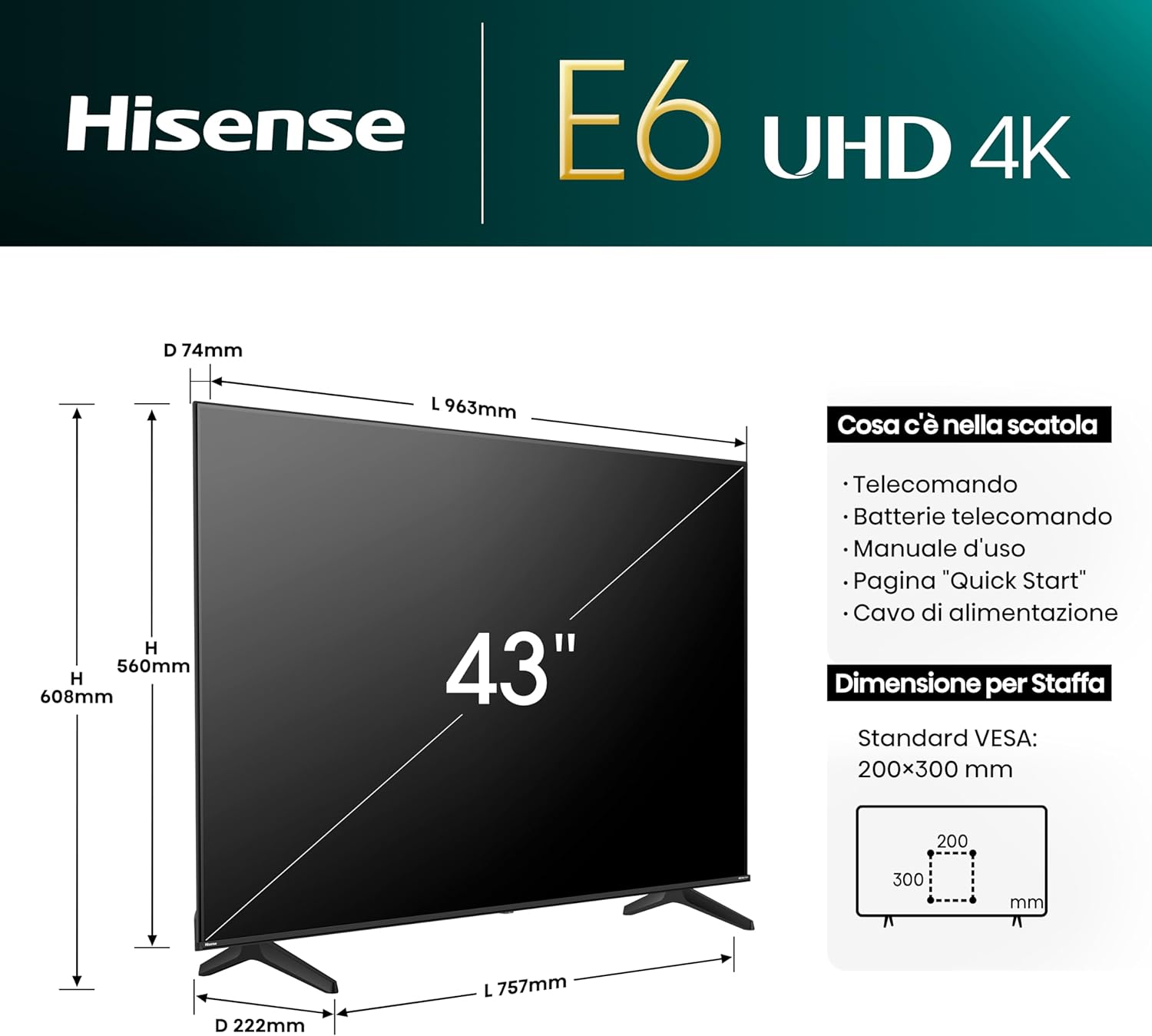
Image 2.1: Diagram showing the Hisense 43E63NT TV dimensions and a list of included accessories.
3. Setup
3.1 Stand Installation
- Carefully place the TV screen-down on a soft, flat surface to prevent damage.
- Attach the stand bases to the designated slots on the bottom of the TV.
- Secure the stands using the provided screws. Ensure they are firmly attached.
3.2 Wall Mounting (Optional)
The Hisense 43E63NT supports VESA standard wall mounts. Refer to the wall mount manufacturer's instructions for proper installation. Ensure the wall mount is compatible with the TV's weight and VESA pattern (200x300 mm).
3.3 Connecting Power
- Connect the power cable to the TV's power input port.
- Plug the other end of the power cable into a suitable electrical outlet.
3.4 Connecting External Devices
The TV features various input ports for connecting external devices.
- HDMI Ports (HDMI 2.1 x2, HDMI 2.1 eARC): For connecting Blu-ray players, game consoles, set-top boxes, etc.
- USB Ports: For connecting USB flash drives for media playback.
- Antenna Inputs (ANT x2): For connecting terrestrial (DVB-T2) and satellite (DVB-S2) antennas.
- Ethernet (LAN): For a wired internet connection.
- Headphone Output: For connecting headphones.
- Digital Audio Out: For connecting to soundbars or audio receivers.
- AV Input: For older devices using composite video and stereo audio.
- CI Card Slot: For conditional access modules.
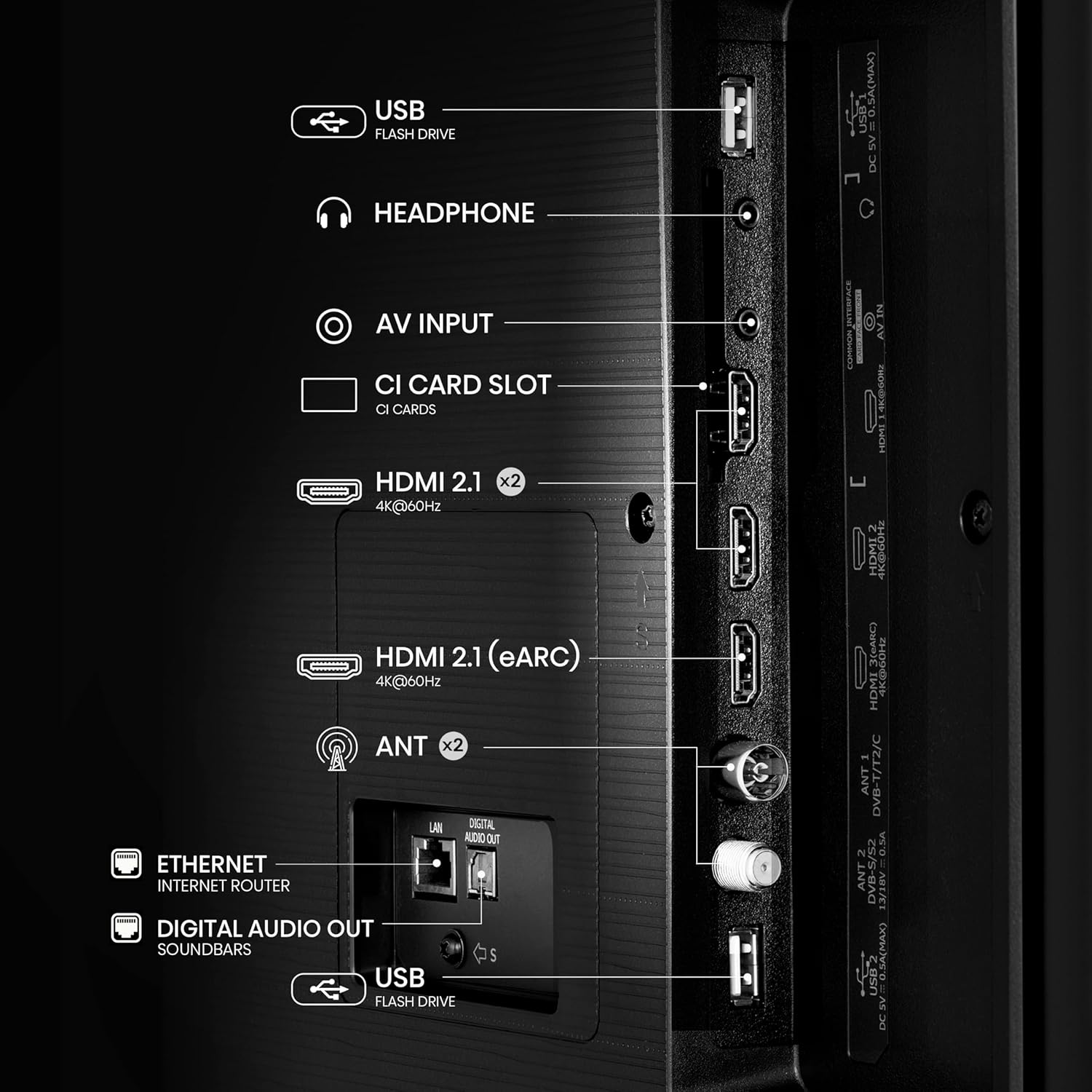
Image 3.1: Detailed view of the rear connectivity ports on the Hisense 43E63NT TV, including HDMI, USB, Ethernet, and antenna inputs.
3.5 Initial Power-On and First-Time Setup
- Press the power button on the remote control or the TV.
- Follow the on-screen instructions to select your language, country, and network settings (Wi-Fi or Ethernet).
- Perform a channel scan for terrestrial and/or satellite broadcasts.
- Log in to your Hisense account or create a new one to access all Smart TV features.
4. Operating the TV
4.1 Remote Control Functions
The included remote control provides access to all TV functions. Insert the provided batteries into the remote control before use.

Image 4.1: The Hisense Smart TV remote control, highlighting dedicated buttons for popular streaming services and voice control.
4.2 Navigating VIDAA U7 Smart TV
The Hisense 43E63NT runs on the VIDAA U7 operating system, offering a user-friendly interface for accessing apps, live TV, and settings.
- Use the directional pad and OK button on the remote to navigate menus.
- Press the Home button to access the main Smart TV interface.
- Dedicated buttons provide quick access to popular streaming services like Netflix, Prime Video, and YouTube.

Image 4.2: The intuitive home screen of the VIDAA Smart TV, showcasing various applications and content recommendations.
4.3 Voice Control (Alexa Built-in, VIDAA Voice)
Your TV supports voice commands through Alexa Built-in and VIDAA Voice. Press the microphone button on your remote and speak your command to control the TV, search for content, or interact with smart home devices.

Image 4.3: An illustration of using voice control to interact with the Hisense TV, demonstrating commands like "pause" or "volume down."
4.4 Picture and Sound Settings
Optimize your viewing and listening experience through the TV's settings menu.
- Dolby Vision & HDR10+: These technologies enhance contrast, brightness, and color for compatible content. The TV automatically detects and activates them.
- DTS Virtual:X: Provides an immersive audio experience without additional speakers. Adjust sound modes in the audio settings.
- 4K AI Upscaler: Improves the quality of lower-resolution content to near-4K clarity.
- Smooth Motion with MEMC: Reduces motion blur in fast-paced scenes for smoother viewing.

Image 4.4: A visual comparison demonstrating the enhanced contrast and color depth provided by Dolby Vision technology on the Hisense TV.

Image 4.5: An example of the 4K AI Upscaler in action, showing how lower resolution images are enhanced for a clearer 4K display.

Image 4.6: An illustration of Smooth Motion with MEMC technology, ensuring fluid and blur-free images, especially during fast-moving scenes.
4.5 Game Mode Plus
For an optimized gaming experience, activate Game Mode Plus. This mode reduces input lag and supports Variable Refresh Rate (VRR) and Auto Low Latency Mode (ALLM) at 60Hz for smoother gameplay.

Image 4.7: A dynamic image illustrating the benefits of Game Mode Plus, providing an incredible response time for a fluid gaming experience.
4.6 Wireless Connectivity
- Wi-Fi: Connect to your home network for internet access and Smart TV features.
- Bluetooth: Pair Bluetooth headphones or other audio devices for private listening.
- AirPlay2 & Android Screen Sharing (Miracast): Cast content from compatible Apple and Android devices directly to your TV.
5. Maintenance
5.1 Cleaning the TV
- Always unplug the TV before cleaning.
- Use a soft, dry, lint-free cloth to gently wipe the screen and TV body.
- For stubborn marks on the screen, lightly dampen the cloth with water or a specialized screen cleaner. Never spray liquid directly onto the screen.
- Avoid using abrasive cleaners, waxes, or solvents.
5.2 Software Updates
Ensure your TV's software is up-to-date for optimal performance and security. The TV can be set to update automatically or you can check for updates manually through the settings menu.
5.3 Power Saving Features
The TV includes an Energy Saving Light Sensor and various energy-saving modes to reduce power consumption. These can be configured in the TV's system settings.
6. Troubleshooting
If you encounter issues with your TV, refer to the following common solutions:
- No Power: Ensure the power cable is securely connected to both the TV and the electrical outlet. Check if the outlet is working.
- No Picture/Sound: Verify that the correct input source is selected. Check all cable connections (HDMI, antenna). Try restarting the TV.
- Remote Control Not Working: Check and replace the batteries. Ensure there are no obstructions between the remote and the TV's IR sensor.
- Network Connection Issues: For Wi-Fi, ensure your router is on and within range. For Ethernet, check the cable connection. Try restarting your router and the TV.
- Picture Quality Issues: Adjust picture settings (brightness, contrast, color). Ensure the content source is of high quality.
For more complex issues, consult the full electronic user manual or contact Hisense customer support.
7. Specifications
| Feature | Specification |
|---|---|
| Brand | Hisense |
| Model Number | 43E63NT |
| Screen Size | 43 Inches |
| Screen Technology | LED |
| Resolution | 4K (3840x2160) |
| Refresh Rate | 60 Hz |
| Aspect Ratio | 16:9 |
| Operating System | VIDAA U7 |
| Special Features | Multiple Voice Assistance, Browser, Frameless Design, Blue Light Filter, Miracast |
| Connectivity Technology | Bluetooth, Ethernet, HDMI, USB, Wi-Fi |
| HDMI Ports | 3 (HDMI 2.1 x2, HDMI 2.1 eARC) |
| Product Dimensions (DxWxH) | 7.4 cm x 96.3 cm x 56 cm |
| Product Weight | 9.89 kg |
| Tuner | DVB-T2/S2 HEVC 10 |
8. Warranty and Support
8.1 Warranty Information
For details regarding the product warranty, please refer to the warranty card included with your TV or visit the official Hisense website for your region. Warranty terms typically cover manufacturing defects for a specified period from the date of purchase.
8.2 Customer Support
If you require technical assistance, have questions about your product, or need to report a defect, please contact Hisense customer support. Contact information can usually be found on the Hisense official website or in the documentation provided with your TV.
9. Official Product Videos
No official product videos from the seller were found in the provided data. Please refer to the Hisense official website or authorized channels for any available video content related to this product.


