
1. Introduction
The AOTIQUAL VT-ER1 is a handheld electromagnetic field (EMF) detector designed to measure electric field, magnetic field, and radio frequency (RF) radiation. This device provides real-time data to help users identify and assess electromagnetic radiation levels in various environments, including homes, offices, and outdoor settings. It features a digital LCD display for clear readings and an alarm function to indicate elevated radiation levels.
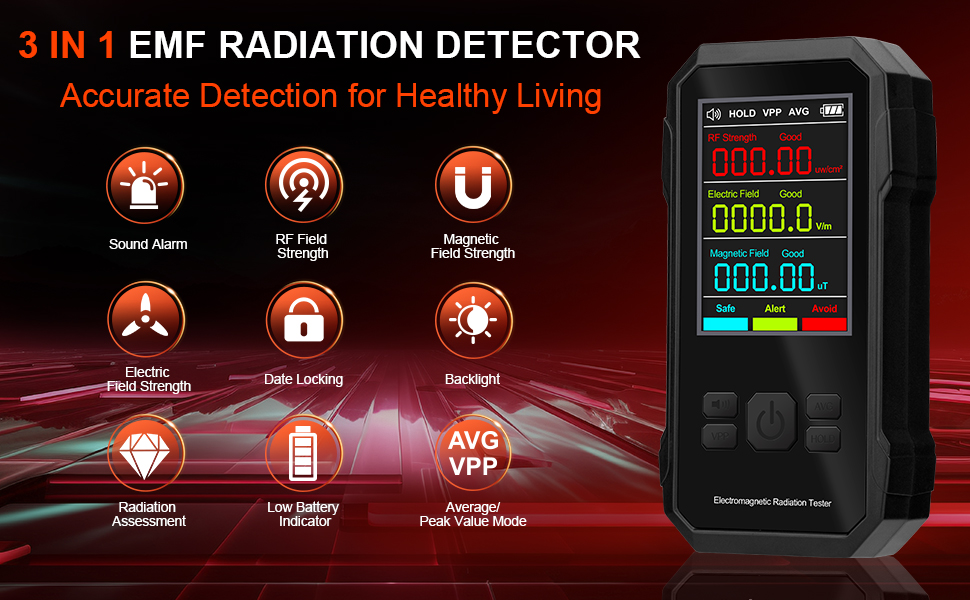
Figure 1: AOTIQUAL VT-ER1 EMF Detector displaying RF strength, electric field, and magnetic field measurements with their respective ranges.
2. Safety Information
- Read all instructions carefully before using the device.
- Do not attempt to disassemble or modify the device. This may cause damage and void the warranty.
- Keep the device away from water and high humidity environments.
- Avoid exposing the device to extreme temperatures or direct sunlight for prolonged periods.
- Use only the specified battery type (3 x 1.5V AAA batteries). Ensure correct polarity during installation.
- Dispose of batteries according to local regulations.
- This device is for informational purposes only and should not be used as a substitute for professional health or safety assessments.
3. Product Overview
3.1 Device Components
The AOTIQUAL VT-ER1 EMF Detector features a compact design with a clear LCD display and intuitive controls.

Figure 2: Front view of the AOTIQUAL VT-ER1 EMF Detector, highlighting the display and control buttons.
- Buzzer Status Indicator: Shows if the audible alarm is active.
- RF Strength Display: Shows the current Radio Frequency radiation level.
- Electric Field Strength Display: Shows the current Electric Field strength.
- Magnetic Field Strength Display: Shows the current Magnetic Field strength.
- Battery Level Indication: Displays the remaining battery power.
- Environmental Radiation Level Indicator: Color-coded bar (Safe, Alert, Avoid) indicating overall radiation level.
- Standard Exceedance Indicator: Icons indicating if any of the three parameters exceed predefined standards.
- Mute Button: Toggles the audible alarm on/off.
- VPP Button (Maximum Value Measurement): Displays the peak value of the measured radiation.
- ON-OFF Button: Powers the device on or off.
- Average Button: Displays the average value of the measured radiation.
- Hold Button: Freezes the current readings on the display.
3.2 High Precision Sensor
The device incorporates a high-precision sensor for accurate and reliable measurements of electromagnetic fields. The detection resolution for each field is:
- RF: 0.001µW/cm²
- EF: 0.01V/m
- MF: 0.001µT

Figure 3: Illustration of the high-precision sensor and its detection resolution for RF, Electric Field, and Magnetic Field.
4. Setup
4.1 Battery Installation
The AOTIQUAL VT-ER1 EMF Detector operates on 3 x 1.5V AAA batteries (not included). The device is not rechargeable via a port; if rechargeable batteries are used, they must be charged externally.
- Locate the battery compartment cover on the back of the device.
- Slide or unclip the cover to open the compartment.
- Insert three 1.5V AAA batteries, ensuring correct polarity (+ and - terminals match the markings inside the compartment).
- Close the battery compartment cover securely.

Figure 4: The AOTIQUAL VT-ER1 EMF Detector requires three 1.5V AAA batteries for operation.
5. Operating Instructions
5.1 Power On/Off
- To power on the device, press and hold the ON-OFF Button (center button) until the display illuminates.
- To power off the device, press and hold the ON-OFF Button again until the display turns off.
5.2 Taking Measurements
Once powered on, the device will automatically begin detecting and displaying real-time values for RF strength, electric field, and magnetic field. Position the detector in the area you wish to measure. Readings may take a few seconds to stabilize.
Video 1: Demonstration of the AOTIQUAL VT-ER1 EMF Detector's display and basic usage, showing real-time readings in different environments.
5.3 Measurement Modes
- Hold Function: Press the Hold Button to freeze the current readings on the display. Press again to resume real-time measurement.
- Maximum Value (VPP): Press the VPP Button to display the peak (maximum) value detected since the device was powered on or the VPP mode was reset.
- Average Value (AVG): Press the Average Button to display the average value of the detected radiation over a period.
5.4 Alarm Function
The device features an audible alarm and visual indicators to alert users when radiation levels exceed predefined thresholds. The alarm thresholds are:
- RF: > 40µW/cm²
- EF: > 40V/m
- MF: > 0.4µT
When a standard is exceeded, the device will emit a "Di" sound, and the corresponding display section will change color (e.g., from green to yellow or red) to indicate the severity of the radiation level.
- To mute or unmute the audible alarm, press the Mute Button.

Figure 5: Display showing alarm thresholds and the visual "Di" alarm notification when levels are exceeded.
6. Understanding Readings
The VT-ER1 uses a three-color light system to provide a rapid visual indication of the current radiation level, based on ICNIRP 1998 standards. This helps users quickly assess whether the environment is safe, requires caution, or should be avoided.
| Indicator Color | RF Strength (µW/cm²) | Electric Field (V/m) | Magnetic Field (µT) | Meaning |
|---|---|---|---|---|
| Green | < 40 | < 40 | < 0.4 | Safe |
| Yellow | 40 - 200 | 40 - 400 | 0.4 - 40 | Alert (Caution) |
| Red | > 200 | > 400 | > 40 | Avoid (High Risk) |
The numerical values on the display provide precise measurements, while the color indicators offer a quick visual summary of the radiation environment.

Figure 6: Visual representation of the three-color radiation rating system on the device display.
7. Maintenance
- Cleaning: Wipe the device with a soft, dry cloth. Do not use abrasive cleaners or solvents.
- Battery Replacement: Replace batteries when the low battery indicator appears on the display to ensure accurate readings.
- Storage: When not in use for extended periods, remove the batteries and store the device in a cool, dry place, away from direct sunlight and extreme temperatures.
- Calibration: The device is factory calibrated. No user calibration is required.
8. Troubleshooting
| Problem | Possible Cause | Solution |
|---|---|---|
| Device does not power on. | Dead or incorrectly installed batteries. | Check battery polarity. Replace with new 1.5V AAA batteries. |
| Readings are unstable or fluctuate significantly. | Interference from other electronic devices; device still stabilizing. | Move away from strong electromagnetic sources. Allow a few seconds for readings to stabilize after powering on or moving. |
| No readings (all zeros) in an area expected to have EMF. | Device might be too far from the source; source might not emit detectable EMF. | Move the device closer to the suspected source. Ensure the source is active. Verify battery level. |
| Audible alarm is not working. | Alarm is muted. | Press the Mute Button to unmute the alarm. |
| Display is dim or unreadable. | Low battery; poor lighting conditions. | Replace batteries. Use in adequately lit conditions. |
9. Specifications
| Parameter | Value |
|---|---|
| Model | VT-ER1 |
| Measurement Range (RF Strength) | 0 - 99.999 µW/cm² |
| Measurement Range (Electric Field) | 0 - 999.99 V/m |
| Measurement Range (Magnetic Field) | 0 - 99.999 µT |
| Detection Resolution (RF) | 0.001 µW/cm² |
| Detection Resolution (Electric Field) | 0.01 V/m |
| Detection Resolution (Magnetic Field) | 0.001 µT |
| Power Supply | 3 x 1.5V AAA Batteries (not included) |
| Display | Digital LCD with color-coded indicators |
| Alarm | Audible ("Di" sound) and visual (color change) |
| Product Dimensions | 2.7 x 1 x 4.7 inches |
| Item Weight | 7.4 ounces |
| Manufacturer | AOTIQUAL |
10. Warranty and Support
For warranty information and customer support, please refer to the documentation provided with your purchase or contact AOTIQUAL customer service directly. Keep your purchase receipt as proof of purchase.
For further assistance, you may visit the AOTIQUAL store on Amazon: AOTIQUAL Store