
1. Introduction
Thank you for choosing the Arno X-TREME 9 40cm 2-in-1 Fan. This manual provides essential information for the safe and efficient use of your new fan. Please read these instructions carefully before assembly, operation, or maintenance, and retain them for future reference.
The Arno X-TREME 9 fan is designed to provide powerful and quiet air circulation, featuring a versatile 2-in-1 design that allows it to function as both a pedestal fan and a table fan. It includes 9 blades, 3 speed settings, 80-degree oscillation, and adjustable height for optimal comfort.
2. Important Safety Instructions
To reduce the risk of fire, electric shock, or injury, always follow these basic safety precautions:
- Read all instructions before using this fan.
- Ensure the voltage indicated on the fan's rating label matches your local power supply before connecting.
- Do not operate any fan with a damaged cord or plug. Discard the fan or return it to an authorized service facility for examination and/or repair.
- Do not run cord under carpeting. Do not cover cord with throw rugs, runners, or similar coverings. Arrange cord away from traffic area and where it will not be tripped over.
- Do not insert or allow fingers or foreign objects to enter any ventilation or exhaust opening as this may cause an electric shock or fire, or damage the fan.
- Do not use outdoors.
- Always unplug the fan before moving, cleaning, or performing maintenance.
- This appliance is not intended for use by persons (including children) with reduced physical, sensory or mental capabilities, or lack of experience and knowledge, unless they have been given supervision or instruction concerning use of the appliance by a person responsible for their safety.
- Children should be supervised to ensure that they do not play with the appliance.
3. Package Contents
Verify that all components are present in the package:
- 1 x Arno X-TREME 9 Fan Unit
- 1 x Pedestal Stand Components (base, pole)
- 1 x Table Stand Component
- 1 x Instruction Manual
- 1 x Warranty Certificate
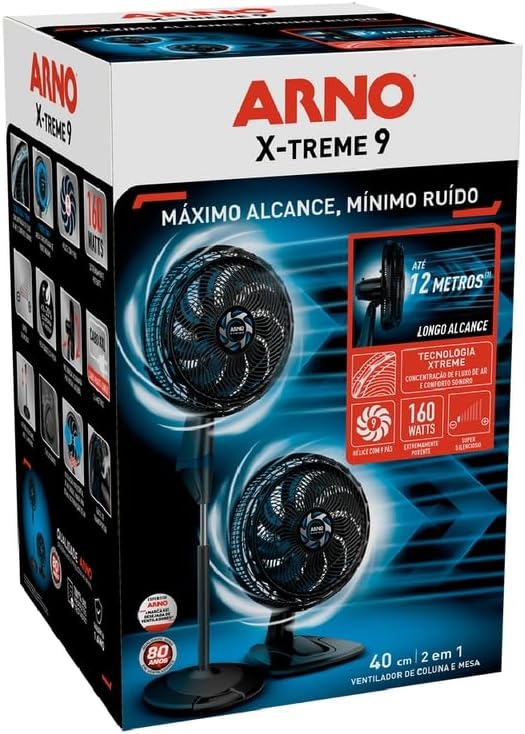
Image 3.1: The fan's retail packaging, showing the product and key features.
4. Setup and Assembly
The Arno X-TREME 9 fan offers a 2-in-1 design, allowing it to be configured as a pedestal fan or a table fan. Follow these steps for assembly.
4.1. Choosing Your Configuration (Pedestal or Table)

Image 4.1: The Arno X-TREME 9 fan shown as a full-height pedestal fan and a compact table fan.
The fan unit can be attached to either the pedestal stand for floor use or the smaller base for table use. The conversion process is designed to be straightforward.
4.2. General Assembly Steps
- Unpack Components: Carefully remove all parts from the packaging.
- Attach Rear Guard: Position the rear guard onto the motor housing, ensuring it aligns correctly.
- Install Blades: Securely attach the 9 fan blades to the motor shaft.
- Attach Front Guard: Fasten the front guard to the rear guard, ensuring it is securely locked in place.
- Connect to Base: Depending on your chosen configuration (pedestal or table), attach the assembled fan head to the appropriate stand. Ensure all connections are firm and stable.

Image 4.2: Visual guide illustrating the easy assembly process of the fan components.
5. Operating Instructions
5.1. Powering On/Off and Speed Control
The fan features a control knob to select between three speed settings and to turn the unit off.
- Off: Turn the knob to the '0' position to turn off the fan.
- Speed 1 (Quiet Sleep): Provides moderate, super quiet airflow for a peaceful night's sleep.
- Speed 2 (Eco Fresh): Offers efficient airflow, up to 20% more economical for extended use.
- Speed 3 (Extreme Power): Delivers the strongest airflow with minimal noise for immediate heat relief.

Image 5.1: The fan's control panel highlighting the three speed settings, including the Quiet Sleep mode.
5.2. Oscillation Function
To activate or deactivate the 80-degree horizontal oscillation, locate the oscillation knob on the top of the motor housing. Push it down to start oscillation and pull it up to stop it.
Image 5.2: A visual representation of the fan's 80-degree horizontal oscillation for wide air distribution.
5.3. Vertical Tilt Adjustment
The fan head can be tilted vertically to direct airflow precisely. Press the lateral button on the side of the fan head to adjust the tilt angle. The fan offers 4 vertical inclination positions.

Image 5.3: The fan head demonstrating its vertical tilt capability for targeted airflow.
5.4. Height Adjustment (Pedestal Mode)
When used as a pedestal fan, the height can be adjusted up to 1.5 meters. Loosen the height adjustment collar on the pole, extend or retract the pole to the desired height, and then securely tighten the collar.

Image 5.4: The pedestal fan illustrating its adjustable height feature.
6. Maintenance and Cleaning
Regular cleaning and maintenance will ensure the longevity and optimal performance of your fan.
6.1. Cleaning the Fan
- Disconnect Power: Always unplug the fan from the power outlet before cleaning.
- Disassemble Guards: Carefully remove the front guard and fan blades. Refer to the assembly instructions in Section 4.2 for reverse steps.
- Clean Components: Wipe the fan blades, guards, and motor housing with a soft, damp cloth. For stubborn dirt, a mild soap solution can be used. Do not use abrasive cleaners or solvents.
- Dry Thoroughly: Ensure all parts are completely dry before reassembling.
- Reassemble: Reattach the blades and guards, ensuring they are securely fastened.
6.2. Storage
If the fan will not be used for an extended period, it can be disassembled for compact storage. Store the fan in its original packaging or a dry, dust-free location.

Image 6.1: The fan features a rear handle for easy transport and repositioning.
7. Troubleshooting
If you encounter issues with your Arno X-TREME 9 fan, refer to the following common problems and solutions:
| Problem | Possible Cause | Solution | |
|---|---|---|---|
| Fan does not turn on. | Not plugged in; power outlet not working; speed setting is '0'. | Ensure the fan is securely plugged into a working outlet. Turn the speed knob to a desired setting (1, 2, or 3). | |
| Weak airflow. | Low speed setting; dirty blades/guards; obstruction. | Increase speed setting. Clean fan blades and guards (refer to Section 6.1). Ensure no objects are blocking the airflow. | |
| Unusual noise or vibration. | Loose components; fan not on a stable surface; foreign object in guards. | Check that all assembly components (guards, blades) are securely fastened. Place the fan on a flat, stable surface. Unplug and inspect for any foreign objects. | |
| Oscillation not working. | Oscillation knob not engaged. | Push down the oscillation knob on top of the motor housing. | |
If the problem persists after trying these solutions, please contact Arno customer support.
8. Specifications
| General Specifications | |
|---|---|
| Brand | Arno |
| Model Name | VE9M |
| Model Number | 2720017493 |
| Color | Black and Dark Blue |
| Material | Polypropylene |
| Power Source | Electric Power |
| Voltage | 110 Volts |
| Power Consumption | 160 Watts |
| Number of Blades | 9 |
| Number of Speeds | 3 |
| Oscillation | 80 degrees horizontal |
| Vertical Inclinations | 4 positions |
| Adjustable Height | Up to 1.5 meters |
| Cord Length | 2.4 meters |
| Energy Efficiency Label (ENCE) | A |
| Product Dimensions (Pedestal) | 43D x 48.6W x 152.3H cm |
| Product Dimensions (Table) | Approx. 43D x 48.6W x 65.5H cm (estimated from image) |
| Package Dimensions | 65 x 41 x 41 cm |
| ASIN | B0CZVM6RFH |
| EAN | 7895500762991 |
| Inmetro Registration | 001568/2024 |
Image 8.1: The product packaging highlighting key specifications and features.
9. Warranty and Support
Arno products are developed and produced in Brazil, ensuring quality and durability.
- Standard Warranty: 1 year for products purchased before July/2025.
- Extended Warranty: 2 years for products purchased from July/2025 onwards.
For warranty claims, technical support, or further assistance, please refer to the contact information provided in your warranty certificate or visit the official Arno website.
Image 9.1: Information regarding Arno's quality, testing, and warranty periods.