
1. Introduction
The ALVBAN CB201X Control Board is designed as a direct replacement for furnace control boards CB201 and CB201V. This component is crucial for managing the operational functions of your HVAC furnace system, ensuring efficient and safe performance. This manual provides essential information for safe installation, operation, and maintenance.
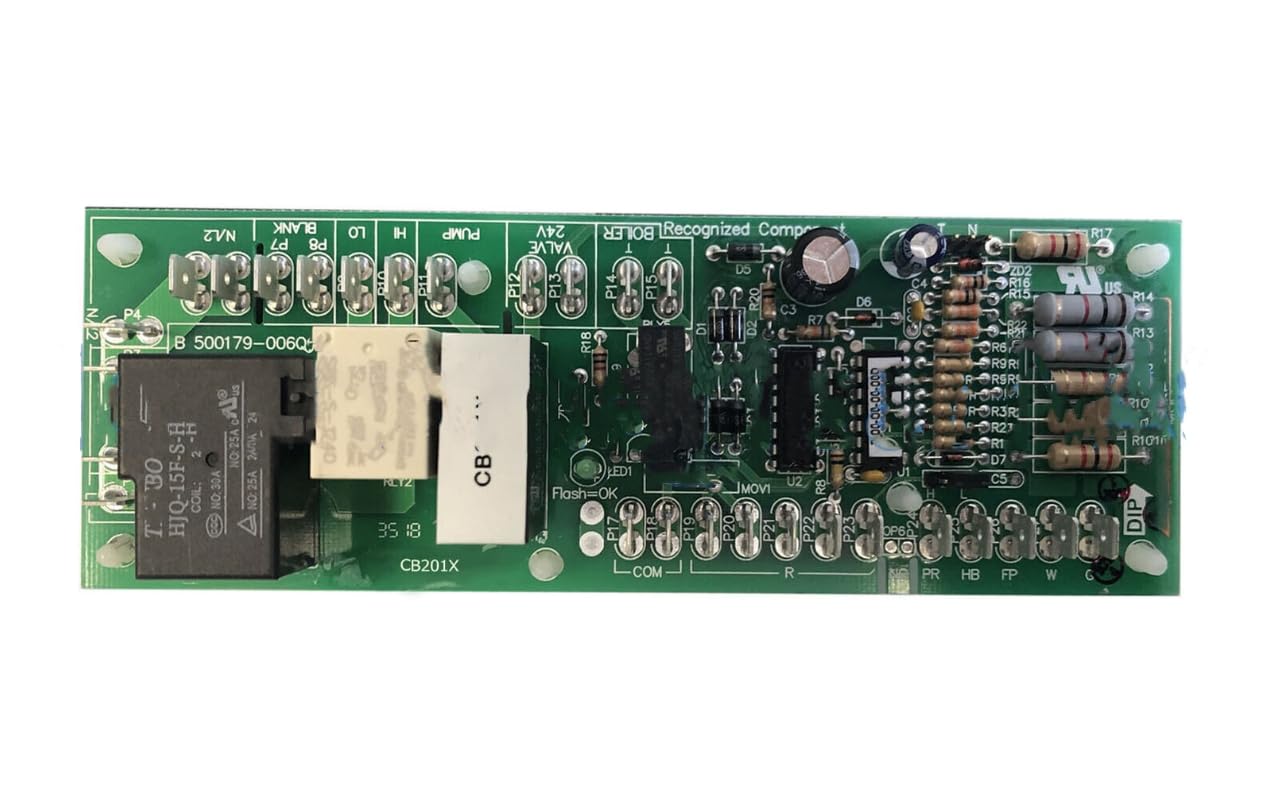
This image shows the ALVBAN CB201X Control Board, highlighting its various connectors and components. The board is typically installed within a furnace unit to manage its operational functions.
2. Safety Information
WARNING: Electrical Shock Hazard. Disconnect power before servicing.
- Always disconnect the main electrical power to the furnace unit before attempting any installation, maintenance, or troubleshooting. Failure to do so can result in serious injury or death.
- Installation should only be performed by qualified and experienced personnel.
- Wear appropriate personal protective equipment, including safety glasses and insulated gloves.
- Ensure all wiring connections are secure and comply with local electrical codes.
- Do not operate the furnace with access panels removed.
3. Package Contents
Verify that all items are present and undamaged upon opening the package:
- 1 x ALVBAN CB201X Control Board
4. Setup and Installation
This section outlines the general steps for replacing a furnace control board. Specific furnace models may vary, so always refer to your furnace manufacturer's service manual for detailed instructions.
- Power Disconnection: Locate the main power switch for your furnace and turn it off. For added safety, turn off the circuit breaker supplying power to the furnace. Verify power is off using a non-contact voltage tester.
- Access Old Board: Open the furnace access panel to locate the existing control board. This may require removing screws or latches.
- Document Connections: Before disconnecting any wires, take clear photographs of all wiring connections to the old board from multiple angles. Label each wire and its corresponding terminal on the old board if necessary, to ensure correct reconnection.
- Disconnect Wires: Carefully disconnect all wires and connectors from the old control board. Be gentle to avoid damaging the wires or connectors.
- Remove Old Board: Unmount the old control board from its housing. This usually involves removing a few screws or releasing clips.
- Install New Board: Mount the ALVBAN CB201X Control Board in the same location as the old board. Ensure it is securely fastened.
- Reconnect Wires: Refer to your photographs and labels to reconnect all wires to the new board. Double-check every connection to ensure it matches the original configuration. Ensure all connections are secure and tight.
- Close Panel: Securely close and fasten the furnace access panel.
- Restore Power: Turn the main power switch and circuit breaker back on.
- Test System: Initiate a heating cycle from your thermostat to confirm proper operation of the furnace. Observe the furnace's startup sequence and ensure all components (igniter, fan, etc.) function correctly.
5. Operating Instructions
Once installed correctly, the ALVBAN CB201X Control Board operates automatically as an integral part of your furnace system. It manages various functions, including:
- Ignition sequence control
- Blower fan operation (heating and cooling)
- Safety limit monitoring
- Thermostat communication
The board responds to signals from your thermostat and other furnace sensors to maintain desired indoor temperatures. No direct user interaction with the control board is typically required after installation.
6. Maintenance
The ALVBAN CB201X Control Board is designed for reliable, long-term operation and generally requires no routine maintenance itself. However, general furnace maintenance practices are recommended to ensure its longevity and proper function:
- Cleanliness: Keep the furnace area clean and free of dust, debris, and obstructions. Excessive dust can lead to overheating or interfere with electrical connections.
- Wiring Inspection: Periodically inspect all wiring connected to the control board for signs of wear, fraying, or loose connections. Address any issues promptly.
- Air Filter Replacement: Regularly replace or clean your furnace's air filter as recommended by the furnace manufacturer. A clogged filter can restrict airflow, causing the furnace to overwork and potentially stress components, including the control board.
7. Troubleshooting
If your furnace experiences issues after installing the ALVBAN CB201X Control Board, consider the following troubleshooting steps:
- Furnace Not Starting:
- Ensure the main power switch and circuit breaker for the furnace are ON.
- Check thermostat settings; ensure it is set to 'Heat' and the temperature is above the current room temperature.
- Verify all wiring connections to the control board are secure and correctly matched according to your installation photos.
- Check the furnace's safety switches (e.g., door switch, limit switch) to ensure they are engaged.
- Fan Not Operating:
- Check if the thermostat's fan setting is set to 'Auto' or 'On'.
- Ensure the fan motor connections to the control board are secure.
- Error Codes: Many control boards have diagnostic LED lights that flash in specific patterns to indicate error codes. Consult your furnace manufacturer's manual for the meaning of any displayed error codes.
- No Power to Board: If the board shows no signs of life (e.g., no diagnostic lights), re-verify power supply to the furnace and check for any blown fuses on the furnace or the control board itself (if applicable).
If issues persist after performing these checks, it is recommended to contact a qualified HVAC technician for further diagnosis and repair.
8. Specifications
| Brand | ALVBAN |
| Manufacturer | ALVBAN |
| Model Number | OEM |
| Part Number | 639394581224 |
| Replaces Part Numbers | CB201, CB201V |
| UPC | 639394581224 |
| Diagnostic Indicators | LCD or LED (if present) |
9. Warranty and Support
The ALVBAN CB201X Control Board comes with a one-year warranty from the date of purchase, covering defects in materials and workmanship.
Additionally, a 30-day return policy is available for refunds or replacements, subject to the retailer's terms and conditions.
For technical assistance, warranty claims, or further support, please contact ALVBAN customer service through your point of purchase or the official ALVBAN support channels.