
TechniSat 0000/3996
TechniSat TECHNIRADIO SOLAR 2 User Manual
Model: 0000/3996
Introduction
The TechniSat TECHNIRADIO SOLAR 2 is a versatile and environmentally conscious portable radio designed for reliable performance in various conditions. Featuring DAB+ and FM radio reception, multiple charging options including solar and crank power, an integrated LED flashlight, and a power bank function, this device is an ideal companion for outdoor adventures, emergencies, or everyday use. Its robust, splash-proof design (IPX4) and construction from 87% marine plastic underscore its commitment to durability and sustainability.
Safety Instructions
- Do not expose the device to extreme temperatures, direct sunlight for prolonged periods (beyond charging), or high humidity.
- Avoid dropping or subjecting the device to strong impacts.
- Do not disassemble or attempt to repair the device yourself. Refer all servicing to qualified personnel.
- Keep the device away from water sources, despite its splash-proof rating (IPX4). It is not designed for submersion.
- Ensure the USB ports are dry before connecting any cables.
- When using the power bank function, ensure the connected device is compatible and that the charging cable is in good condition.
- Dispose of the battery and device responsibly according to local regulations.
Product Overview
Familiarize yourself with the components and controls of your TECHNIRADIO SOLAR 2.

Figure 1: Front view of the TechniSat TECHNIRADIO SOLAR 2, showing the speaker grille, digital display, and control buttons for volume, info/menu, mode, and OK/scan. The flashlight is visible on the left side.
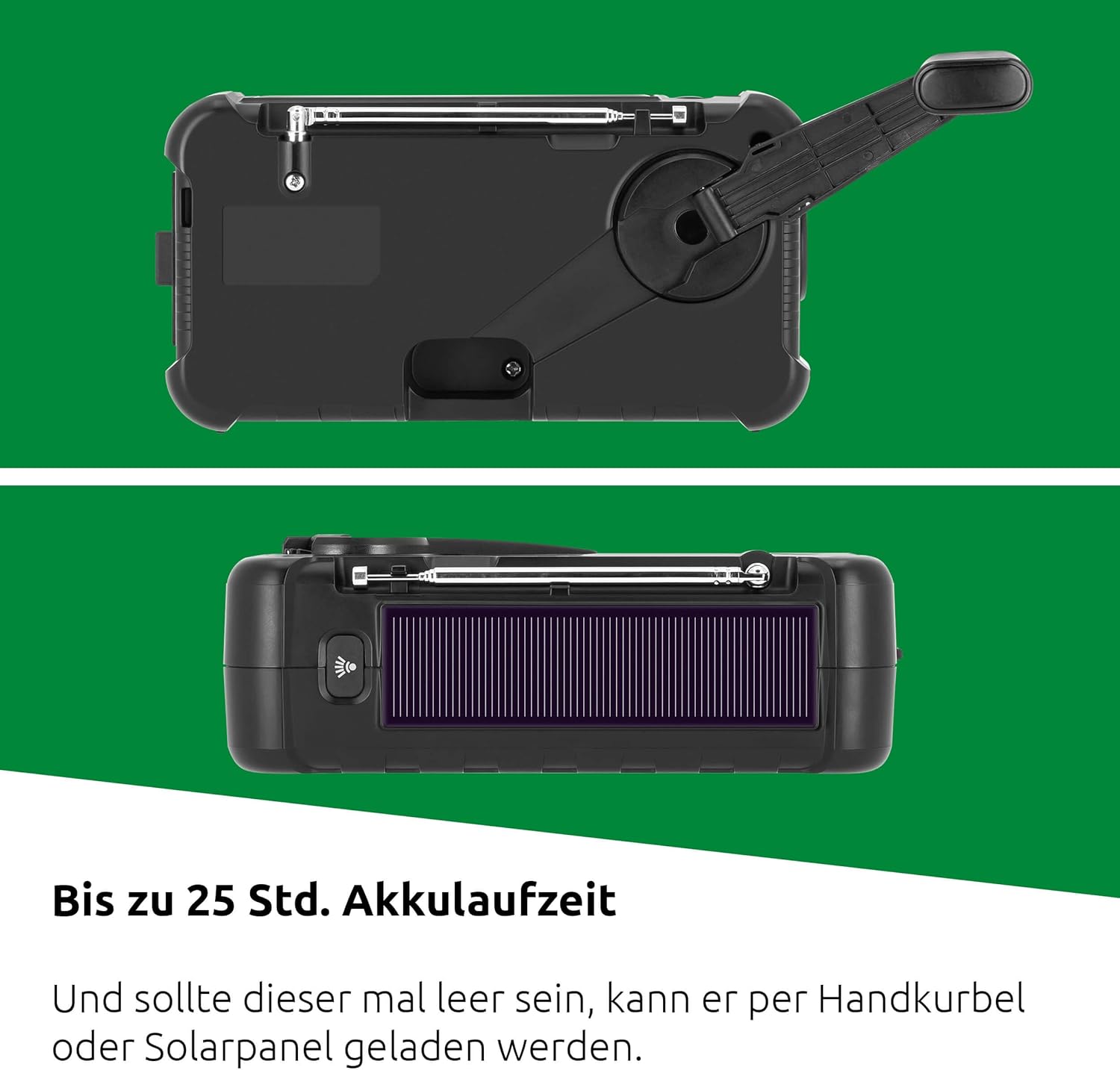
Figure 2: Top view of the radio highlighting the integrated solar panel. The rear view shows the foldable hand crank for manual power generation.

Figure 3: Side view of the radio with the protective cover open, revealing the DC OUT (USB-A) port for power bank function, DC IN (USB-C) port for charging the radio, and a 3.5mm headphone jack.
Controls and Ports:
- Display: Shows station information, time, battery status, and menu options.
- Power Button: Turns the radio on/off.
- VOL +/- Buttons: Adjusts volume.
- INFO/MENU Button: Accesses information display and menu settings.
- MODE Button: Switches between DAB+ and FM radio modes.
- OK/SCAN Button: Confirms selections or initiates station scans.
- Preset Buttons (1-5+): Quick access to saved favorite stations.
- Flashlight Button: Activates the LED flashlight.
- Solar Panel: Located on top for solar charging.
- Hand Crank: Foldable crank on the rear for manual power generation.
- USB-C Input (DC IN 5V 2.3A): For charging the radio's internal battery.
- USB-A Output (DC OUT 5V 1A): For charging external devices (power bank function).
- 3.5mm Headphone Jack: For private listening.
- Telescopic Antenna: Extend for optimal radio reception.
Setup
Initial Charging
Before first use, it is recommended to fully charge the internal battery. The radio offers multiple charging methods:
- USB-C Charging: Connect the included USB-C cable to the DC IN port on the side of the radio and to a standard USB power adapter (not included) or a computer USB port. A full charge takes approximately 4 hours.
- Solar Charging: Place the radio with the solar panel facing direct sunlight. The solar panel will slowly charge the internal battery. This method is ideal for maintaining charge or for emergency charging in daylight.
- Hand Crank Charging: Unfold the hand crank on the rear of the radio. Rotate the crank clockwise or counter-clockwise at a steady pace. Approximately 1 minute of cranking can provide enough power for a few minutes of radio playback or flashlight use. This method is for emergency power generation.
Figure 4: The solar panel on top and the hand crank on the rear are primary methods for sustainable charging.
The battery indicator on the display will show the charging status. A fully charged battery provides up to 25 hours of playback time.
Operating Instructions
Turning On/Off and Volume
- Press the Power Button to turn the radio on or off.
- Use the VOL + and VOL - buttons to adjust the listening volume.
Radio Operation (DAB+/FM)
Extend the telescopic antenna for optimal reception.

Figure 5: The TECHNIRADIO SOLAR 2 supports both DAB+ and FM radio for a wide range of listening options.
- Press the MODE button to switch between DAB+ and FM radio modes.
- Automatic Station Scan: In either mode, press and hold the OK/SCAN button to initiate an automatic scan for available stations. The radio will store found stations.
- Manual Tuning (FM): In FM mode, short press the OK/SCAN button to manually tune frequencies.
- Selecting Stations: Use the VOL + and VOL - buttons (or dedicated tuning buttons if available) to navigate through the scanned stations.
- Saving Favorite Stations:
- Tune to the desired station.
- Press and hold one of the numbered preset buttons (1-5+). The display will confirm the station has been saved.
- To recall a favorite station, simply short press the corresponding numbered preset button. The radio supports 10 favorite stations for DAB+ and 10 for FM.
- INFO/MENU: Press the INFO/MENU button to cycle through different information displays (e.g., program type, signal strength, time) or to access the radio's settings menu.
Flashlight Function
The integrated LED flashlight provides illumination in two brightness levels.

Figure 6: The powerful LED flashlight offers two brightness settings for various lighting needs.
- Press the dedicated Flashlight Button (located near the flashlight lens) once for the first brightness level.
- Press it again for the second, brighter level.
- Press a third time to turn the flashlight off.
Power Bank Function
The TECHNIRADIO SOLAR 2 can charge external devices like smartphones via its USB-A output port.

Figure 7: Use the power bank function to charge your mobile devices on the go, ensuring you stay connected.
- Open the protective cover on the side of the radio to access the USB-A output port (DC OUT 5V 1A).
- Connect your device's charging cable to this port.
- Charging will begin automatically if the radio has sufficient battery power.
- Close the protective cover when not in use to maintain IPX4 splash protection.
Maintenance
- Cleaning: Wipe the device with a soft, dry cloth. For stubborn dirt, use a slightly damp cloth and mild detergent, then dry thoroughly. Do not use abrasive cleaners or solvents.
- Storage: When not in use for extended periods, store the radio in a cool, dry place. It is advisable to charge the battery fully every few months to maintain its lifespan.
- Environmental Responsibility: The radio's housing is made from 87% marine plastic, and its packaging is 100% plastic-free, reflecting an eco-friendly design.

Figure 8: The TECHNIRADIO SOLAR 2 is designed with environmental sustainability in mind, utilizing recycled marine plastic for its casing.
Troubleshooting
| Problem | Possible Cause | Solution |
|---|---|---|
| Radio does not turn on. | Battery is depleted. | Charge the radio using the USB-C cable, solar panel, or hand crank. |
| Poor radio reception (DAB+/FM). | Antenna not extended or weak signal area. | Fully extend the telescopic antenna. Try repositioning the radio or moving to an area with better signal. Perform a new station scan. |
| Flashlight not working. | Battery is too low or flashlight button not pressed correctly. | Charge the radio. Ensure you press the flashlight button firmly. |
| Power bank function not charging external device. | Radio battery is too low, incorrect cable, or device incompatibility. | Ensure the radio's battery is sufficiently charged. Use a compatible charging cable. Some devices may draw too much power or are not compatible with 5V 1A output. |
Specifications

Figure 9: Dimensions of the TechniSat TECHNIRADIO SOLAR 2.
| Feature | Detail |
|---|---|
| Model Number | 0000/3996 |
| Radio Bands Supported | DAB+, FM (with RDS and PLL) |
| Favorite Station Memory | 10 for DAB+, 10 for FM |
| Power Source | Integrated Li-ion Battery (3.7V, 3000mAh, 11.11W), Solar Panel, Hand Crank, USB-C (DC IN 5V 2.3A) |
| Battery Life (Playback) | Up to 25 hours |
| Battery Charge Time | Approx. 4 hours (via USB-C) |
| Power Bank Output | USB-A (DC OUT 5V 1A) |
| Flashlight | Integrated LED with 2 brightness levels |
| Speaker | 1W (RMS) Mono Speaker |
| Headphone Jack | 3.5mm |
| Water Protection Rating | IPX4 (Splash-proof) |
| Housing Material | 87% Recycled Marine Plastic |
| Dimensions (L x W x H) | 17 cm x 5.5 cm x 9.5 cm |
| Included Components | TECHNIRADIO SOLAR 2, USB-C Charging Cable (110 cm), User Manual |
Warranty and Support
For warranty information and technical support, please refer to the official TechniSat website or contact your local retailer. Keep your proof of purchase for warranty claims.
Related documents0000/3996


Ask a question about this manual
Ask about setup, troubleshooting, compatibility, parts, safety, or missing instructions. Manuals+ will review the question and use this page’s manual context to help answer it.