
1. Important Safety Instructions
Please read this entire manual carefully before operating the TRUE FIT 502 Multifunctional Electric Treadmill. Retain this manual for future reference. Failure to follow these instructions may result in injury or damage to the equipment.
- Consult your physician before beginning any exercise program.
- Keep children and pets away from the treadmill during operation.
- Place the treadmill on a solid, level surface with adequate clearance around it.
- Ensure the safety key is properly attached before starting the treadmill. In case of emergency, pull the safety key to stop the machine.
- Do not operate the treadmill if it has a damaged cord or plug, or if it is not working properly.
- Wear appropriate athletic footwear and clothing.
- Do not use the treadmill outdoors or in wet conditions.
2. Product Overview
The TRUE FIT 502 is a multifunctional electric treadmill designed for home use, offering various features for a comprehensive workout. It includes a powerful DC motor, an electric massage belt, and an integrated display for tracking your progress.

Image 2.1: The TRUE FIT 502 Treadmill in use, demonstrating its compact design suitable for home environments.
2.1 Key Components
- Running Deck: The main surface for walking or running.
- Control Panel: Features an LED display, speed controls, program selection, and pulse sensors.
- Handrails: For balance and stability, often incorporating pulse sensors.
- Safety Key: Essential safety device that stops the treadmill when removed.
- Electric Massage Belt: An additional feature for post-workout relaxation or targeted massage.
- Device Holder: For securing a smartphone or tablet.
- Bottle Holder: For hydration during workouts.
- Hydraulic Folding System: Allows for easy storage and space-saving.
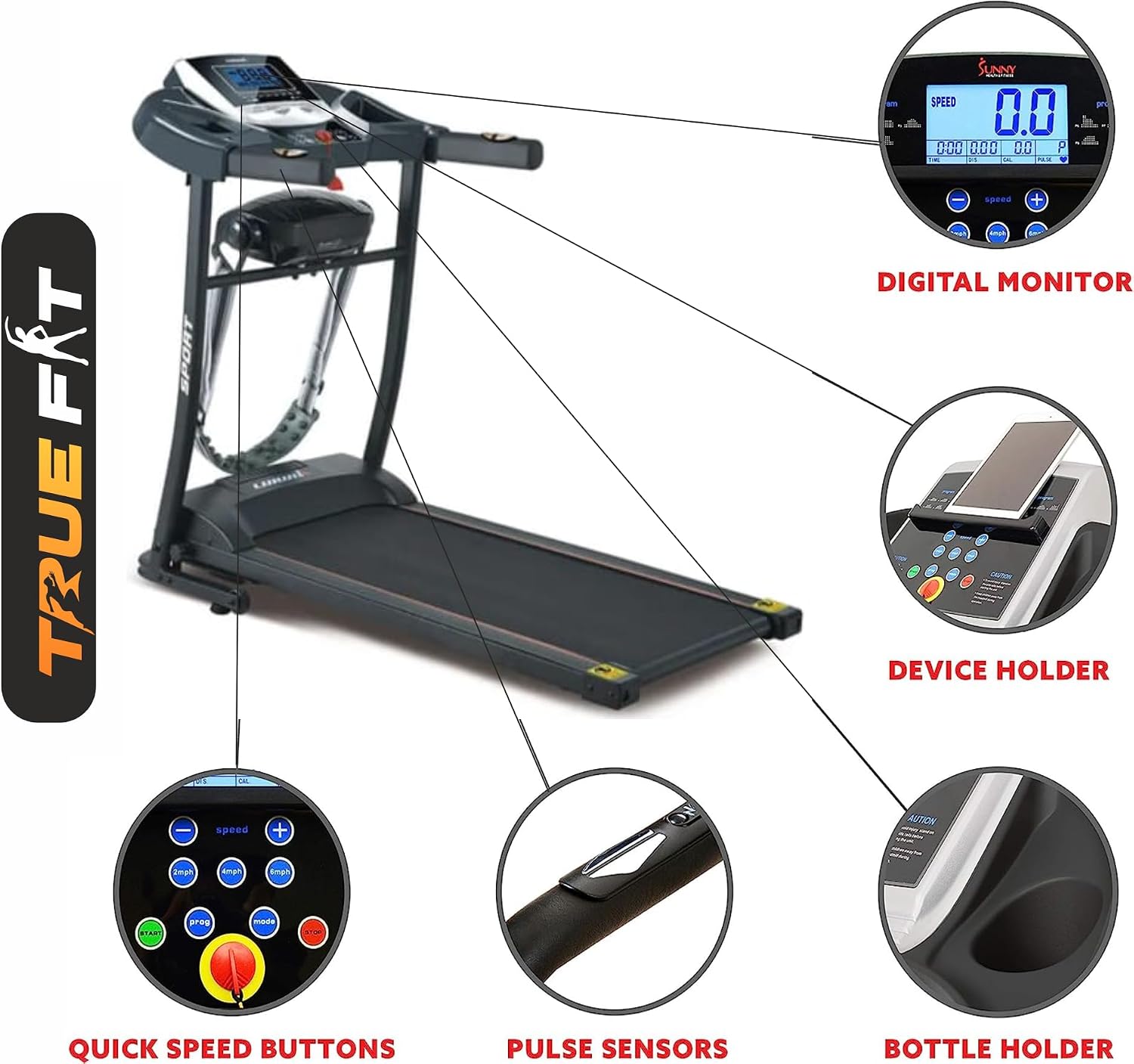
Image 2.2: Detailed view of the control panel and integrated features, including the digital monitor, quick speed buttons, pulse sensors, device holder, and bottle holder.
3. Setup and Assembly
The TRUE FIT 502 treadmill comes partially assembled. Follow these steps to complete the setup.
3.1 Unpacking
- Carefully remove all components from the packaging.
- Check the included components against the packing list: Lubricant, Safety Key, Tool Kit, User Manual.
- Inspect for any shipping damage. If any damage is found, contact customer support immediately.
3.2 Placement
Choose a suitable location for your treadmill:
- Place the treadmill on a firm, level surface.
- Ensure there is at least 2 meters (6.5 feet) of clear space behind the treadmill and 0.5 meters (1.6 feet) on each side.
- Avoid placing the treadmill near water or in excessively humid environments.
3.3 Assembly (Using Tool Kit)
Refer to the detailed diagrams in the included user manual for specific assembly steps. Generally, this involves:
- Attaching the uprights to the base frame.
- Securing the control panel to the uprights.
- Connecting any necessary cables (refer to wiring diagram in the physical manual).
- Ensuring all bolts and screws are tightened securely.

Image 3.1: Product dimensions and various views, useful for assembly and placement planning.
3.4 Power Connection
Connect the power cord to a grounded electrical outlet. The treadmill operates on a standard corded electric power source.
3.5 Hydraulic Folding System
The treadmill features a hydraulic folding system for convenient storage. To fold, lift the running deck until it locks into place. To unfold, gently release the lock and lower the deck. Always ensure the deck is fully locked in either position before moving or using the treadmill.

Image 3.2: The hydraulic folding system in action, allowing for easy storage.
4. Operating Instructions
Familiarize yourself with the control panel and basic operations before starting your workout.
4.1 Starting the Treadmill
- Ensure the power cord is plugged in and the main power switch (if present) is ON.
- Attach the safety key clip to your clothing and insert the safety key into its designated slot on the control panel. The display will illuminate.
- Step onto the treadmill belt, holding the handrails for support.
- Press the 'START' button. The treadmill will begin at a low speed (e.g., 1.0 Km/h) after a short countdown.
4.2 Adjusting Speed and Programs
- Speed Adjustment: Use the '+' and '-' buttons on the control panel or the quick speed buttons to increase or decrease the running speed. The maximum speed is 12 Kilometers per Hour.
- Pre-set Programs: The treadmill offers 24 pre-set programs. Press the 'PROGRAM' button to cycle through the available programs. Each program has varying speed and incline profiles. Select your desired program and press 'START' to begin.
- Manual Mode: If no program is selected, the treadmill operates in manual mode, allowing you to adjust speed manually.
4.3 Using the Electric Massage Belt
The electric massage belt can be used for muscle relaxation. Attach the belt to the designated points on the treadmill frame and activate it via the control panel (refer to specific button in your physical manual). Use it while standing off the running belt.
4.4 Using the Waist Twisting Disc
The included waist twisting disc can be used for core exercises. Place it on a flat surface and stand on it to perform twisting motions. This is a separate accessory and not integrated into the treadmill's operation.

Image 4.1: The waist twisting disc, an accessory for core workouts.
4.5 Stopping the Treadmill
- Press the 'STOP' button to gradually slow down and stop the treadmill.
- In an emergency, pull the safety key from the control panel. The treadmill will stop immediately.
- After stopping, remove the safety key and turn off the main power switch.
5. Maintenance
Regular maintenance ensures the longevity and safe operation of your treadmill.
5.1 Cleaning
- Always unplug the treadmill before cleaning.
- Wipe down the control panel and exterior surfaces with a damp cloth. Avoid abrasive cleaners.
- Periodically vacuum underneath the treadmill to remove dust and debris.
5.2 Lubrication
The running belt and deck require periodic lubrication to reduce friction and wear. Use the provided lubricant or a treadmill-specific silicone lubricant.
- Unplug the treadmill.
- Loosen the rear roller bolts slightly to lift the belt.
- Apply a thin line of lubricant evenly under the center of the running belt.
- Tighten the rear roller bolts.
- Plug in the treadmill and run it at a low speed for 2-3 minutes to distribute the lubricant.
Lubricate every 3-6 months, depending on usage.
5.3 Belt Adjustment
If the running belt slips or drifts to one side, it may need adjustment. Refer to the physical user manual for detailed instructions on adjusting belt tension and centering.
6. Troubleshooting
This section addresses common issues you might encounter with your treadmill.
- Treadmill does not start:
- Check if the power cord is securely plugged into a grounded outlet.
- Ensure the main power switch is ON.
- Verify that the safety key is correctly inserted into its slot.
- Check the circuit breaker on the treadmill (if present) and your home's electrical panel.
- Running belt slips:
- The belt may need tensioning. Refer to the 'Belt Adjustment' section in your physical manual.
- The belt may need lubrication. Refer to the 'Lubrication' section.
- Running belt drifts to one side:
- The belt needs centering. Refer to the 'Belt Adjustment' section in your physical manual.
- Unusual noises:
- Ensure all assembly bolts are tight.
- Lubricate the running belt if a squeaking sound is heard.
- If the noise persists, contact customer support.
- Display not working:
- Check power connections and safety key.
- If the issue continues, contact customer support.
For issues not covered here, please contact TRUE FIT customer support.
7. Specifications
Detailed technical specifications for the TRUE FIT 502 Multifunctional Electric Treadmill.
| Feature | Specification |
|---|---|
| Model | 502 |
| Brand | TRUE FIT |
| Motor | DC 2.5 Horsepower |
| Material | Alloy Steel |
| Display Type | LED |
| Maximum Speed | 12 Kilometers per Hour |
| Number of Programs | 24 |
| Power Source | Corded Electric |
| Features | Portable, Electric Massage Belt, Waist Twisting Disc |
| Product Dimensions (D x W x H) | 150D x 51W x 150H centimeters |
| Item Weight | 45000 Kilograms (Note: This weight appears to be an error in the source data. Typically treadmills weigh around 45-70 kg.) |
| Included Components | Lubricant, Safety Key, Tool Kit, User Manual |
| Recommended Uses | Exercise, physical therapy, and muscle recovery |
| Target Audience | Adult, Youth |

Image 7.1: The 2.5 HP DC motor, designed for efficient and quiet operation.
8. Warranty Information
The TRUE FIT 502 Multifunctional Electric Treadmill comes with a five-year warranty. Please retain your proof of purchase for warranty claims. The warranty covers manufacturing defects and major component failures under normal use conditions. It does not cover damage due to misuse, accidents, or unauthorized modifications.
For detailed warranty terms and conditions, please refer to the warranty card included with your product or contact TRUE FIT customer support.
9. Customer Support
If you have any questions, require technical assistance, or need to make a warranty claim, please contact TRUE FIT customer support using the information below:
- Phone: 0100 427 3802
- Phone: 0100 367 58 98
Please have your model number (502) and proof of purchase ready when contacting support.
Image 9.1: TRUE FIT customer support contact details.