Timex UFC Rush 52mm Men's Digital Watch User Manual
Model: TW5M594006B
Introduction
This manual provides detailed instructions for the setup, operation, and maintenance of your Timex UFC Rush 52mm Men's Digital Watch. Please read this manual thoroughly before using your watch to ensure proper function and longevity.
The Timex UFC Rush watch features a commanding 52mm case and a robust, masculine construction designed for active lifestyles. The segmented dial display highlights essential information including time, day, date, and chronograph features. A textured polyurethane strap, INDIGLO backlight, and 100m water resistance enhance its versatile and durable design.
Product Overview
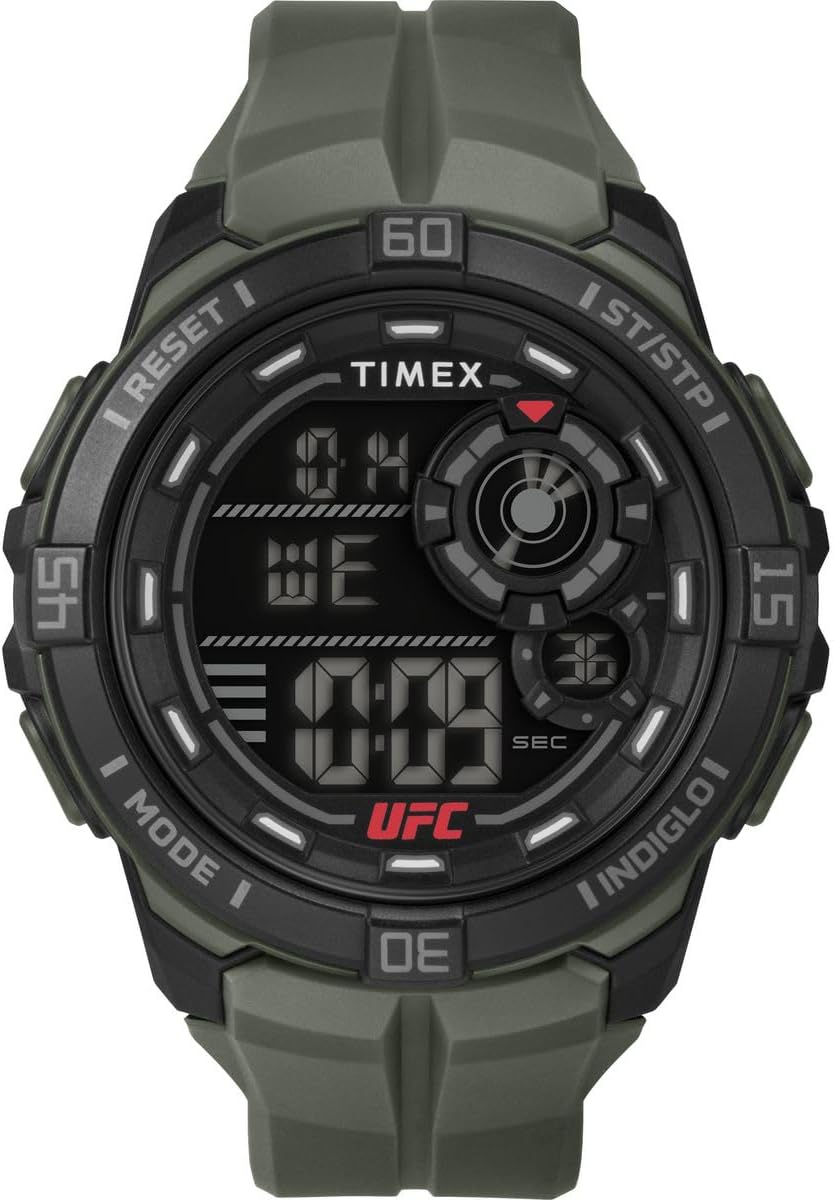
Figure 1: Front view of the Timex UFC Rush digital watch, showing the digital display, buttons, and green strap.

Figure 2: Side view of the watch, highlighting the control buttons on the case.

Figure 3: Close-up view of the watch case back, showing "UFC TIMEX" engraving and water resistance rating.
The watch features a 52mm round black resin case, a green polyurethane strap with a buckle clasp, and an acrylic crystal. It is equipped with a digital display for time and date, and includes chronograph, alarm, and countdown timer functions.
Setup
Initial Setup and Time Setting
- Activate the Watch: If the watch display is off, press any button to activate it. The watch comes with a pre-installed battery.
- Enter Time Set Mode: Locate the "MODE" button (typically on the left side). Press and hold the "MODE" button until the time digits begin to flash.
- Adjust Time: Use the "ST/STP" (Start/Stop) button (typically on the right side) to increase the flashing digit. Use the "RESET" button (typically on the top left) to move to the next digit (hours, minutes, seconds).
- Set Date and Day: Continue using the "RESET" button to cycle through date and day settings. Adjust them using the "ST/STP" button.
- Exit Time Set Mode: Once all settings are correct, press the "MODE" button again to save your changes and exit the setting mode.
Strap Adjustment
The polyurethane strap is designed to fit wrist sizes from 150 mm to 205 mm. Adjust the buckle clasp to achieve a comfortable and secure fit on your wrist.
Operating Instructions
Basic Functions
- Time Display: The default screen displays the current time, day, and date.
- INDIGLO Night-Light: Press the "INDIGLO" button (typically on the top right) to illuminate the watch face for easy viewing in low-light conditions.
Chronograph Mode
- Enter Chronograph Mode: Press the "MODE" button repeatedly until "CHRONO" or "STOPWATCH" appears on the display.
- Start/Stop: Press the "ST/STP" button to start the chronograph. Press it again to stop.
- Lap/Split Time: While the chronograph is running, press the "RESET" button to record a lap or split time. The main timer continues to run in the background.
- Reset: When the chronograph is stopped, press the "RESET" button to clear the time to zero.
Alarm Mode
- Enter Alarm Mode: Press the "MODE" button repeatedly until "ALARM" appears.
- Set Alarm Time: Use the "ST/STP" and "RESET" buttons to set the desired alarm time, similar to setting the main time.
- Activate/Deactivate Alarm: Press the "INDIGLO" button to toggle the alarm on or off. An alarm icon will appear when activated.
- Snooze: When the alarm sounds, press any button (except "RESET") to activate the snooze function. The alarm will sound again after a few minutes. Press "RESET" to turn off the alarm completely.
Countdown Timer Mode
- Enter Timer Mode: Press the "MODE" button repeatedly until "TIMER" or "CDT" appears.
- Set Countdown Time: Use the "ST/STP" and "RESET" buttons to set the desired countdown duration.
- Start/Stop: Press the "ST/STP" button to start the countdown. Press it again to pause.
- Reset: When paused or finished, press the "RESET" button to reset the timer to its initial set time.
Maintenance
Cleaning Your Watch
- Wipe the watch case and strap regularly with a soft, damp cloth.
- For stubborn dirt, use a mild soap solution and rinse thoroughly with clean water. Ensure all soap residue is removed.
- Dry the watch completely with a soft, dry cloth after cleaning.
- Avoid using harsh chemicals, solvents, or abrasive cleaners, as these can damage the watch's finish or components.
Water Resistance
This watch is water resistant to 100 meters (330 feet). This rating means it is generally suitable for snorkeling and swimming. Important: Do not press any buttons while the watch is submerged in water, as this can compromise the water resistance seal. The watch is not suitable for diving.
Battery Replacement
The watch is powered by one unknown type battery (included). When the display dims or functions become erratic, it may be time to replace the battery. Battery replacement should ideally be performed by a qualified watch technician to ensure the water resistance seal is maintained. Opening the watch case yourself may void the warranty and compromise its water resistance.
Troubleshooting
| Problem | Possible Cause | Solution |
|---|---|---|
| Display is blank or dim. | Low battery. | Replace the battery. Consult a professional watch technician. |
| Buttons are unresponsive. | Watch may be in a locked mode or battery is very low. | Try pressing all buttons firmly. If unresponsive, replace battery. |
| Time is incorrect. | Time needs to be reset. | Follow the "Initial Setup and Time Setting" instructions in the Setup section. |
| Water inside the watch. | Water resistance compromised (e.g., buttons pressed underwater, damaged seal). | Immediately take the watch to a qualified watch repair center. Do not attempt to dry it yourself. |
Specifications
| Feature | Detail |
|---|---|
| Model Number | TW5M594006B |
| Case Diameter | 52 mm |
| Case Material | Resin |
| Strap Material | Polyurethane |
| Crystal Material | Acrylic |
| Water Resistance | 100 meters (330 feet) |
| Functions | Digital Time, Date, Day, Chronograph, Alarm, Countdown Timer, INDIGLO Night-Light |
| Battery | 1 (included) |
| Product Dimensions (L x W x H) | 4 x 10 x 6 cm |
| Weight | 142 grams |
| Country of Origin | China |
Warranty and Support
Timex watches typically come with a limited warranty covering manufacturing defects. For specific warranty details and duration, please refer to the warranty card included with your purchase or visit the official Timex website. Keep your proof of purchase for warranty claims.
For technical support, service, or to inquire about replacement parts, please contact Timex Customer Service. Contact information can usually be found on the Timex website or on the packaging of your watch.
You can find more information and support on the official Timex website: www.timex.com


